
1. Introducere
This manual provides essential information for the safe and effective operation of your TASI TA500 series digital tachometer. The TA500 series includes models TA500A, TA500B, and TA500C, designed for accurate measurement of rotational and linear speeds. This device features both non-contact (photoelectric) and contact measurement capabilities, automatic ranging, and a clear digital display. It is suitable for a wide range of applications in various industries, including electric motors, fans, washing machines, automobiles, and more.
Vă rugăm să citiți cu atenție acest manual înainte de a utiliza dispozitivul și să îl păstrați pentru referințe ulterioare.
2. Produs terminatview
The TASI TA500 series tachometer is a portable, handheld instrument engineered for precision. Its compact and lightweight design ensures ease of use and portability. Key features include a large LCD screen for clear readings, a memory function to store measurement data, and a dual-purpose design allowing for both non-contact and contact measurements.
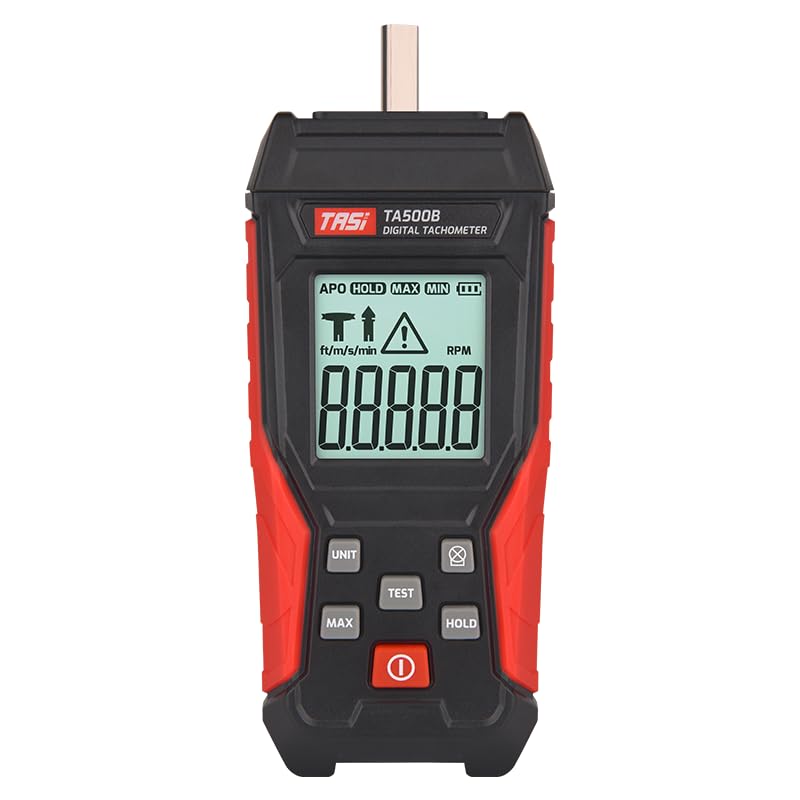
Figura 2.1: Față view of the TASI TA500B Digital Tachometer, showing the display and control buttons.
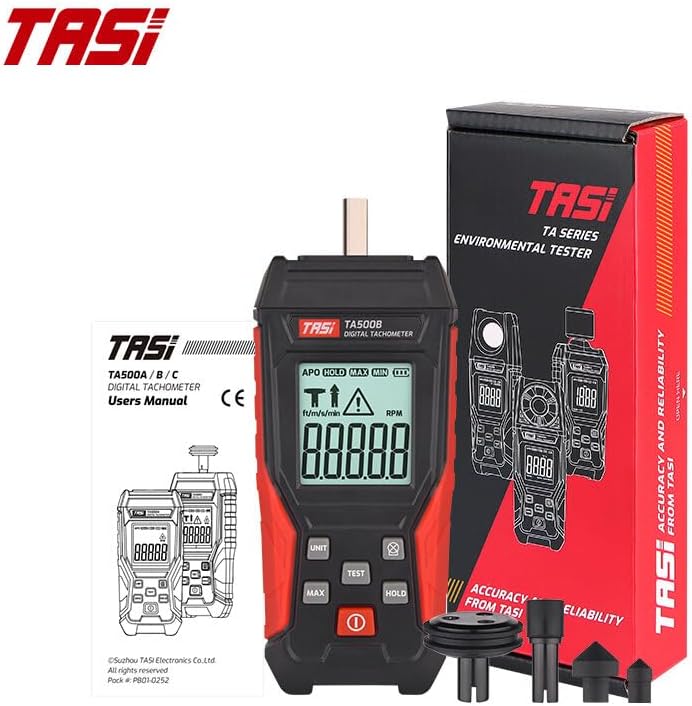
Figure 2.2: The TASI TA500B Digital Tachometer shown with its retail packaging and various contact measurement accessories.
3. Configurare
3.1 Instalarea bateriei
The TA500 series tachometer requires two AA batteries for operation. Batteries are not included with the device.
- Localizați capacul compartimentului bateriei pe spatele dispozitivului.
- Glisați sau desfaceți capacul pentru a deschide compartimentul.
- Introduceți două baterii AA, asigurându-vă de polaritatea corectă (+ și -) așa cum este indicat în interiorul compartimentului.
- Închideți bine capacul compartimentului bateriei.

Figura 3.1: Spate view of the tachometer, highlighting the battery compartment for installation of two AA batteries.
3.2 Attaching Contact Accessories (for TA500B/TA500C models)
For contact measurements, attach the appropriate contact wheel or cone to the shaft at the top of the tachometer. Ensure it is firmly seated to prevent inaccurate readings.
4. Instrucțiuni de utilizare
4.1 Pornire/Oprire
Apăsați butonul roșu de alimentare (O) to turn the device on. Press and hold the power button to turn it off.
4.2 Selecting Measurement Mode and Units
The TA500 series supports different measurement modes and units. Press the "UNIT" button to cycle through available units and modes (e.g., RPM, ft/m/s, m/min). The selected mode will be displayed on the LCD screen.
4.3 Non-Contact (Photoelectric) Measurement (TA500A/TA500C)
This mode uses a semiconductor laser sensor to measure rotational speed without physical contact.
- Ensure the tachometer is in a non-contact RPM mode (indicated by a specific icon on the display, typically a target symbol).
- Attach a reflective tape (not included, but commonly used with such devices) to the rotating object.
- Point the laser beam from the tachometer at the reflective tape on the rotating object. The effective measurement distance is 50-500 mm.
- Press the "TEST" button. The measurement symbol on the display will flash, and the RPM reading will appear.
- Release the "TEST" button to stop measurement.

Figure 4.1: Detail of the semiconductor laser sensor used for non-contact RPM measurements. The effective distance for measurement is between 50mm and 500mm.
4.4 Contact Measurement (TA500B/TA500C)
This mode uses physical contact with the rotating object via an attached accessory.
- Attach the appropriate contact accessory (e.g., cone or wheel) to the tachometer's shaft.
- Ensure the tachometer is in a contact measurement mode (indicated by a contact icon on the display, typically a 'T' or similar).
- Gently press the contact accessory against the center of the rotating object or surface.
- Press the "TEST" button. The measurement symbol on the display will flash, and the RPM or linear speed reading will appear.
- Release the "TEST" button to stop measurement.

Figure 4.2: The TASI TA500C tachometer demonstrating a contact measurement on a fan blade. The display shows the measured RPM.

Figure 4.3: A user holding the TASI TA500B tachometer, performing a contact measurement. The digital display shows a reading of 798.5 RPM.
4.5 MAX/MIN/HOLD Functions
- ȚINEȚI: Press the "HOLD" button to freeze the current reading on the display. Press it again to resume live measurement.
- MAX / MIN: During measurement, press the "MAX" button to display the maximum recorded value. Press "MAX" again to display the minimum recorded value. Press a third time to return to live measurement.

Figure 4.4: The tachometer display indicating the MAX/MIN function is active, showing the maximum recorded RPM value.
5. Întreținere
5.1 Curățare
Wipe the device with a soft, dry cloth. Do not use abrasive cleaners or solvents. Keep the sensor lens clean for accurate non-contact measurements.
5.2 Depozitare
When not in use for extended periods, remove the batteries to prevent leakage. Store the tachometer in a cool, dry place, away from direct sunlight and extreme temperatures. The included cloth bag can be used for protection during storage and transport.
5.3 Înlocuirea bateriei
Replace batteries when the low battery indicator appears on the display to ensure continued accurate operation.
6. Depanare
- Dispozitivul nu pornește: Verificați instalarea bateriilor și asigurați-vă că bateriile nu sunt descărcate. Înlocuiți-le dacă este necesar.
- Citiri inexacte:
- For non-contact measurement, ensure the reflective tape is properly applied and the laser is aimed correctly. Verify the measurement distance is within 50-500 mm.
- For contact measurement, ensure the contact accessory is firmly attached and making proper contact with the rotating object.
- Ensure the correct measurement mode and units are selected.
- Afișajul este gol sau pâlpâie: Low battery power may be the cause. Replace batteries.
7. Specificații
| Caracteristică | Caietul de sarcini |
|---|---|
| Model | TA500A / TA500B / TA500C |
| Culoare | Negru |
| Material | ABS |
| Test Range (Photoelectric - TA500A/TA500C) | 3-100000 RPM |
| Test Range (Contact RPM - TA500B/TA500C) | 0.5-19999 RPM |
| Test Range (Contact Surface Speed - TA500B/TA500C) | 0.05-1999.9 m/min |
| Precizie | ±(0.05%FS + 1 RPM) |
| Selectarea intervalului | Comutator automat |
| SampLing Time | 0.8 seconds (for measurements > 60 RPM) |
| Effective Distance (Photoelectric) | 50-500 mm |
| Alimentare electrică | 2 * baterii AA (nu sunt incluse) |
| Tachometer Size (TA500A) | 130 × 59 × 29 mm |
| Tachometer Size (TA500B/TA500C) | 146 × 59 × 29 mm |
8. Garanție și asistență
Pentru informații despre garanție și asistență tehnică, vă rugăm să consultați documentația furnizată odată cu achiziția sau să contactați distribuitorul. Păstrați bonul fiscal ca dovadă a achiziției.