
1. Introducere
Thank you for choosing the Amazon Basics Automatic Pet Feeder with Cooling Pack. This device is designed to help you manage your pet's feeding schedule by automatically dispensing dry pet food meals and treats. It features a programmable timer and includes a cooling pack to help keep food fresh. Please read this manual thoroughly before use to ensure proper operation and maintenance.

Figura 1: Sus view of the Amazon Basics Automatic Pet Feeder.
2. Informații de siguranță
- This product is for pet use only.
- Do not submerge the unit in water. The feeder tray is removable for cleaning.
- Asigurați-vă că alimentatorul este așezat pe o suprafață stabilă și plană pentru a preveni răsturnarea.
- A nu se lăsa la îndemâna copiilor.
- Use only dry pet food. Do not use wet food without the cooling pack, and ensure the cooling pack is properly frozen if using wet food.
- Batteries are not included. Use 3 AA batteries. Replace batteries within 1 minute to keep settings.
- Do not force the rotation of the food tray manually.
3. Conținutul pachetului
Before setting up your feeder, please verify that all components are present:
- Unitate automată de hrănire pentru animale de companie
- Tavă detașabilă pentru alimente (6 compartimente)
- Cooling Pack (2 pieces)
- Manual de instructiuni

Figura 2: Explodat view of the feeder components.
Unboxing Video
Video 1: An unboxing demonstration of a similar automatic pet feeder, showing typical package contents and initial setup steps.
4. Produs terminatview
Familiarize yourself with the main parts of your automatic pet feeder:
- Capac superior: Covers the food tray and programming interface.
- Tava cu alimente: Contains 6 individual compartments for pet food.
- Panou de control: Located on the top, it includes an LCD display and buttons for setting time and schedules.
- Cooling Pack Compartment: Located beneath the food tray, designed to hold the cooling packs.
- Compartiment baterie: Located on the underside of the unit.
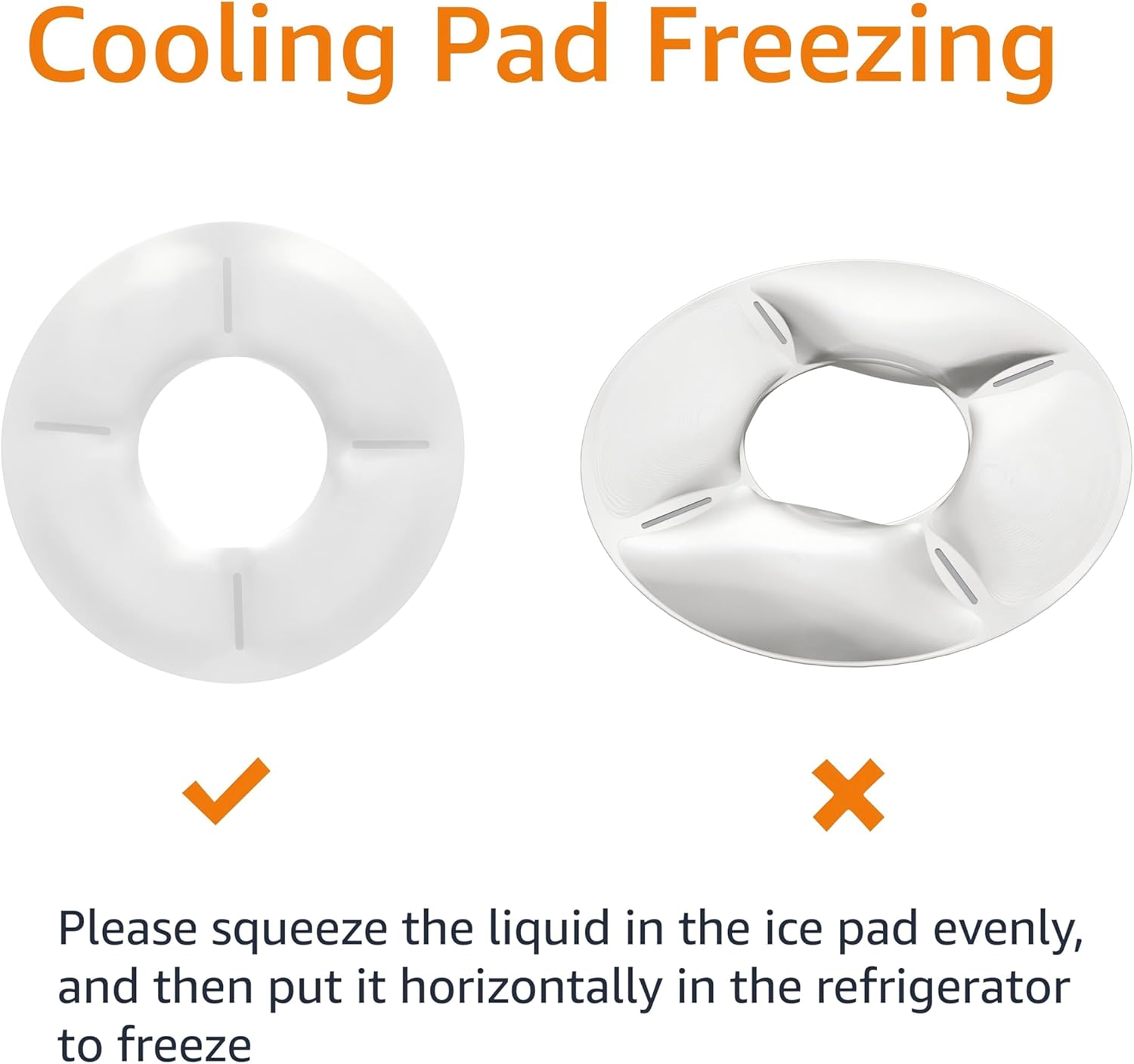
Figure 3: Product dimensions for the Amazon Basics Automatic Pet Feeder.
5. Configurare
5.1 Instalarea bateriei
- Turn the feeder upside down.
- Localizați capacul compartimentului bateriei.
- Open the cover and insert 3 new AA batteries, ensuring correct polarity (+/-).
- Închideți bine capacul compartimentului bateriei.

Figura 4: De jos view of the feeder with the battery compartment indicated.
5.2 Cooling Pack Preparation
For wet food or to keep dry food fresh longer, use the included cooling packs:
- Place the cooling packs horizontally in a freezer until completely frozen.
- Remove the food tray from the feeder.
- Place the frozen cooling packs into the designated compartment at the base of the feeder.
- Reinsert the food tray.

Figure 5: Proper method for freezing the cooling pack.
5.3 Filling Food Trays
- Deschideți capacul superior al alimentatorului.
- Fill each of the 6 compartments of the food tray with the desired amount of dry pet food or treats.
- Închideți bine capacul superior.
6. Instrucțiuni de utilizare
The feeder allows you to program up to 6 meals per day. The tray will rotate to expose the next meal at the scheduled time.
6.1 Setarea orei curente
- Press and hold the 'SET' button until the hour digits on the LCD display start flashing.
- Use the 'UP' or 'DOWN' arrow buttons to adjust the hour.
- Press 'SET' again to move to the minute digits, then use 'UP' or 'DOWN' to adjust the minutes.
- Press 'SET' one more time to confirm and save the current time.
6.2 Programming Feeding Schedules
You can program up to 6 meal times. Each meal corresponds to one compartment of the food tray.
- After setting the current time, press 'SET' to enter the first meal setting (P1). The hour digits for P1 will flash.
- Use 'UP' or 'DOWN' to set the desired hour for the first meal.
- Press 'SET' to move to the minute digits, then use 'UP' or 'DOWN' to adjust the minutes.
- Press 'SET' to confirm P1 and move to the next meal setting (P2).
- Repeat steps 2-4 for up to 6 meals (P1-P6). If you do not wish to set all 6 meals, simply press 'SET' to skip to the next program or exit programming mode.
- After setting all desired meals, press 'SET' until the display returns to the current time. The feeder is now programmed.
6.3 Alimentarea manuală
To dispense a meal immediately, press the 'MANUAL' button. The tray will rotate to the next available compartment.

Figure 6: A pet enjoying a meal from the automatic feeder.
7. Întreținere
7.1 Curățare
The food tray is dishwasher safe for easy cleaning. The main unit should be wiped clean with a damp pânză. Nu scufundați unitatea principală în apă.
- Remove the top lid and food tray.
- Wash the food tray in the dishwasher or by hand with warm, soapy water.
- Ștergeți unitatea principală cu reclamăamp cloth, ensuring no water enters the battery compartment or control panel.
- Lăsați toate piesele să se usuce complet înainte de reasamblare.
7.2 Înlocuirea bateriei
When the battery indicator on the LCD display shows low power, replace the batteries promptly. To retain your settings, replace all 3 AA batteries within 1 minute.
8. Depanare
| Problemă | Cauza posibila | Soluţie |
|---|---|---|
| Feeder does not turn on. | Bateriile sunt descărcate sau instalate incorect. | Înlocuiți bateriile cu altele noi, asigurând polaritatea corectă. |
| Feeder does not dispense food at scheduled time. | Incorrect time or schedule settings; low batteries. | Verify current time and feeding schedules. Replace batteries if low. |
| Tray does not rotate smoothly. | Food debris obstructing mechanism; tray not properly seated. | Clean the feeder thoroughly, especially around the central mechanism. Ensure the tray is correctly aligned. |
| Pet is able to access food prematurely. | Capacul nu este închis bine. | Ensure the top lid is firmly snapped into place after filling. |
9. Specificații
- Model: DE116471
- Marca: Bazele Amazon
- Material: Tereftalat de polietilenă
- Culoare: Alb
- Dimensiuni: 31.5 x 31.5 x 7.59 cm (12.4 x 12.4 x 3.0 țoli)
- Greutate: 640 g
- Putere: 3 x baterii AA (nu sunt incluse)
- Producător: Amazon
- Țara de origine: China
10. Garanție și asistență
This Amazon Basics product is backed by a limited warranty. For specific warranty details, please refer to the warranty information provided at the time of purchase or visit the Amazon Basics website-ul.
For customer support, troubleshooting assistance, or to inquire about replacement parts, please contact Amazon customer service through your Amazon account or the Amazon Basics support page.