
1. Introducere
This manual provides essential instructions for the safe installation, operation, and maintenance of your PAL Lighting 500W Multi-Color Dual Zone Remote Control LED Controller, model PCR-3D-500. This unit is designed to power and control multi-color LED lighting systems, typically used in pool and spa environments, offering dual-zone control for enhanced lighting customization. Please read this manual thoroughly before installation and use, and retain it for future reference.
2. Informații de siguranță
- Pericol electric: Installation must be performed by a qualified electrician in accordance with all national and local electrical codes. Ensure power is disconnected at the circuit breaker before any installation or maintenance.
- Apă și umiditate: The controller unit has an IP65 rating, indicating protection against dust and low-pressure water jets. However, it is not designed for submersion. Ensure the unit is mounted in a location that prevents direct exposure to heavy rain or standing water.
- Voltage Compatibilitate: This unit operates with a supply voltage of 100-240V (50/60Hz) and provides a 24V DC output. Verify that your lighting system is compatible with 24V DC.
- Protecție la suprasarcină: Do not exceed the maximum output power of 500 Watts. Overloading the unit can cause damage and create a fire hazard.
- Ventilare: Ensure adequate ventilation around the unit to prevent overheating. Do not cover the controller.
- Copii și animale de companie: Keep the unit and its remote control out of reach of children and pets.
3. Conținutul pachetului
Verificați dacă toate articolele sunt prezente și nedeteriorate la despachetare:
- PAL Lighting PCR-3D-500 LED Controller Unit
- PAL PCZ-2 Color Touch 2 Zone Remote Control
- Manual de instrucțiuni (acest document)
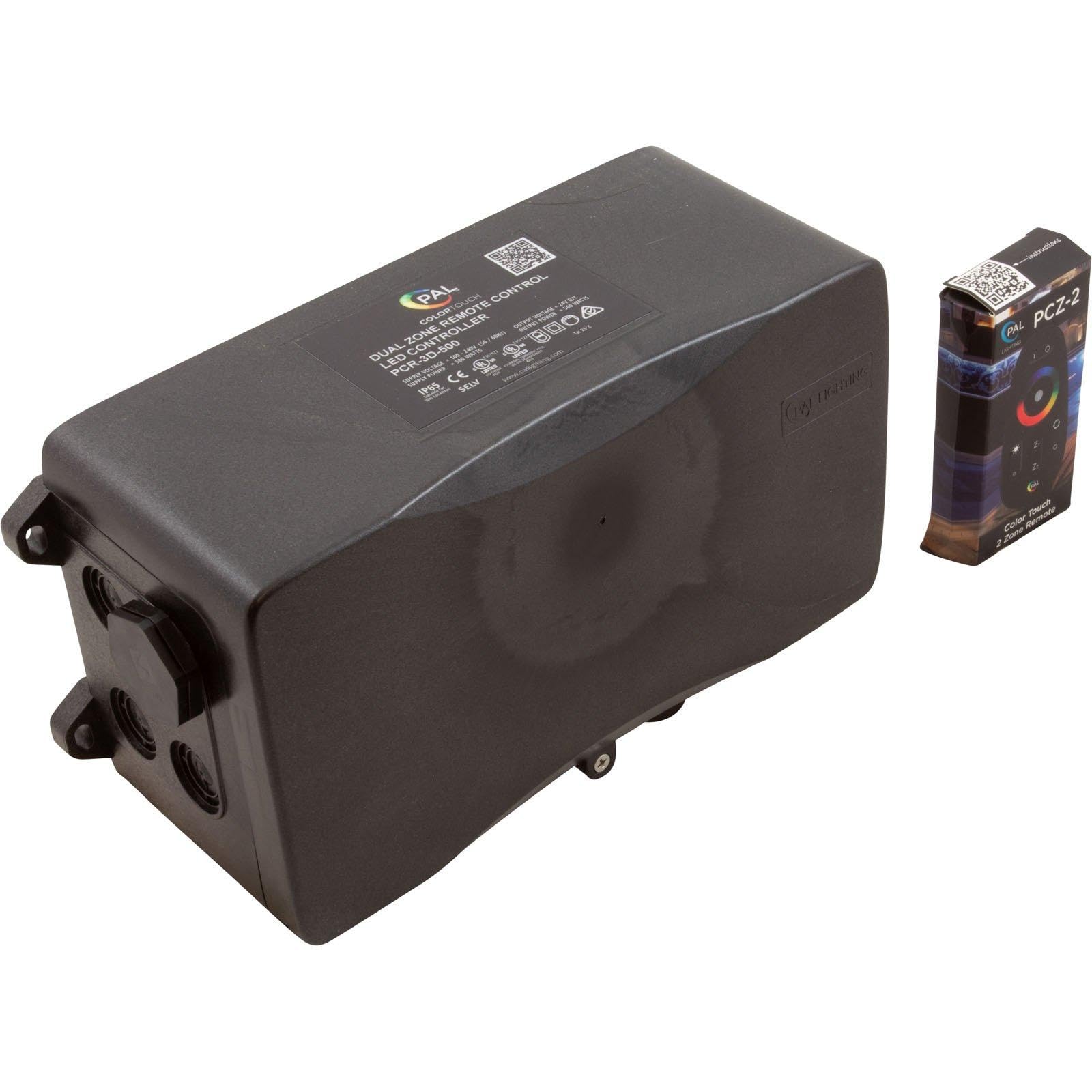
Image 1: The PAL Lighting PCR-3D-500 LED Controller unit (left) and the PAL PCZ-2 Color Touch 2 Zone Remote Control (right). The controller unit is a black rectangular box with connection ports, and the remote is a small, black, rectangular device with a color wheel and buttons.
4. Specificații
| Model | PCR-3D-500 |
| Numărul piesei | 64-PCR-3D-500 |
| Marca | PAL Lighting |
| Volumul aprovizionăriitage | 100-240V AC, 50/60Hz |
| Ieșire Voltage | 24V DC |
| Alimentare cu putere | 550 wați |
| Putere de ieșire | 500 wați |
| Evaluare IP | IP65 |
| Tip de montare | Montare pe perete |
| Greutatea articolului | 4 livre (aprox. 1.8 kg) |
| Producător | PAL Lighting LLC |
5. Configurare și instalare
Important: Installation should only be performed by a qualified professional electrician. Ensure all power is disconnected before beginning installation.
- Alegeți locația de montare: Select a suitable wall-mount location that is easily accessible for wiring, protected from direct heavy weather, and allows for adequate ventilation. The IP65 rating provides protection against dust and water jets, but avoid areas prone to submersion or constant heavy water exposure.
- Montați controlerul: Securely mount the PCR-3D-500 unit to a sturdy surface using appropriate fasteners. Ensure the unit is level.
- Input Power Wiring: Connect the main power supply (100-240V AC, 50/60Hz) to the designated input terminals on the controller. Follow local electrical codes for wiring practices, including proper grounding.
- Output Wiring to Lights: Connect your 24V DC multi-color LED lights to the output terminals of the controller. Ensure correct polarity (+ and -) for all connections. This unit supports dual zones; connect lights for each zone to their respective output terminals. Do not exceed the total 500W output capacity.
- Verificați conexiunile: Verificați de două ori toate conexiunile cablurilor pentru siguranță și corectitudine înainte de a restabili alimentarea cu energie electrică.
- Restabiliți puterea: După ce toate conexiunile sunt verificate și securizate, restabiliți alimentarea circuitului.

Imaginea 2: Un prim-plan view of the PAL Lighting PCR-3D-500 LED Controller, highlighting the sealed wiring ports on the side, designed for secure electrical connections.
6. Instrucțiuni de utilizare
The PAL Lighting PCR-3D-500 LED Controller is operated using the included PAL PCZ-2 Color Touch 2 Zone Remote Control.
6.1 Remote Control Functions (PAL PCZ-2)
- Pornire/Oprire: Apăsați tasta Putere button to turn the connected lights on or off.
- Selectarea zonei: Utilizați Zona 1 şi Zona 2 buttons to select which lighting zone you wish to control. The selected zone will typically be indicated on the remote.
- Alegerea culorii: The Color Touch Wheel allows you to select a specific color for your lights. Simply touch the desired color on the wheel.
- Reglarea luminozității: Utilizați Luminozitate mărită (+) şi Reducere luminozitate (-) buttons to adjust the intensity of the selected color or lighting mode.
- Selectarea modului: The remote may include buttons for pre-programmed lighting modes (e.g., Se estompează, Salt, Stroboscop). Refer to the remote's specific instructions for detailed mode descriptions.
- Reglarea vitezei: For dynamic lighting modes, Accelera şi Viteza de Jos buttons may be available to control the transition speed.
Ensure the remote control has fresh batteries and is within operational range of the controller unit for reliable performance.
7. Întreținere
- curatenie: Periodically clean the exterior of the controller unit with a soft, damp lavetă. Nu utilizați substanțe de curățare abrazive sau solvenți. Asigurați-vă că unitatea este oprită înainte de curățare.
- Inspecţie: Regularly inspect the wiring connections for any signs of wear, corrosion, or damage. Ensure all connections remain secure.
- Ventilare: Keep the area around the controller clear of obstructions to ensure proper airflow and prevent overheating.
- Baterii pentru telecomandă: Replace the remote control batteries when performance degrades or it stops responding. Refer to the remote's specific instructions for battery type and replacement procedure.
8. Depanare
| Problemă | Cauza posibila | Soluţie |
|---|---|---|
| Luminile nu se aprind. | Nu există alimentare cu energie electrică la controler. Conexiune defectuoasă a cablurilor. Bateria telecomenzii este descărcată. Lights are faulty. | Verificați întrerupătorul și sursa de alimentare. Inspect all wiring connections for security and correctness. Înlocuiți bateriile telecomenzii. Test lights with a known working power source if possible. |
| Lights are not responding to remote control. | Bateria telecomenzii este descărcată sau descărcată. Telecomanda este în afara razei de acțiune. Interferență. Remote not paired (if applicable). | Înlocuiți bateriile telecomenzii. Move closer to the controller unit. Ensure no large metal objects or other wireless devices are interfering. Refer to remote instructions for pairing procedure if necessary. |
| Luminile pâlpâie sau își schimbă culorile neregulat. | Conexiunea cablajului slab. Circuit supraîncărcat. Faulty lights or controller. | Verificați și asigurați toate conexiunile cablajului. Asigurați wat totaltage of connected lights does not exceed 500W. Contact support if problem persists after checking connections and load. |
| Only one zone is working. | Incorrect zone selection on remote. Wiring issue for the non-working zone. Faulty lights in the non-working zone. | Ensure the correct zone is selected on the remote. Inspect wiring for the non-working zone. Test lights in the non-working zone. |
If troubleshooting steps do not resolve the issue, contact PAL Lighting customer support.
9. Garanție și asistență
This product is manufactured by PAL Lighting LLC. For warranty information, technical support, or service inquiries, please contact PAL Lighting directly.
Producător: PAL Lighting LLC
Website: www.palighting.com
Please have your model number (PCR-3D-500) and purchase date available when contacting support.