
Inateck BCST-54
Inateck BCST-54 Wireless 1D/2D Barcode Scanner User Manual
Model: BCST-54 | Brand: Inateck
Introducere
This manual provides detailed instructions for the setup, operation, maintenance, and troubleshooting of your Inateck BCST-54 Wireless 1D/2D Barcode Scanner. Please read this manual carefully before using the device to ensure optimal performance and longevity.
Video: Pesteview of the Inateck BCST-54 Barcode Scanner's features and functionality.
Conținutul pachetului
Verificați dacă toate articolele sunt prezente în colet:
- Inateck BCST-54 Barcode Scanner (x1)
- Cablu USB (x1)
- Smart Base (x1)
- Manual de instrucțiuni (x1)

Image: The Inateck BCST-54 barcode scanner, smart base, USB cable, and user guide as included in the package.
Configurare și conectare
The Inateck BCST-54 offers three connection modes: 2.4 GHz Wireless via Smart Base, Wired via USB, and Bluetooth.
1. 2.4 GHz Wireless Mode (via Smart Base)
The scanner and smart base are pre-paired by default. Simply connect the smart base to your computer using the provided USB cable. The scanner will automatically connect wirelessly to the base.
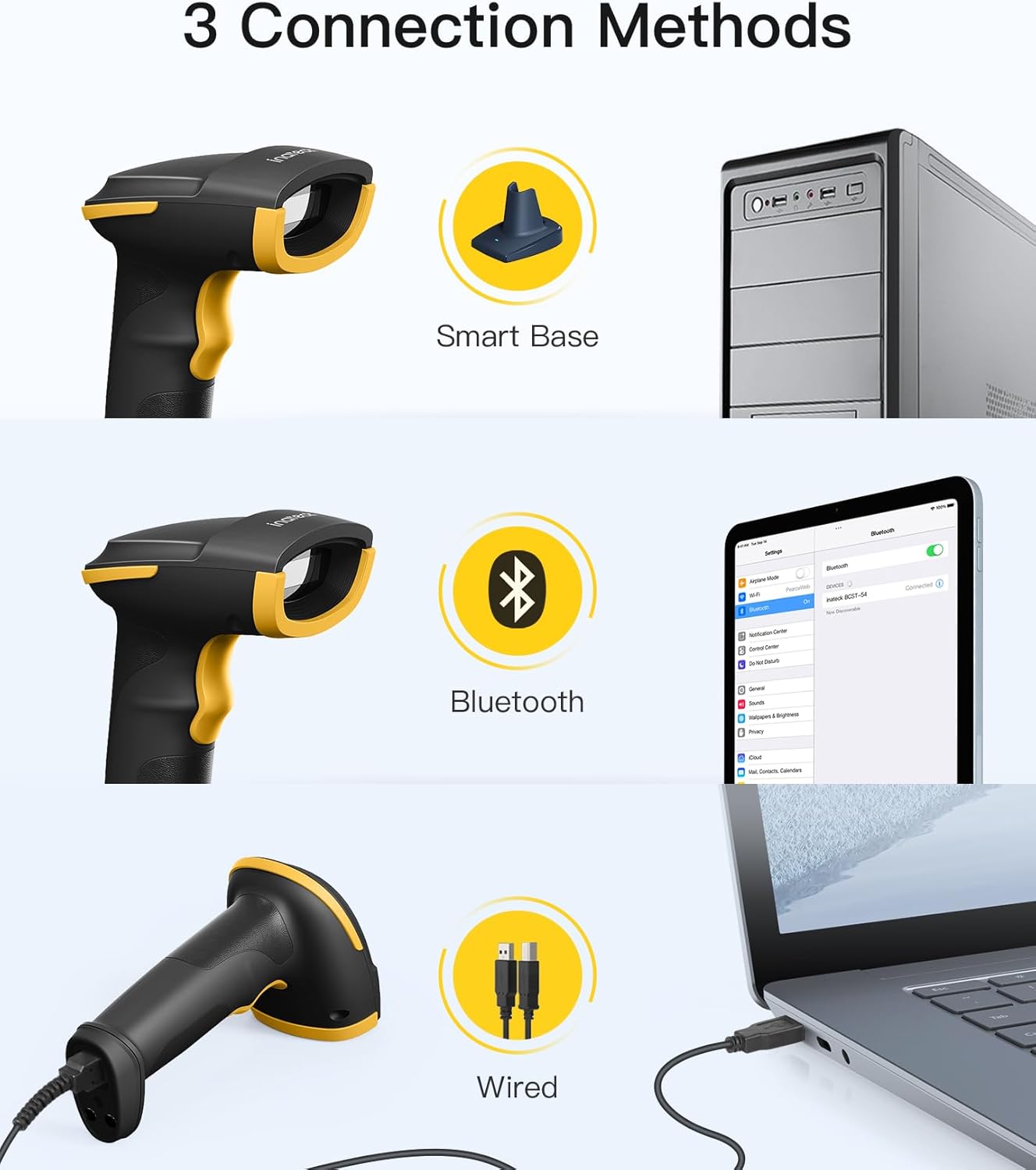
Image: Illustration of the three connection methods: 2.4 GHz wireless via smart base, Bluetooth, and wired USB connection.
The smart base also functions as a charging station and data transfer hub when connected to a computer.

Image: The smart base connected via USB, indicating its function for charging the scanner and transmitting barcode data.
2. Wired Mode (USB Cable)
Connect the scanner directly to your computer using the USB cable. This is a plug-and-play connection, requiring no additional configuration.
3. Mod Bluetooth
To connect via Bluetooth to smartphones, tablets, or other compatible devices, manual configuration is required. Refer to the specific pairing instructions in the full user guide for your device.
Operațiunea
Scanarea codurilor de bare
The BCST-54 can read both 1D and 2D barcodes, including those with minor damage or surface imperfections. It is equipped with CMOS sensors for reading barcodes directly from screens.

Image: The Inateck BCST-54 barcode scanner demonstrating its ability to read various 1D and 2D barcode types.

Image: The Inateck BCST-54 scanner reading a QR code displayed on a smartphone screen.
Notificare vibrații
The scanner features a vibration mode to indicate successful scans, useful in noisy environments or when visual/auditory feedback is not preferred. This feature can be enabled or disabled as per user preference.

Image: The barcode scanner vibrating to indicate a successful scan, shown in hospital and library settings.
Modul inventar
In inventory mode, the BCST-54 can store over 270,000 barcodes in its buffer memory. This allows for scanning a large volume of items without being constantly connected to a host device. The number of scanned codes can be easily retrieved. This mode is beneficial for warehouses and assembly lines.
The scanner supports multiple scanning modes, including manual, hands-free, and continuous scanning.
Configurație personalizată
The BCST-54 allows for personalized configurations. You can set up the scanner according to your specific needs, including:
- Customizing prefixes/suffixes (1 to 32 digits).
- Adding Enter or Tab as a suffix.
- Removing leading/trailing digits (0-99).
- Outputting barcodes in uppercase/lowercase.
- Switching to different language keyboards (e.g., Japanese, US English, German, French, Spanish, Italian, UK English).
For detailed configuration steps, please refer to the comprehensive instruction manual.
Specificații
| Caracteristică | Detaliu |
|---|---|
| Model | BCST-54 |
| Marca | Inateck |
| Dispozitive compatibile | Computer, Laptop, POS, Smartphone, Tablet |
| Tehnologia de conectivitate | Bluetooth, USB (Wired, 2.4 GHz Wireless via Smart Base) |
| Sursa de alimentare | Electric Cable (for Smart Base charging) |
| Tip baterie | 1 baterie litiu-ion (inclusă) |
| Rata de scanare | 200 scanări pe secundă |
| Temperatura maximă de depozitare | 50 de grade Celsius |
| Real View Unghi | 28.65 de grade |
| Greutatea articolului | 10.7 uncii |
| Coduri de bare 1D acceptate | Code128, EAN-13, EAN-8, UPC-A, UPC-E, Code39, Code93, Codabar, Interleaved2of5, Standard2of5, Industrial2of5, Matrix2of5, IATA2of5, MSI, Code11, ISBN, ISSN |
| Coduri de bare 2D acceptate | QRCode, PDF-417, AztecCode, MaxiCode, DataMatrix |
| Supported GS1 Codes | GS1 128, GS1 DataBar, GS1 DataBar Expanded, GS1 DataBar Limited, GS1-DataBar Stacked, GS1-DataBar Stacked Omni, GS1-DataBar Expanded Stacked, GS1-DataBar Stacked Omni Composite, GS1-128 Composite Symbology, GS1-DataBar Composite, GS1-DataBar Limited Composite, GS1-DataBar Expanded Composite |
Depanare
Scanner Not Turning On / Battery Issues
The scanner automatically enters a low-power state if the scan button is pressed for 3 seconds or if it is inactive for 10 minutes. To reactivate the scanner, simply press the scan button once. The battery is designed for durability, so frequent charging should not be a concern under normal usage.
Difficulty Scanning Specific Barcodes
Some less common barcodes are deactivated by default for faster decoding. If you encounter issues scanning a particular barcode type, please refer to the instruction manual to enable support for these specific barcode types (e.g., Code11, Code32, ISBN, ISSN, MSI, IATA2of5, Matrix2of5, Standard2of5, Industrial2of5, AztecCode, MaxiCode).
Probleme de configurare
If you are having difficulty with custom configurations (e.g., prefixes, suffixes, language settings), ensure you are following the steps outlined in the detailed instruction manual precisely. Incorrect sequencing of configuration scans can lead to unexpected behavior.
Întreţinere
To ensure the longevity and optimal performance of your Inateck BCST-54 barcode scanner, follow these maintenance guidelines:
- curatenie: Folosiți o lavetă moale și uscată pentru a curăța exteriorul scanerului. Pentru fereastra de scanare, folosiți o lavetă de curățare a lentilelor pentru a evita zgârieturile. Nu utilizați substanțe de curățare abrazive sau solvenți.
- Depozitare: Store the scanner in a cool, dry place away from direct sunlight and extreme temperatures. The maximum storage temperature is 50 degrees Celsius.
- Îngrijirea bateriei: While the battery is resistant, avoid completely draining it for extended periods. Charge the scanner regularly, especially if it will be stored for a long time.
- Manipulare: Although designed to be robust, avoid dropping the scanner or subjecting it to harsh impacts to prevent internal damage.
Informații despre garanție
The Inateck BCST-54 barcode scanner comes with a 2 an garanție. Please retain your proof of purchase for warranty claims. For specific terms and conditions, refer to the warranty card included in your package or contact Inateck customer support.
Suport expert
Inateck's dedicated R&D team and production site enable us to offer expert support. If you require a special configuration or encounter any issues not covered in this manual, please provide a detailed description of your needs. We are able to provide customized firmware solutions if necessary.
Do not hesitate to contact us for assistance; we are always ready to help.

Image: An Inateck customer service representative assisting a user.
Ask a question about this manual
Ask about setup, troubleshooting, compatibility, parts, safety, or missing instructions. Manuals+ will review the question and use this page’s manual context to help answer it.