
Introducere
Thank you for choosing the Vieta Pro Karaoke Party Microphone. This device combines a high-quality microphone with an integrated speaker, designed for an engaging karaoke experience. It features True Wireless technology, allowing two microphones to connect to a single device, and offers various sound modes and connectivity options.
Conținutul pachetului
- Vieta Pro Karaoke Party Microphone with Integrated Speaker
- Cablu de încărcare (USB-C)
- Manual de utilizare

Image: The retail box of the Vieta Pro Karaoke Party Microphone, showing the product and its features.
Produs terminatview
Familiarize yourself with the main components and controls of your Vieta Pro Karaoke Party Microphone.

Imagine: față view of the Vieta Pro Karaoke Party Microphone, highlighting the control buttons for power, volume, mode, and Bluetooth.
Comenzi și porturi:
- Buton de alimentare: Apăsați și mențineți apăsat pentru a porni/opri. Apăsați scurt pentru a schimba modurile.
- Butoane de volum (+/-): Reglați volumul difuzoarelor.
- Butonul de mod (M): Cycle through sound effects or modes.
- Buton Bluetooth: Inițiați asocierea Bluetooth.
- Port USB-C: Pentru încărcarea dispozitivului.
- 3.5mm Audio Jack (Input): Conectați surse audio externe.
- 3.5mm Audio Jack (Output): Conectați căști sau difuzoare externe.
- Buton Mod lumină: Change or turn off LED lighting effects.
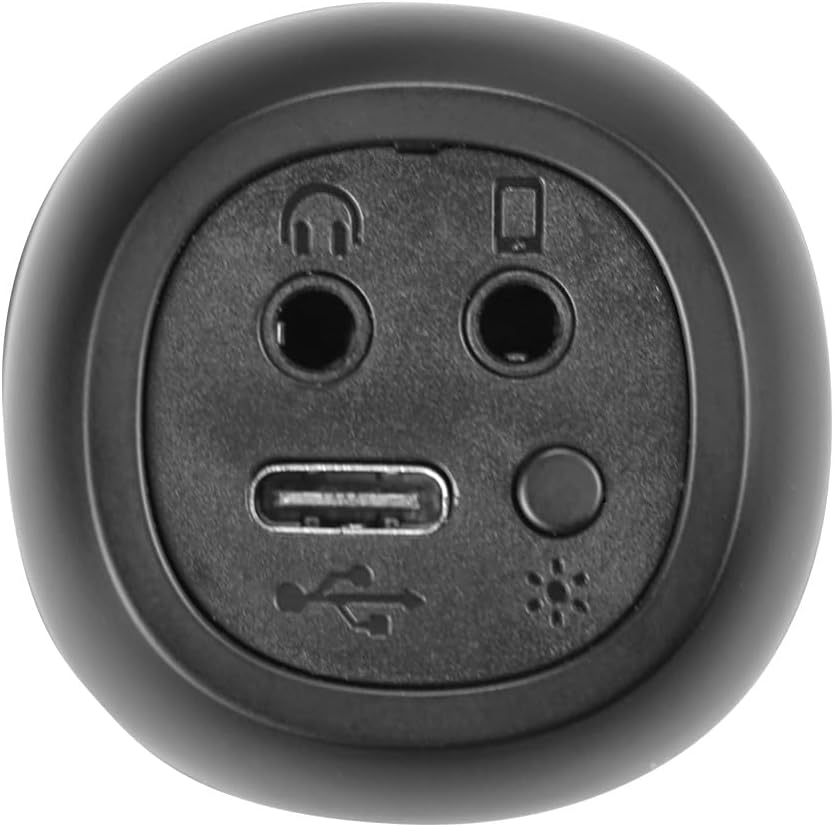
Imagine: Prim-plan view of the bottom of the microphone, showing the USB-C charging port, 3.5mm audio input/output jacks, and the light mode button.
Configurare și conectare
1. Încărcarea microfonului
Before first use, fully charge the microphone. Connect the provided USB-C cable to the microphone's USB-C port and the other end to a USB power adapter (not included) or a computer's USB port. The battery indicator light will show charging status.
2. Pornire/Oprire
Țineți apăsat butonul Buton de alimentare for approximately 3 seconds to turn the microphone on or off. A sound prompt will indicate the power status.
3. Asociere Bluetooth
- Turn on the microphone. It will automatically enter Bluetooth pairing mode, indicated by a flashing Bluetooth light.
- Pe smartphone, tabletă sau computer, activați Bluetooth și căutați dispozitivele disponibile.
- Select "Vieta Pro Karaoke Party" from the list of devices.
- Once connected, a sound prompt will confirm successful pairing, and the Bluetooth light will stop flashing.
4. True Wireless Connection (Connecting Two Microphones)
To use two Vieta Pro Karaoke Party microphones simultaneously with one device:
- Ensure both microphones are powered on and not connected to any other Bluetooth device.
- On one microphone (this will be the primary), double-press the Buton Bluetooth. It will enter True Wireless pairing mode.
- The primary microphone will search for the second microphone. Once connected, a sound prompt will confirm the True Wireless connection.
- Now, connect the primary microphone to your device via Bluetooth as described in step 3. Both microphones will now output audio from your device.

Image: Two individuals holding and using Vieta Pro Karaoke Party Microphones, demonstrating the True Wireless feature.
5. Conexiune cu fir (AUX)
Connect an external audio source (e.g., MP3 player) to the microphone using a 3.5mm audio cable (not included) plugged into the 3.5mm audio input jack.
Instrucțiuni de operare
1. Reglarea volumului
Utilizați Volumul + şi Volum - buttons on the microphone to adjust the speaker output volume. You can also control the volume from your connected device.
2. Changing Sound Modes/Effects
Apăsați tasta Butonul de mod (M) repeatedly to cycle through the four available sound configuration modes or voice effects. Experiment to find your preferred sound.
3. Voice Reduction Feature
This feature allows you to reduce the vocal track of a song, making it easier to sing along. To activate or deactivate this feature, refer to the specific instructions in the full manual or experiment with the Butonul de mod (M) or a dedicated button if present (not explicitly detailed in provided data, but mentioned as a feature).
4. Înregistrare
The microphone supports one-touch recording. Connect the microphone to a compatible recording device (e.g., smartphone with a recording app) via Bluetooth or the 3.5mm output jack. Press the dedicated Buton de înregistrare (if available, or refer to the full manual for specific button assignment) to start and stop recording.
5. LED Lighting Effects
Apăsați tasta Buton pentru modul de lumină (located near the ports at the bottom) to change the LED lighting patterns or turn them off.

Image: Close-up of the Vieta Pro Karaoke Party Microphone's speaker grille, showing the integrated LED lighting effects.
Întreţinere
- curatenie: Use a soft, dry cloth to clean the microphone's surface. Do not use abrasive cleaners or solvents.
- Depozitare: Depozitați microfonul într-un loc răcoros și uscat, ferit de lumina directă a soarelui și de temperaturi extreme.
- Îngrijirea bateriei: Pentru a prelungi durata de viață a bateriei, evitați descărcarea completă frecventă a bateriei. Încărcați dispozitivul în mod regulat, chiar dacă nu îl utilizați pentru perioade lungi de timp.
- Expunerea la apă: Acest dispozitiv nu este impermeabil. Evitați expunerea la apă sau umiditate ridicată.
Depanare
| Problemă | Cauza posibila | Soluţie |
|---|---|---|
| Fără putere | Bateria este epuizată. | Încărcați microfonul folosind cablul USB-C. |
| Nu se poate conecta prin Bluetooth | Bluetooth is off on the device; microphone is already connected to another device; microphone is out of range. | Ensure Bluetooth is enabled on your device. Disconnect from other devices. Move microphone closer to your device (within 10 meters). Restart both devices. |
| Fără ieșire de sunet | Volume is too low; microphone is muted; incorrect input source. | Increase volume on both the microphone and your connected device. Check if the microphone is in the correct operating mode. |
| True Wireless connection fails | One or both microphones are already paired; microphones are too far apart. | Ensure both microphones are unpaired from other devices. Place them close to each other during True Wireless pairing. Follow True Wireless pairing steps carefully. |
Specificații
| Caracteristică | Detaliu |
|---|---|
| Numele modelului | Petrecere Karaoke |
| Marca | Vieta Pro |
| Tehnologia de conectivitate | True Wireless, Bluetooth |
| Tip conector | USB-C, mufă de 3.5 mm |
| Putere de ieșire | 18 W |
| Durata de viață a bateriei | Până la 10 ore |
| Tip baterie | 1 baterie litiu-ion (inclusă) |
| Gama de frecvente | 50 până la 15,000 Hz |
| Impedanta | 600 ohmi |
| Model polar | Unidirecțional |
| Dispozitive compatibile | Computer personal, Smartphone |
| Caracteristici speciale | Volume Control, 1-Touch Recording, Lighting Modes, Battery Indicator, Radio |
| Greutate | 337 grame |
| Material | Plastic |
Garanție și suport
For warranty information and technical support, please contact the manufacturer, FRAMASON AUDIO SA, or your local retailer. Keep your proof of purchase for any warranty claims.
Manufacturer: FRAMASON AUDIO SA