
Introducere
Mulțumesc pentru achizițieasing the WOOPKER AK45 Pro HiFi Amplifier. This manual provides detailed instructions for the proper setup, operation, and maintenance of your new audio amplifier. Please read this manual thoroughly before using the product to ensure optimal performance and safety. Keep this manual for future reference.
Instrucțiuni de siguranță
AVERTISMENT: Pentru a reduce riscul de incendiu sau electrocutare, nu expuneți acest aparat la ploaie sau umezeală.
- Citiți toate instrucțiunile înainte de a utiliza ampmai în viață.
- Păstrați ampA se păstra departe de apă, umiditate și lumina directă a soarelui.
- Nu blocați niciun orificiu de ventilație. Instalați conform instrucțiunilor producătorului.
- Nu instalați lângă nicio sursă de căldură, cum ar fi calorifere, registre de căldură, sobe sau alte aparate (inclusiv ampliificatori) care produc căldură.
- Protejați cablul de alimentare pentru a nu fi pășit sau ciupit, în special la prize, prize și la punctul în care acestea ies din ampmai în viață.
- Utilizați numai atașamente/accesorii specificate de producător.
- Deconectați acest lucru ampmai ridicat în timpul furtunilor cu fulgere sau când nu este folosit pentru perioade lungi de timp.
- Consultați toate lucrările de service către personalul de service calificat. Întreținerea este necesară atunci când amplifier has been damaged in any way, such as power-supply cord or plug is damaged, liquid has been spilled or objects have fallen into the ampmai vie, ampdispozitivul a fost expus la ploaie sau umezeală, nu funcționează normal sau a fost scăpat.
Conținutul pachetului
Vă rugăm să bifați căsuța pentru următoarele elemente:
- WOOPKER AK45 Pro HiFi Ampliificator x 1
- EU Power Cable x 1
- Telecomanda IR x 1
- FM Antenna x 1
- Manual de utilizare x 1

Image: The complete package contents of the AK45 Pro amplifier, showing all included accessories.
Produs terminatview
Panoul frontal

Imagine: Detaliată view of the AK45 Pro amplifier's front panel, highlighting each control and input.
- Întrerupător: Întoarce ampmai viață pornită sau oprită.
- USB/SD Slot: For playing audio from USB drives or SD cards.
- Display LED: Afișează modul curent și informații despre piesă.
- Butonul de mod: Switches between input modes (Bluetooth, AUX, FM, USB, SD).
- Butonul următor anterior: Trece la piesa anterioară.
- Buton Redare/Pauză: Redă sau întrerupe redarea audio.
- Butonul următor următor: Salt la următoarea piesă.
- Butonul de repetare: Repetă piesa sau lista de redare curentă.
- Control înalte: Adjusts the high-frequency audio level.
- Controlul basului: Adjusts the low-frequency audio level.
- MIC/VOL Control: Reglează volumul microfonului.
- Intrări MIC1/MIC2: Mufe de 6.35 mm pentru conectarea microfoanelor.
- Control volum principal: Ajustează volumul general de ieșire.
Panoul din spate

Imagine: Detaliată view of the AK45 Pro amplifier's rear panel, showing all connection ports.
- Audio Input Jack (RCA): Pentru conectarea dispozitivelor audio externe prin cabluri RCA.
- Mufă antenă FM: For connecting the FM antenna.
- Terminale de ieșire pentru difuzor: For connecting passive speakers.
- DC 12V/5A Power Supply Input: Alternative power input for 12V DC.
- AC 240V Power Supply Input: Main power input for AC 110-240V.
Înființat
Conexiune difuzor
The AK45 Pro amplifier supports passive speakers with 4-16 Ohm impedance.

Image: Visual guide for connecting speaker wires to the amplifier's output terminals.
- Before connecting speakers, identify the positive (+) and negative (-) terminals on your speakers. Typically, the positive terminal is red and the negative is black.
- Apăsați clamp on the back of the AK45 Pro amplifier and insert the bare speaker wires, ensuring positive matches positive and negative matches negative.
- Avoid inserting or removing USB drives, SD cards, RCA audio cables, or speaker cables while the ampLifierul este pornit.
Conexiune de alimentare
Connect the provided power cable to the AC power input on the rear panel of the amplifier and then plug it into a suitable wall outlet (AC 110-240V). Alternatively, you can use a DC 12V/5A power supply (not included) with the DC input.
Conectarea surselor audio
Conexiune Bluetooth

Image: Illustration of a smartphone wirelessly connected to the AK45 Pro ampliifier prin Bluetooth.
- Porniți ampmai în viață.
- Press the 'Mode' button on the front panel or remote control until 'BLUE' appears on the LED display.
- Enable Bluetooth on your mobile device (phone, tablet, etc.).
- Caută 'AK45 Pro' in your device's Bluetooth settings and select it to pair.
- Odată conectat, puteți reda audio de pe dispozitiv prin intermediul ampmai în viață.
Note: Maintain a distance of less than 10 meters (30 feet) between your device and the amplifier for stable Bluetooth connection. For TV or PC connections, keep the distance within 5 meters (15 feet).
AUX/RCA Connection
Use an RCA audio cable to connect external audio devices such as CD players, DVD players, TVs, or PCs to the 'Audio Input' jacks on the rear panel. Press the 'Mode' button to select the AUX input.
Redare card USB/SD
Insert a USB drive or SD card into the corresponding slot on the front panel. The ampLiferul va comuta automat în modul USB/SD și va începe să redea sunetul files. Supported formats include MP3.
Radio FM
Connect the provided FM antenna to the 'FM ANT' jack on the rear panel. Press the 'Mode' button to select FM radio mode. The amplifier will automatically scan and store available radio stations.
Intrare microfon
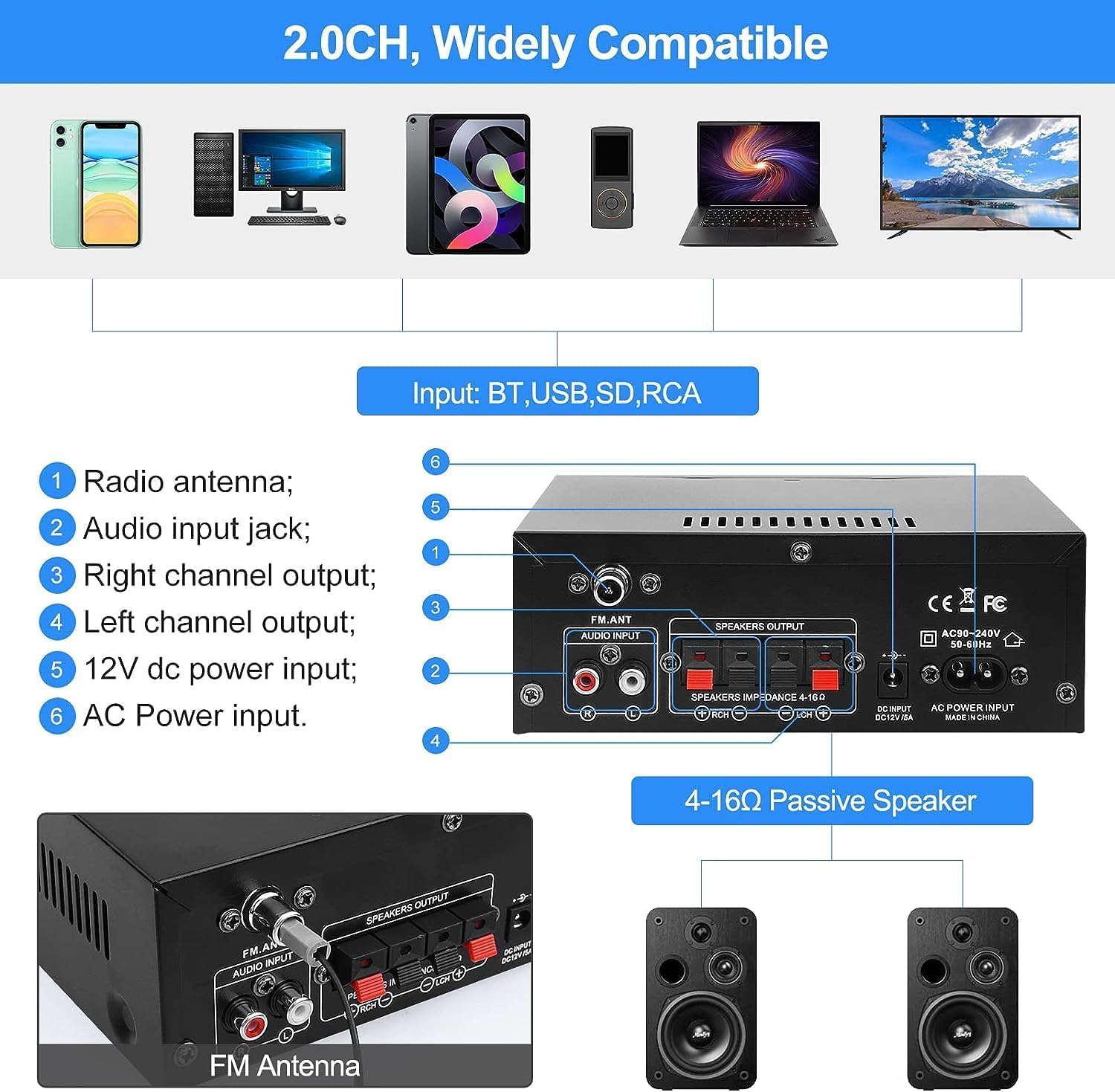
Image: Two individuals enjoying karaoke with microphones connected to the AK45 Pro ampmai în viață.
Connect up to two microphones to the 'MIC1' and 'MIC2' inputs on the front panel. Adjust the microphone volume using the 'MIC/VOL' knob. This feature is ideal for karaoke or public speaking.
Instrucțiuni de operare
Pornire/Oprire
Toggle the 'Power' switch on the front panel to turn the ampmai viață pornită sau oprită.
Controlul volumului
Rotate the large 'Volume' knob on the front panel clockwise to increase volume and counter-clockwise to decrease it. You can also adjust the volume using the remote control.
Selectarea modului
Press the 'Mode' button on the front panel or remote control to cycle through available input sources: Bluetooth, AUX, FM, USB, and SD.
Ajustare înalte și bass
Use the 'Treble' and 'Bass' knobs on the front panel to fine-tune the high and low frequencies of the audio output according to your preference.
Telecomanda

Image: A hand holding the infrared remote control, used for convenient operation of the amplifier de la distanță.
The included IR remote control allows you to conveniently manage power, volume, mode selection, track skipping, and other functions from a distance.
Întreţinere
- curatenie: Utilizați o cârpă moale și uscată pentru a curăța amplifier's exterior. Do not use liquid cleaners or aerosol sprays.
- Depozitare: Când nu este utilizat pentru perioade lungi de timp, depozitați ampA se păstra într-un loc răcoros și uscat, ferit de lumina directă a soarelui și de temperaturi extreme.
- Ventilare: Asigurați o ventilație adecvată în jurul amplifier to prevent overheating. Do not cover the ventilation openings.
Depanare
| Problemă | Cauză/Soluție posibilă |
|---|---|
| Fără putere | Check if the power cable is securely connected. Ensure the power switch is in the 'ON' position. Verify the power outlet is functional. |
| Fără ieșire de sunet | Check speaker connections (positive/negative). Ensure the correct input mode is selected. Increase the master volume. Check audio source device volume. |
| Bluetooth nu se conectează | Asigurați amplifier is in Bluetooth mode. Make sure Bluetooth is enabled on your device. Move your device closer to the ampDeconectați-vă de la alte dispozitive Bluetooth. |
| Probleme de redare pe USB/SD | Ensure the USB drive/SD card is inserted correctly. Check if audio files are in a supported format (e.g., MP3). Try a different USB drive/SD card. |
| Recepție radio FM slabă | Ensure the FM antenna is properly connected and extended. Try repositioning the antenna for better signal. |
| Microfonul nu funcționează | Ensure microphones are securely plugged in. Adjust the 'MIC/VOL' knob. Check microphone functionality. |
Specificații
| Caracteristică | Detaliu |
|---|---|
| Model | AK45 Pro |
| Putere nominală | Up to 50W x 2 |
| Canale | Stereo pe 2.0 canale |
| Impedanta difuzorului | 4-16 ohmi |
| Intrare de putere | AC 110-240V; DC 12V/5A |
| Versiune Bluetooth | Bluetooth 5.0 |
| Intrări | Bluetooth, AUX (RCA), MIC, SD Card, USB |
| Caracteristici suplimentare | FM Radio, Treble/Bass Adjustment, Remote Control |
| Dimensiuni (aprox.) | 180 mm x 138 mm x 65 mm (7.09 inchi x 5.44 inchi x 2.56 inchi) |
| Greutate (aproximativ) | 880 de grame |
Garanție și suport
WOOPKER is committed to providing high-quality products and excellent customer service. For any inquiries or support needs, please refer to the following:
- 24 de ore: Quick response within 24 hours for customer queries.
- 30 Day Return: Return within 30 days for an exchange or refund.
- Suport tehnic pe viață: Enjoy lifetime technical customer support for your product.

Image: WOOPKER's commitment to customer service, including response times and support duration.