
1. Introducere
Thank you for choosing the Honeywell HC35W25R3 5MP IR Fixed Micro WDR IP Dome Camera. This camera is designed for reliable security surveillance, offering high-quality video results with a 5MP resolution, Wide Dynamic Range (WDR), and infrared (IR) capabilities for clear imaging in various lighting conditions. This manual provides essential information for the proper installation, operation, and maintenance of your camera.
2. Informații de siguranță
Vă rugăm să citiți cu atenție toate instrucțiunile de siguranță înainte de instalare și utilizare. Nerespectarea acestor instrucțiuni poate duce la deteriorarea produsului sau la vătămări corporale.
- Asigurați-vă că sursa de alimentare voltage is within the specified range for the camera.
- Nu expuneți camera la apă sau umezeală.
- Evitați amplasarea camerei în lumina directă a soarelui sau în apropierea surselor de căldură.
- Manevrați camera cu grijă pentru a preveni deteriorarea fizică.
- Instalarea trebuie efectuată de către personal calificat, în conformitate cu codurile electrice locale.
3. Conținutul pachetului
Verificați dacă toate articolele sunt prezente în colet. Dacă lipsesc sau sunt deteriorate articole, contactați furnizorul.
- Cameră IP Dome Honeywell HC35W25R3
- Șuruburi de montare și dibluri de perete
- Șablon de instalare
- Ghid de pornire rapidă
- Waterproof Connector (for network cable)
4. Configurare
4.1 Instalare fizică
The HC35W25R3 camera supports both ceiling and wall mount installations. Choose a location that provides the desired surveillance coverage and is within reach of power and network connections.
- Use the provided installation template to mark drilling points on the mounting surface.
- Dați găuri și introduceți dibluri de perete, dacă este necesar.
- Fixați baza camerei pe suprafața de montare folosind șuruburile furnizate.
- Adjust the camera's angle and orientation for optimal viewing.
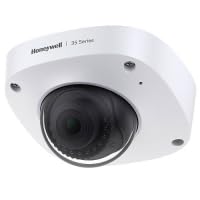
Figure 1: Illustrative diagram of the camera's mounting points and adjustable dome.
4.2 Conexiune de rețea
The camera supports wired Ethernet connectivity and Wi-Fi. For initial setup, a wired connection is recommended.
- Conexiune prin cablu: Connect an Ethernet cable from your network router/switch to the camera's RJ45 port. Ensure the connection is secure, especially if using the waterproof connector for outdoor installations.
- Conexiune Wi-Fi: After initial wired setup, you can configure Wi-Fi settings through the camera's web interface. Navigate to Network Settings and select your Wi-Fi network, then enter the password.
4.3 Configurare inițială
After connecting the camera to your network and power, you can access its web interfata pentru configurare.
- Use a network scanner tool or refer to your router's connected devices list to find the camera's IP address.
- Deschide a web browser și introduceți adresa IP a camerei.
- Log in using the default username and password (refer to the Quick Start Guide or product documentation for default credentials).
- Schimbați imediat parola implicită din motive de securitate.
- Follow the on-screen prompts to set up basic parameters like date, time, and video resolution.
Figura 2: Prim-plan view of the camera's network and power ports for connection.
5. Operare
5.1 Operare de bază
Once configured, you can access the camera's live view and settings through its web interface or compatible surveillance software.
- Trăi View: The main interface typically displays the real-time video feed.
- Redare: Acces înregistrat footage from the storage device (if installed).
- Setări: Modify various camera parameters, including video quality, network settings, and user management.
5.2 Caracteristici avansate
- Gamă dinamică largă (WDR): This feature helps the camera capture clear images in scenes with both very bright and very dark areas, balancing exposure to reveal details in both. Enable WDR in the image settings if your environment has high contrast lighting.
- Iluminare în infraroșu (IR): The camera is equipped with IR LEDs for night vision. These automatically activate in low-light conditions, providing clear black-and-white video up to a certain range.
- Detectarea mișcării: Configure motion detection zones and sensitivity to trigger alarms or recording when movement is detected.
5.3 Înregistrare video
Camera acceptă diverse metode de înregistrare:
- Înregistrare continuă: Înregistrează video în mod constant.
- Înregistrare activată de mișcare: Înregistrează doar când este detectată mișcare.
- Înregistrare programată: Înregistrări în perioade de timp specifice.
Recording typically requires a Network Video Recorder (NVR), a local storage device (e.g., microSD card, if supported by the model), or cloud storage services.
Figura 3: Examppartea camerei web interface showing live video feed and control options.
6. Întreținere
6.1 Curățare
- Regularly clean the camera lens and housing with a soft, dry cloth.
- Pentru murdăria persistentă, folosiți o lavetă ușor tamponată.ampened with water or a mild lens cleaning solution. Avoid abrasive cleaners.
6.2 de actualizări de firmware
Verificați periodic asistența Honeywell website for firmware updates. Keeping your camera's firmware updated ensures optimal performance, security, and access to new features.
- Download the latest firmware from the official Honeywell support page.
- Accesați camera web interface and navigate to the System or Maintenance section.
- Follow the instructions to upload and install the new firmware. Do not power off the camera during the update process.
7. Depanare
| Problemă | Cauza posibila | Soluţie |
|---|---|---|
| Fără putere | Adaptorul de alimentare este deconectat sau defect. | Check power connections. Ensure the power adapter is working. |
| Fără conexiune la rețea | Ethernet cable loose/damaged, incorrect IP settings, Wi-Fi issues. | Verify cable connection. Check network settings (IP address, gateway). Reconfigure Wi-Fi. |
| Calitate slabă a imaginii | Dirty lens, incorrect focus, low light, WDR not enabled. | Clean the lens. Adjust focus if applicable. Ensure adequate lighting or enable WDR. |
| Nu se poate accesa web interfață | Incorrect IP address, network firewall, browser issues. | Confirm IP address. Check firewall settings. Try a different browser. |
8. Specificații
| Caracteristică | Detaliu |
|---|---|
| Model | HC35W25R3 |
| Rezoluție statică efectivă | 5 MP (2592 x 1944) |
| Obiectiv | Distanță focală fixă de 2.80 mm |
| Deschidere | f/2.0 maximum |
| Tehnologia de conectivitate | Cu fir, Wi-Fi |
| Caracteristici speciale | Wide Dynamic Range (WDR), Infrared (IR) |
| Utilizare în interior/exterior | De interior |
| Factor de formă | Dom |
| Tip de montare | Montare pe tavan, montare pe perete |
| Consumul de energie | 8 wați |
| Format de captură video | MPEG-4 |
| UPC | 085267982306 |
9. Garanție și asistență
Pentru informații despre garanție, consultați cardul de garanție inclus împreună cu produsul sau vizitați site-ul oficial Honeywell. website. For technical support, product registration, or to download the latest software and documentation, please visit the Honeywell support portal or contact their customer service.
Asistență Honeywell: www.honeywell.com/us/en/support


