
Introducere
Mulțumesc pentru achizițieasing the 7artisans AF 50mm F1.8 Full Frame Lens. This manual provides essential information for the safe and effective use of your new lens. Please read it thoroughly before use and keep it for future reference.
This 50mm F1.8 lens is designed for Sony E-Mount full-frame cameras, offering a large aperture, fast autofocus, and support for advanced features like face and eye recognition. Its versatile focal length makes it suitable for a wide range of photographic applications, from portraits to street photography.
Informații de siguranță
- Do not look at the sun or bright light sources through the lens, as this may cause permanent vision impairment.
- Nu expuneți obiectivul la lumina directă a soarelui atunci când nu îl utilizați pentru a preveni riscurile de incendiu sau deteriorarea componentelor interne.
- Avoid exposing the lens to extreme temperatures, high humidity, or dust.
- Do not attempt to disassemble or repair the lens yourself. Contact authorized service personnel for assistance.
- A nu se lăsa la îndemâna copiilor.
Conținutul pachetului
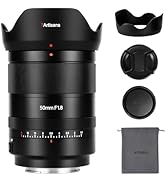
Verificați dacă toate articolele sunt prezente în colet:
- 7artisans AF 50mm F1.8 Full Frame Lens
- Capac lentilă față
- Capac lentilă spate
- Parasolar
- Husa pentru lentile
- Manual de instrucțiuni (acest document)

Image: The 7artisans AF 50mm F1.8 lens shown with its included accessories: front and rear lens caps, lens hood, and a soft pouch.
Produs terminatview
The 7artisans AF 50mm F1.8 lens features a robust metal construction with a sleek black finish. Key components include:
- Inel de focalizare: For manual focusing.
- Inel de diafragmă: Allows switching between automatic and manual aperture control.
- Comutator AF/MF: Toggles between autofocus and manual focus modes.
- Montare lentile: Sony E-Mount compatible.
- Port USB-C: Pentru actualizări de firmware.
Imagine: Un prim-plan view of the lens barrel, highlighting the AF/MF switch for mode selection.

Imagine: O imagine detaliată view of the lens mount, showing the electronic contacts and the integrated USB-C port for firmware updates.
Înființat
- Atașarea lentilei:
- Align the white dot on the lens barrel with the white dot on your camera's lens mount.
- Introduceți ușor obiectivul în montura camerei.
- Rotiți lentila în sensul acelor de ceasornic până când se aude un clic, indicând faptul că este fixată în siguranță.
- Scoaterea lentilei:
- Apăsați și țineți apăsat butonul de eliberare a obiectivului de pe corpul camerei.
- Rotiți obiectivul în sens invers acelor de ceasornic până când se desprinde de montura camerei.
- Atașați capacele frontale și posterioare ale obiectivului pentru a proteja elementele obiectivului.
- Atașarea parasolarului:
- Aliniați parasolarul cu partea din față a obiectivului.
- Twist the hood clockwise until it locks securely.
- The lens hood helps reduce flare and provides physical protection to the front element.

Image: The 7artisans AF 50mm F1.8 lens securely mounted on a Sony mirrorless camera, viewed din lateral.
Operarea obiectivului
1. Focus Mode Selection (AF/MF)
Use the AF/MF switch on the lens barrel to select your desired focus mode:
- AF (Focalizare automată): The camera will automatically focus on the subject. This lens features a high-speed STM stepping motor for quick and accurate autofocus performance.
- MF (Focalizare manuală): You can manually adjust the focus by rotating the focus ring on the lens.
Imagine: O imagine detaliată view of the AF/MF switch, allowing users to toggle between autofocus and manual focus modes.
2. Controlul diafragmei
The lens features an aperture ring that can be switched between automatic and manual control:
- Automatic Aperture: Set the aperture ring to the 'A' position. The camera will control the aperture settings.
- Manual Aperture: Rotate the aperture ring to select your desired F-stop (F1.8 to F16). This provides precise control over depth of field and exposure.
The large F1.8 aperture allows for excellent low-light performance and the creation of beautiful background blur (bokeh).
3. Face/Eye Recognition Support
This lens supports your camera's face and eye recognition functions. When enabled on your camera, the lens will automatically set accurate focusing points and exposure for human faces or eyes, ensuring sharp portraits.

Image: A photograph illustrating the camera's eye recognition feature actively focusing on a subject's eye.
4. Actualizări de firmware
The integrated USB-C port allows for easy firmware updates. Connect the lens to your computer using a USB-C cable and follow the instructions provided on the 7artisans official website to update the firmware. This ensures optimal performance and compatibility with future camera models.
Imagine: O imagine detaliată view of the lens mount, showing the electronic contacts and the integrated USB-C port for firmware updates.
Întreţinere
- curatenie: Use a soft, lint-free cloth to clean the lens barrel. For lens elements, use a lens brush to remove dust, then gently wipe with a lens cleaning cloth and lens cleaning solution.
- Depozitare: When not in use, store the lens with both caps attached in a cool, dry place away from direct sunlight and moisture. Consider using a desiccant to prevent mold growth.
- Manipulare: Avoid dropping or subjecting the lens to strong impacts, as this can damage internal optical elements.
Depanare
1. Lens not focusing:
- Ensure the AF/MF switch is set to the desired mode (AF for autofocus).
- Check camera settings to ensure autofocus is enabled and the correct focus area is selected.
- Clean the lens contacts on both the lens and camera body.
2. Images are blurry:
- Verify that the lens is properly focused.
- Check shutter speed to avoid camera shake, especially in low light.
- Ensure the lens elements are clean and free from smudges or dust.
3. Lens not recognized by camera:
- Remove and reattach the lens, ensuring it clicks securely into place.
- Clean the electronic contacts on both the lens and camera body with a clean, dry cloth.
- Check for available firmware updates for both the lens and your camera.
Specificații
| Caracteristică | Detaliu |
|---|---|
| Marca | 7 artizani |
| Numărul de model | AF5018EB |
| Distanța focală | 50mm |
| Diafragma maximă | F1.8 |
| Diafragmă minimă | F16 |
| Tip de lentile | Lentila standard Prime |
| Suporturi compatibile | Sony E-Montură |
| Structura optică | 11 elemente în 9 grupe |
| Lame de diafragmă | 11 bucăți |
| Unghiul de View | D:46.8°, H:39.6°, V:27.0° |
| Distanța de focalizare cea mai mică | 0.5M - ∞ |
| Dimensiunea filtrului | 58mm |
| Greutatea articolului | 1.78 livre (aprox. 807 g) |
| Dimensiunile produsului | 40.94 x 28.35 x 28.35 inci |
Garanție și suport
For warranty information, technical support, or service inquiries, please visit the official 7artisans website-ul web sau contactați distribuitorul autorizat. Păstrați dovada achiziției pentru a putea solicita garanție.
For the latest firmware updates and additional resources, please visit: 7artisans Official Store
Videoclipuri oficiale despre produse
Watch these official videos for more information on the 7artisans AF 50mm F1.8 lens:
7artisans AF50mm F1.8
Video: O prezentare video oficială a produsuluiasing the features and capabilities of the 7artisans AF 50mm F1.8 lens.
7artisans AutoFocus 50mm F1.8
Video: Another official product video demonstrating the autofocus performance and image quality of the 7artisans 50mm F1.8 lens.