
1. Produs terminatview
The NOHON MS15 Mag-Safe Wireless Power Bank is a compact and efficient portable charging solution designed for iPhone 12, 13, 14, and 15 series, and other compatible devices. Featuring a 5000mAh capacity, ultra-slim design, and 20W Power Delivery (PD) fast charging, it offers convenient wireless and wired charging capabilities.

Figure 1: NOHON MS15 Mag-Safe Wireless Power Bank with iPhone.
2. Conținutul pachetului
- NOHON MS15 Mag-Safe Wireless Power Bank
- Cablu de încărcare USB-C
- Manual de utilizare
3. Configurarea și încărcarea bateriei externe
3.1 Taxa inițială
Before first use, fully charge the NOHON MS15 Power Bank. Use the included USB-C cable and connect it to a compatible power adapter (not included).
3.2 Indicatori de încărcare
The integrated LED indicators on the side of the power bank display the remaining battery capacity and charging status. Each light typically represents approximately 25% of the battery charge.

Figure 2: LED Power Indicator explanation.
4. Instrucțiuni de utilizare
4.1 Wireless Charging (Mag-Safe Compatible)
- Ensure your device is Mag-Safe compatible (iPhone 12 series or newer) or has a magnetic phone case.
- Align the NOHON power bank with the back of your iPhone. The magnets will automatically snap it into place, initiating wireless charging.
- To stop charging, simply detach the power bank from your device.

Figura 3: Atașament magnetic pentru încărcare wireless.
Încărcare prin cablu 4.2 (USB-C)
- Conectați un capăt al cablului USB-C la portul USB-C al power bank-ului.
- Conectați celălalt capăt al cablului USB-C la portul de încărcare al dispozitivului.
- Încărcarea va începe automat.
4.3 Încărcare simultană
The NOHON MS15 supports charging two devices simultaneously: one wirelessly via Mag-Safe and another via the USB-C port.
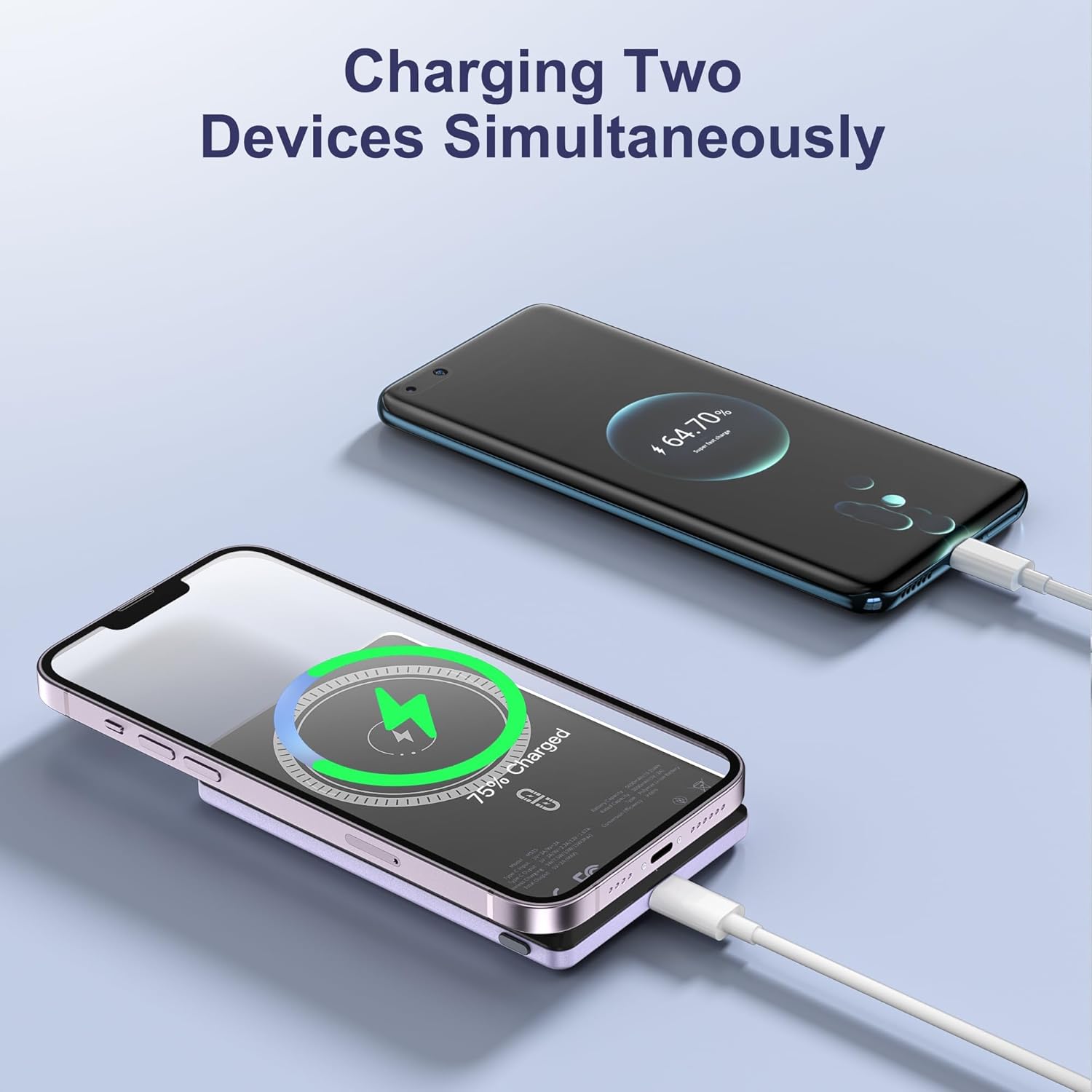
Figure 4: Charging two devices simultaneously.
4.4 Pornire/Oprire
The power bank automatically activates charging when a device is connected wirelessly or via cable. To turn off the power bank, press the power button twice in quick succession.
5. Caracteristici cheie
- Design ultra-subțire: Measuring just 0.32 inches (8mm) in thickness, it's designed for easy portability.
- Capacitate 5000mAh: Oferă ample putere pentru uz zilnic.
- Conexiune magnetica: Ensures a secure and stable wireless charging link.
- Încărcare rapidă PD de 20 W: Delivers efficient wired charging speeds.
- Încărcare simultană: Charge two devices at once (wireless + wired).
- Protecție inteligentă: Protecții încorporate împotriva supracurentului, supratensiuneitage, și scurtcircuit.

Figura 5: Pesteview of NOHON MS15 features.
6. Compatibilitate
The NOHON MS15 Mag-Safe Wireless Power Bank is designed for universal compatibility with:
- Mag-Safe Charging: iPhone 12, 13, 14, and 15 series (including Pro Max models).
- Încărcare fără fir: Other Qi-enabled smartphones (requires a magnetic phone case for secure attachment).
- Încărcare prin cablu: Any device compatible with USB-C charging.
Nota: For non-magnetic charging phones, a magnetic phone case is required to ensure a secure connection for wireless charging.
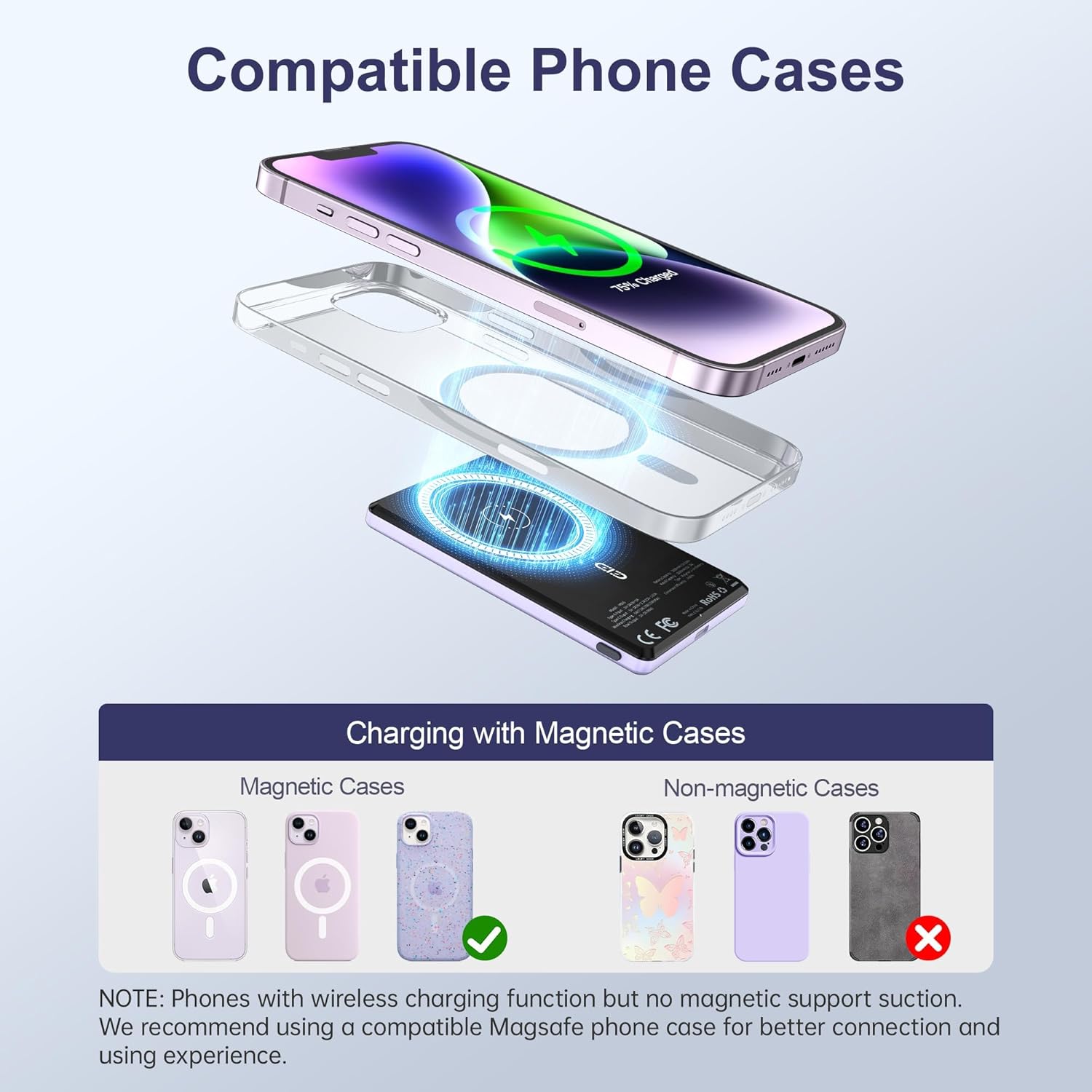
Figure 6: Compatible phone cases for magnetic charging.
7. Întreținere și îngrijire
- Păstrați bateria externă departe de apă, umiditate și temperaturi extreme.
- Evitați scăderea sau supunerea dispozitivului la impacturi puternice.
- Curățați suprafața cu o cârpă moale și uscată. Nu utilizați substanțe chimice dure sau materiale abrazive.
- A se păstra într-un loc răcoros și uscat atunci când nu este utilizat.
8. Depanare
8.1 Dispozitivul nu se încarcă
- Asigurați-vă că bateria externă este suficient încărcată. Verificați indicatorii LED.
- For wireless charging, verify proper alignment between the power bank and your device/magnetic case.
- For wired charging, check that the USB-C cable is securely connected to both the power bank and your device. Try a different cable if necessary.
- Remove any non-magnetic cases that may interfere with wireless charging.
8.2 Supraîncălzirea bateriei externe
- Este normal ca bateria externă să se încălzească ușor în timpul încărcării.
- If it becomes excessively hot, discontinue use immediately and contact customer support.
- Asigurați o ventilație corespunzătoare și evitați încărcarea în lumina directă a soarelui sau în spații închise.
9. Specificații
| Caracteristică | Detaliu |
|---|---|
| Numărul de model | MS15 |
| Capacitatea bateriei | 5000mAh |
| Dimensiunile produsului | 4 x 2.5 x 0.32 inci |
| Greutatea articolului | 4.1 uncii |
| Ieșire de încărcare cu fir | PD 20W (USB Type C) |
| Ieșire de încărcare wireless | Up to 15W (for Android), 7.5W (for iOS) |
| Caracteristici speciale | Fast Charging, Slim Design, Wireless Charging, Magnetic Attachment |
| Culoare | Violet Ash |
10. Videoclip oficial al produsului
Videoclip 1: Produs finalizatview of the NOHON Mag-Safe Power Bank. This video demonstrates the features and usage of the power bank, including its slim design and magnetic attachment.
11. Garanție și asistență
NOHON products typically come with a 12-month warranty. For any product inquiries, technical support, or warranty claims, please contact NOHON customer service through the retailer's platform or the official NOHON website. Please have your purchase details and model number (MS15) ready.