
Introducere
Thank you for choosing the HyperGear Bunny Tracks Kids Bluetooth Wireless Headphones. These headphones are designed to provide a fun and immersive audio experience for children, featuring wireless Bluetooth connectivity, LED rabbit ears, and multiple playback options. This manual provides essential information for setting up, operating, and maintaining your headphones to ensure optimal performance and longevity.

The image displays the HyperGear Bunny Tracks Kids Bluetooth Wireless Headphones in white, featuring LED rabbit ears. The product packaging is also visible, highlighting key features like Bluetooth connectivity, kid-friendly sizing, comfortable fit, and mic/volume control.
Produs terminatview
Caracteristici cheie
- Conectivitate wireless Bluetooth: Seamless audio streaming from compatible devices.
- LED Rabbit Ears: Fun, illuminated design element.
- Design pliabil: Îmbunătățește portabilitatea și depozitarea.
- Microfon încorporat: Pentru apeluri hands-free și comunicare online.
- Multi-Mode Playback: Supports Bluetooth, 3.5mm Aux, microSD card, and FM radio.
- Potrivire confortabilă: Adjustable headband and soft over-ear cushions.
- Durată de redare de 10 ore: Extended listening on a single charge.
Comenzi și porturi
The headphones feature intuitive controls and versatile input options for various audio sources.

Această imagine oferă o imagine detaliată view of the control buttons located on the headphone ear cup. Labels indicate functions for power on/off, next track/volume up, play/pause/answer call, previous track/volume down, and mode switch.
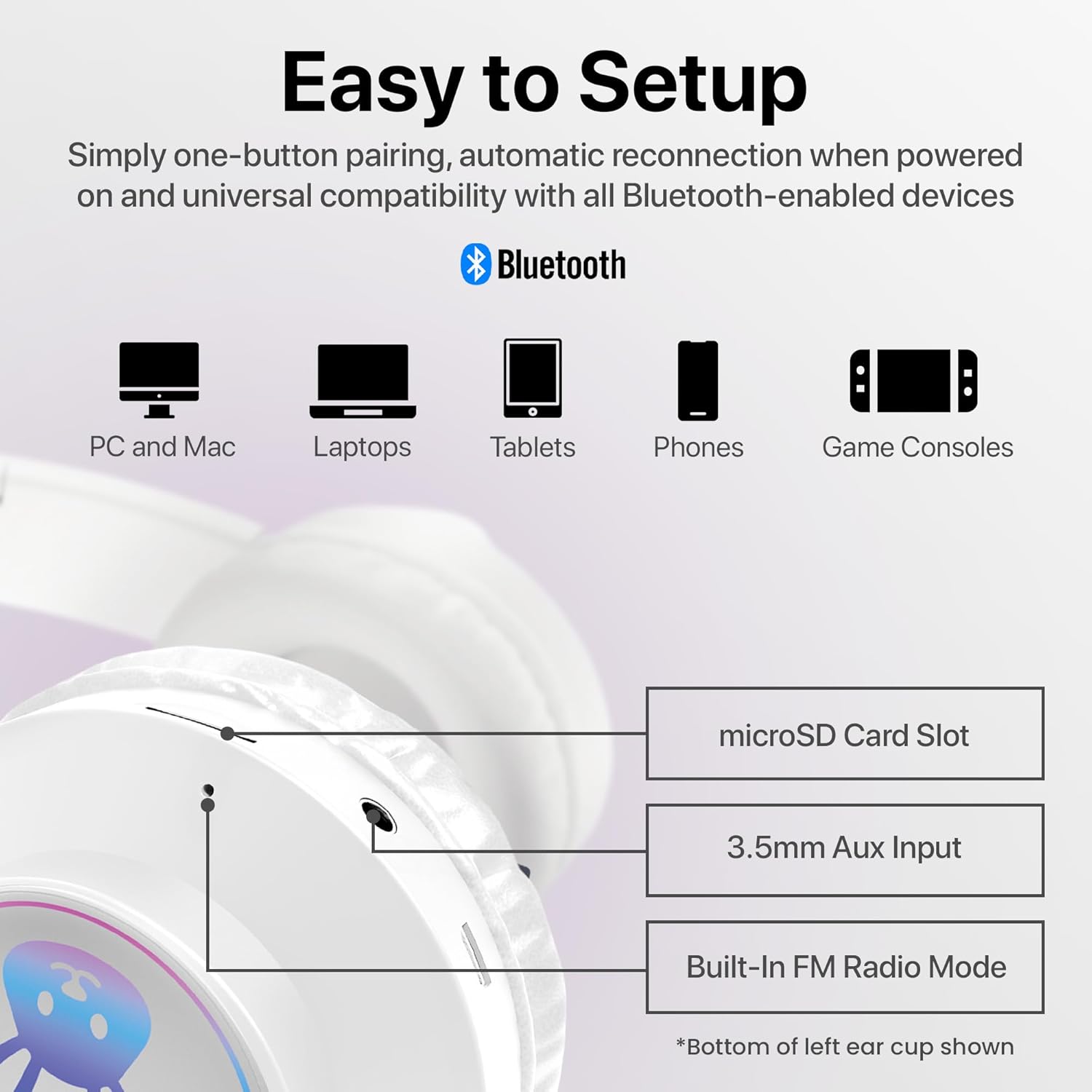
The image shows the various input ports on the bottom of the left ear cup, including a microSD card slot for direct audio playback, a 3.5mm Aux input for wired connections, and an indication of the built-in FM radio mode.
Instrucțiuni de configurare
1. Încărcarea căștilor
- Conectați cablul de încărcare inclus la portul de încărcare al căștilor.
- Conectați celălalt capăt al cablului de încărcare la o sursă de alimentare USB (de exemplu, portul USB al computerului, adaptorul USB de perete).
- The LED indicator will illuminate during charging and turn off or change color when fully charged. A full charge takes approximately 2 hours.
2. Pornire/Oprire
- Pentru a porni: Press and hold the Power button (usually combined with Play/Pause) until the LED indicator lights up and you hear an audible prompt.
- Pentru a opri: Apăsați și mențineți apăsat butonul de pornire/oprire până când indicatorul LED se stinge și auziți un mesaj sonor.
3. Asociere Bluetooth
- Asigurați-vă că sunt complet încărcate și oprite căștile.
- Apăsați și mențineți apăsat butonul de pornire timp de aproximativ 3-5 secunde, până când indicatorul LED clipește în albastru și roșu, indicând modul de asociere.
- Pe dispozitivul dvs. (smartphone, tabletă, computer), activați Bluetooth și căutați dispozitivele disponibile.
- Select "HyperGear Bunny Tracks" from the list of found devices.
- Once paired, the LED indicator will typically show a solid blue light or flash blue slowly, and you will hear a confirmation tone.
4. Conexiune prin cablu (mod Aux)
Pentru a utiliza căștile în modul cu fir:
- Connect one end of a 3.5mm audio cable (not always included, check packaging) to the Aux input port on the headphones.
- Conectați celălalt capăt la mufa de ieșire audio a dispozitivului.
- The headphones will automatically switch to Aux mode. Bluetooth functionality will be disabled in this mode.
5. microSD Card Playback
To play audio directly from a microSD card:
- Insert a microSD card with MP3 audio files into the microSD card slot on the headphones.
- The headphones will automatically switch to microSD mode and begin playing audio.
6. Modul radio FM
Pentru a utiliza radioul FM încorporat:
- Porniți căștile.
- Press the 'M/EQ' button (Mode/Equalizer) to switch to FM radio mode.
- Use the Volume Up/Down buttons to scan for stations. A short press may change frequency, while a long press might auto-scan. Refer to the control image for specific button functions.

This image depicts a young girl wearing the headphones while interacting with a laptop, suggesting use for online learning or entertainment.
Instrucțiuni de operare
Basic Controls (Bluetooth/microSD Mode)
| Buton/Acțiune | Funcţie |
|---|---|
| Buton de pornire (apăsare scurtă) | Play/Pause music; Answer/End phone calls. |
| Buton de alimentare (apăsare lungă) | Pornire / oprire. |
| '+' Button (Short Press) | Următoarea piesă. |
| '+' Button (Long Press) | Creșterea volumului. |
| '-' Button (Short Press) | Pista anterioară. |
| '-' Button (Long Press) | Reducerea volumului. |
| 'M/EQ' Button (Short Press) | Switch Audio Mode (Bluetooth, FM, microSD, Aux). |
| 'M/EQ' Button (Long Press) | Activate Equalizer (if available, check product specifications for details). |
Gestionarea apelurilor telefonice
- Răspunde la apel: Apăsați scurt butonul de Pornire/Oprire când primiți un apel.
- Terminare apel: Apăsați scurt butonul de Pornire/Oprire în timpul unui apel.
- Respinge apelul: Apăsați lung butonul de Pornire/Oprire când primiți un apel.
LED Rabbit Ears
The LED rabbit ears illuminate automatically when the headphones are powered on, adding a visual element to the listening experience. There are no specific controls for the LED lights; they operate in conjunction with the headphone's power state.

A boy is shown wearing the headphones and holding a game controller, illustrating the headphones' suitability for gaming.
Întreţinere
Curatenie
- Ștergeți căștile cu o lavetă moale, uscată și fără scame.
- Nu utilizați agenți de curățare abrazivi, solvenți sau substanțe chimice puternice.
- Evitați pătrunderea umezelii în orice deschidere.
Depozitare
- Depozitați căștile într-un loc răcoros și uscat, ferit de lumina directă a soarelui și de temperaturi extreme.
- Utilize the foldable design for compact storage and to protect the ear cups.
Îngrijirea bateriei
- Charge the headphones regularly, even if not in frequent use, to maintain battery health.
- Evitați descărcarea completă a bateriei pentru perioade lungi de timp.
Depanare
| Problemă | Soluție posibilă |
|---|---|
| Căștile nu pornesc. | Asigurați-vă că sunt complet încărcate căștile. Conectați-le la o sursă de alimentare și încercați din nou. |
| Niciun sunet din căști. | Check volume levels on both the headphones and the connected device. Ensure headphones are correctly paired via Bluetooth or properly connected via Aux cable. Verify the correct audio mode is selected. |
| Nu se poate conecta prin Bluetooth. | Ensure headphones are in pairing mode (flashing blue/red LED). Turn off and on Bluetooth on your device. Move headphones closer to the device. Clear previous Bluetooth connections on your device. |
| Calitate slabă a sunetului. | Ensure the headphones are within Bluetooth range (10 meters). Check for interference from other wireless devices. Try a different audio source or file. |
| LED rabbit ears not lighting up. | Ensure the headphones are powered on. If the issue persists, contact customer support. |
Specificații
| Caracteristică | Detaliu |
|---|---|
| Numele modelului | Bunny Tracks Headphones |
| Numărul de model al articolului | 15866 |
| Tehnologia de conectivitate | Wireless (Bluetooth) |
| Tehnologia comunicațiilor fără fir | Bluetooth 4.0 |
| Gama Bluetooth | 10 metri |
| Forma căștilor | Peste ureche |
| Tip de driver audio | Dynamic Driver (40mm, inferred from image) |
| Gama de frecvente | 20 Hz - 20,000 Hz |
| Durata de viață a bateriei | Până la 10 ore |
| Timp de încărcare | Approximately 2 Hours (inferred from A+ content) |
| Tip control | Control media, atingere |
| Caracteristici speciale | Adjustable Comfy Fit, Ultra-Soft Plush Memory Foam Ear Cushions, LED Light-Up Rabbit Ears, Easy One-Button Setup, Foldable & Portable, Microphone Included |
| Material | Plastic |
| Greutatea articolului | 7.2 uncii (0.45 lire) |
| Dimensiunile produsului | 7.1 x 2.9 x 10.6 inci |
| UPC | 633755158667 |

Un intern view of the headphone ear cup, illustrating the 40mm dynamic driver responsible for audio output, designed for clear sound and bass.
Garanție și suport
For warranty information or technical support, please refer to the official HyperGear website or contact HyperGear customer service directly. Keep your purchase receipt as proof of purchase for any warranty claims.
Producător: HIPERECHIPAMENTE