
Introducere
This manual provides instructions for the setup, operation, and maintenance of your Lamzu Atlantis OG V2 PRO Wireless Gaming Mouse. Please read this manual thoroughly before using the product to ensure proper functionality and longevity.

Imagine: Sus view of the Lamzu Atlantis OG V2 PRO Wireless Gaming Mouse in Elegant Blue.
Înființat
1. Conținutul pachetului
Verificați dacă următoarele articole sunt incluse în pachetul dumneavoastră:
- Lamzu Atlantis OG V2 PRO Wireless Gaming Mouse
- Dongle wireless 2.4G
- Cablu USB tip C (pentru conectare cu fir și încărcare)
- Manual de utilizare (acest document)
- Additional accessories (e.g., grip tape, extra skates) may be included.
2. Conectarea mouse-ului
The mouse supports both 2.4G wireless and wired connections.
2.1. Wireless Connection (2.4G)
- Locate the 2.4G wireless dongle.
- Conectați dongle-ul la un port USB disponibil de pe computer.
- Turn on the mouse using the switch located on the underside. The mouse should automatically connect to the dongle.
- If connection is not established, ensure the mouse is sufficiently charged.
2.2. Conexiune prin cablu
- Connect one end of the provided USB Type-C cable to the mouse.
- Conectați celălalt capăt al cablului USB Type-C la un port USB disponibil de pe computer.
- Mouse-ul va funcționa în modul cu fir și se va încărca simultan.

Image: Illustration of the dual mode connection options for the mouse, showing the USB Type-C cable and 2.4G wireless dongle.
3. Instalarea driverelor și a software-ului
For full customization of DPI settings, button assignments, and other advanced features, download the official driver software from the Lamzu website-ul. Consultați website for specific instructions on software installation and usage.
Operațiunea
1. Ajustarea DPI-ului
The mouse features a high-precision sensor with up to 26000 DPI. DPI settings can be adjusted through the dedicated software. The software allows users to set custom DPI levels according to their preferences.

Image: Screenshot of the software interface showing DPI adjustment options, with a maximum setting of 26000 DPI.
2. Rata de sondare
The mouse supports a 1000Hz / 1ms polling rate. When used with an optional 4K wireless adapter (sold separately), it supports a 4K polling rate for enhanced responsiveness.
3. Ergonomie și priză
The Lamzu Atlantis OG V2 PRO features a symmetrical design, suitable for both left-handed and right-handed users. Its shape is particularly optimized for a claw grip style, providing comfort and control during use.

Image: Diagram illustrating the optimal claw grip for the Lamzu Atlantis OG V2 PRO mouse.
Întreţinere
1. Curatenie
Pentru a menține performanțe optime, curățați mouse-ul în mod regulat. Folosiți o cârpă moale și uscată pentru a șterge suprafața. Pentru murdăria persistentă, curățați ușor.amp cloth with mild soap can be used, ensuring no liquid enters the mouse's internal components. Avoid abrasive cleaners or solvents.
2. Îngrijirea bateriei
The mouse is equipped with a rechargeable Lithium Ion battery. To prolong battery life:
- Evitați descărcarea completă frecventă a bateriei.
- Depozitați mouse-ul într-un loc răcoros și uscat atunci când nu îl utilizați pentru perioade lungi de timp.
- Încărcați mouse-ul folosind cablul USB Type-C furnizat.
Depanare
If you encounter issues with your Lamzu Atlantis OG V2 PRO mouse, refer to the following common solutions:
| Problemă | Cauza posibila | Soluţie |
|---|---|---|
| Mouse-ul nu răspunde (Wireless) | Low battery, dongle not connected, interference, mouse not paired. | Charge the mouse. Ensure dongle is securely plugged in. Move dongle closer to mouse. Re-pair the mouse if necessary (refer to software instructions). |
| Mouse-ul nu răspunde (cu fir) | Cable not connected properly, faulty cable, USB port issue. | Ensure USB-C cable is securely connected to both mouse and computer. Try a different USB port. Test with another USB-C cable if available. |
| Mișcarea cursorului este neregulată sau sacadată | Dirty sensor, unsuitable mouse pad surface, software conflict. | Clean the optical sensor on the underside of the mouse. Use a clean, uniform mouse pad. Check for conflicting software or drivers. |
| Butoanele mouse-ului nu funcționează | Problemă de software, daune fizice. | Restart your computer. Reinstall mouse drivers. If the issue persists, contact customer support. |
If the problem persists after attempting these solutions, please contact Lamzu customer support for further assistance.
Specificații
The following are the technical specifications for the Lamzu Atlantis OG V2 PRO Wireless Gaming Mouse:
- Model: LA-OG
- Conectivitate: 2.4G Wireless, USB Wired (Type-C)
- Senzor: Senzor optic PAW3395
- DPI: Până la 26000 DPI
- Rata de sondare: 1000Hz (1ms), 4000Hz with optional 4K dongle
- Comutatoare: Mechanical Switches (Silver TTC Encoder)
- MCU: Nordic 52840
- Greutate: Aproximativ 57 g
- Dimensiuni: 4.84 x 2.6 x 0.1 inchi (123 mm x 66 mm x 38 mm)
- Baterie: 1 litiu ion (inclus)
- Culoare: Elegant Blue (variant)

Image: Technical diagram showing the dimensions of the Lamzu Atlantis OG V2 PRO mouse.
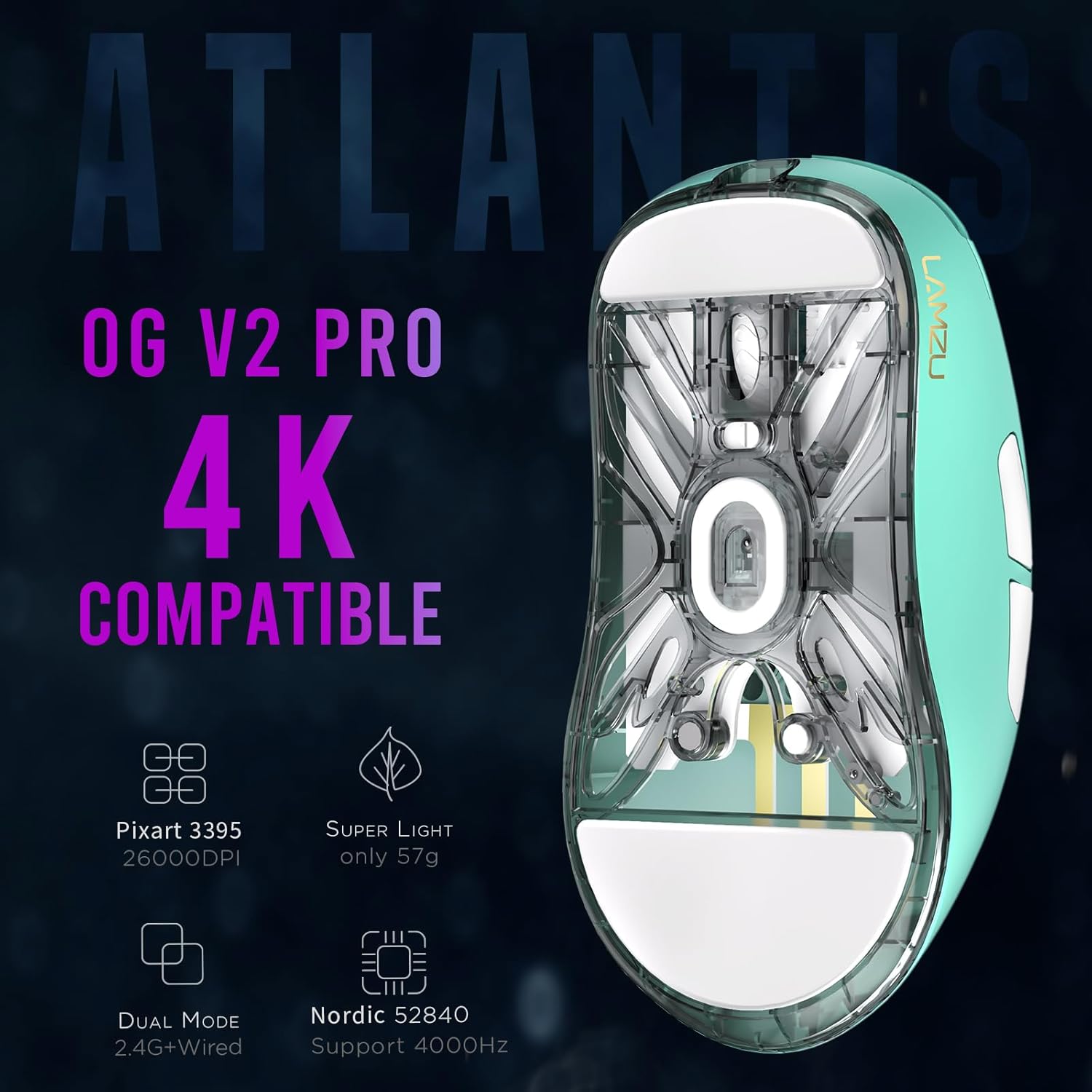
Imagine: Jos view of the Lamzu Atlantis OG V2 PRO mouse, highlighting key features like Pixart 3395 sensor, 57g weight, dual mode, and Nordic 52840 MCU.
Informații despre garanție
Lamzu products are covered by a limited warranty. For detailed information regarding warranty terms, conditions, and duration, please refer to the official Lamzu website-ul lor web sau contactați direct serviciul de asistență pentru clienți. Păstrați dovada achiziției pentru solicitările de garanție.
Asistență pentru clienți
For technical assistance, troubleshooting, or general inquiries about your Lamzu Atlantis OG V2 PRO Wireless Gaming Mouse, please visit the official Lamzu website:
De asemenea, puteți găsi întrebări frecvente și resurse suplimentare pe paginile lor de asistență.