
1. Introducere
This manual provides detailed instructions for the proper use, setup, and maintenance of your Yealink W59R Ruggedized DECT Handset. Please read this manual thoroughly before operating the device to ensure optimal performance and safety. The Yealink W59R is designed for environments requiring a durable and reliable communication solution.
2. Produs terminatview
The Yealink W59R is a professional ruggedized DECT handset built to withstand challenging environments. It features an IP67 rating for dust, splash, and water resistance, along with integrated Bluetooth and a vibration alarm. This handset is fully compatible with the Yealink W80 Multi-Cell System, enabling seamless roaming and call handover.
Caracteristici cheie:
- Evaluat IP67: Shock, dust, and water resistant for reliable operation in harsh conditions.
- Durabilitate îmbunătățită: Tough rubberized surface protects against drops, slips, and scratches.
- Mobilitate fără probleme: Compatible with Yealink W80 Multi-Cell System for extensive coverage.
- Conectivitate Bluetooth: Allows use with Bluetooth headsets for hands-free communication.
- Alarmă de vibrații: Ensures calls are not missed in noisy environments.
- Optimal HD Audio: Features FNR (Flexible Noise Reduction), full duplex, and Opus codec for clear sound.
- Comprehensive Alarm Functions: Includes push-button, no-movement, man-down, and running alarms for occupational safety.
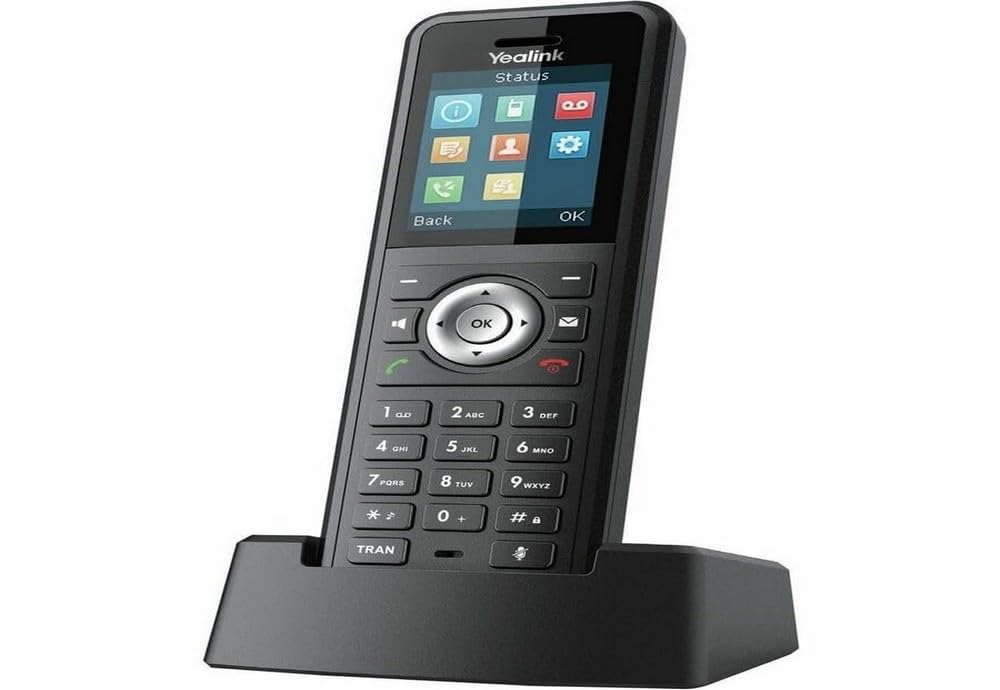
Figure 2.1: Yealink W59R Ruggedized DECT Handset. This image displays the front view of the handset, highlighting its robust design.
3. Configurare
3.1. Conținutul pachetului
Înainte de a continua, asigurați-vă că toate articolele sunt prezente în colet:
- Telefon DECT rezistent Yealink W59R
- Leagăn de încărcare
- Baterie reîncărcabilă
- Adaptor de alimentare
- Copertă decorativă
- Ghid de pornire rapidă
3.2. Instalarea bateriei
- Localizați capacul compartimentului bateriei pe spatele receptorului.
- Scoateți cu grijă capacul.
- Introduceți bateria reîncărcabilă, asigurându-vă că contactele sunt aliniate corect.
- Replace the battery compartment cover and secure it firmly to maintain the IP67 rating.
3.3. Încărcarea receptorului
- Conectați adaptorul de alimentare la suportul de încărcare.
- Conectați adaptorul de alimentare la o priză de perete.
- Place the handset into the charging cradle. The charging indicator on the handset will illuminate.
- Lăsați receptorul să se încarce timp de cel puțin 4 ore înainte de prima utilizare.
3.4. Registering the Handset
The W59R handset must be registered to a Yealink DECT base station (e.g., W80 Multi-Cell System) to function. Refer to your DECT base station's manual for specific registration procedures. Generally, this involves:
- Put the DECT base station into registration mode.
- On the W59R handset, navigate to the registration menu (typically Meniu > Setări > Înregistrare > Înregistrare receptor).
- Select the desired base and enter the system PIN (default is 0000).
- Telefonul va afișa un mesaj de confirmare după înregistrarea cu succes.
4. Instrucțiuni de utilizare
4.1. Funcții de apel de bază
- Efectuarea unui apel: Introduceți numărul de telefon și apăsați tasta Apel cheie.
- Răspunsul la un apel: Apăsați tasta Apel key when the handset rings.
- Încheierea unui apel: Apăsați tasta Terminați apelul cheie.
- Reglarea volumului: Folosiți tastele de navigare în timpul unui apel pentru a regla volumul căștilor.
4.2. Utilizarea Bluetooth
The W59R supports Bluetooth for connecting wireless headsets. To pair a Bluetooth device:
- Enable Bluetooth on your headset and set it to pairing mode.
- On the W59R, navigate to Meniu > Setări > Bluetooth.
- Activează Bluetooth On și selectați Paired Devices > Add Device.
- Select your headset from the list of available devices and enter the PIN if prompted (usually 0000 or 1234).
4.3. Funcții de alarmă
The W59R includes several alarm features designed to enhance user safety in hazardous environments. These alarms can be configured by an administrator.
- Push-Button Alarm: Activates an emergency alert when a dedicated button is pressed.
- No-Movement Alarm: Triggers an alert if the handset detects no movement for a configurable period.
- Man-Down Alarm: Activates if the handset detects a sudden change in orientation, indicating a fall.
- Running Alarm: Can be configured to alert if the user is running or moving rapidly beyond a set threshold.

Figure 4.1: Detail of the Yealink W59R handset, showing a button that can be configured for alarm functions.
5. Întreținere
5.1. Curatenie
To maintain the handset's IP67 rating and overall performance:
- Wipe the handset with a soft, damp pânză.
- Nu utilizați substanțe chimice dure, solvenți de curățare sau detergenți puternici.
- Ensure all port covers are securely closed after cleaning to maintain water and dust resistance.
5.2. Îngrijirea bateriei
- Evitați expunerea bateriei la temperaturi extreme.
- Charge the battery regularly to prolong its lifespan.
- If the handset will not be used for an extended period, fully charge the battery before storage.
6. Depanare
This section addresses common issues you may encounter with your W59R handset.
| Problemă | Cauza posibila | Soluţie |
|---|---|---|
| Telefonul nu pornește. | Battery is not installed or discharged. | Asigurați-vă că bateria este instalată corect și complet încărcată. |
| Cannot register handset to base. | Base station not in registration mode; incorrect PIN. | Verify base station is in registration mode. Check the PIN. Ensure handset is within range. |
| Nu există ton de apel sau nu se pot efectua apeluri. | Handset not registered; network issue. | Confirm handset is registered. Check network connection of the base station. |
| Calitate audio slabă. | Interference; handset out of range. | Move closer to the base station. Avoid sources of interference (e.g., microwaves, Wi-Fi routers). |
If the problem persists after attempting these solutions, please contact Yealink technical support.
7. Specificații
| Caracteristică | Detaliu |
|---|---|
| Marca | Yealink |
| Numărul de model | W59R |
| Culoare | Negru |
| Tip de telefon | Fără fir |
| Sursa de alimentare | Alimentat cu baterie |
| Dimensiuni articol (L x l x H) | 7.6 x 4.4 x 3.7 inci |
| Greutatea articolului | 14.4 uncii |
| Dispozitive compatibile | Yealink W80 Multi-Cell System, Bluetooth devices |
| Tehnologie DECT | CAT-iq2.0 (not compatible with third-party DECT devices) |
| Evaluare IP | IP67 (Shock, dust, and water resistant) |
| Capacitate de înregistrare | 30 Minutes (Answering System Type: Digital) |
| UPC | 841885104410 |
8. Garanție și asistență
Informații despre garanție: The product specifications indicate that warranty information is not available. Please refer to your purchase documentation or contact your vendor for specific warranty details.
Suport tehnic: For technical assistance, troubleshooting beyond this manual, or inquiries regarding your Yealink W59R, please contact Yealink customer support or visit the official Yealink website pentru resurse de asistență.