
LS VISION LS-MS2
LS VISION 4K 180-Degree Ultra-Wide Angle 4G Solar-Powered Outdoor Security Camera
Model: LS-MS2
Marcă: LS VISION
1. Introducere
This user manual provides detailed instructions for the installation, operation, and maintenance of your LS VISION 4K 180-Degree Ultra-Wide Angle 4G Solar-Powered Outdoor Security Camera. Please read this manual thoroughly before using the product to ensure proper functionality and safety.
2. Produs terminatview
2.1 Caracteristici cheie
- 4K/8MP Resolution for clear video capture.
- 180-Degree Ultra-Wide Angle Dual Lens for comprehensive coverage without distortion.
- Integrated 4G Module for connectivity without Wi-Fi, ideal for remote locations.
- Solar-Powered with 6W solar panel and built-in 18000 mAh batteries for continuous operation. Supports integrated and separate solar panel installation.
- Two-Way Audio for real-time communication.
- Cloud Storage and local TF card storage (up to 128GB, TF card not included).
- Telecomanda Viewing and Playback via Niview app (Android/iOS).
- PIR + Human Detection with automatic human tracking, wake-up video recording, and push notifications.
- Multiple Recording Modes: 24-hour continuous recording, 24-hour + trigger recording, and three trigger recording modes.
- Dual Light Source Design: Full-color night vision up to 20 meters and infrared night vision up to 40 meters.
- IP66 Waterproof Rating for outdoor durability.
2.2 Diagrama produsului
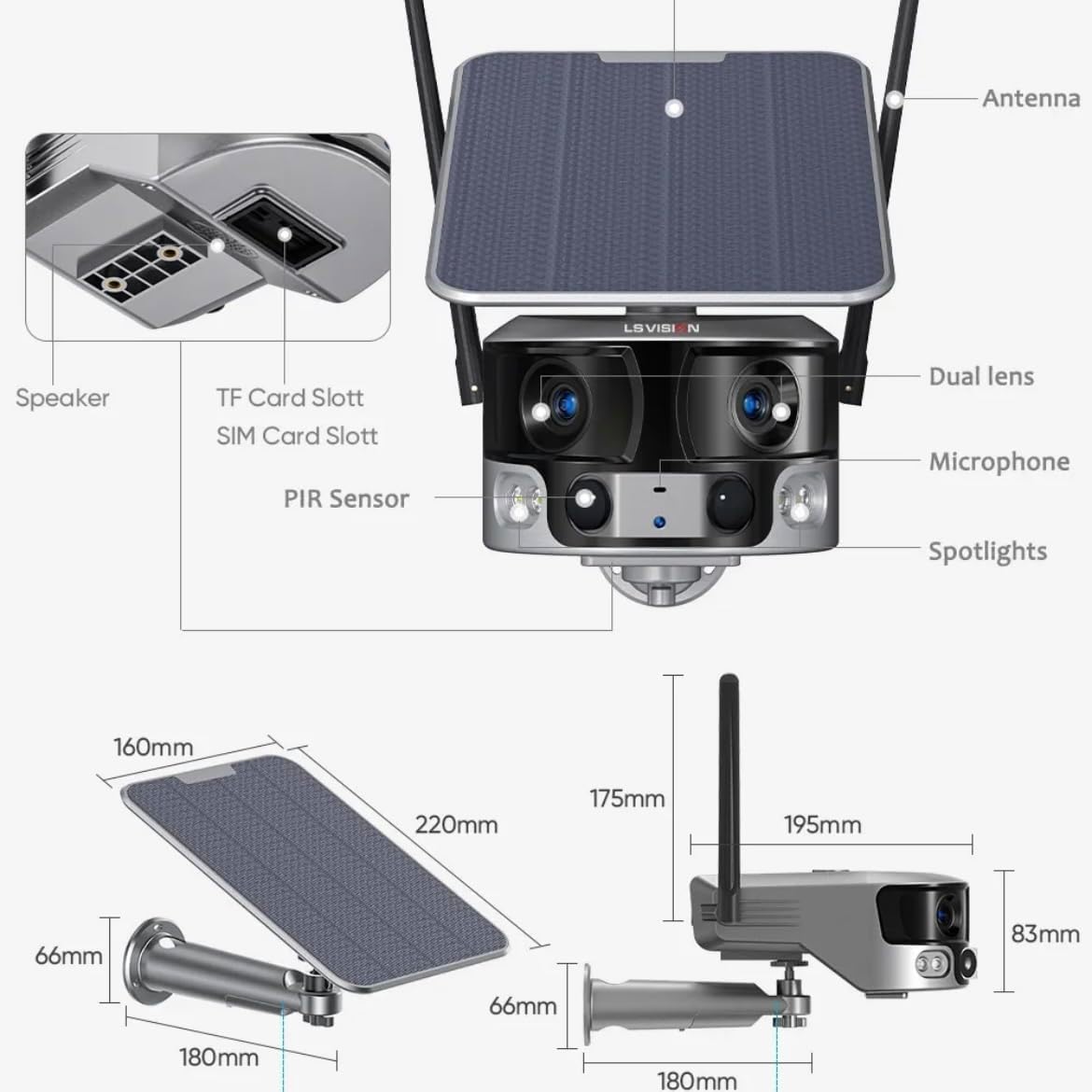
Figure 2.1: Product components and dimensions. Key parts include the solar panel, antennas, dual lens, microphone, spotlights, PIR sensor, speaker, TF card slot, and SIM card slot.
3. Conținutul pachetului
Vă rugăm să verificați conținutul pachetului la deschidere pentru a vă asigura că toate articolele sunt prezente și nu sunt deteriorate:
- 1 x LS VISION 4K 180-Degree Ultra-Wide Angle 4G Solar-Powered Outdoor Security Camera
- 1 x Solar Panel (6W)
- 1 x set de suporturi de montare
- 1 x antenă 4G
- 1 x Set of Screws and Wall Plugs
- 1 x 2-meter Extension Cable for Solar Panel
4. Ghid de instalare
4.1 Încărcare inițială
Although the camera is solar-powered, it is recommended to fully charge the built-in batteries before the first use. Connect the camera to a 5V/2A USB power adapter (not included) using a standard USB cable for initial charging. The charging indicator will show the status.
4.2 SIM Card & TF Card Installation
Locate the SIM card slot and TF card slot on the camera (refer to Figure 2.1). Ensure the camera is powered off before inserting or removing cards.
- Open the protective cover of the card slots.
- Insert a standard 4G SIM card into the SIM card slot with the gold contacts facing down. Ensure it clicks into place.
- Insert a TF (microSD) card (up to 128GB, not included) into the TF card slot with the gold contacts facing down. Ensure it clicks into place.
- Close the protective cover firmly to maintain the IP66 waterproof rating.
4.3 Montarea camerei
The camera is designed for wall mounting and outdoor use. Consider the following for optimal placement:
- Alegeți o locație cu amplumina directă a soarelui pentru panoul solar.
- Asigurați-vă că camera are o claritate view a zonei pe care doriți să o monitorizați.
- Mount the camera at a height that provides good coverage and deters tampering.

Figure 4.1: The LS VISION camera shown with its solar panel and mounting bracket, ready for outdoor installation.

Figure 4.2: The camera operates on a 4G network, eliminating the need for a Wi-Fi router, making it suitable for locations without existing Wi-Fi infrastructure.
The solar panel can be installed integrated with the camera or separately using the 2-meter extension cable for optimal sun exposure.
4.4 Instalarea și conectarea aplicației
To access and control your camera, download the Niview aplicația din magazinul de aplicații al smartphone-ului (disponibilă pentru Android și iOS).
- Caută "Niview" in the App Store or Google Play Store and install it.
- Înregistrează un cont nou sau autentifică-te dacă ai deja unul.
- Urmați instrucțiunile din aplicație pentru a adăuga camera. De obicei, aceasta implică scanarea unui cod QR pe cameră sau introducerea manuală a ID-ului acesteia.
- Odată conectat, poți view trăi footage, access recordings, and configure settings.
5. Instrucțiuni de utilizare
5.1 În direct View & Redare
Access the Niview app on your smartphone or tablet to view live video streams from your camera anytime, anywhere. The app also allows you to review inregistrat footage.

Figure 5.1: The Niview app interface demonstrating real-time monitoring and timeline playback, ensuring no moment is missed.
5.2 Detectarea mișcării și alertele
The camera features advanced PIR and human detection capabilities. When motion or a human figure is detected, the camera will:
- Automatically begin recording a wake-up video.
- Send instant push notifications to your connected smartphone.
- Initiate automatic human tracking to follow the detected subject.

Figure 5.2: The camera's human tracking feature automatically follows detected individuals, ensuring continuous monitoring of their movement.
5.3 Vedere nocturnă
The camera is equipped with a dual light source design for enhanced night vision:
- Viziune nocturnă full-color: Provides clear, colored images up to 20 meters in low-light conditions when spotlights are activated.
- Vedere nocturnă în infraroșu (IR): Offers black and white vision up to 40 meters using infrared LEDs.
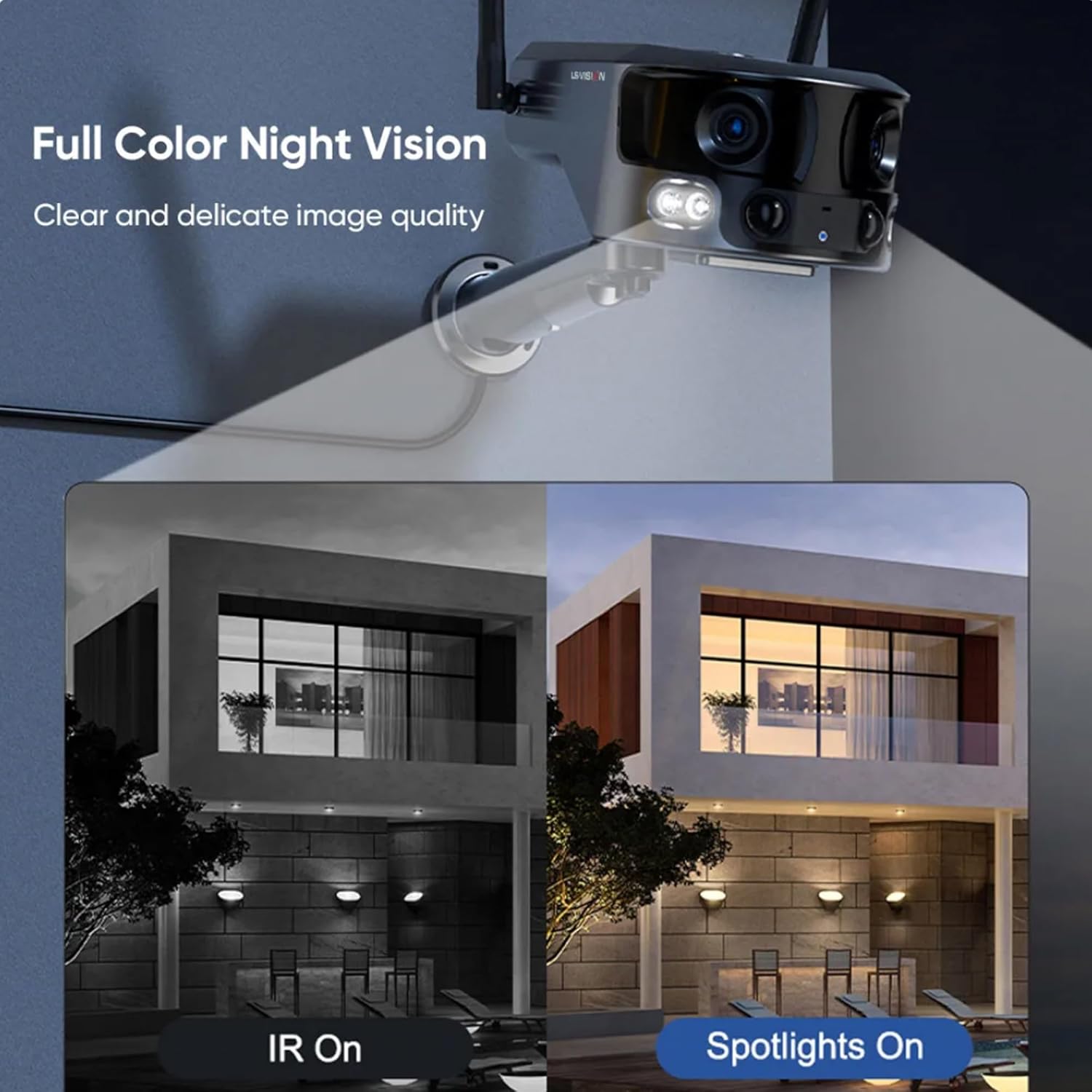
Figure 5.3: Comparison illustrating the difference between standard IR night vision and full-color night vision when the camera's spotlights are active.
5.4 Sunet bidirecțional
Utilize the built-in microphone and speaker for two-way audio communication through the Niview app. This allows you to listen in on the camera's surroundings and speak through the camera.
5.5 Moduri de înregistrare
The camera supports various recording modes to suit your needs:
- Înregistrare continuă 24 de ore: Records continuously throughout the day.
- Înregistrare declanșatoare: Records only when motion or human detection is triggered. This mode has three sub-options for customization.
6. Întreținere
Întreținerea regulată asigură performanța optimă și longevitatea camerei dumneavoastră:
- curatenie: Ștergeți periodic obiectivul camerei și panoul solar cu o lavetă moale și umedă.amp o lavetă pentru a îndepărta praful și resturile. Nu folosiți substanțe chimice dure.
- Îngrijirea bateriei: Ensure the solar panel is exposed to sufficient sunlight to keep the built-in batteries charged. In prolonged periods of low sunlight, consider manually charging the camera.
- Actualizări firmware: Check the Niview app regularly for firmware updates. Keeping the firmware updated ensures the latest features and security patches.
- Protecția mediului: While IP66 rated, avoid exposing the camera to extreme weather conditions beyond its specified operating range if possible.

Figure 6.1: The camera's IP66 industrial-grade waterproof design ensures reliable operation even in adverse outdoor weather conditions like rain.
7. Depanare
Dacă întâmpinați probleme cu camera, consultați următoarele probleme și soluții frecvente:
| Problemă | Cauza posibila | Soluţie |
|---|---|---|
| Aparat foto offline | No 4G signal; Low battery; SIM card issue. | Check 4G signal strength; Recharge battery; Reinsert SIM card or try a different one. |
| Calitate slabă a imaginii | Dirty lens; Insufficient light; Network bandwidth. | Clean the lens; Ensure adequate lighting or enable night vision; Check 4G network speed. |
| Detectarea mișcării nu funcționează | Detection sensitivity too low; Incorrect settings; Obstructions. | Adjust sensitivity in app; Verify detection zone settings; Clear any obstructions. |
| Bateria nu se încarcă | Insufficient sunlight; Dirty solar panel; Faulty connection. | Relocate solar panel to direct sunlight; Clean solar panel; Check cable connections. |
Dacă problema persistă, vă rugăm să contactați serviciul de asistență pentru clienți.
8. Specificații
| Caracteristică | Caietul de sarcini |
|---|---|
| Numele modelului | LS-MS2 |
| Rezoluție captură video | 4K |
| Viewunghiul ing | 180 Degrees (Ultra-Wide) |
| Tehnologia de conectivitate | 4G Cellular Network (also supports Wi-Fi) |
| Sursa de alimentare | Alimentat cu energie solară (panou solar de 6W) |
| Capacitatea bateriei | 18000 mAh (încorporat) |
| Rază de vizibilitate nocturnă (culoare) | Până la 20 metri |
| Rază de vizibilitate nocturnă (IR) | Până la 40 metri |
| Depozitare | Cloud Storage, TF Card (Max 128GB, not included) |
| Evaluare rezistentă la apă | IP66 |
| Material | Acrylonitrile Butadiene Styrene (ABS) and Metal |
| Tip de instalare | Montare pe perete |
| Dispozitive compatibile | Tablet, Smartphone (Android/iOS) |
| Dimensiunile produsului | 18 x 18 x 15 cm |
| Greutatea articolului | 1.25 kilograme |
9. Informații despre garanție
This product comes with a standard manufacturer's warranty. For specific warranty terms, duration, and claim procedures, please refer to the warranty card included in your product packaging or contact the retailer/manufacturer directly. Keep your purchase receipt as proof of purchase.
10. Asistență pentru clienți
For technical assistance, product inquiries, or troubleshooting beyond this manual, please contact LS VISION customer support. Contact details can typically be found on the product packaging, the manufacturer's official website sau prin punctul dvs. de vânzare.
Ask a question about this manual
Ask about setup, troubleshooting, compatibility, parts, safety, or missing instructions. Manuals+ will review the question and use this page’s manual context to help answer it.