
1. Introducere
This manual provides essential information for the safe assembly, operation, and maintenance of your ProForm X Bike Folding Exercise Bike, Model PFEX78918R. Please read all instructions carefully before using the equipment. Retain this manual for future reference.
2. Informații importante privind siguranța
AVERTIZARE: To reduce the risk of serious injury, read all important precautions and instructions in this manual and all warnings on your exercise bike before use. ProForm assumes no responsibility for personal injury or property damage sustained by or through the use of this product.
- Consult your physician before beginning any exercise program. This is especially important for individuals over age 35 or persons with pre-existing health problems.
- The exercise bike is intended for home use only. Do not use in any commercial, rental, or institutional setting.
- Keep children and pets away from the exercise bike at all times. The exercise bike is not a toy.
- Place the exercise bike on a level surface with at least 0.6 m (2 ft.) of clearance around it. Do not place the exercise bike on any surface that blocks air openings.
- Wear appropriate exercise clothing and athletic shoes. Do not wear loose clothing that could become caught in the exercise bike.
- The maximum user weight capacity for this exercise bike is 113.4 kg (250 lbs).
- Inspectați și strângeți toate piesele în mod regulat. Înlocuiți imediat toate piesele uzate.
- Always hold the handlebars when mounting or dismounting the exercise bike.
- Ensure the seat adjustment knob is securely tightened before each use.
3. Conținutul pachetului
Verificați dacă toate componentele sunt prezente înainte de asamblare. Dacă lipsesc sau sunt deteriorate piese, contactați serviciul de asistență pentru clienți.
- Ansamblul cadru principal
- Stabilizer Bars (Front and Rear)
- Pedale (stânga și dreapta)
- Scaun și tijă de scaun
- Ansamblu ghidon cu consolă
- Suport pentru gantere
- Two 2 lb Dumbbells
- Hardware Packet (bolts, washers, nuts, tools)
4. Instructiuni de asamblare
Assembly typically takes 30-60 minutes. Two people are recommended for easier assembly.
- Atașați barele stabilizatoare: Secure the front and rear stabilizer bars to the main frame using the provided bolts and washers. Ensure they are tightly fastened.
- Atașați pedalele: Identificați pedalele stânga (L) și dreapta (R). Pedala stânga se strânge în sens invers acelor de ceasornic, iar pedala dreaptă se strânge în sensul acelor de ceasornic. Înșurubați-le cu grijă în brațele pedalierului și strângeți-le bine cu o cheie.
- Install Seat Post and Seat: Introduceți tija de șa în cadrul principal și fixați-o la înălțimea dorită folosind butonul de reglare. Atașați șaua la tija de șa.
- Atașați ansamblul ghidonului: Connect the handlebar assembly to the main frame. Ensure all cables from the console are properly connected to the main frame wiring. Secure with bolts.
- Install Dumbbell Holder: Attach the dumbbell holder to the rear of the seat post. Place the two 2 lb dumbbells into the holder.

Image: The ProForm X Bike fully assembled, showing the integrated dumbbell holder at the rear of the seat.
5. Instrucțiuni de utilizare
5.1 Adjusting the Seat
To adjust the seat height, loosen the adjustment knob located on the seat post. Raise or lower the seat to a comfortable position where your knees have a slight bend at the bottom of the pedal stroke. Tighten the knob securely before use.

Image: A person demonstrating how to adjust the seat height using the knob on the seat post.
5.2 Using the Console and Adjusting Resistance
The console displays your workout metrics. It typically requires batteries (not included) or a power adapter (if specified) to operate. Refer to the console's specific instructions for battery installation.

Imagine: Un prim-plan view of the LCD console, displaying workout time, and the handlebars with EKG grip sensors.
- Pornire: The console typically activates when you begin pedaling or press any button.
- Indicatori de afișare: The LCD window shows mileage, speed, calorie burn, heart rate, and time. Use the 'DISPLAY' button to cycle through different metrics if available.
- Reglarea rezistenței: Use the '+' and '-' buttons on the console to increase or decrease the magnetic resistance. There are 10 digital resistance levels.
- EKG Grip Sensors: To measure your heart rate, firmly grasp the metal sensors on the handlebars with both hands. Your heart rate will appear on the console after a few seconds.
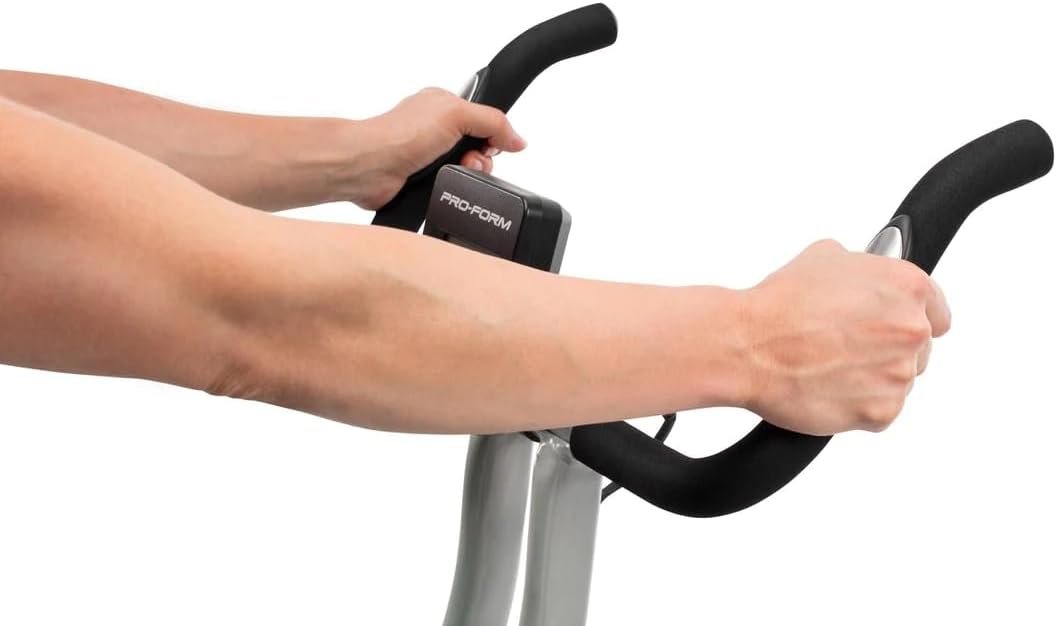
Image: A user's hands gripping the EKG pulse sensors integrated into the handlebars for heart rate monitoring.
5.3 Using the Included Dumbbells
The ProForm X Bike includes two 2 lb dumbbells for upper-body exercises during your workout. They are stored in a holder behind the seat.
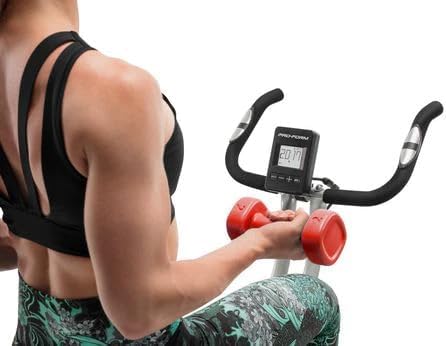
Image: A woman seated on the ProForm X Bike, performing upper body exercises with the included 2 lb dumbbells.
6. Pliere și depozitare
The ProForm X Bike features a folding design for convenient storage.
- Ensure the area around the bike is clear.
- Locate the folding pin or knob (refer to your specific model's diagram if available) on the main frame.
- Pull or loosen the pin/knob and carefully fold the bike's frame inward until it locks into the folded position.
- The bike can then be rolled using its transport wheels or stored upright against a wall.
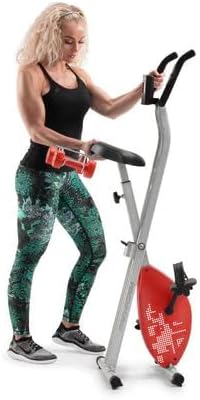
Image: A woman standing beside the ProForm X Bike in its folded, space-saving configuration, demonstrating its compact storage.
7. Întreținere
Regular maintenance ensures optimal performance and longevity of your exercise bike.
- curatenie: Ștergeți bicicleta de exerciții după fiecare utilizare cu reclameamp o lavetă pentru a îndepărta transpirația și praful. Evitați substanțele de curățare abrazive sau solvenții.
- Inspecţie: Periodically check all bolts, nuts, and connections to ensure they are secure. Tighten any loose fasteners.
- pedale: Asigurați-vă că pedalele sunt fixate corect și se rotesc liber.
- Transmisie prin curea: The belt drive system is generally maintenance-free. Do not attempt to lubricate or adjust the belt.
- Depozitare: Store the exercise bike in a dry, temperate environment, away from direct sunlight and extreme temperatures.
8. Depanare
| Problemă | Cauza posibila | Soluţie |
|---|---|---|
| Consola nu afișează datele | Low or dead batteries; Loose cable connection | Replace batteries; Check all console cable connections. |
| Rezistența nu se schimbă | Console malfunction; Internal mechanism issue | Ensure console is powered on. If problem persists, contact customer support. |
| Bicicleta este instabilă sau se clatină | Uneven surface; Loose stabilizer bolts | Move bike to a level surface; Tighten all bolts on stabilizer bars. |
| Pedals feel loose or make noise | Pedals not tightened correctly | Retighten pedals securely. Remember left pedal is reverse threaded. |
9. Specificații
| Caracteristică | Caietul de sarcini |
|---|---|
| Numărul de model | PFEX78918R |
| Dimensiuni produs (L x l x H) | 108 x 42 x 94 cm (42.5 x 16.5 x 37 țoli) |
| Greutatea articolului | 18.1 kg (39.9 lbs) |
| Greutatea maximă a utilizatorului | 113.4 kg (250 lbs) |
| Sistem de rezistență | Rezistență magnetică silențioasă SMR |
| Niveluri de rezistență | 10 de niveluri digitale |
| Tip de afișare | LCD |
| Metrici afișate | Time, Speed, Distance, Calories, Heart Rate |
| Monitorizarea ritmului cardiac | EKG Grip Pulse Sensors |
| Accesorii incluse | Two 2 lb Dumbbells |
| Material | Oţel inoxidabil |
| Sistemul de acționare | centura |

Image: A diagram illustrating the key dimensions of the ProForm X Bike: 108cm height, 94cm length, and 42cm width.
10. Garanție și asistență
ProForm products are manufactured with high-quality materials and craftsmanship. For specific warranty details, including coverage period and terms, please refer to the warranty card included with your product or visit the official ProForm website. For technical assistance, replacement parts, or customer service inquiries, please contact ProForm customer support through their official channels.
Suport online: www.proform.com/support
Asistență telefonică: Refer to your warranty card or the ProForm website-ul pentru numerele de contact regionale.