
1. Introducere
This manual provides detailed instructions for the PUSOKEI F10 2G Flip Cell Phone. Please read this manual carefully before using your device to ensure proper operation and to maximize its features. The F10 is designed for ease of use, featuring a 1.8-inch screen, large backlit buttons, and a 3600mAh battery, making it suitable for seniors or as a reliable backup phone.
Caracteristicile cheie includ:
- 1.8-inch high-definition display.
- Large, backlit, raised buttons for easy dialing and navigation.
- Support for 3 SIM cards and 1 storage card (up to 16GB, not included).
- 3600mAh lithium-ion battery for extended standby time.
- Functions: Calls, SMS, camera, MP3/MP4, Bluetooth, FM radio, alarm, recording, calendar, flashlight, calculator, and basic internet browser.
- Loud speaker for clear audio during calls.
2. Configurare
2.1 Conținutul pachetului
Verificați dacă toate articolele sunt prezente în colet:
- 1 x PUSOKEI F10 Mobile Phone
- 1 x adaptor de alimentare (priză SUA)
- 1 x Lithium Ion Battery (3600mAh)
- 1 x Manual de utilizare (acest document)
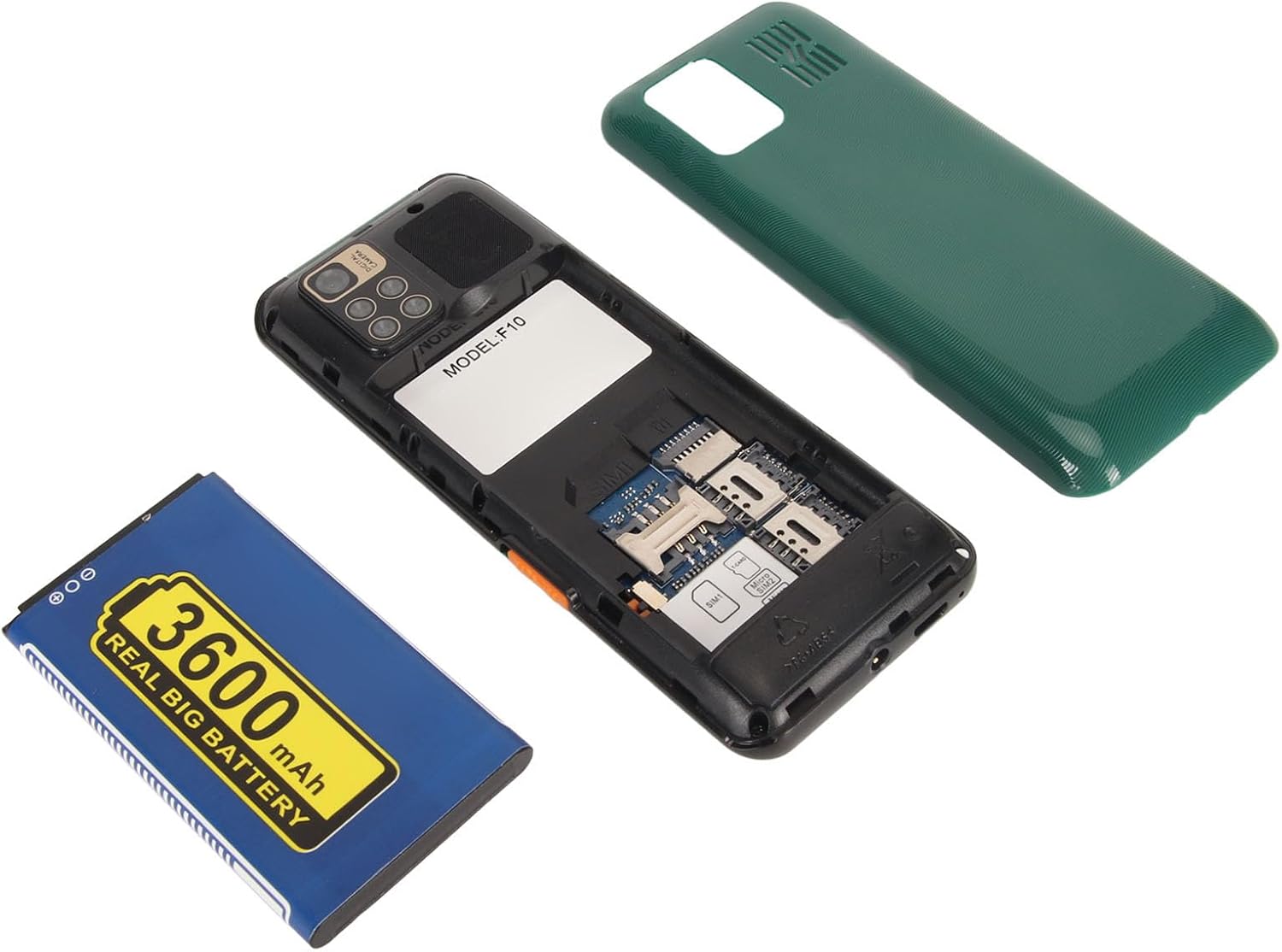
2.2 Battery, SIM Card, and Storage Card Installation
Follow these steps to install the battery, SIM cards, and an optional storage card:
- Scoateți capacul din spate: Gently pry open the back cover of the phone using the notch provided, usually at the bottom edge.
- Introduceți cartelele SIM: The phone supports up to three SIM cards. Locate the SIM card slots. Insert your 2G GSM SIM cards into the designated slots with the gold contacts facing down and the cut corner oriented correctly. Ensure they click into place.
- Insert Storage Card (Optional): If you wish to expand storage, insert a MicroSD card (up to 16GB, not included) into the storage card slot.
- Instalați bateria: Place the 3600mAh lithium-ion battery into the battery compartment, ensuring the gold contacts on the battery align with the contacts in the phone.
- Puneți la loc capacul din spate: Align the back cover and press it firmly until it snaps securely into place.
2.3 Încărcarea bateriei
Înainte de prima utilizare, încărcați complet bateria telefonului.
- Connect the small end of the Micro USB charging cable to the charging port at the bottom of the phone.
- Connect the larger end of the charging cable to the provided power adapter.
- Conectați adaptorul de alimentare la o priză de perete.
- The battery indicator on the screen will show the charging status. Once fully charged, disconnect the charger.

3. Instrucțiuni de utilizare
3.1 Pornire/Oprire
- Pentru a porni: Țineți apăsat butonul Pornire/Încheiere apel butonul (de obicei roșu) până când ecranul se aprinde.
- Pentru a opri: Țineți apăsat butonul Pornire/Încheiere apel apăsați butonul până când apar opțiunile de oprire, apoi selectați „Oprire”.
3.2 Navigare de bază
The phone features a physical keypad and a central navigation button for menu interaction.

- Buton de navigare: Use the central 4-way navigation button (Up, Down, Left, Right) to scroll through menus and options.
- Buton OK/Confirmare: The central button within the 4-way navigation is typically used to select or confirm an option.
- Taste soft: The buttons directly below the screen (often labeled "Menu" and "Contacts" or similar) perform context-sensitive actions displayed on the screen above them.
- Buton de apelare: Press the green call button to initiate a call or answer an incoming call.
- End Call Button: Press the red end call button to end a call or return to the home screen.
3.3 Efectuarea și primirea apelurilor
- Pentru a efectua un apel:
- Din ecranul principal, formați numărul de telefon folosind tastatura.
- Apăsați verde Apel buton pentru a iniția apelul.
- Pentru a răspunde la un apel: Când sună telefonul, apăsați butonul verde Apel buton.
- Pentru a încheia un apel: Apăsați pe roșu Terminați apelul buton.
- Reglarea volumului: During a call, use the side volume buttons (if present) or navigation keys to adjust the call volume.
3.4 Messaging (SMS)
- From the main menu, navigate to "Messages" or "SMS".
- Selectați „Scrie mesaj” sau „Mesaj nou”.
- Introduceți numărul de telefon al destinatarului sau selectați din contacte.
- Tastați mesajul folosind tastatura. Apăsați tasta „#” pentru a schimba modurile de introducere (de exemplu, ABC, Abc, abc, 123).
- Press the "Send" option (usually a soft key).
3.5 Camera
Telefonul este echipat cu o cameră de 0.3MP.
- Din meniul principal, selectați „Cameră”.
- Încadrează-ți fotografia folosind ecranul ca viewcăutare.
- Apăsați butonul central OK/Confirmare butonul pentru a face o poză.
- Pictures are saved to the phone's memory or the installed storage card.

3.6 Multimedia and Other Functions
Explore the main menu for various applications:
- MP3/MP4 Player: Redare audio și video files stored on your phone or storage card.
- Bluetooth: Connect to compatible Bluetooth devices like headsets. Go to "Settings" > "Bluetooth" to enable and pair.
- Radio FM: Listen to local radio stations. A headset may be required to act as an antenna.
- Lanternă: Activate the built-in flashlight from the shortcuts or tools menu.
- Alarm Clock, Recording, Calendar, Calculator, Games: Access these standard utility functions from the main menu.
- Internet Browser/WhatsApp: The phone supports basic internet access and applications like WhatsApp. Note that performance may vary due to 2G network limitations.
4. Întreținere
4.1 Curăţarea dispozitivului
- Folosește o lavetă moale, uscată și fără scame pentru a curăța ecranul și carcasa telefonului.
- Avoid using harsh chemicals, cleaning solvents, or strong detergents, as these can damage the phone's surface or internal components.
- Nu expuneți telefonul la umiditate excesivă.
4.2 Îngrijirea bateriei
- Pentru a prelungi durata de viață a bateriei, evitați descărcarea completă frecventă a acesteia.
- Charge the phone using only the provided charger or a compatible charger.
- Nu expuneți bateria la temperaturi extreme (căldură sau frig).
- Dacă telefonul nu va fi utilizat pentru o perioadă lungă de timp, încărcați-l la aproximativ 50% înainte de a-l depozita.
4.3 Depozitare
- Depozitați telefonul într-un loc răcoros și uscat, ferit de lumina directă a soarelui și de temperaturi extreme.
- Țineți telefonul departe de câmpuri magnetice.
5. Depanare
If you encounter issues with your PUSOKEI F10, refer to the following common solutions:
| Problemă | Cauză/Soluție posibilă |
|---|---|
| Telefonul nu pornește. |
|
| No network signal or cannot make/receive calls. |
|
| Call volume is too low. |
|
| Phone is unresponsive or frozen. |
|
| Cannot access internet or WhatsApp. |
|
6. Specificații
| Caracteristică | Detaliu |
|---|---|
| Model | F10 |
| Marca | PUSOKEI |
| Dimensiunea ecranului | 1.8 inchi |
| Tip de afișare | LCD |
| Rezoluţie | 240 x 320 |
| Tip de rețea | 2G GSM |
| Banda de frecventa | GSM 850 / 900 / 1800 / 1900 MHz |
| Sloturi pentru carduri SIM | 3 (Triple SIM Standby) |
| Suport pentru carduri de stocare | MicroSD de până la 16 GB (nu este inclus) |
| Capacitatea bateriei | 3600 mAh Litiu-Ion |
| Camera foto | 0.3MP |
| Bluetooth | Versiunea 2.0 |
| Interfață de încărcare | Micro USB |
| Limbi acceptate | English, French, Indonesian, Portuguese, Russian, Spanish, Vietnamese |
| Dimensiunile corpului | 130 x 53 x 15mm / 5.1 x 2.1 x 0.6in |
| Greutate | Aproximativ. 170 g / 6.0 oz |
7. Garanție și asistență
7.1 Informații despre garanție
The PUSOKEI F10 Flip Cell Phone comes with a standard manufacturer's warranty. Please refer to the warranty card included in your product packaging for specific terms, conditions, and duration. Keep your proof of purchase for warranty claims.
7.2 Asistență pentru clienți
For technical assistance, troubleshooting beyond this manual, or warranty inquiries, please contact PUSOKEI customer support through the retailer where you purchased the product or visit the official PUSOKEI website pentru detalii de contact.
Când contactați serviciul de asistență, vă rugăm să aveți la îndemână modelul produsului (F10) și informațiile de achiziție.