
1. Introducere
Mulțumesc pentru achizițieasing the BLOW 4625FHD DVB-T2 H.265 Digital Terrestrial TV Tuner. This device allows you to receive digital terrestrial television broadcasts (DVB-T2) with H.265 (HEVC) compression, offering high-definition video quality. This manual provides essential information for the safe and efficient setup, operation, and maintenance of your new tuner. Please read it thoroughly before use and retain it for future reference.
2. Informații de siguranță
- Siguranta electrica: Pentru a preveni electrocutarea, nu deschidețiasing. Apelați la personal calificat pentru toate lucrările de service.
- Sursa de alimentare: Folosiți doar adaptorul de alimentare specificat. Asigurați-vă că voltajultage corespunde cerințelor dispozitivului.
- Ventilare: Nu blocați orificiile de ventilație. Asigurați o circulație adecvată a aerului în jurul dispozitivului pentru a preveni supraîncălzirea.
- Umiditate: Keep the device away from water, rain, and excessive humidity.
- curatenie: Deconectați alimentarea înainte de curățare. Folosiți o cârpă moale și uscată. Nu utilizați agenți de curățare lichizi sau aerosoli.
- Plasare: Place the device on a stable, flat surface. Avoid placing it near heat sources or in direct sunlight.
3. Conținutul pachetului
La deschiderea ambalajului, vă rugăm să verificați dacă toate componentele sunt prezente și în stare bună:
- BLOW 4625FHD DVB-T2 Tuner Unit
- Telecomanda
- Power Adapter (integrated cable)
- Manual de utilizare (acest document)

Image 3.1: Retail packaging of the BLOW 4625FHD DVB-T2 Tuner, showing the tuner unit and remote control.
4. Produs terminatview
4.1. Panoul frontal
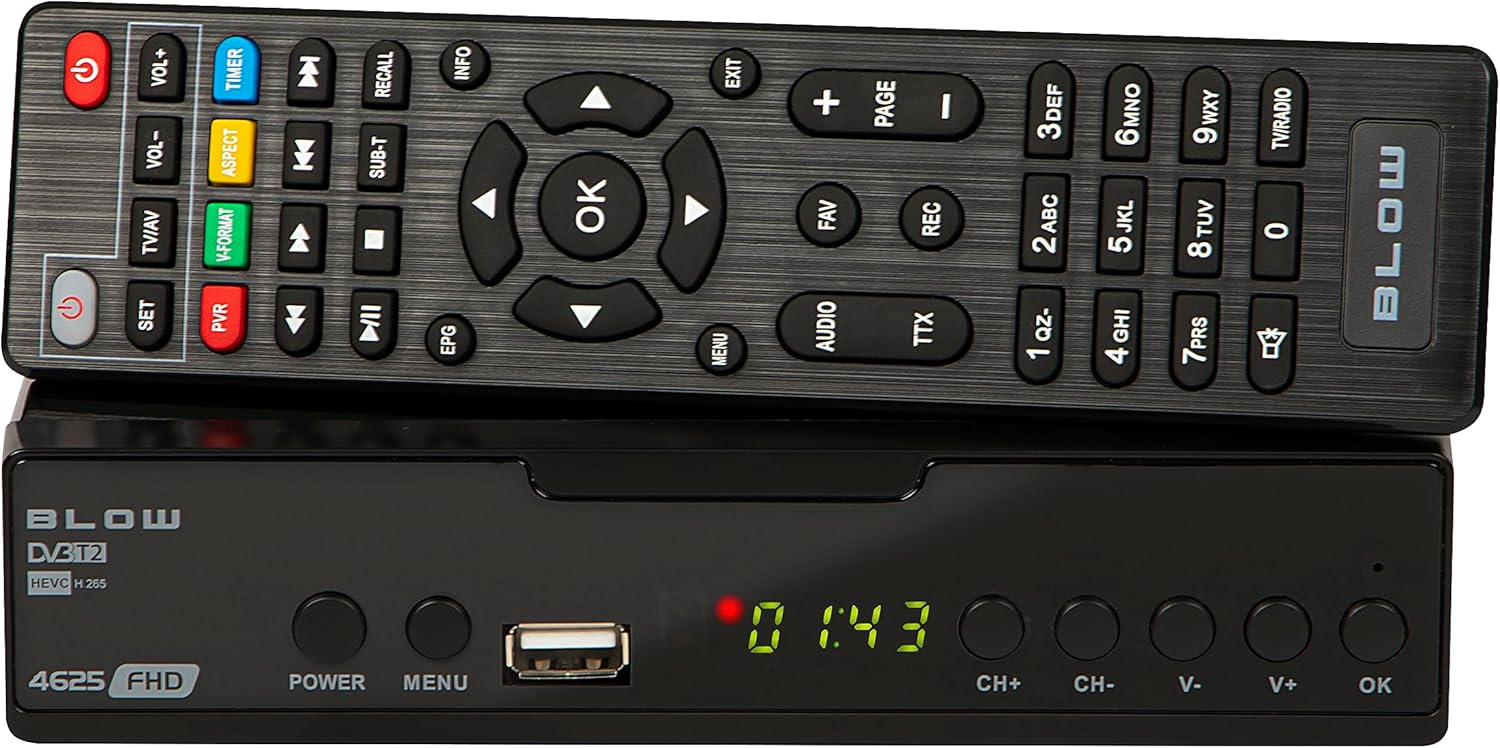
Imaginea 4.1: Față view of the BLOW 4625FHD DVB-T2 Tuner with its remote control.
The front panel features a digital display, a USB port for media playback and PVR functions, and essential control buttons:
- Afişa: Shows channel number, time, or menu information.
- PUTERE: Turns the device on or off (standby).
- MENIUL: Accesează meniul principal.
- Port USB: Pentru conectarea dispozitivelor de stocare USB.
- CH+/CH-: Schimbă canalele în sus sau în jos.
- V+/V-: Reglează volumul în sus sau în jos.
- OK: Confirmă selecțiile din meniu.
4.2. Panoul din spate

Image 4.2: Rear panel of the BLOW 4625FHD DVB-T2 Tuner, showing various input and output ports.
Panoul din spate oferă toate porturile de conectare necesare:
- RF IN: Se conectează la antena terestră.
- IESIREA RF: For looping the antenna signal to another device (e.g., another TV or tuner).
- COAXIAL: Ieșire audio digitală.
- HDMI: High-Definition Multimedia Interface output for connecting to modern TVs.
- SCART: Analog video and audio output for connecting to older TVs.
- AC IN: Intrare de alimentare pentru dispozitiv.
4.3. Telecomanda
The remote control provides full functionality for operating the tuner. Familiarize yourself with its buttons for easy navigation and control.
- PUTERE: Pornește/oprește tunerul.
- VOL + / VOL-: Reglează volumul.
- CH+/CH-: Schimbă canale.
- OK: Confirmă selecțiile.
- Butoane de navigare (Sus/Jos/Stânga/Dreapta): Navighează prin meniuri.
- MENIUL: Deschide meniul principal.
- IEȘIRE: Ieșire din meniul sau ecranul curent.
- EPG: Afișează Ghidul electronic de programe.
- PVR: Accesează funcțiile înregistratorului video personal.
- REC: Starts recording the current program.
- FAV: Accesses favorite channel list.
- TV/AV: Switches between TV and AV input modes on the tuner.
- V-FORMAT: Changes video output format.
- AUDIO: Selects audio track (if available).
- TTX: Funcția teletext.
- Butoane numerice (0-9): Selectare directă a canalului.
5. Configurare
5.1. Connecting the Tuner
- Conexiune antenă: Conectați cablul antenei terestre la Rf in port on the rear panel of the tuner.
- Conexiune TV (HDMI): For best picture quality, connect an HDMI cable from the HDMI port on the tuner to an available HDMI input on your television.
- Conexiune TV (SCART): If your TV does not have an HDMI input, connect a SCART cable from the SCART port on the tuner to the SCART input on your television.
- Conexiune de alimentare: Conectați adaptorul de alimentare la AC IN port on the tuner, then plug the adapter into a wall outlet.
5.2. First Time Installation and Channel Scan
- Turn on your television and select the correct input source (HDMI or SCART) corresponding to where you connected the tuner.
- Apăsați tasta PUTERE button on the tuner or remote control to turn on the device.
- The first time you power on the tuner, a "First Time Installation" wizard will appear. Follow the on-screen prompts.
- Select your preferred language, country, and other initial settings.
- Initiate the "Auto Scan" or "Channel Search" function. The tuner will automatically search for available DVB-T2 channels in your area. This process may take several minutes.
- Once the scan is complete, the tuner will save the channels and display the first available channel.
6. Operare
6.1. Basic TV Viewing
- Schimbarea canalelor: Utilizați CH + / CH- buttons on the remote or front panel, or enter the channel number directly using the number buttons.
- Reglarea volumului: Utilizați VOL + / VOL- butoanele de pe telecomandă.
- Mut: Apăsați tasta Mut button on the remote to mute/unmute audio.
- Information Bar: Apăsați tasta INFO button on the remote to display current program information.
6.2. Ghid electronic de programe (EPG)
Apăsați tasta EPG button on the remote control to access the Electronic Program Guide. This displays program schedules for all available channels. Use the navigation buttons to browse through channels and programs. Press OK la view details or set a reminder/recording.
6.3. Redare media (USB)
The BLOW 4625FHD supports media playback from a USB storage device. Insert a USB drive into the front USB port. Navigate to the "Multimedia" or "USB" section in the main menu to browse and play supported audio (MP3, WMA) and video files.
6.4. Personal Video Recorder (PVR)
To use the PVR function, connect a USB storage device (e.g., USB flash drive or external hard drive) to the USB port. The device must be formatted correctly (usually FAT32 or NTFS). You can record live TV programs by pressing the REC button on the remote. Scheduled recordings can be set via the EPG or the PVR menu.
- Înregistrare instantanee: While watching a program, press REC pentru a începe înregistrarea. Presa STOP a se termina.
- Înregistrare programată: In the EPG, select a program and press OK, then choose the option to schedule a recording.
- Redare înregistrări: Access recorded content through the PVR or Multimedia menu.
7. Întreținere
- curatenie: Ensure the device is unplugged before cleaning. Use a soft, dry, lint-free cloth to wipe the exterior. Do not use abrasive cleaners, waxes, or solvents.
- Ventilare: Regularly check that the ventilation slots are not obstructed by dust or debris.
- Actualizări de software: Verificați periodic producătorul website for any available software updates. Follow the instructions provided with the update carefully.
8. Depanare
| Problemă | Cauză/Soluție posibilă |
|---|---|
| Fără imagine sau sunet |
|
| Mesajul „Fără semnal” |
|
| Telecomanda nu funcționează |
|
| Picture freezes or pixelates |
|
9. Specificații
| Model | BLOW 4625FHD (77-048) |
| Dimensiuni (L x l x H) | 9D x 9B x 2.5H cm |
| Greutate | 428 grame |
| Conectivitate | HDMI, USB, SCART, Coaxial, RF IN/OUT |
| Rezoluția ieșirii video | 1080p |
| Standarde acceptate | DVB-T2, H.265 (HEVC), H.264 |
| Gama de frecvente | VHF: 170-230MHz, UHF: 470-860MHz |
| Formate audio | MP3, WMA |
| Mod ieșire audio | Stereo, Surround |
| Alimentare electrică | 12 Volt, 43 Milliampere (Operating) |
| Consumul de energie în standby | <0.5W |
| Utilizare recomandată | Digital terrestrial TV viewing și înregistrare |
| Producător | Lovitură |
10. Garantie
The BLOW 4625FHD DVB-T2 H.265 Digital Terrestrial TV Tuner comes with a 2 ani garanție producător from the date of purchase. This warranty covers defects in materials and workmanship under normal use. It does not cover damage caused by misuse, accident, unauthorized modification, or external causes. Please retain your proof of purchase for warranty claims.
11. Suport
If you encounter any issues that cannot be resolved using the troubleshooting guide, or if you require further assistance, please contact your retailer or the manufacturer's customer support. Refer to the product packaging or the manufacturer's official website pentru detalii de contact.