
1. Introducere
The IHSENO ZigBee3.0 Smart Switch Mini Relay is an intelligent on-off device designed for smart home integration. Utilizing the ZigBee 3.0 protocol, this mini relay switch allows users to control lighting and other appliances through the Tuya Smart Life APP, voice commands via Alexa or Google Assistant, and custom scene modes. Its compact design ensures easy installation within existing electrical boxes.
2. Informații de siguranță
AVERTIZARE: Electrical installation should only be performed by qualified personnel. Always turn off power at the circuit breaker before installing or servicing the device. Failure to do so may result in serious injury or death.
- Asigurați-vă că sursa de alimentare este deconectată înainte de instalare.
- Verificați dacă volumul de operaretage (AC 100-240V) and current rating (0.2 Amps) are compatible with your electrical system.
- Do not exceed the maximum load capacity of the switch.
- Acest dispozitiv este conceput numai pentru utilizare în interior.
- A nu se lăsa la îndemâna copiilor.
The device has an International Protection Rating of IP54, indicating protection against dust and splashing water. However, it is not waterproof and should not be exposed to direct water.
3. Caracteristicile produsului
- Protocolul ZigBee 3.0: Ensures high stability, strong anti-interference ability, and low power consumption.
- Tuya Smart Life App Control: Seamless integration with the Tuya/Smart Life APP for remote control and intelligent scene linkage.
- Customizable Scene Modes: Create personalized scenes like 'Reading' or 'Movie' for specific rooms or activities.
- Control vocal: Compatibil cu Amazon Alexa și Google Assistant pentru operare hands-free.
- Controlul grupului: Manage multiple smart switches simultaneously through the app.
- Sincronizare inteligentă: Set schedules for automatic on/off operations to save energy.
- Design compact: Mini size allows for easy installation within standard electrical boxes.
4. Specificații
| Parametru | Valoare |
|---|---|
| Modul de operare | ON-OFF |
| Evaluare curentă | 0.2 Amps |
| Vol. De operaretage | AC 100-240 volți |
| Tip de contact | Deschis normal |
| Marca | IHSENO |
| Terminal | Prin gaura |
| Tipul circuitului | 1 sensuri |
| Material de contact | Cupru, Alamă, Argint |
| Evaluarea internațională de protecție | IP54 |
| Protocol de conectivitate | ZigBee |
| Metoda de control | Aplicație, telecomandă, voce |
| Tip controler | Amazon Alexa, Asistent Google |
| Culoare | Alb |
| Dimensiuni | 43 mm x 43 mm x 22 mm (aprox. 1.69 in x 1.69 in x 0.87 in) |
The IHSENO ZigBee3.0 Smart Switch Mini Relay is designed for seamless integration into your smart home ecosystem.

Imagine: Detaliată view of the IHSENO Mini Smart Switch with its dimensions and basic specifications.
5. Configurare și instalare
Before beginning installation, ensure the main power supply is turned off at the circuit breaker to prevent electrical shock.
5.1 diagrame de cablare
The input and output connections cannot be reversed. Follow the diagrams carefully based on your specific wiring setup.

Image: Wiring Method 1 shows a direct connection of the smart switch between the mains power and a lamp. L-out connects to the lamp's live wire, N-out to the lamp's neutral wire. L-in and N-in connect to the mains live and neutral respectively. S1 and S2 are not used in this configuration.

Image: Wiring Method 2 illustrates connecting the smart switch with a traditional 1-way wall switch. The mains live (L) and neutral (N) connect to L-in and N-in. The lamp connects to L-out and N-out. The 1-way switch connects to S1 and S2, allowing manual control while maintaining smart functionality.

Image: Wiring Method 3 demonstrates connecting the smart switch with a 2-way wall switch setup. Similar to Method 2, mains live (L) and neutral (N) connect to L-in and N-in, and the lamp to L-out and N-out. The 2-way switch connects to S1 and S2, enabling manual control from two locations while integrating smart features.

Image: This diagram illustrates how the smart DIY switch supports 2-way control, allowing connection with two parallel switches or one series switch. It highlights that the controller connects only to line N and L, not directly to the switch, and allows manual control of the old switch after installation.
5.2 Împerecherea cu ZigBee Gateway
- Ensure your ZigBee gateway (hub) is powered on and connected to your network.
- Open the Tuya Smart Life APP and navigate to add a new device.
- Follow the in-app instructions to put your ZigBee gateway into pairing mode.
- Power on the IHSENO Smart Switch. It should automatically enter pairing mode. If not, refer to the device's specific reset procedure (usually involves pressing a button for a few seconds).
- Once detected, add the device in the APP and assign it to a room or group.
6. Instrucțiuni de utilizare
Telecomandă prin aplicație 6.1
After successful pairing, you can control the smart switch from anywhere using the Tuya Smart Life APP on your smartphone.
- Open the Tuya Smart Life APP.
- Select the IHSENO Smart Switch from your device list.
- Tap the on/off icon to toggle the connected appliance or light.
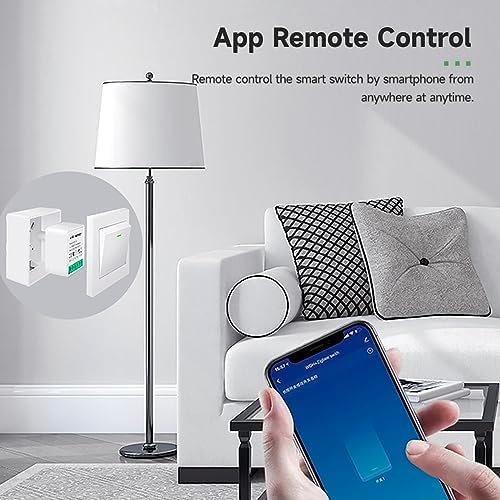
Image: A smartphone screen showing the Tuya Smart Life app interface, with a finger tapping to control a lamp, demonstrating remote control functionality.
6.2 Intelligent Timing and Scheduling
Set up schedules, countdowns, and cycling timers to automate your devices.
- In the Tuya Smart Life APP, select the smart switch.
- Tap on the 'Timer' or 'Schedule' option.
- Configure desired on/off times, countdowns, or recurring cycles.

Image: A smartphone displaying the intelligent timing features within the app, including options for setting specific on/off times, daily cycling, and countdowns for the smart switch.
6.3 Control vocal
Integrare cu Amazon Alexa sau Google Assistant pentru comenzi vocale convenabile.
- Ensure your Alexa or Google Home device is set up and linked to your Tuya Smart Life account.
- Folosește comenzi precum:
- „Alexa, pornește [numele dispozitivului].”
- „Hei Google, dezactivează [numele dispozitivului].”

Image: A person relaxing on a bed, using voice commands to control a lamp via an Amazon Echo and Google Home Mini device, illustrating the voice control feature.
6.4 Group Control and Scene Modes
Organize multiple smart switches into groups or create custom scene modes for unified control.
- In the Tuya Smart Life APP, go to 'Smart' or 'Scenes' section.
- Create a new scene or group and add your IHSENO Smart Switches.
- Define actions for the scene (e.g., 'Reading Mode' turns on specific lights).
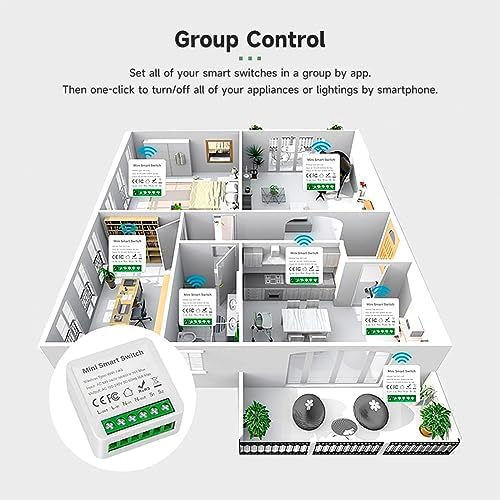
Image: A floor plan illustration depicting multiple IHSENO Mini Smart Switches installed throughout a home, demonstrating how they can be grouped and controlled via an app for whole-house automation.
7. Întreținere
The IHSENO Smart Switch requires minimal maintenance.
- Păstrați dispozitivul curat și fără praf. Folosiți o cârpă uscată și moale pentru curățare.
- Nu utilizați substanțe chimice dure sau produse de curățare abrazive.
- Ensure the device is not exposed to excessive moisture or extreme temperatures.
- Regularly check for firmware updates through the Tuya Smart Life APP to ensure optimal performance and security.
8. Depanare
- Dispozitivul nu se conectează:
- Ensure the ZigBee gateway is powered on and within range.
- Confirm the smart switch is in pairing mode (refer to device reset instructions if needed).
- Check your Wi-Fi network for stability and ensure it's 2.4GHz (if applicable for your hub).
- Niciun răspuns de la aplicație/comandă vocală:
- Verify the smart switch has power and is connected to the ZigBee network.
- Verificați-vă conexiunea la internet.
- Ensure the Tuya Smart Life APP is updated to the latest version.
- Relink your Tuya Smart Life account with Alexa/Google Assistant if necessary.
- Comutatorul fizic nu funcționează:
- Review the wiring diagrams to ensure correct connection of the physical switch to S1 and S2 terminals.
- Ensure the physical switch itself is functional.
- Dispozitivul se deconectează frecvent:
- The ZigBee signal might be weak. Consider adding more ZigBee devices to create a stronger mesh network or repositioning your gateway.
- Verificați dacă există surse de interferență (de exemplu, alte dispozitive wireless).
9. Garanție și asistență
IHSENO is committed to providing quality products and customer satisfaction.
- For any questions or issues regarding your IHSENO ZigBee Smart Switch, please contact our customer service team.
- Ne propunem să răspundem la toate întrebările în termen de 24 de ore.
- Please retain your purchase receipt for warranty claims. Specific warranty duration may vary by region and retailer.


