
mabe 238C4974G001, WR01F04364
Mabe Refrigerator Control Board User Manual
Model: 238C4974G001, WR01F04364
Marcă: mabe
Introducere
This manual provides essential information for the Mabe Sirius Refrigerator Control Board, identified by part numbers 238C4974G001 and WR01F04364. This component is a critical part of your refrigerator's electrical system, responsible for managing various functions. This guide covers general aspects of its installation, operation, maintenance, and troubleshooting.
Notă importantă de siguranță:
Installation and replacement of this control board should only be performed by qualified technicians. Disconnecting power and following proper safety procedures are crucial to prevent electrical shock or damage to the appliance.
Configurare și instalare
The Mabe Refrigerator Control Board is a replacement part designed for specific Mabe and GE refrigerator models. Proper installation is vital for the correct functioning of your appliance.
Înainte de instalare:
- Deconectați alimentarea: Always unplug the refrigerator from the power outlet before attempting any installation or repair.
- Verificați compatibilitatea: Ensure the new control board (238C4974G001 or WR01F04364) is compatible with your specific refrigerator model. Refer to the list of compatible models provided in the product description or your refrigerator's service manual.
- Adunați instrumente: You may need screwdrivers, pliers, and a multimeter for testing.
- Prevenirea descărcărilor statice: Purtați o curea antistatică la încheietura mâinii sau atingeți frecvent un obiect metalic împământat pentru a descărca electricitatea statică, care poate deteriora componentele electronice.
Pași de instalare (îndrumări generale):
- Locate the Existing Board: The control board is typically located in the back of the refrigerator, behind a service panel, or within the control console.
- Conexiuni document: Before disconnecting any wires, take clear photos or draw a diagram of all wire connections to the old board. This will aid in reconnecting them correctly to the new board.
- Deconectați firele: Carefully disconnect all wire harnesses and connectors from the old board. Note any specific locking mechanisms.
- Îndepărtați placa veche: Deșurubați sau desprindeți vechea placă de control de pe suporturile de montare.
- Instalați placa nouă: Secure the new control board (238C4974G001 / WR01F04364) in the same position as the old one.
- Reconectați firele: Using your photos or diagram, carefully reconnect all wire harnesses and connectors to the new board. Ensure all connections are secure and correctly seated.
- Panouri securizate: Reattach any service panels or covers removed during the process.
- Restabiliți puterea: Conectați frigiderul înapoi la priza de curent.
- Funcționalitate de testare: Verify that the refrigerator powers on and functions correctly. Check for proper cooling, light operation, and any error codes.
For detailed, model-specific installation instructions, consult your refrigerator's service manual or a qualified appliance technician.

Figura 1: Faţă view of the Mabe Refrigerator Control Board. This image displays the main components including the white multi-pin connector, a black potentiometer, and various circuit traces. The board is green with white markings indicating part numbers (238C4974G001), a QR code (content: 2248|5557|02846), and other technical specifications like "POT SIRIUS R600" and "EBX1549P001R000 21/03/2013".

Figura 2: Spate view of the Mabe Refrigerator Control Board. This image shows the solder points and circuit traces on the reverse side of the green board. The text "EBX1549P001R000 21/03/2013" is visible, along with a "TOTALHOGAR" watermark.
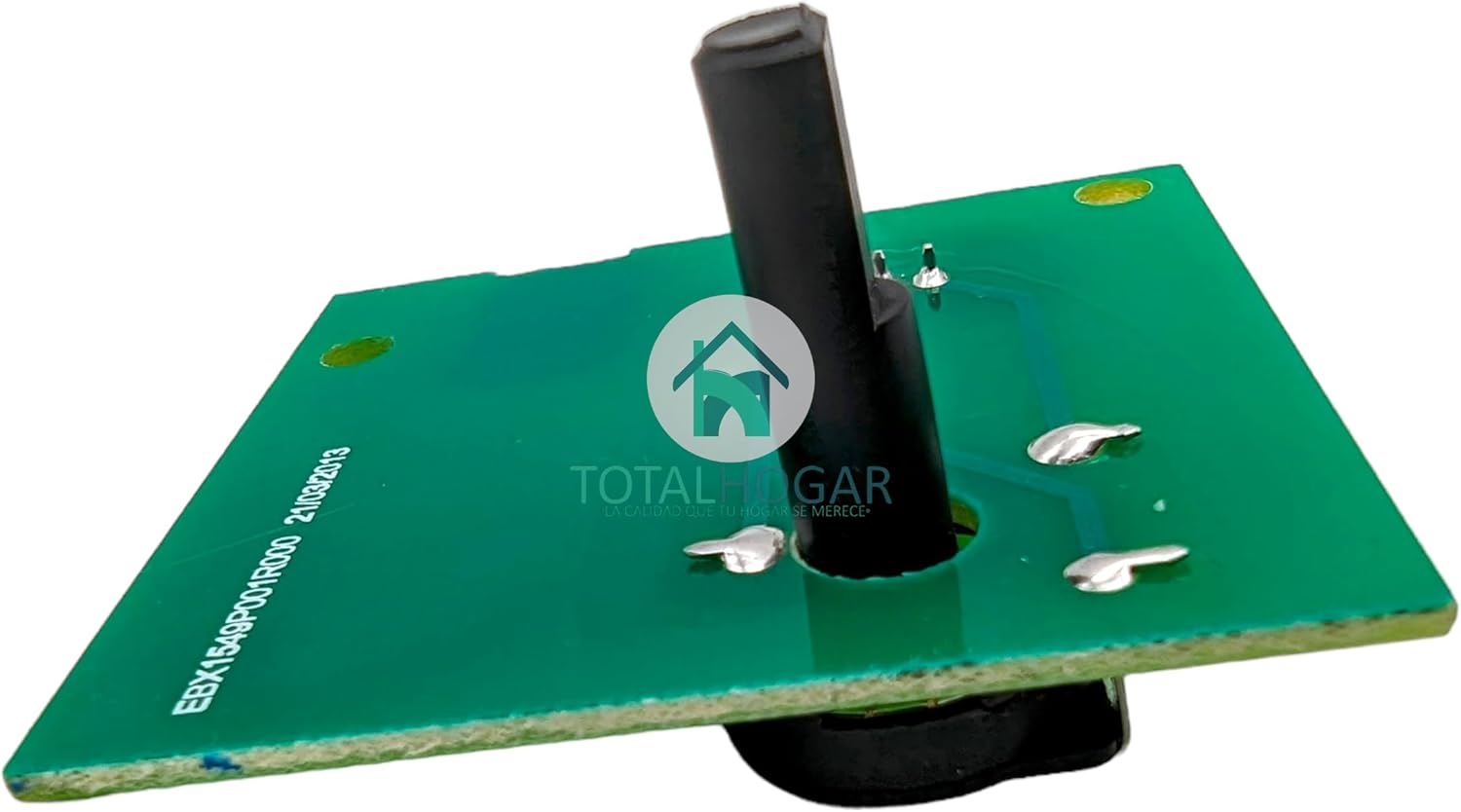
Figura 3: Înclinat view of the Mabe Refrigerator Control Board. This perspective highlights the black potentiometer shaft extending from the board, which is used for adjustments or mode selection. The "EBX1549P001R000 21/03/2013" text and "TOTALHOGAR" watermark are also visible.
Operațiunea
The Mabe Refrigerator Control Board (238C4974G001 / WR01F04364) is the central electronic component that governs various operational aspects of your refrigerator. Once correctly installed, it manages functions such as:
- Reglarea temperaturii: Controls the cooling cycles of the compressor and fan motors to maintain desired temperatures in the fresh food and freezer compartments.
- Defrost Cycles: Initiates and manages automatic defrost cycles to prevent ice buildup on the evaporator coils.
- Iluminat: Controls the internal lighting of the refrigerator.
- Interfata utilizator: Processes inputs from temperature controls, mode selectors, and other user-facing components.
- Detectarea erorilor: Monitors the system for malfunctions and may trigger error codes or warning indicators if issues are detected.
Users interact with the refrigerator's functions through the appliance's external controls (e.g., temperature dials, digital displays), which send signals to this control board for execution.
Întreţinere
While the control board itself requires minimal direct maintenance, ensuring its longevity involves proper care of the refrigerator and its environment.
- Păstrați uscat: Ensure the area where the control board is located remains dry and free from moisture or condensation. Moisture can cause short circuits and damage electronic components.
- Clean Surrounding Area: Periodically clean the area around the control board to prevent dust and debris buildup, which can impede airflow and lead to overheating. Always disconnect power before cleaning.
- Sursă de alimentare stabilă: Connect the refrigerator to a stable power supply. Voltage fluctuations or power surges can potentially damage electronic components. Consider using a surge protector if your area experiences frequent power issues.
- Evitați impactul fizic: Protect the refrigerator from physical impacts that could dislodge or damage internal components, including the control board.
Depanare
If your refrigerator experiences issues after replacing the control board, or if you suspect the control board is malfunctioning, consider the following general troubleshooting steps. Always ensure the refrigerator is unplugged before inspecting internal components.
Simptome frecvente și cauze potențiale:
- Frigiderul nu răcește:
- Verificați dacă cablul de alimentare este bine conectat.
- Verificați dacă întrerupătorul de circuit nu s-a declanșat.
- Asigurați-vă că setările de temperatură sunt corecte.
- Inspect for proper airflow around the condenser coils.
- If these basic checks fail, the control board or other major components (compressor, fan) may be faulty.
- Luminile nu funcționează:
- Check if the light bulb is loose or burnt out.
- Ensure the door switch is functioning correctly.
- If bulbs and switches are fine, the control board might not be sending power to the lights.
- Refrigerator Running Constantly or Not At All:
- Check door seals for proper closure.
- Ensure condenser coils are clean.
- Persistent issues may indicate a faulty thermostat, temperature sensor, or the control board itself.
- Zgomote neobișnuite:
- Identify the source of the noise (e.g., fan motor, compressor).
- While the control board doesn't directly cause mechanical noises, it controls components that do. A faulty board could lead to erratic operation of these components.
When to Seek Professional Help:
If basic troubleshooting does not resolve the issue, or if you are uncomfortable performing electrical diagnostics, it is highly recommended to contact a certified appliance technician. Attempting complex repairs without proper knowledge and tools can lead to further damage or personal injury.
Specificații
The following specifications are for the Mabe Refrigerator Control Board, part numbers 238C4974G001 and WR01F04364.
| Atribut | Detaliu |
|---|---|
| Marca | Mabe |
| Numerele piesei | 238C4974G001, WR01F04364 |
| Tip de produs | Refrigerator Control Board / Selector Board |
| Compatible Models (Partial List) | RMS400IABREA, RMA250PHEL1_AA, RME360FJMRBA, RMT510RXTRBA, RME360FYMRSA, RMP400FLCT_AA, RME360FJMRSA, RMA305FYCC_AA, RMP365FYCT_AA, RMT510RYMRED, RME360FXMREA, RMP400FHUG1_AA, RMP360FJPC1_AA, RMS400IXMREC, RMA250FJCG1_AA, IBGP360TJCG1_AA, RMS400IAMREC, RMA235FJCT_AA, RGT400RYMRXA, RME360PVMREA, RME360FXMRBA, RMT510RYMRPA, ROS510IANRXA, RMA430FYEU1_AA, RMP400FLCG1_AA, IBGP420TJCG1_AA, RMS510IVMREC, RMA255FYCU_AA, RMA250FVPG1_AA, RME360FXMRSA, RMT510RXMRXC, RMA230FVEL1_AA, RMT510RYMREC, RMT400RYMREC, RME360FDMRPA, RMA250FHEL1_AA, RME360FDMRDA, RMS510IXMRXD, RMT510RXMRBC, IOM400MYMRNA, RMS510IXMRXA, IBGA230TJCG1_AA, RMA520FVPG1_AA, RGP400FGMU_AA, RETFA51XEUEA, RMP942FJLEL1_AA, RMS400IAMRPC, RMP405FYCU_AA, RMP360FLCL_AA, RMS510IAMRXA, RMA300FWUT_AA, RMS510IVMRED, RMT510RYMRPD, RMT510RXMRCA, RMS510IAMREA, RMS400IAMRXC, RMP425FYCU_AA, RMP840FYEU1_AA, RCT510RYMREC, RMS510IAMRPA, RMS510IXMRXC, RMA230FVPL1_AA, IOM400MYMRVA, RMP420FLPG1_AA, RMS400IXMREA, RMS400IVMREA, RGS510IXTRXA, RGT510RYMRXA, RMS400IAMREA, RMP420FLCG1_AA, RMT510RXMREA, RME360FDMREA, RMP942FLPG1_AA, RMA250FVPL1_AA, RMA250PHUG1_AA, RMP840FLEL1_AA, RMS510IABREA, RMT510RYMRPC, ROS400IANRXA, RMA305FYCT_AA, RTE360FXCRBA, RMA250PJEL1_AA, RME360FGMREA, RMT510RYMRCA, RMA250FJCL1_AA, RMP736FHEL1_AA, RCT510RYMREA, RTE360FXCREA, RGA300FBML_AA, RME360FDMRSA, RMP736FYEU1_AA, RMA430FBEG1_AA, RMT400RYMRCA, RMS400IAMRPA, ROS510IANRXC, RMT510RYMREA, RME360FYMREA, RMT510RXMRCC, RGS510IXTRBA, RMT510RXMRXA, RMS400IAMRXA, RMS510IVMREA, RMS400IVMREC, RME360FGMRSA, RMA230FJCG1_AA, RMT510RXMRBA, RMA250FYM7L_AA, RMA300FJCG_AA, RMA300FBPG1_AA, RMT400RYMREA, RME360FDMRXA |
| ASIN | B0CDYZNLSJ |
| Prima dată disponibilă | 7 august 2023 |
Garanție și suport
For information regarding the warranty of your Mabe Refrigerator Control Board (238C4974G001 / WR01F04364), please refer to the original purchase documentation or contact the seller directly. Warranty terms and conditions may vary depending on the retailer and region.
For technical support, service inquiries, or to find authorized service centers, please visit the official Mabe website-ul lor sau contactați departamentul lor de asistență pentru clienți. De asemenea, puteți vizita Mabe Brand Store on Amazon pentru mai multe informații despre produse și resurse.
Ask a question about this manual
Ask about setup, troubleshooting, compatibility, parts, safety, or missing instructions. Manuals+ will review the question and use this page’s manual context to help answer it.