
1. Introducere
The CALEX Smart Home Indoor Ambiance Aroma Diffuser 590100500 is designed to enhance your indoor environment by improving air quality, diffusing pleasant aromas, and providing ambient lighting. This smart device integrates seamlessly into your smart home ecosystem, offering control through the Calex app, voice commands, and programmable features.
Caracteristicile cheie includ:
- Aroma diffusion with essential oils.
- Realistic flame effect for ambiance.
- Adjustable ambient lighting with 16 million color options.
- Smart control via Calex app (timers, programmable scenarios).
- Voice control compatibility with Google Assistant, Siri, and Amazon Alexa.
- 300ml water tank capacity with automatic shut-off.
2. Informații de siguranță
Vă rugăm să citiți toate instrucțiunile de siguranță înainte de a utiliza dispozitivul pentru a preveni vătămările corporale sau deteriorarea acestuia.
- Always place the diffuser on a stable, flat surface away from direct sunlight, heat sources, and electronic devices.
- Do not exceed the maximum water fill line (300ml) to prevent overflow.
- Folosiți doar apă curată de la robinet sau apă distilată. Nu folosiți apă fierbinte.
- Only use 100% pure, water-soluble essential oils. Other oils or corrosive liquids may damage the device.
- Nu lăsați dispozitivul la îndemâna copiilor și a animalelor de companie.
- Do not cover the mist outlet during operation.
- Deconectați dispozitivul de la priză înainte de curățare sau reumplere.
- The device features an automatic shut-off function when the water tank is empty, and sends a notification to your phone.
- A built-in safety configuration will cause the diffuser to flash if the remaining water in the tank needs to cool down after a maximum of 72 hours of continuous operation.
- Nu încercați să reparați sau să modificați dispozitivul singur. Contactați serviciul de asistență pentru clienți pentru asistență.
3. Conținutul pachetului
Verificați dacă toate articolele sunt prezente în colet:
- CALEX Smart Home Indoor Ambiance Aroma Diffuser (Model 5901000500)
- Adaptor de alimentare
- Manual de utilizare
4. Produs terminatview
Familiarize yourself with the components of your aroma diffuser.
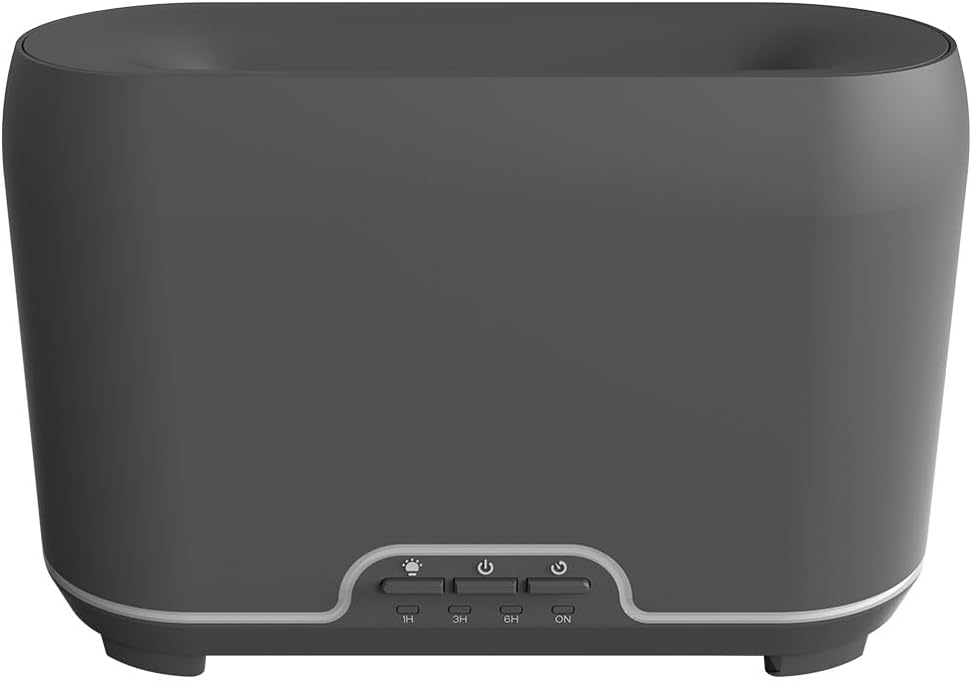
Imagine: față view of the CALEX Smart Home Aroma Diffuser, showing the control panel with buttons for light, power, and timer settings (1H, 3H, 6H, ON).

Image: The CALEX Smart Home Aroma Diffuser operating on a wooden table, displaying its ambient flame effect and mist output.
The diffuser typically consists of a water tank, an ultrasonic plate, a mist outlet, and a control panel with buttons for power, light, and timer functions. The power input port is usually located at the back or bottom of the device.
5. Configurare
Urmați acești pași pentru configurarea inițială:
- Plasare: Așezați difuzorul pe o suprafață plană, stabilă.
- Capacul deschis: Îndepărtați cu grijă capacul superior al difuzorului.
- Umpleți rezervorul de apă: Fill the water tank with clean water up to the 300ml maximum fill line. Do not overfill.
- Adăugați ulei esențial: Adăugați câteva picături din uleiul esențial preferat direct în rezervorul de apă.
- Închideți capacul: Puneți bine capacul superior.
- Conectare alimentare: Plug the power adapter into the diffuser's power input port, then plug the adapter into a wall outlet.
- Download Calex App: Download the free Calex Smart app from your smartphone's app store (available for iOS and Android).
- Conectați-vă la WiFi: Follow the in-app instructions to connect your diffuser to your home WiFi network. Ensure your WiFi is 2.4GHz.
6. Instrucțiuni de utilizare
The CALEX Smart Home Aroma Diffuser can be operated via the Calex app or its integrated control buttons.
6.1 Using the Calex Smart App
The Calex app provides full control over your diffuser's functions:
- Pornire/Oprire: Turn the diffuser on or off remotely.
- Controlul ceții: Adjust the mist output level.
- Controlul luminii: Change the ambient light color from over 16 million options, adjust brightness, and select lighting modes.
- Efect de flacără: Activate or deactivate the flame effect.
- Cronometre: Set schedules for the diffuser to turn on or off automatically.
- Scenarii programabile: Create custom scenarios based on time, weather, or other smart home triggers.
- Notificări: Receive alerts when the water tank is empty.
6.2 Control vocal
Integrate your diffuser with voice assistants for hands-free control:
- Asistent Google: Link your Calex account in the Google Home app. Use commands like "Hey Google, turn on the diffuser."
- Siri: Create custom shortcuts in the Apple Home app or through the Calex app for Siri commands.
- Amazon Alexa: Enable the Calex skill in the Alexa app. Use commands like "Alexa, set diffuser light to blue."
6.3 Butoane de control manual
The control panel on the diffuser allows for basic operation:
- Buton de alimentare: Press once to turn on/off the mist and flame effect.
- Buton luminos: Press to cycle through light colors or turn the light on/off.
- Timer Buttons (1H, 3H, 6H, ON): Select a desired operating duration. The diffuser will automatically shut off after the selected time. 'ON' typically means continuous operation until water runs out or manually turned off.
7. Întreținere
Curățarea regulată asigură o performanță optimă și prelungește durata de viață a difuzorului.
- Curatenie zilnica: After each use, empty any remaining water from the tank. Wipe the inside of the tank with a clean, soft cloth.
- Curățenie săptămânală: For a more thorough clean, unplug the device. Add a small amount of white vinegar (about 10ml) to the water tank and let it sit for 10-15 minutes to dissolve mineral buildup. Gently wipe the ultrasonic plate with a cotton swab or soft brush. Rinse the tank thoroughly with clean water, avoiding the air outlet.
- Curățare externă: Ștergeți exteriorul difuzorului cu o lavetă moale șiamp pânză. Nu utilizați agenți de curățare abrazivi sau solvenți.
- Ensure the device is completely dry before refilling or storing.
8. Depanare
Dacă întâmpinați probleme, consultați următoarele probleme și soluții comune:
| Problemă | Cauza posibila | Soluţie |
|---|---|---|
| Fără ceață sau ceață slabă | Nivel scăzut al apei Placa cu ultrasunete murdara Ieșire de ceață blocată | Refill water to the appropriate level. Curățați placa cu ultrasunete conform instrucțiunilor de întreținere. Ensure the mist outlet is clear. |
| Dispozitivul nu pornește | Fără putere Rezervor de apă gol Defecțiune a dispozitivului | Verificați conexiunea la alimentare și priza de perete. Umpleți rezervorul de apă. Contactați asistența pentru clienți dacă problema persistă. |
| Probleme de conectare la aplicație | Parolă WiFi incorectă Routerul este prea departe 2.4GHz vs 5GHz WiFi | Verificați parola WiFi. Move diffuser closer to the router. Ensure your router is broadcasting a 2.4GHz network and connect to it. |
| Efectul de flacără nu funcționează | Feature deactivated in app Defecțiune a dispozitivului | Check app settings to ensure flame effect is enabled. Contactați asistența pentru clienți. |
9. Specificații
| Caracteristică | Caietul de sarcini |
|---|---|
| Numărul de model | 5901000500 |
| Marca | CALEX |
| Capacitate | 300 de mililitri |
| Material | Plastic |
| Oprire automată | Da |
| Conectivitate | WiFi (2.4 GHz) |
| Metode de control | Calex Smart App, Voice Control (Google Assistant, Siri, Amazon Alexa), Manual Buttons |
| Opțiuni de lumină | 16 milioane de culori |
| Zona de utilizare recomandată | Medium space |
| Codul Internațional al Articolului (EAN/UPC) | 08712879157090 |
10. Garanție și asistență
Pentru informații despre garanție sau asistență tehnică, vă rugăm să consultați documentația furnizată odată cu achiziția sau să contactați direct distribuitorul/producătorul. Păstrați dovada achiziției pentru reclamații în garanție.


