
1. Produs terminatview
The Gemini GMU-M200 is a dual-person handheld UHF wireless microphone system designed for various audio applications. It features two handheld microphones and a compact plug-in receiver, providing wireless audio transmission up to 164 feet (50 meters). This system is suitable for performances, karaoke, weddings, conferences, meetings, and lectures.
Each microphone is equipped with a dynamic mic capsule and a cardioid pickup pattern, which helps to focus on the speaker's voice and minimize background noise and feedback. The dual-channel receiver connects to audio equipment via a standard 1/4" TS plug. Both microphones and the receiver are powered by rechargeable lithium batteries, with convenient USB charging capability.
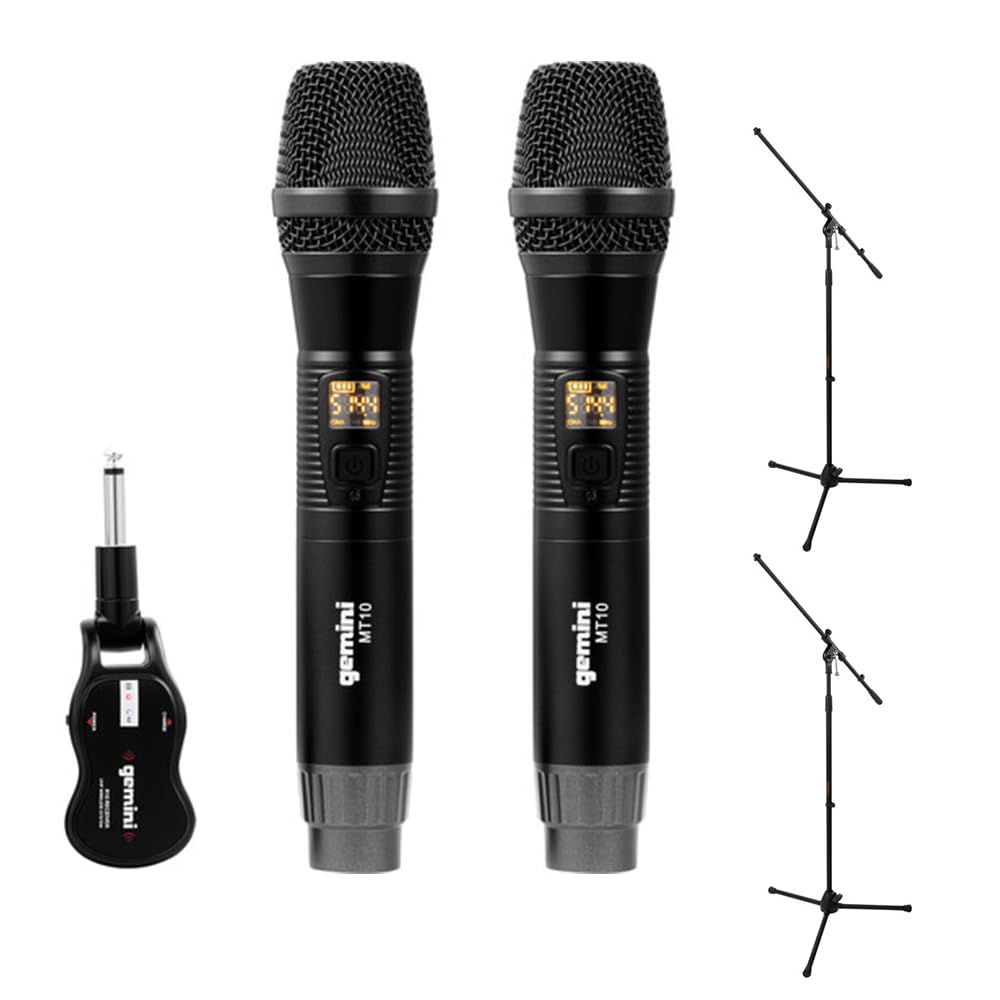
Image 1.1: Gemini GMU-M200 Wireless Microphone System components, including two handheld microphones and a plug-in receiver.
2. Ce se află în cutie
Verify that all components are present before setup.
- 2x Handheld Wireless Microphones (Gemini MT10)
- 1x Plug-in Wireless Receiver (Gemini R10)
- 2x Rechargeable 18650 1200mAh Lithium Batteries (pre-installed in microphones)
- 1x cablu de încărcare Micro-USB
- 2x Auray MS-5230F Tripod Microphone Stands with Fixed Boom (Note: These are included as part of the bundle.)
- Manual de utilizare (acest document)

Image 2.1: Included Micro-USB charging cable.

Image 2.2: Two Auray MS-5230F Tripod Microphone Stands included in the bundle.
3. Instrucțiuni de configurare
3.1. Microphone Battery Installation and Charging
- Deșurubați capacul inferior al fiecărui microfon portabil.
- Ensure the 18650 1200mAh rechargeable lithium battery is correctly inserted according to polarity markings. The batteries are typically pre-installed.
- To charge the microphones, connect the micro-USB charging cable to the DC-5V port located at the bottom of each microphone. Connect the other end to a USB power source (e.g., computer USB port, USB wall adapter).
- The LED display on the microphone will indicate charging status. A full charge provides several hours of use.

Image 3.1: Handheld microphone with the battery compartment open, showing the rechargeable 18650 battery.

Imaginea 3.2: Prim-plan view of the micro-USB charging port (DC-5V) at the base of the microphone.
3.2. Receiver Charging and Connection
- The plug-in receiver also contains a rechargeable lithium battery. Charge it using the provided micro-USB cable and a USB power source.
- Once charged, plug the receiver's 1/4" TS connector directly into the microphone input of your audio device (e.g., PA speaker, amplifier, mixer, karaoke machine).
- Ensure the audio device's input volume is set to a low level before powering on the receiver.
4. Instrucțiuni de utilizare
4.1. Pornirea și asocierea automată
- Press and hold the power button on each handheld microphone to turn them on. The LED display will illuminate.
- Press and hold the power button on the plug-in receiver to turn it on.
- The microphones and receiver will automatically pair. A successful connection is indicated by a stable signal indicator on the microphone's LED display.
4.2. Reglarea volumului
- Volume can be controlled directly from the handheld microphones. Refer to the microphone's controls for volume adjustment buttons.
- Additionally, adjust the input volume on your connected audio device (PA speaker, amplificator, mixer) pentru a obține nivelul sonor dorit.
4.3. Changing Frequencies
If you experience interference or signal dropouts, you can change the operating frequency:
- On the handheld microphone, locate the "SET" button.
- Press the "SET" button to cycle through available UHF frequencies. The LED display will show the current frequency.
- The receiver will automatically sync to the new frequency selected on the microphone.
- Select a frequency that provides clear, interference-free audio. The system operates within the 512-541.7 MHz range in the United States.

Image 4.1: Two Gemini MT10 handheld microphones, showing their LED displays and control buttons.
5. Întreținere
5.1. Curatenie
- Ștergeți microfoanele și receptorul cu o lavetă moale și uscată.
- Nu utilizați produse de curățare abrazive, solvenți sau substanțe chimice dure.
- Evitați contactul umezelii cu componentele electronice.
5.2. Îngrijirea bateriei
- Recharge batteries regularly, even if the system is not in frequent use, to maintain battery health.
- If storing the system for an extended period, charge the batteries to approximately 50% before storage.
- Replace batteries if their performance significantly degrades. Use only approved 18650 rechargeable lithium batteries for the microphones.
6. Depanare
- Fără sunet:
- Ensure microphones and receiver are powered on.
- Check battery levels on both microphones and receiver. Recharge if necessary.
- Verify the receiver is securely plugged into the audio device's input.
- Increase the volume on the microphones and the connected audio device.
- Confirm that the microphones and receiver are paired (stable signal indicator).
- Interferență/Electricitate statică:
- Press the "SET" button on the microphone to change to a different operating frequency.
- Ensure there are no other wireless devices operating on similar frequencies nearby.
- Reduceți distanța dintre microfoane și receptor.
- Avoid physical obstructions between the transmitter and receiver.
- Rază scurtă de acțiune wireless:
- Ensure line of sight between microphones and receiver for optimal performance.
- Evitați amplasarea receptorului în apropierea obiectelor metalice mari sau a altor dispozitive electronice care pot cauza interferențe.
- Check battery levels. Low batteries can affect range.
7. Specificații
| Caracteristică | Caietul de sarcini |
|---|---|
| Numele modelului | GEGMUM200 |
| Factor de formă a microfonului | Microphone System (Handheld) |
| Tehnologia de conectivitate | Wireless UHF |
| Interval de frecvență (SUA) | 512 - 541.7 MHz |
| Numărul de canale | 2 (canal dual) |
| wireless Range | Peste 50 de metri (164 de picioare) |
| Sursa de alimentare | Alimentat cu baterii (litiu reîncărcabile) |
| Microphone Battery Type | 18650 1200mAh (User-replaceable) |
| Port de încărcare | Micro-USB (DC-5V) |
| Receiver Connector Type | Dop TS de 1/4" |
| Model polar | Unidirecțional (cardioid) |
| Material | Metal |
| Culoare | Negru |
| Greutatea articolului | 2 livre (sistem) |
| Dispozitive compatibile | Ampliifier, aparat de karaoke, difuzor |
8. Garanție și asistență
For warranty information or technical support, please refer to the official Gemini website-ul lor web sau contactați departamentul lor de asistență pentru clienți. Păstrați bonul fiscal ca dovadă a achiziției pentru orice reclamații în garanție.
Gemini Official Website: www.geminisound.com (Notă: Acesta este un substituent URL, please verify the actual support website-ul.)


