
Introducere
This manual provides detailed instructions for the safe and efficient operation of your CAIWEI X99+ 4K Smart Projector. Please read this manual thoroughly before using the projector and retain it for future reference.
Informații de siguranță
Pentru a asigura o funcționare sigură și a preveni deteriorarea, respectați următoarele precauții:
- Do not place the projector in boxes or cabinets with poor ventilation properties. Ensure adequate airflow around the device to prevent overheating.
- Avoid direct exposure of the projector lens to sunlight.
- Nu blocați orificiile de ventilație.
- Folosiți doar adaptorul de alimentare furnizat împreună cu proiectorul.
- Nu lăsați proiectorul să intre în contact cu apă sau alte lichide.
- Nu încercați să dezasamblați sau să reparați singur proiectorul. Contactați personalul de service calificat pentru asistență.
Conținutul pachetului
Verificați dacă toate articolele sunt prezente în colet:
- CAIWEI X99+ Smart Projector
- Telecomanda
- Cablu HDMI
- Power Cable (UK-plug)
- Cablu AV
- Geanta pentru proiector
- Manual de utilizare (acest document)
Produs terminatview
The CAIWEI X99+ is a smart projector designed for versatile entertainment and presentation needs. It features a native 1080P resolution with 4K support, 800 ANSI lumens brightness, and an integrated Android 9.0 operating system.

Figure 1: CAIWEI X99+ Smart Projector front view, spectacolasindesignul său compact și caracteristicile cheie.
Caracteristici cheie:
- Tehnologia de afișare: Native 1920x1080P resolution, 4K support, 800 ANSI lumens, 15500:1 contrast ratio.
- Sistem de operare inteligent: Android 9.0 with access to over 6000 authorized apps (Netflix, YouTube, Prime Video, etc.).
- Memorie: 2 GB RAM + 16 GB memorie ROM.
- Conectivitate wireless: Dual 2.4G/5G WiFi, Airplay/DLNA/Miracast support, Bluetooth 5.0.
- Audio: Integrated 10W high-power stereo speakers, Dolby Audio support, 3.5mm audio output.
- Îmbunătățirea imaginii: HDR10 processing, MEMC technology for smoother motion.
- Ajustari: 4D and ±50° vertical/horizontal electronic keystone correction, 40% digital image zoom.
- Durabilitate: Fully sealed optical engine for dust protection and extended lifespan.

Figure 2: Visual representation of the projector's color accuracy, brightness, and image quality in various lighting conditions.
Înființat
1. Plasare
Position the projector on a stable, flat surface or mount it to the ceiling using the four screw holes. Ensure the projector is placed at an appropriate distance from the projection surface to achieve the desired screen size. Maintain adequate ventilation around the unit.
2. Conexiune la alimentare
- Conectați cablul de alimentare la portul de intrare al proiectorului.
- Conectați celălalt capăt al cablului de alimentare la o priză electrică adecvată.
- Apăsați butonul de pornire de pe proiector sau telecomandă pentru a porni dispozitivul.
3. Initial Focus and Keystone Adjustment
Upon initial power-on, the projected image may appear blurry or distorted. Adjust these settings for optimal clarity:
- Focus: Rotiți inelul de focalizare de pe lentila proiectorului până când imaginea este clară și ascuțită.
- Corecție trapezoială: Use the remote control to access the keystone correction settings. The projector supports 4D keystone correction and ±50° vertical/horizontal electronic correction to square the image if the projector is not perfectly perpendicular to the screen.
- Zoom digital: Adjust the image size without moving the projector using the digital zoom function (40% zoom out/in).
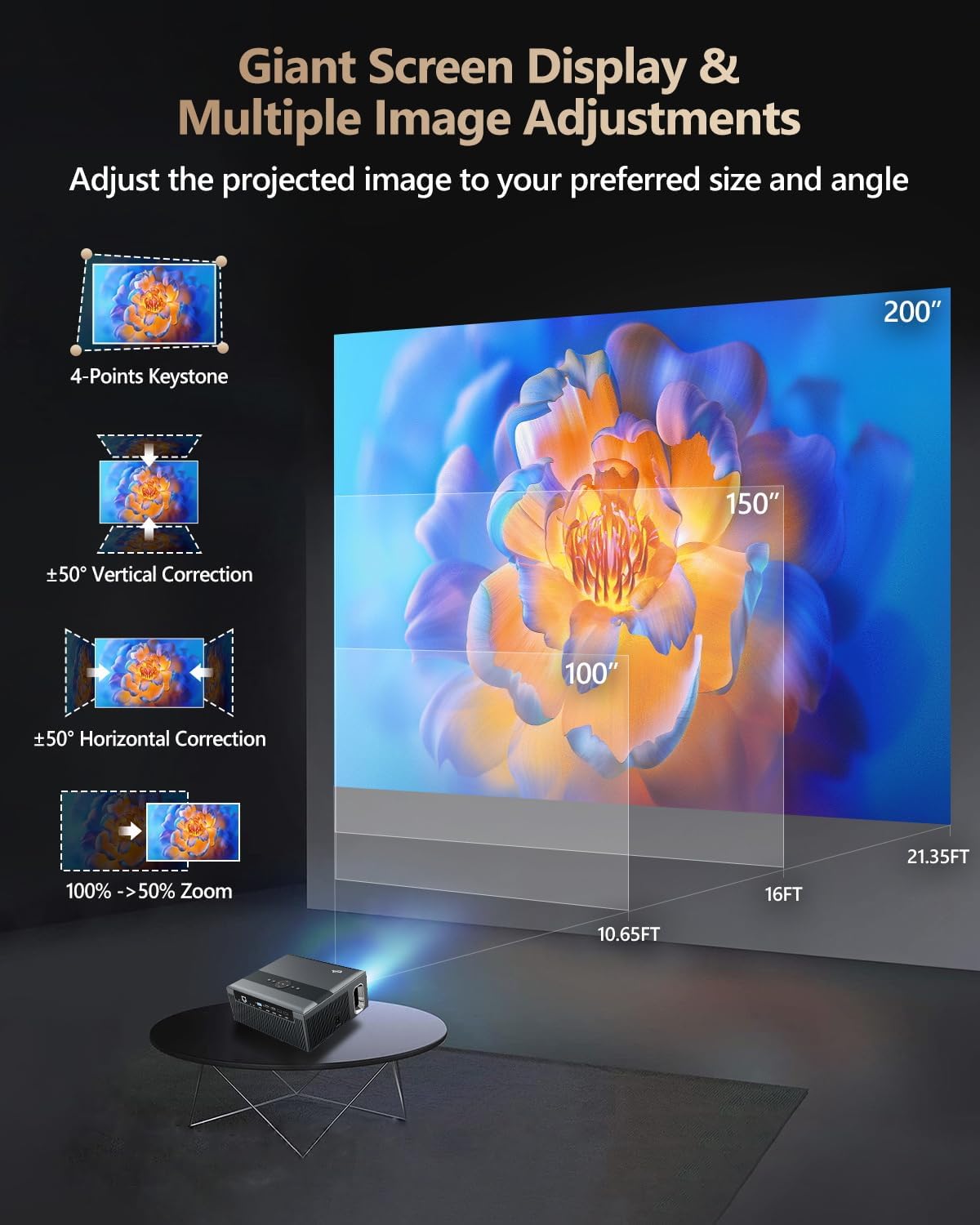
Figure 3: Image adjustment options including keystone correction and digital zoom.
4. Conexiune la rețea
Connect the projector to the internet for access to streaming apps and online content.
- Wifi: Navigate to the network settings in the Android OS. Select your desired 2.4G or 5G Wi-Fi network and enter the password.
- LAN (Ethernet): Connect an Ethernet cable from your router to the RJ45 port on the projector for a wired internet connection.
5. Asociere Bluetooth
Pair Bluetooth devices such as external speakers, headphones, mice, keyboards, or gamepads.
- Asigurați-vă că dispozitivul Bluetooth este în modul de asociere.
- On the projector, go to Bluetooth settings within the Android OS.
- Select the desired device from the list and confirm pairing.

Figure 4: Wireless connectivity for streaming and audio.
Instrucțiuni de operare
1. Android TV OS Navigation
Use the remote control to navigate the Android 9.0 interface. The home screen provides access to installed applications, settings, and input sources.

Figure 5: Android TV 9.0 interface with pre-installed and accessible applications.
2. Instalarea și utilizarea aplicației
The projector comes with pre-installed apps like Netflix, YouTube, and Prime Video. You can download additional authorized applications from the app store within the Android OS.
- Select an app icon from the home screen to launch it.
- Follow on-screen prompts for login or content selection.
3. Screen Mirroring (Airplay/DLNA/Miracast)
Synchronize your smartphone, tablet, or laptop screen wirelessly to the projector.
- Asigurați-vă că dispozitivul și proiectorul sunt conectate la aceeași rețea Wi-Fi.
- Select the appropriate mirroring function (Airplay for iOS, Miracast for Android/Windows, DLNA for compatible devices) on the projector's interface.
- Initiate screen mirroring from your source device.
4. Conectarea dispozitivelor externe
The projector offers multiple ports for connecting various external devices.

Figure 6: Available input and output ports for external devices.
- HDMI: Connect Blu-ray/DVD players, TV sticks, game consoles (PS5), PCs, or laptops using an HDMI cable. Select the corresponding HDMI input from the projector's source menu.
- USB: Insert USB flash drives or hard drives into the USB ports to play media files direct.
- VGA: Conectați PC-uri sau laptopuri mai vechi folosind un cablu VGA.
- DE: Use the AV cable to connect devices with composite video and stereo audio outputs.
5. Ieșire audio
The projector features built-in 10W stereo speakers. For alternative audio experiences:
- Bluetooth: Pair with external Bluetooth speakers or headphones as described in the Setup section.
- Ieșire audio de 3.5 mm: Connect wired headphones or external speakers using a 3.5mm audio cable.

Figure 7: Projector's integrated audio system.
Întreţinere
1. Curatenie
- Obiectiv: Folosiți o lavetă moale, fără scame, special concepută pentru lentile optice. Nu utilizați produse de curățare abrazive.
- Exterior: Ștergeți exteriorul proiectorului cu o cârpă moale și uscată. Pentru petele persistente, ștergeți ușorampro pânza cu apă.
- Deschideri de ventilație: Periodically check and gently clean the ventilation openings to ensure unobstructed airflow.
2. Protecție împotriva prafului
The CAIWEI X99+ features a fully sealed optical engine and an air purifier filter, which significantly reduces dust accumulation and light decay, contributing to a longer service life.

Figure 8: Dust-proof design of the CAIWEI X99+ projector.
3. Depozitare
When not in use for extended periods, store the projector in a cool, dry place, preferably in its original packaging or the provided projector bag, to protect it from dust and physical damage.
Depanare
Dacă întâmpinați probleme cu proiectorul, consultați următoarele probleme și soluții frecvente:
| Problemă | Cauza posibila | Soluţie |
|---|---|---|
| Fără imagine sau mesajul „Fără semnal” | Sursă de intrare selectată incorect; conexiune slăbită a cablului; dispozitivul nu este pornit. |
|
| Imagine neclară | Focus not adjusted; keystone correction needed. |
|
| Nici un sunet | Volume too low; incorrect audio output selected; external device audio issue. |
|
| Probleme de conexiune Wi-Fi | Parolă incorectă; în afara razei de acoperire; probleme cu routerul. |
|
| Telecomanda nu funcționează | Baterii descărcate; obstrucție; problemă de împerechere. |
|
Specificații
| Marca | CAIWEI |
| Model | X99+ |
| Rezoluția afișajului | Rezoluție nativă 1920 x 1080 (acceptă 4K) |
| Luminozitate | 800 ANSI lumeni (12000 LED lumeni) |
| Raport de contrast | 15500:1 |
| Sistem de operare | Android 9.0 |
| Memorie | 2 GB RAM + 16 GB ROM |
| Tehnologia de conectivitate | Bluetooth 5.0, Dual-band Wi-Fi (2.4G/5G), USB, HDMI, VGA, AV, LAN (RJ45) |
| Caracteristici speciale | Built-In Wi-Fi, Portable, Wireless, HDR10, MEMC, Dolby Audio, Sealed Optical Engine, 4D Keystone Correction, Digital Zoom |
| Audio | 10W High Power Stereo Speakers, 3.5mm Audio Output |
| Dimensiunile produsului | 10.55 x 9.25 x 4.92 inci |
| Greutatea articolului | 7.48 lire sterline |
Garanție și suport
For warranty information and technical support, please refer to the warranty card included with your product or visit the official CAIWEI webContactați serviciul clienți pentru asistență cu privire la orice probleme care nu sunt acoperite în acest manual.
Producător: CAIWEI
Website: CAIWEI Official Store on Amazon