
1. Introducere
This manual provides detailed instructions for the installation, operation, and maintenance of your Tiandy TC-C32XN 2MP Fixed IP Dome Turret Camera. Please read this manual thoroughly before using the product to ensure correct usage and optimal performance. Keep this manual for future reference.
2. Informații de siguranță
- Asigurați-vă că sursa de alimentare corespunde cerințelor camerei pentru a preveni deteriorarea.
- Nu expuneți camera la temperaturi extreme, umiditate sau medii corozive.
- Evitați să îndreptați camera direct către surse de lumină puternică pentru perioade lungi de timp, deoarece acest lucru poate deteriora senzorul de imagine.
- Manevrați camera cu grijă. Nu o scăpați și nu o supuneți la vibrații puternice.
- All installation and service should be performed by qualified personnel.
- Deconectați alimentarea cu energie electrică înainte de curățare sau efectuarea de lucrări de întreținere.
3. Conținutul pachetului
Verificați dacă toate articolele sunt prezente în colet:
- Tiandy TC-C32XN 2MP Fixed IP Dome Turret Camera
- Adaptor
- Șuruburi de montare și dibluri de perete
- Ghid de pornire rapidă (dacă este inclus)
4. Produs terminatview
The Tiandy TC-C32XN is a 2MP Fixed IP Dome Turret Camera designed for reliable surveillance. It features Smart IR for clear night vision up to 30 meters, a built-in microphone, and an SD card slot for local storage.

Figura 4.1: Față view of the Tiandy TC-C32XN camera, showing the lens and IR illuminators.
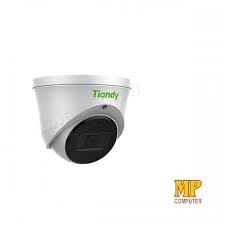
Figura 4.2: lateral view of the Tiandy TC-C32XN camera, highlighting its dome turret form factor.
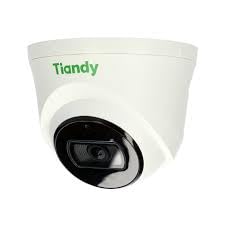
Figura 4.3: Înclinat view of the Tiandy TC-C32XN camera, showcasindatorită designului său compact.
5. Configurare și instalare
5.1 Montare
- Selectați o locație: Choose a suitable outdoor or indoor location (IP67 rated for outdoor use) that provides the desired viewing angle and is within reach of power and network connections. The camera is designed for protruding mounting.
- Găuri: Use the provided mounting template (if applicable) to mark and drill holes for the mounting screws.
- Securizați camera: Attach the camera base securely to the mounting surface using the provided screws and wall plugs.
5.2 Cablare
- Conexiune de alimentare: Connect the provided adapter to the camera's power input and then to a power outlet. The camera operates on corded electric power.
- Conexiune retea: Connect an Ethernet cable from your network router or PoE switch to the camera's Ethernet port. This camera supports Ethernet connectivity for data transmission.
5.3 Configurare inițială
- Pornire: Once wired, power on the camera.
- Network Discovery: Use the Tiandy client software or a network scanner tool to discover the camera's IP address on your local network.
- Accesați camera: Deschide a web browser și introduceți adresa IP a camerei pentru a accesa web interface. Log in using the default credentials (refer to the quick start guide for default username/password).
- Schimbați parola implicită: Din motive de securitate, schimbați parola implicită imediat după prima conectare.
- Integrare NVR: If using with an NVR, add the camera to your NVR system following the NVR's instructions. This camera is compatible with all brand NVRs.
- Configurare aplicație mobilă: Download the official Tiandy mobile application (available for Android and iOS) and follow the in-app instructions to add your camera for remote viewing și control.
6. Instrucțiuni de utilizare
6.1 În direct View și Înregistrare
Accesați imaginile live ale camerei view prin intermediul web interface, NVR, or mobile app. Configure recording schedules and methods (continuous, motion-triggered) via the camera's settings.
6.2 Smart IR and Night Vision
The camera features Smart IR technology, which automatically adjusts the intensity of its infrared LEDs to prevent overexposure of objects close to the camera, ensuring clear images in low-light conditions up to 30 meters. It also supports 'Night Color' low light technology for enhanced visibility.
6.3 Detectarea mișcării și alertele
Configure motion detection zones and sensitivity in the camera settings. The camera supports 'Motion Only' alert types. When motion is detected, the camera can trigger recordings, send notifications to your mobile device, or activate other configured actions. It also supports advanced features like tripwire and perimeter intrusion detection.
6.4 Funcționalitate audio
The built-in microphone allows for audio monitoring of the surveillance area. Audio settings can be adjusted in the camera's web interfață sau NVR.
6.5 Stocare pe card SD
Insert a compatible SD card into the camera's SD card slot for local storage of recordings. Ensure the card is formatted correctly via the camera's settings. The camera supports SD flash memory type.
6.6 Butonul de resetare
A reset button is included for restoring the camera to its factory default settings. Consult the quick start guide for the exact location and procedure for your model.
7. Întreținere
- curatenie: Ștergeți ușor obiectivul și corpul camerei cu o cârpă moale și uscată. Nu utilizați substanțe chimice dure sau produse de curățare abrazive.
- Actualizări firmware: Regularly check the Tiandy official website for firmware updates. Keeping your camera's firmware up-to-date ensures optimal performance and security.
- Verificarea cablului: Periodically inspect all cables for signs of wear or damage, especially for outdoor installations.
8. Depanare
- Fără putere: Asigurați-vă că adaptorul de alimentare este conectat corect și că priza funcționează.
- Fără videoclip: Check network cable connections. Verify the camera's IP address and network settings. Ensure the camera is properly added to your NVR or viewing software.
- Calitate slabă a imaginii: Clean the camera lens. Adjust focus if applicable. Check lighting conditions and camera placement.
- Probleme de conexiune la rețea: Verify router and network cable functionality. Restart the camera and network devices.
- Nu se poate accesa Web Interfata: Ensure your computer is on the same network segment as the camera. Verify the camera's IP address. Try resetting the camera to factory defaults if necessary (this will erase all settings).
9. Specificații
| Caracteristică | Caietul de sarcini |
|---|---|
| Model | TC-C32XN |
| Rezoluție statică efectivă | 2 MP (1920x1080) |
| Frame Rate | 30 de cadre pe secundă |
| Tehnologia senzorului foto | CMOS (1/2.8") |
| Gama de vedere nocturnă | 30 Metres (Smart IR) |
| Tehnologie cu lumină scăzută | Culoarea Nopții |
| Zoom optic | 3 x |
| Microfon încorporat | Da |
| Slot pentru card SD | Yes (Flash Memory Type: SD) |
| Tip de alertă | Motion Only (supports tripwire and perimeter) |
| Tehnologia de conectivitate | Wireless (IR), Ethernet |
| Sursa de alimentare | Electric cu fir |
| Evaluarea internațională de protecție | IP67 |
| Factor de formă | Dome Turret |
| Tip de montare | Ieșind |
| Compatibilitatea sistemelor de operare | Android, iOS |
| Dimensiuni produs (L x l x H) | 50 x 50 x 70 milimetri |
| Greutatea articolului | 20 grame |
| Componente incluse | Adaptor |
| Culoare | Alb |
10. Garanție și asistență
For warranty information and technical support, please refer to the warranty card included with your product or visit the official Tiandy website. Contact the seller or manufacturer directly for assistance with product issues or inquiries.