
1. Introducere
Thank you for choosing the Deko TV PRO2 DVB-T2 HEVC Digital Terrestrial Receiver. This device allows you to receive digital terrestrial television broadcasts (DVB-T2) with HEVC (H.265) encoding, providing high-quality video and audio. This manual will guide you through the setup, operation, and maintenance of your new receiver to ensure optimal performance and enjoyment.
2. Conținutul cutiei
Vă rugăm să verificați cu atenție conținutul pachetului. Dacă lipsesc sau sunt deteriorate articolele, contactați distribuitorul.
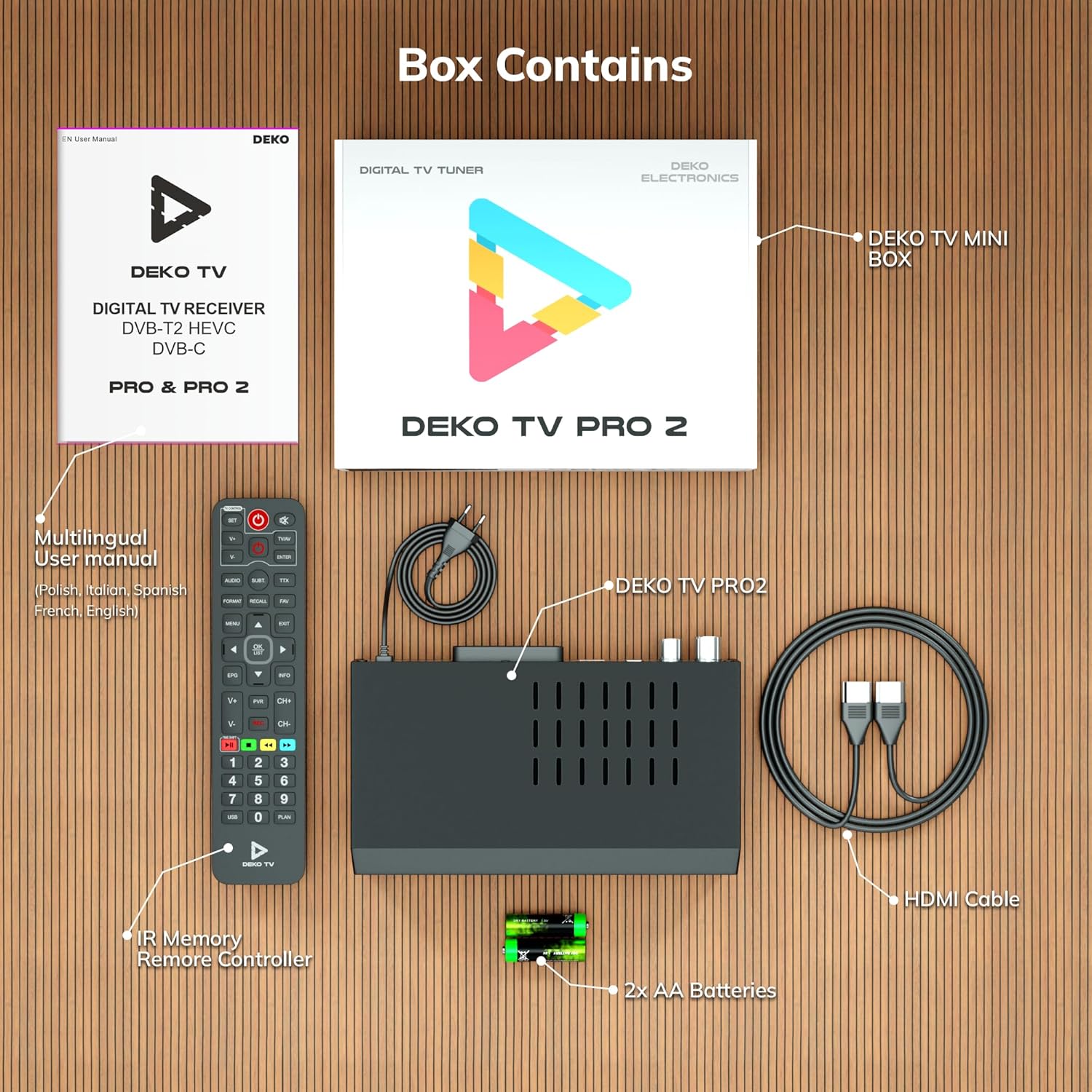
Figura 2.1: Deko TV PRO2 Box Contents. The image displays the Deko TV PRO2 receiver, a multilingual user manual, an IR remote control, two AA batteries, a power cable, and an HDMI cable.
- Deko TV PRO2 Digital Terrestrial Receiver
- Telecomanda IR
- 2x baterii AAA
- Cablu de alimentare
- Cablu HDMI
- Manual de utilizare multilingv
3. Caracteristicile produsului
The Deko TV PRO2 offers a range of features designed to enhance your viewexperiență:

Figura 3.1: Deko TV PRO2 Key Features. This image illustrates the main functionalities including DVB-T2 Terrestrial reception, Timeshift, HEVC H.265 Codec support, Personal Video Recorder (PVR), universal compatibility, and Crystal Clear Full HD output.
- DVB-T2 Terrestrial: Supports the latest digital terrestrial broadcasting standard.
- HEVC H.265 Codec: Ensures efficient video compression for high-quality picture.
- Universal Compatibilitate: Works with both modern and older television models.
- Schimbare de timp: Întrerupeți transmisiunea TV în direct și reluați vizionarea mai târziu.
- Înregistrator video personal (PVR): Record your favorite programs to a connected USB storage device.
- Crystal Clear Full HD: Delivers high-definition video output.
- Porturi USB duble: For media playback and PVR functionality.
4. Ghid de instalare
4.1. Conexiuni fizice
Before powering on the device, ensure all necessary connections are made.

Figura 4.1: Rear Panel Connections. This image details the rear panel of the Deko TV PRO2, indicating the RF IN, RF LOOP THROUGH, two USB ports, HDMI output, and SCART connector.
- Conexiune antenă: Conectați cablul antenei terestre la Rf in port on the back of the receiver. If you have another device (e.g., a TV with an integrated tuner) that also needs an antenna signal, you can connect it to the RF LOOP THROUGH port.
- Conexiune TV (HDMI): Pentru video și audio de înaltă definiție, conectați un cablu HDMI de la HDMI portul HDMI de pe receptor la o intrare HDMI de pe televizor.
- Conexiune TV (SCART): Pentru televizoarele mai vechi, conectați un cablu SCART de la SCART portul SCART de pe receptor la intrarea SCART de pe televizor. (Note: Do not use both HDMI and SCART simultaneously for video output.)
- Dispozitive USB: Insert USB storage devices (for PVR or media playback) into the USB ports. The device has two USB ports.
- Conexiune de alimentare: Connect the power cable to the receiver and then plug it into a wall outlet.
4.2. Instalarea bateriei telecomenzii
Open the battery compartment on the back of the remote control and insert two AAA batteries, ensuring correct polarity (+/-). Close the compartment.
4.3. Pornirea inițială și scanarea canalelor
- Asigurați-vă că toate conexiunile sunt sigure.
- Turn on your television and select the correct HDMI or SCART input source corresponding to where the Deko TV PRO2 is connected.
- Power on the Deko TV PRO2 using the power button on the front panel or the remote control.
- The first time you power on the receiver, an initial setup wizard will appear. Follow the on-screen instructions to select your language, country, and initiate an automatic channel scan. This process will find and store all available digital terrestrial channels.
- Once the scan is complete, you should be able to view canalele.
5. Instrucțiuni de utilizare
5.1. Funcții de bază ale televizorului
- Selectarea canalului: Utilizați CH + / CH- buttons or the numeric keypad on the remote control to change channels.
- Controlul volumului: Utilizați VOL + / VOL- butoanele de pe telecomandă.
- Acces la meniu: Apăsați tasta MENIU buton pentru a accesa meniul principal de setări și funcții.
- Ghid electronic de programe (EPG): Apăsați tasta EPG butonul pentru a view program information and schedules.
- Afișare informații: Apăsați tasta INFO button to display current channel and program details.
5.2. Redare media USB
The Deko TV PRO2 supports media playback from USB storage devices.
- Introduceți o unitate flash USB sau un hard disk extern într-unul dintre porturile USB.
- Navigate to the "Media" or "USB" section in the main menu.
- Selectați tipul de fișier media pe care doriți să îl redați (de exemplu, video, muzică, fotografie).
- Răsfoiți-vă files și selectați conținutul dorit pentru redare.
5.3. PVR (Personal Video Recorder) and Timeshift
To use PVR and Timeshift functions, a USB storage device must be connected and formatted by the receiver.
- Înregistrare: În timp ce vizionați un program, apăsați butonul REC de pe telecomandă pentru a începe înregistrarea. Apăsați butonul STOP to end the recording. Recorded programs can be accessed via the "PVR" or "Recordings" menu.
- Schimbare de timp: Apăsați tasta PAUZĂ button during live TV to activate Timeshift. The program will pause, and recording will begin in the background. You can then use JUCA, ÎNAINTE RAPID, și ÎNAPOI buttons to control playback. Press STOP to exit Timeshift and return to live TV.
5.4. Internet and Multimedia Features (Optional Wi-Fi Adapter)
The Deko TV PRO2 supports internet connectivity via a compatible USB Wi-Fi adapter (sold separately). Once connected, you can access certain online multimedia features.

Figura 5.1: Internet Connectivity. This image shows the Deko TV PRO2 with an optional USB Wi-Fi adapter, indicating support for Wi-Fi, YouTube, and IPTV functionalities.
- Insert a compatible USB Wi-Fi adapter into one of the USB ports.
- Go to the "Network Settings" in the main menu to configure your Wi-Fi connection.
- Once connected, you may find options for applications like YouTube or IPTV within the receiver's menu, depending on the firmware version.
6. Întreținere
- curatenie: Use a soft, dry cloth to clean the receiver. Do not use liquid or aerosol cleaners.
- Ventilare: Ensure the receiver has adequate ventilation. Do not block the ventilation slots.
- Actualizări de software: Verificați periodic producătorul webConsultați site-ul pentru actualizări de software disponibile. Actualizările pot îmbunătăți performanța și pot adăuga funcții noi. Urmați cu atenție instrucțiunile furnizate împreună cu actualizarea.
7. Depanare
| Problemă | Cauza posibila | Soluţie |
|---|---|---|
| Fără imagine sau sunet | Incorrect TV input selected; loose cables; receiver not powered on. | Select the correct HDMI/SCART input on your TV. Check all cable connections. Ensure the receiver is powered on. |
| Mesajul „Fără semnal” | Antenna not connected; poor antenna signal; no channels scanned. | Check antenna connection. Adjust antenna position. Perform a channel scan (refer to Section 4.3). |
| Telecomanda nu funcționează | Batteries are dead or incorrectly inserted; obstruction between remote and receiver. | Replace batteries with new AAA batteries, ensuring correct polarity. Remove any obstructions. Point the remote directly at the receiver. |
| Nu se poate înregistra pe USB | USB device not connected or formatted; insufficient storage space. | Ensure USB device is properly connected. Format the USB device via the receiver's menu (this will erase all data). Check available storage space. |
8. Specificații
| Caracteristică | Detaliu |
|---|---|
| Marca | Deko |
| Numărul de model | PRO2 |
| Tehnologia de conectivitate | USB |
| Conexiuni | USB, Wi-Fi (via adapter), HDMI, SCART, RF IN, RF LOOP THROUGH |
| Dispozitive compatibile | Televiziune |
| Caracteristici speciale | Connected and multimedia functions, universal remote control |
| Total porturi USB | 2 |
| Total porturi HDMI | 1 |
| Codificare audio | DD |
| Mod ieșire audio | Stereo, Surround |
| Configurare canal de sunet surround | 2.1 |
| Tip telecomandă | Telecomanda |
| Bateriile necesare | 2 AAA batteries (Zinc-carbon) |
9. Garanție și asistență
The Deko TV PRO2 receiver comes with a standard manufacturer's warranty. Please refer to the warranty card included in your package or contact your retailer for specific warranty terms and conditions.
For technical support, troubleshooting assistance beyond this manual, or inquiries about spare parts and software updates, please visit the official Deko Electronics website-ul web sau contactați departamentul de asistență pentru clienți. Informațiile de contact se găsesc de obicei pe ambalajul produsului sau pe fișa producătorului. website-ul.