
Introducere
This manual provides detailed instructions for the installation, operation, and maintenance of your DB Drive WDX200.4 4-Channel Speaker AmpVă rugăm să citiți cu atenție acest manual înainte de a încerca să instalați sau să utilizați amplifier to ensure proper function and safety. The WDX200.4 is a versatile 4-channel amplifier designed to deliver high-quality audio performance for various applications.
Configurare și instalare
Instalarea corectă este crucială pentru performanța optimă și durata de viață a mașinii dumneavoastră. ampinstalator. Se recomandă ca instalarea să fie efectuată de către un profesionist calificat.
Montare
The amplifier features a surface mount design. Ensure the mounting location provides adequate ventilation to prevent overheating. Avoid mounting in direct sunlight or near heat sources.
Conexiuni de alimentare
The WDX200.4 operates within a voltage range of 9V to 16V DC. Connect the power and ground cables securely to the robust power and output connectors. Ensure proper gauge wiring is used for power and ground connections to handle the ampconsumul de curent al lifierului.
Conexiuni de intrare
The amplifier supports both RCA (low-level) and high-level inputs. This allows for compatibility with both aftermarket and factory head units without the need for additional adapters.
- Intrare RCA: Use RCA cables to connect your head unit's pre-amp ieșiri către ampintrările RCA ale lifitorului.
- Intrare la nivel înalt: If your head unit does not have RCA outputs, use the high-level input. This input typically connects directly to your head unit's speaker outputs.
Conexiuni difuzoare
The WDX200.4 is a 4-channel amplifier, providing 200 Watts RMS per channel at 2 ohms. It also supports bridging, allowing for 2 channels of 400 Watts RMS at 4 ohms. Connect your speakers to the appropriate output terminals, ensuring correct polarity.

Imagine: Sus și jos view of the DB Drive WDX200.4 4-Channel Speaker Amplifier, illustrating the various input and output terminals for connection.
Ajustări crossover
The amplifier features integrated crossovers with High-Pass Filter (HPF), Low-Pass Filter (LPF), and Full-Range adjustments. These allow you to tailor the frequency response for your specific speaker setup (subwoofers, woofers, midranges, tweeters).
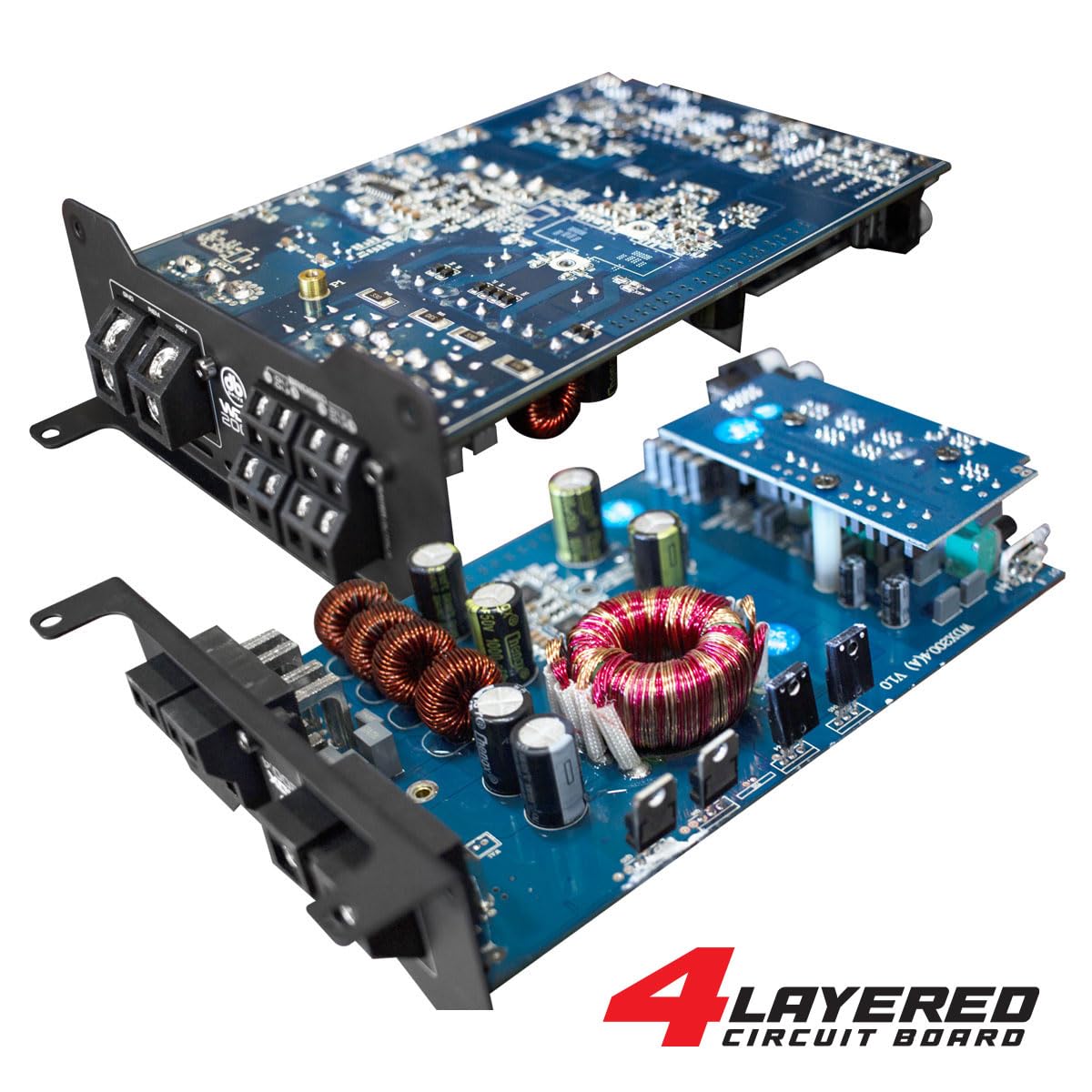
Imagine: O imagine internă view of the DB Drive WDX200.4 amplifier, highlighting its 4-layered circuit board design for enhanced performance and durability.
Instrucțiuni de operare
Odată instalat, amplifier requires minimal user interaction for daily operation. The primary adjustments are for input level and crossover settings.
Reglarea nivelului
Adjust the input level controls to match the output voltage of your head unit. Start with the amplifier's level control at minimum and slowly increase it until the desired volume is achieved without distortion.
Setări crossover
- HPF (filtru de trecere înaltă): Use this setting for speakers that should only reproduce high frequencies (e.g., tweeters, mid-range speakers). This filters out low bass frequencies.
- LPF (Filtru trece-jos): Use this setting for speakers that should only reproduce low frequencies (e.g., subwoofers). This filters out high frequencies.
- COMPLET (Interval complet): Use this setting for speakers that should reproduce the entire frequency spectrum.
Adjust these settings according to the specifications of your speakers and your desired audio output.
Întreţinere
To ensure the longevity and optimal performance of your DB Drive WDX200.4 amplifter, urmați aceste instrucțiuni de întreținere:
- curatenie: Curățați periodic exteriorul amplifier with a soft, dry cloth. Do not use harsh chemicals or abrasive cleaners. Ensure all ventilation openings are free from dust and debris.
- Conexiuni: Regularly check all power, ground, and speaker connections to ensure they are secure and free from corrosion. Loose connections can lead to poor performance or damage.
- Ventilare: Asigurați amplifier always has adequate airflow around it. Blocked vents can lead to overheating and thermal shutdown.
Depanare
Dacă întâmpinați probleme cu dvs amplifier, consultați următoarele probleme și soluții comune:
- Fără putere: Check the main fuse, power and ground connections, and the remote turn-on wire. Ensure the vehicle's battery has sufficient charge.
- Fără sunet: Verify all input and output connections. Check speaker wires for shorts or open circuits. Ensure the head unit is functioning correctly and sending an audio signal. Check crossover settings.
- Sunet distorsionat: Reduce the input level (gain) on the amplifier. Check for proper crossover settings. Ensure speakers are not overdriven or damaged.
- AmpSupraîncălzirea lifierului: Asigurați o ventilație adecvată în jurul amplifier. Check speaker impedance to ensure it matches the amplifier's capabilities. Reduce the volume or gain settings.
- Mod de protecție: Dacă amplifier enters protection mode (indicated by a specific LED), it usually signifies an issue such as overheating, a short circuit in the speaker wiring, or an impedance mismatch. Disconnect power, inspect all connections and speaker wiring, and allow the amplifier to cool before reconnecting.
If problems persist after attempting these solutions, consult a qualified car audio technician.
Specificații
| Caracteristică | Caietul de sarcini |
|---|---|
| Numărul de model | WDX200.4 |
| Marca | Unitate DB |
| Numărul de canale | 4 |
| Putere de ieșire (stereo) | 200 Watts RMS per channel at 2 Ohms |
| Output Power (Bridged) | 400 Watts RMS per channel at 4 Ohms (2 channels) |
| Voltage | 9 - 16 volți (CC) |
| Tip de montare | Montare la suprafață |
| Crossover | Integrated HPF, LPF, Full-Range |
| Intrări | RCA (Low-Level), High-Level with Automatic Turn-On |
| Certificare | FCC |
Garanție și suport
For warranty information and technical support, please refer to the documentation included with your purchase or visit the official DB Drive webPăstrați dovada achiziției pentru orice reclamații în garanție.