
Speedlink SL-680016-BK
Manual de utilizare pentru mouse-ul de gaming TAUROX
Model: SL-680016-BK | Brand: Speedlink
1. Introducere
The TAUROX gaming mouse is designed to provide precise and responsive control for an enhanced gaming experience. With an impressive sensor resolution of up to 7,200 DPI and customizable features, it adapts to various gaming styles.
Caracteristici cheie
- High-precision sensor with up to 7,200 DPI for accurate tracking.
- Two integrated DPI switches for on-the-fly sensitivity adjustment.
- 5 configurable buttons for personalized control and macros.
- Lightweight design (135 grams with cable) for comfortable extended use.
- Customizable RGB lighting to personalize your gaming setup.
- Durable fabric-covered cable with 1.8-meter length for flexibility.
- USB-A connection for easy and universal compatibility.

Image: The TAUROX Gaming Mouse showcasing its multi-coloured LED lighting and ergonomic design.
2. Conținutul pachetului
Vă rugăm să vă asigurați că toate articolele sunt prezente în colet:
- TAUROX Gaming Mouse
- Configuration Software (downloadable or included)

Imagine: față view of the TAUROX Gaming Mouse retail packaging, highlighting key features.
3. Ghid de instalare
3.1 Conectarea mouse-ului
Connect the USB-A connector of the TAUROX Gaming Mouse to an available USB port on your computer. The mouse is plug-and-play for basic functionality.
3.2 Instalare software
For full utilization of all functions, including macro programming and advanced customization, the installation of the dedicated configuration software is necessary. This software is typically provided via a download link or included on a small disc. Refer to the product packaging or Speedlink's official website for the download location.
Image: Side of the product box indicating the need for configuration software.
4. Operating Your TAUROX Gaming Mouse
4.1 Ajustare DPI
The TAUROX Gaming Mouse features two integrated DPI switches located behind the scroll wheel. Use these buttons to cycle through different sensitivity levels (up to 7,200 DPI) to match your gaming style or task requirements. The current DPI setting may be indicated by the mouse's LED lighting color, depending on software configuration.

Image: Screenshot of the Speedlink software's 'Performance' tab, showing DPI control settings.
4.2 Butoane programabile
The mouse is equipped with 5 configurable buttons. These buttons can be assigned various functions, including keyboard macros, multimedia controls, or specific in-game actions, using the configuration software. Launch the software and navigate to the 'Button' or 'Macro' section to customize these settings.
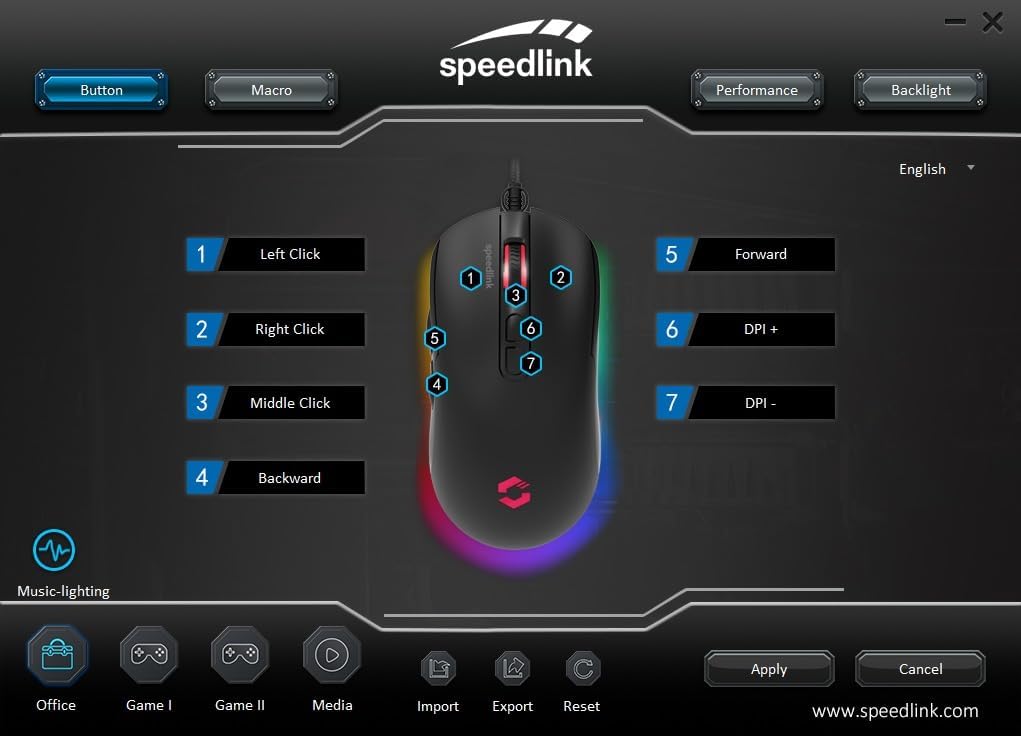
Image: Screenshot of the Speedlink software's 'Button' tab, illustrating the mapping of the mouse's 7 buttons.
4.3 Iluminare RGB
The TAUROX Gaming Mouse features multi-coloured RGB lighting that can be customized through the configuration software. You can select from various lighting effects, colors, and brightness levels to match your personal preference or gaming setup. Access the 'Backlight' section in the software to adjust these settings.

Image: Screenshot of the Speedlink software's 'Backlight' tab, showing options for customizing the mouse's RGB lighting effects.
5. Întreținere
To ensure the longevity and optimal performance of your TAUROX Gaming Mouse, follow these maintenance guidelines:
- curatenie: Folosiți o lavetă moale și uscată pentru a curăța suprafața mouse-ului. Pentru murdăria persistentă, ștergeți ușor.amp cloth can be used, but ensure no liquid enters the mouse. Avoid abrasive cleaners.
- Îngrijirea cablului: Avoid sharp bends, kinks, or excessive pulling on the cable. Store the cable neatly when not in use to prevent damage.
- Întreținere senzor: Păstrați senzorul optic de pe partea inferioară a mouse-ului curat și fără praf sau resturi pentru a asigura o urmărire precisă.
6. Depanare
If you encounter issues with your TAUROX Gaming Mouse, consider the following:
- Mouse-ul nu răspunde: Ensure the USB cable is securely connected to your computer. Try plugging the mouse into a different USB port.
- Urmărire inexactă: Clean the optical sensor on the bottom of the mouse. Ensure you are using the mouse on a suitable surface (e.g., a mouse pad).
- Probleme de software: If the configuration software is not functioning correctly, try reinstalling it. Ensure your operating system is up to date.
- Butoanele nu funcționează: Check the button assignments in the configuration software to ensure they are correctly configured.
- Iluminatul nu funcționează: Verify the RGB lighting settings in the configuration software.
For persistent issues, refer to the support section on the Speedlink website-ul.
7. Specificatii tehnice
| Caracteristică | Caietul de sarcini |
|---|---|
| Dimensiunile produsului | 4.92 x 2.48 x 0.04 inches (125x63x40 mm LxWxH) |
| Greutatea articolului | 5.7 ounces (135 grams with cable) |
| Numărul de model | SL-680016-BK |
| Marca | Speedlink |
| Culoare | Negru |
| Tehnologia de conectivitate | USB-A (cu fir) |
| Caracteristici speciale | Programmable Buttons, Multi-coloured LED Lighting |
| Tehnologia de detectare a mișcării | Optic |
| Rezolutie DPI | Până la 7,200 DPI (reglabil) |
| Lungimea cablului | 1.8 metri |
| Producător | Speedlink |
8. Safety Instructions and Compliance
8.1 Instrucțiuni importante de siguranță
Please note that the failure to observe these instructions can cause product damage, explosion, fire and/or electric shock!
- Utilizați dispozitivele numai așa cum este indicat în ghidul de utilizare. Nu le deschideți și nu le reparați.
- Nu expuneți dispozitivele la lichide, căldură sau frig.
- Nu utilizați dispozitivele din reclameamp mediu. Curățați dispozitivul cu o cârpă uscată.
- Păstrați dispozitivele și toate piesele libere departe de copii, animale de companie și persoane neautorizate.
- Only use the devices with the appropriate provided accessories.
- Disconnect cables from the devices if they will not be used for a long time. When disconnecting by cables, don't pull on the cord but on the plug.
- Don't use the cables in any way other than mentioned in the user guide. Don't bend, cut, extend, knot or step on them.
- Don't insert any foreign objects into the openings of the device.
- Dacă dispozitivele sunt deteriorate în vreun fel sau se încălzesc prea mult, încetați imediat să le utilizați.
- Take caution when using devices that emit radio signals if you have a pacemaker or are dependent on other sensitive electronic aids.
Instrucțiuni de siguranță în alte limbi: www.speedlink.com
8.2 Warning Symbols and Markings
Extended use of input devices may cause health problems such as discomfort or pain. As such, take regular breaks and consult a doctor if problems persist.
8.3 Declarație FCC
Acest echipament a fost testat și sa constatat că respectă limitele pentru un dispozitiv digital de Clasa B, în conformitate cu partea 15 din Regulile FCC. Aceste limite sunt concepute pentru a oferi o protecție rezonabilă împotriva interferențelor dăunătoare într-o instalație rezidențială. Acest echipament generează, utilizează și poate radia energie de frecvență radio și, dacă nu este instalat și utilizat în conformitate cu instrucțiunile, poate provoca interferențe dăunătoare comunicațiilor radio. Cu toate acestea, nu există nicio garanție că interferențele nu vor apărea într-o anumită instalație. Dacă acest echipament cauzează interferențe dăunătoare recepției radio sau televiziunii, ceea ce poate fi determinat prin oprirea și pornirea echipamentului, utilizatorul este încurajat să încerce să corecteze interferența prin una sau mai multe dintre următoarele măsuri:
- Reorientați sau mutați antena de recepție.
- Măriți distanța dintre echipament și receptor.
- Conectați echipamentul la o priză pe un circuit diferit de cel la care este conectat receptorul.
- Consultați distribuitorul sau un tehnician radio/TV cu experiență pentru ajutor.
Acest dispozitiv respectă partea 15 din Regulile FCC. Funcționarea este supusă următoarelor două condiții: (1) Acest dispozitiv nu poate cauza interferențe dăunătoare și (2) acest dispozitiv trebuie să accepte orice interferență primită, inclusiv interferențe care pot cauza o funcționare nedorită.
Nota: Modifications to this product will void the user's authority to operate this equipment.
8.4 Conformity Notice
IMPORTATOR/PRODUCĂTOR: Zocherl Media GmbH, Im Dorf 5, 29303 Hemslingen, GERMANY
Telefon: +49 4267 9341 0
DETALII PRODUS:
Nr tip: SL-680016-BK
Descriere produs: Mouse pentru jocuri TAUROX, negru
PRODUSUL SE CONFORMĂ CU URMĂTOARELE DIRECTIVE:
CEM: 2014/30/UE
RoHS: 2011/65/UE
For a full declaration of conformity, the latest user guide, FAQ or further information, please visit: www.speedlink.com
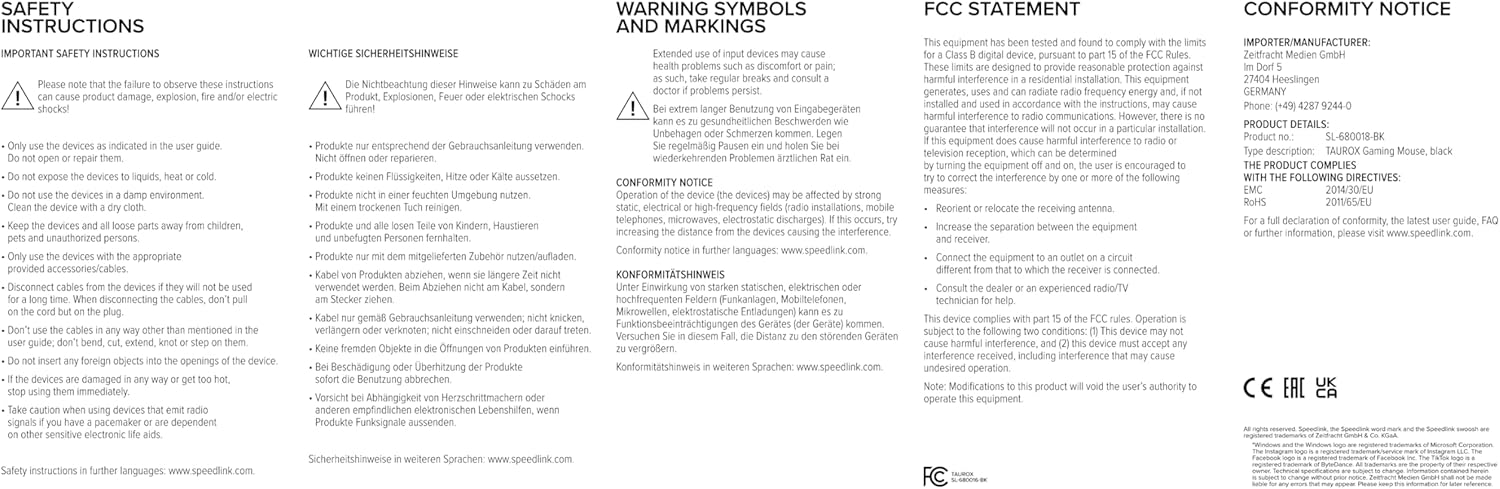
Image: Product packaging displaying various certifications and multilingual product names.
9. Garanție și asistență
For warranty information, technical support, frequently asked questions (FAQs), and the latest user guides, please visit the official Speedlink website:
Documente aferenteSL-680016-BK


Ask a question about this manual
Ask about setup, troubleshooting, compatibility, parts, safety, or missing instructions. Manuals+ will review the question and use this page’s manual context to help answer it.