
Introducere
This user manual provides detailed instructions for the operation and maintenance of your MOBI Connect Smart 4 in 1 Wi-Fi Air Purifier & Humidifier. This device is designed to improve indoor air quality by purifying and humidifying the air, offering a healthier and more comfortable living environment. Please read this manual thoroughly before use to ensure proper function and safety.

Image: The MOBI Connect Smart 4 in 1 Wi-Fi Air Purifier & Humidifier, a compact white cylindrical device with a light band and control panel.
Informații importante privind siguranța
Pentru a reduce riscul de incendiu, electrocutare sau vătămare corporală, respectați întotdeauna măsurile de siguranță de bază atunci când utilizați acest aparat.
- Always place the device on a firm, level surface.
- Nu blocați intrările sau ieșirile de aer.
- Țineți aparatul departe de apă și umiditate.
- Deconectați dispozitivul înainte de curățare sau întreținere.
- Nu utilizați dispozitivul dacă cablul de alimentare sau ștecherul sunt deteriorate.
- A nu se lăsa la îndemâna copiilor și a animalelor de companie.
- Only use original MOBI replacement filters.
Produs terminatview
Familiarize yourself with the components and controls of your air purifier and humidifier.
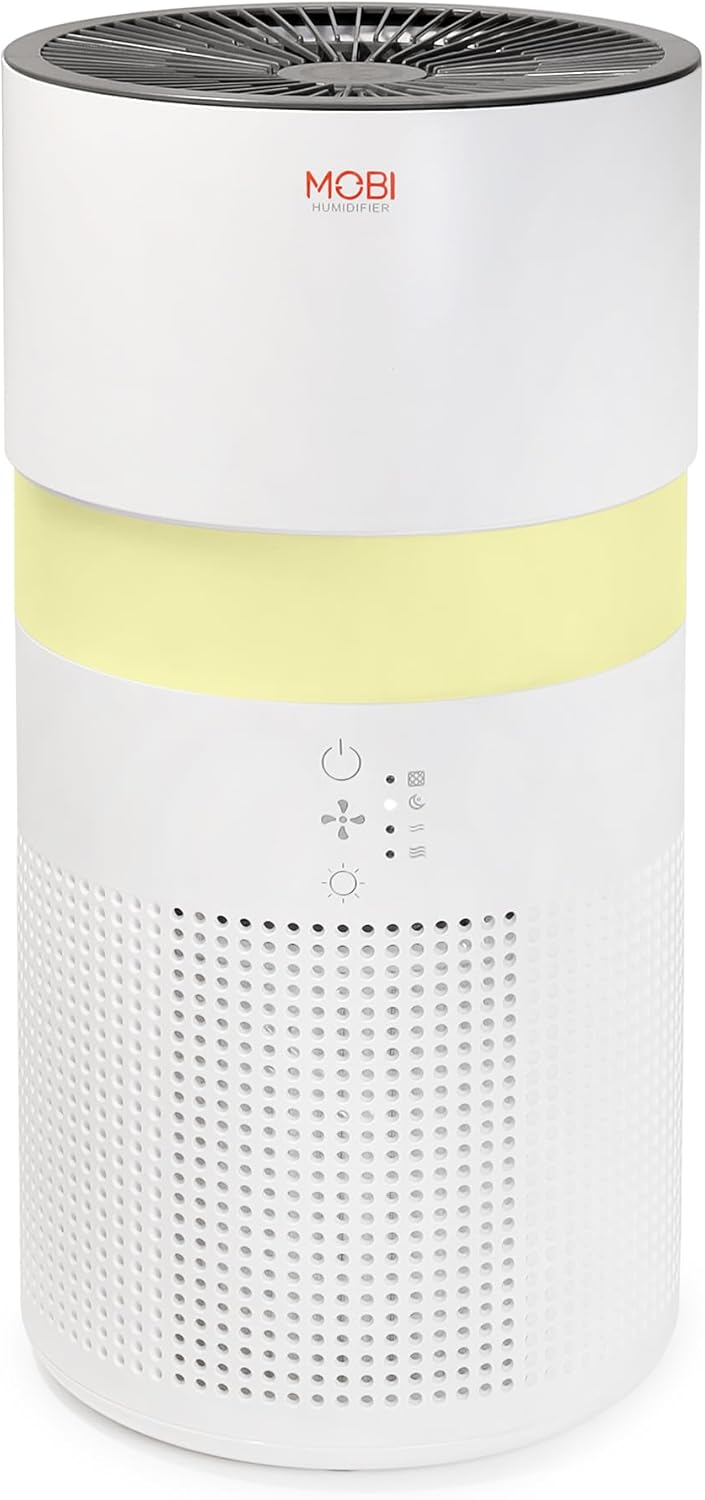
Imagine: Un prim-plan view of the control panel on the MOBI Air Purifier, showing power, fan speed, light, and humidifier icons.
Caracteristicile panoului de control:
- Buton de alimentare: Turns the unit on/off and activates pairing mode.
- Indicator de viteză a ventilatorului: Displays current fan speed (Sleep, Medium, High).
- Humidifier Indicator: Shows humidifier status.
- Buton Mod lumină: Cycles through light modes (Off, Gradient, Fixation).
- Indicator de înlocuire a filtrului: Illuminates when filter replacement is needed.
Ghid de instalare
Follow these steps to set up your MOBI Connect Smart 4 in 1 Wi-Fi Air Purifier & Humidifier and connect it to the MOBI Smart App.
Configurare inițială:
- Despachetați dispozitivul și îndepărtați toate materialele de ambalare.
- Ensure the filter is correctly installed inside the unit. Refer to the 'Maintenance' section for filter installation.
- Așezați dispozitivul pe o suprafață stabilă, plană.
- Plug the power adapter into the device and then into a wall outlet. The device will enter pairing mode, indicated by a red blinking LED.
Conexiune la aplicație:
- Descărcați MOBI Smart App din magazinul de aplicații al dispozitivului dvs.
- Open the app and sign up for an account if you don't have one.
- Accept all requested permissions (Bluetooth, Location, Notifications) for full functionality.
- On the app's home screen, tap 'Add Device' or the '+' icon in the top right corner.
- The app will search for nearby devices. If your device is blinking red, it should appear in the 'Discovering devices' area. Tap 'Add'.
- If not automatically discovered, select 'Mobi Air Purifier' from the 'Add Manually' list.
- Enter your 2.4GHz Wi-Fi network username and password. (Note: 5GHz networks are not supported).
- Follow the on-screen instructions to activate the device for pairing. If the red LED is not blinking, press and hold the power button until it starts blinking.
- Once the device is blinking red, tap 'Finish network configuration' and then 'Next' in the app.
- The app will connect to the device. Once connected, tap the blue button with the white plus sign next to 'MOBI Smart Air Care 4 IN 1' and then 'Done' in the top right corner.
Video: A detailed guide on how to connect and set up the MOBI Smart 4-in-1 Air Purifier & Humidifier using the MOBI Smart App, including app permissions, device discovery, Wi-Fi setup, and pairing instructions.
Instrucțiuni de operare
Control your MOBI Connect Smart 4 in 1 Wi-Fi Air Purifier & Humidifier using the physical buttons on the device or through the MOBI Smart App.
Using the Device Buttons:
- Pornire/Oprire: Press the power button once to turn the unit on or off.
- Reglați viteza ventilatorului: Press the fan speed button to cycle through Sleep, Medium, and High settings.
- Control Night Light: Press the light button to cycle through Off, Gradient (color flow), and Fixation (single color) modes.
- Funcția umidificator: Press the humidifier button to activate or deactivate the humidification feature.
Using the MOBI Smart App:
The app provides comprehensive control and additional features.
- Comutator: Power the device on or off remotely.
- Viteza vântului: Select Sleep, Medium, or High wind speed options.
- Temporizator de numărătoare inversă: Set a timer for 2, 4, or 6 hours for automatic shut-off.
- Setări: Access advanced options:
- Dezinfectare UV: Enable or disable the UV disinfection feature.
- Resetați filtrul: Reset the filter life indicator after replacing the filter.
- Modul de lumină: Choose between Off, Gradient (cycling colors), or Fixation (select a single color).
- Programa: Create custom schedules for when the device should turn on or off.
- Integrare Smart Home: Monitor your home's air quality and integrate with other MOBI Smart devices.
- Aromatherapy Pad: Add essential oils to the designated pad to diffuse scents into the air.

Image: The MOBI Air Purifier showcasing its 7 color-changing LED night light feature, adding ambiance to any room.

Image: The MOBI Air Purifier next to a smartphone displaying the MOBI Smart App interface, highlighting smart home control features.
Întreţinere
Întreținerea regulată asigură performanțe optime și prelungește durata de viață a dispozitivului dumneavoastră.
Înlocuirea filtrului:
The MOBI Connect Smart 4 in 1 Wi-Fi Air Purifier & Humidifier uses a 3-stage filtration system (Pre-Filter, Carbon, and HEPA filter). The filter replacement alert will notify you when it's time to change the filter.

Image: A visual representation of the 3-stage HEPA filtration system, showing the layers of the filter.
- Deconectați dispozitivul de la priză.
- Remove the bottom cover of the unit.
- Scoateți cu grijă filtrul vechi.
- Insert the new MOBI replacement filter, ensuring it is seated correctly.
- Puneți la loc capacul inferior.
- Conectați din nou dispozitivul.
- In the MOBI Smart App, go to 'Settings' and select 'Reset Filter' to reset the filter life indicator.

Image: The MOBI Air Purifier with a new filter, illustrating the filter replacement alert system.
Curățarea dispozitivului:
- Ștergeți exteriorul dispozitivului cu un material moale, damp pânză. Nu utilizați produse de curățare abrazive.
- Clean the water tank regularly to prevent mineral buildup and mold growth. Use a mild detergent and rinse thoroughly.
- Asigurați-vă că toate piesele sunt complet uscate înainte de a reasambla și utiliza dispozitivul.
Depanare
If you encounter issues with your device, refer to the following common problems and solutions.
| Problemă | Cauza posibila | Soluţie |
|---|---|---|
| Dispozitivul nu pornește. | Nu este conectat la priză; problemă cu priza; cablu deteriorat. | Ensure power cord is securely plugged in. Test outlet with another device. Check for cord damage. |
| Dispozitivul nu se conectează la Wi-Fi. | Incorrect Wi-Fi password; 5GHz network; device not in pairing mode. | Verify Wi-Fi password. Ensure you are connecting to a 2.4GHz network. Press and hold power button to enter pairing mode (red blinking LED). |
| Calitatea aerului nu se îmbunătățește. | Dirty filter; incorrect fan speed; room size too large. | Check filter indicator and replace if necessary. Increase fan speed. Ensure device is suitable for your room size. |
| Umidificatorul nu produce abur. | Water tank empty; humidifier function off; mineral buildup. | Refill water tank. Activate humidifier function via app or button. Clean water tank and humidifier components. |
Specificații
| Caracteristică | Detaliu |
|---|---|
| Dimensiunile produsului | 6.5"A x 6.5"L x 13"Î (6.5 x 6.5 x 13 inci) |
| Numărul de model al articolului | 70692 |
| Greutate | 3 lire sterline |
| Culoare | Alb |
| Acoperirea suprafeței podelei | Până la 350 de metri pătrați |
| Sistem de filtrare | 3-Stage (Pre-Filter, Activated Carbon, HEPA) |
| Tip umidificator | Forced-air water tank method |
| Lumină de noapte | 7 Unique LED Colors, Adjustable Modes (Off, Gradient, Fixation) |
| Nivel de zgomot | 24dB (Sleep Mode) |
| Rata de circulație a aerului | 5x per hour |
| Conectivitate | Wi-Fi (2.4GHz required) |
| Certificari | UL Certified, RoHS Certified |
| Wattage | 680 wați |
Garanție și suport
MOBI products are designed with quality and reliability in mind. For warranty information and customer support, please refer to the official MOBI website-ul lor sau contactați direct serviciul lor de asistență pentru clienți.
For frequently asked questions (FAQ) and feedback, you can also access these sections within the MOBI Smart App under the device settings.