
SCHWAIGER SOEM0100
SCHWAIGER SOEM0100 Energy Cost Meter Instruction Manual
Marca: SCHWAIGER | Model: SOEM0100
1. Introducere
The SCHWAIGER SOEM0100 Energy Cost Meter is designed to help you monitor and manage the electricity consumption and associated costs of your household appliances. With its large, rotatable display and multiple viewing modes, it provides clear and accurate data, enabling informed decisions about energy usage. This manual will guide you through the setup, operation, and maintenance of your device.
Official Product Summary Video for SCHWAIGER SOEM0100. This video provides a brief overview of the energy cost meter's features and design.
2. Informații de siguranță
- Citiți cu atenție toate instrucțiunile înainte de utilizare.
- Nu depășiți sarcina maximă de 16 A / 3600 W. Overloading can cause damage to the device and connected appliances, and poses a fire hazard.
- Acest dispozitiv este destinat exclusiv utilizării în interior. Nu îl expuneți la umiditate sau temperaturi extreme.
- Nu dezasamblați și nu încercați să reparați dispozitivul. Apelați la personal calificat pentru orice operațiune de service.
- A nu se lăsa la îndemâna copiilor.
- Ensure the device is securely plugged into a wall socket and that the appliance is securely plugged into the meter.
3. Conținutul pachetului
- 1x SCHWAIGER SOEM0100 Energy Cost Meter
- 1x Manual de instrucțiuni (acest document)
4. Produs terminatview
The SCHWAIGER SOEM0100 features a compact design with an integrated display and intuitive controls for easy operation.
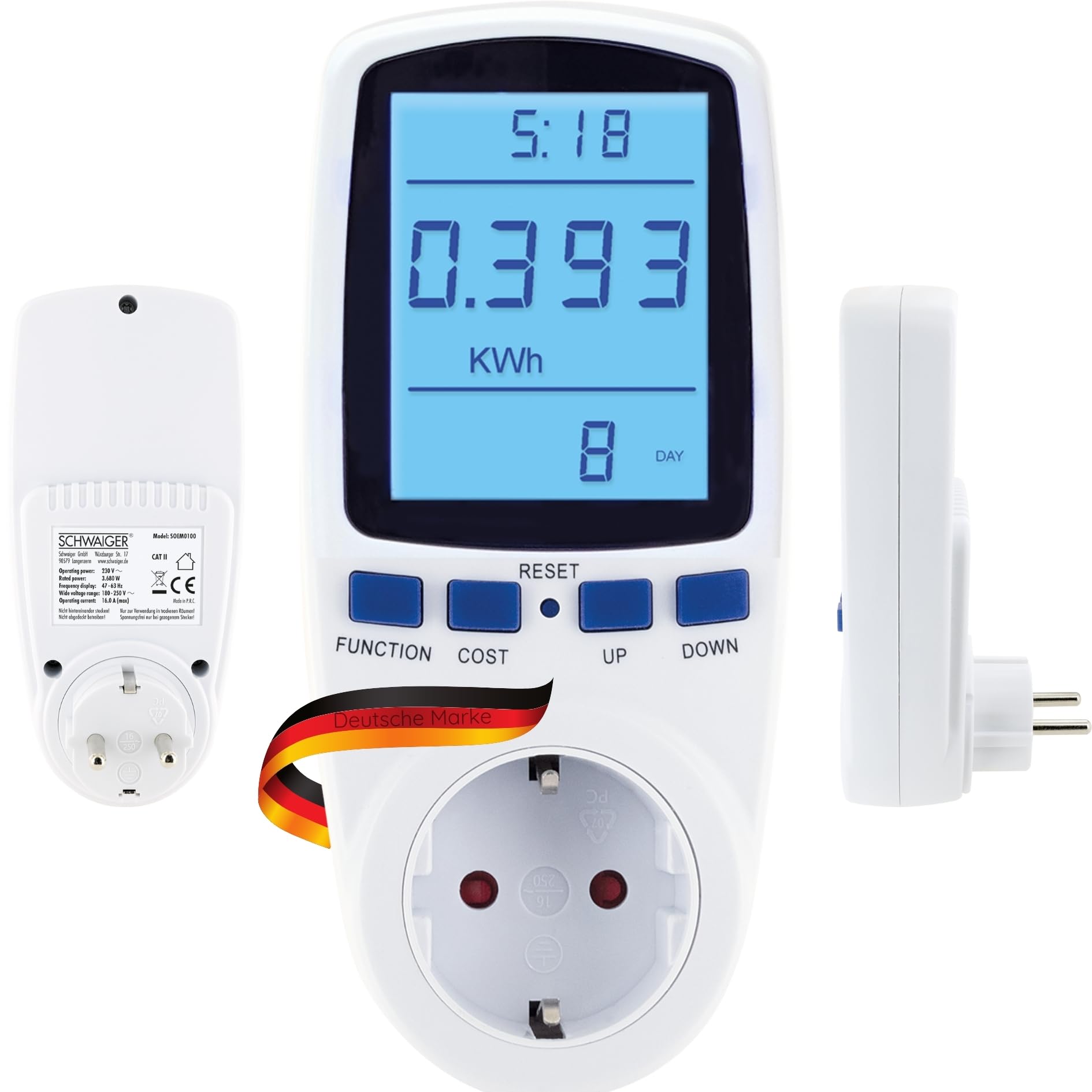


Comenzi și afișare:
- Afişa: Large, 180° rotatable, backlit LCD for clear visibility of measurement data.
- Buton FUNCȚIE: Cycles through the 7 different display modes (e.g., KWh, Watt, Voltage, Frequency, Cost, Total Time).
- COST Button: Used to set the electricity cost per KWh.
- Butonul de resetare: Resets accumulated data.
- Butoanele SUS/JOS: Folosit pentru ajustarea valorilor în timpul setărilor.
5. Configurare
- Plug In the Meter: Insert the SCHWAIGER SOEM0100 into a standard wall socket.
- Pornire inițială: The display will light up, and the device will be ready for use.
- Set Current Time (Optional): If the device has a clock function, use the appropriate buttons (refer to specific button combinations if available, otherwise assume 'FUNCTION' or 'SET' to access time settings and 'UP/DOWN' to adjust).
- Set Electricity Cost:
- Apăsați tasta COST button. The cost setting will appear on the display.
- Utilizați UP şi JOS buttons to adjust the cost per KWh according to your local electricity tariff.
- Presa COST din nou pentru a confirma și salva setarea.
- Conectați aparatul: Conectați aparatul pe care doriți să îl monitorizați la priza din partea frontală a contorului de energie.

6. Instrucțiuni de utilizare
Viewing Measurement Data:
Apăsați tasta FUNCŢIE button repeatedly to cycle through the 7 different display modes. These modes typically include:
- Current Power (Watt): Shows the real-time power consumption of the connected appliance.
- Accumulated Energy (KWh): Displays the total energy consumed since the last reset.
- Voltage (V): Arată volumul liniei curentetage.
- Curent (A): Displays the current drawn by the appliance.
- Frecvența (Hz): Shows the mains frequency.
- Electricity Cost: Calculates the total cost based on accumulated energy and your set tariff.
- Total Operating Time: Shows the duration the appliance has been connected and powered on.
Stocarea datelor:
The SCHWAIGER SOEM0100 features internal memory to store accumulated data (KWh, cost, total operating time) even during a power outage or when unplugged. This ensures continuous tracking of your energy usage.
Resetting Data:
To clear all accumulated data (KWh, cost, total operating time) and start a new measurement cycle, press and hold the RESET button for approximately 3-5 seconds until the display clears or resets to zero.
7. Întreținere
- curatenie: Ștergeți dispozitivul cu o lavetă moale și uscată. Nu utilizați substanțe de curățare abrazive sau solvenți.
- Depozitare: When not in use for extended periods, unplug the device and store it in a cool, dry place away from direct sunlight.
- Inspecţie: Periodically check the device and its connections for any signs of damage. Do not use if damaged.
8. Depanare
| Problemă | Cauza posibila | Soluţie |
|---|---|---|
| Afișajul este gol sau nu se aprinde. | No power to the socket or device is faulty. | Check if the wall socket is live. Try plugging another device into the socket. If the problem persists, the meter may be faulty. |
| Incorrect readings or no readings. | Appliance not properly connected or meter malfunction. | Ensure the appliance is fully plugged into the meter. Try resetting the meter by holding the RESET button. |
| Cost calculation is incorrect. | Electricity cost per KWh is set incorrectly. | Re-enter the correct electricity cost per KWh using the COST and UP/DOWN buttons. |
| Dispozitivul se simte cald. | Normal operation for some loads, or device is overloaded. | Ensure the connected appliance does not exceed the maximum load of 16A / 3600W. If it continues to feel excessively hot, discontinue use. |
9. Specificații
| Marca | SCHWAIGER |
| Model | SOEM0100 |
| Putere de operare | 230V ~ 50Hz |
| Max. Încărca | 16 A / 3600 W |
| Voltage Gama | 180-250V |
| Afișarea frecvenței | 47-63 Hz |
| Greutate | 210 g |
| Componente incluse | Contor de cost al energiei |
Note: Product specifications are subject to change without prior notice.

10. Garanție și asistență
Garantie:
The SCHWAIGER SOEM0100 Energy Cost Meter comes with a 2 an garanție from the date of purchase. This warranty covers manufacturing defects and material faults under normal use. It does not cover damage caused by misuse, accidents, unauthorized modifications, or natural disasters.
Asistență clienți:
For technical assistance, troubleshooting, or warranty claims, please contact SCHWAIGER customer support. You can find contact information on the official SCHWAIGER website-ul web sau prin intermediul distribuitorului dumneavoastră.
Visit the official SCHWAIGER website pentru mai multe informatii: SCHWAIGER Official Website-ul
Ask a question about this manual
Ask about setup, troubleshooting, compatibility, parts, safety, or missing instructions. Manuals+ will review the question and use this page’s manual context to help answer it.