
Turing TP-MFD4A28
Turing TP-MFD4A28 Smart Series 4MP IR Dome IP Camera User Manual
Model: TP-MFD4A28
1. Introducere
This manual provides detailed instructions for the installation, operation, and maintenance of the Turing TP-MFD4A28 Smart Series 4MP IR Dome IP Camera. This camera features 4-megapixel resolution, TwilightVision technology for optimal low-light performance, Smart IR up to 30 meters (98 feet), and robust IP67 and IK10 ratings for outdoor and vandal-resistant use. It supports Power over Ethernet (PoE) and a 256GB MicroSD card for local storage.
Caracteristicile cheie includ:
- Max. 4MP (2688x1520) resolution at 30/25fps
- Obiectiv fix 2.8mm
- TwilightVision for optimal image clarity in low light
- Smart IR up to 30m (98ft) night vision
- IP67 weather resistance and IK10 vandal resistance
- Gama dinamică largă (WDR)
- Suport Power over Ethernet (PoE).
- Support for 256GB MicroSD card
- People and Vehicle Search capabilities when used with Turing Smart Series NVR and Turing Vision Cloud
2. Informații de siguranță
Please read these safety instructions carefully before using the product to prevent damage or injury.
- Alimentare electrică: Use only the specified power adapter (12V DC) or a compliant Power over Ethernet (PoE) switch/injector. Incorrect voltagEste posibil să deteriorați camera.
- Instalare: Ensure the camera is securely mounted to prevent it from falling. Professional installation is recommended for outdoor or high-altitude mounting.
- Mediu: Do not expose the camera to extreme temperatures, humidity, or corrosive environments beyond its IP67 rating. Avoid direct sunlight for prolonged periods.
- curatenie: Deconectați alimentarea înainte de curățare. Folosiți o cârpă moale și uscată. Nu utilizați detergenți sau solvenți puternici.
- dezasamblarea: Nu încercați să dezasamblați sau să modificați camera. Aceasta va anula garanția și poate provoca deteriorări.
- Cabluri: Protect network and power cables from being walked on or pinched, especially at plugs and the point where they exit the camera.
3. Conținutul pachetului
Verificați dacă toate articolele sunt prezente și în stare bună la despachetare:
- Turing TP-MFD4A28 IP Dome Camera
- Șuruburi de montare și dibluri de perete
- Conector impermeabil pentru cablu Ethernet
- Quick Start Guide / Instruction Manual (this document)
- Șablon de găurire (poate fi inclus)
Note: A power adapter (12V DC) is not always included as the camera supports PoE. A PoE switch or injector is required for PoE power.
4. Produs terminatview
The Turing TP-MFD4A28 is a compact dome-style IP camera designed for discreet surveillance. Its robust housing provides protection against weather and vandalism.
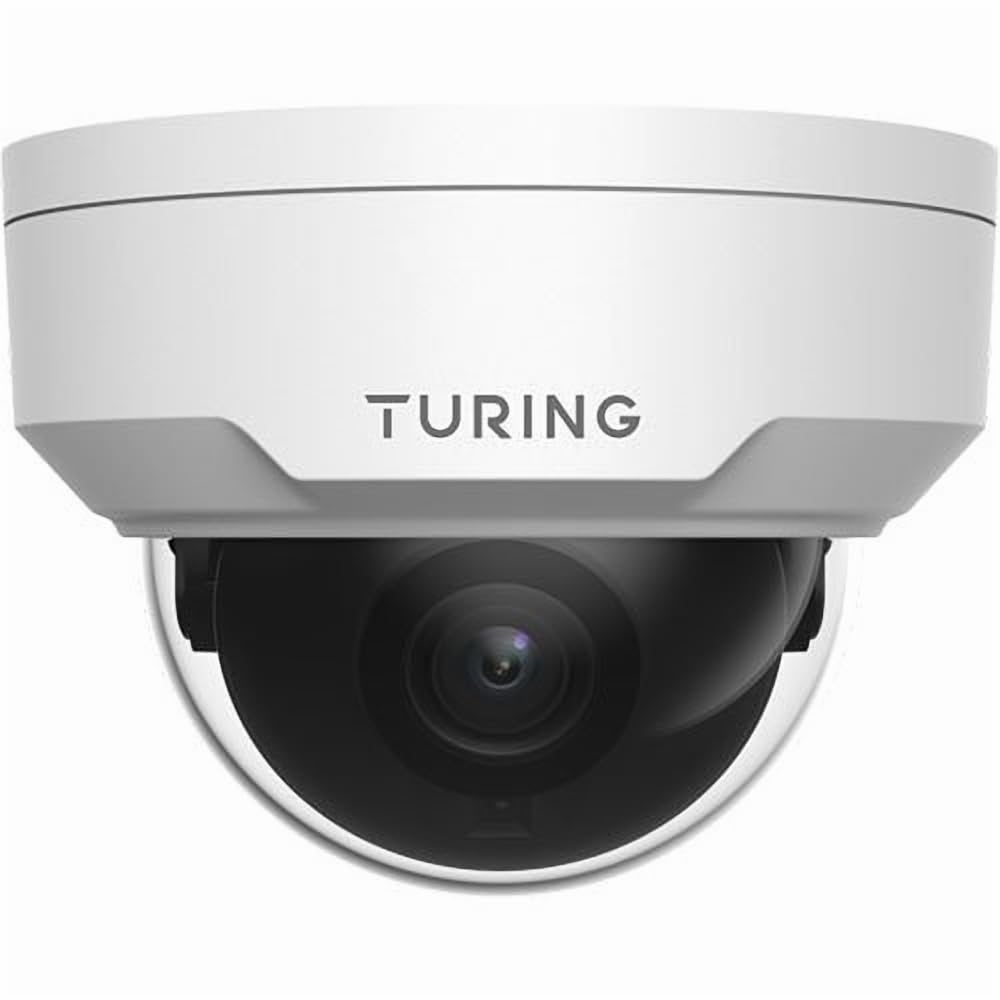
Figura 4.1: Faţă view of the Turing TP-MFD4A28 4MP IR Dome IP Camera, showing its white dome design and lens.
Componente cheie:
- Capac cupolă: Protective cover for the lens and IR LEDs.
- Obiectiv: 2.8mm fixed lens for a wide field of view.
- LED-uri IR: Infrared illuminators for night vision.
- Slot pentru card MicroSD: Located internally, accessible by removing the dome cover.
- Buton de resetare: Located internally, used for factory reset.
- Port Ethernet (RJ45): Pentru conexiune la rețea și Power over Ethernet (PoE).
- Power Input (DC 12V): Optional power input if PoE is not used.
5. Configurare
5.1 Physical Installation (Wall Mount)
- Alegeți o locație: Select a suitable wall-mount location that provides the desired viewing angle and is within range of your network cable.
- Pregătiți suprafața: Use the provided drill template (if available) to mark the screw holes on the wall. Drill pilot holes.
- Mount the Camera Base: Secure the camera's mounting base to the wall using the provided screws and wall plugs.
- Traseul cablurilor: Pass the Ethernet cable through the cable entry point on the mounting base.
5.2 Conectarea la rețea și la alimentare
- Conexiune Ethernet: Connect an Ethernet cable from your PoE switch/injector or network router to the camera's RJ45 port. Use the waterproof connector for outdoor installations.
- Putere (Opțional): Dacă nu utilizați PoE, conectați un adaptor de alimentare CC de 12 V (nu este inclus) la intrarea de alimentare a camerei.
- Verificați puterea: The camera's indicator light (if present) should illuminate, indicating power.
5.3 Instalarea cardului MicroSD
The camera supports up to a 256GB MicroSD card for local storage.
- Deconectați alimentarea: Ensure the camera is powered off before installing or removing the MicroSD card.
- Remove Dome Cover: Carefully twist or unclip the outer dome cover to access the internal components.
- Introduceți cardul MicroSD: Locate the MicroSD card slot and insert the card with the contacts facing down until it clicks into place.
- Replace Dome Cover: Securely reattach the dome cover, ensuring a watertight seal for IP67 protection.
- Formatați cardul: After powering on, format the MicroSD card via the camera's web interface or connected NVR for proper operation.
5.4 Configurare inițială
For initial setup and advanced configuration, access the camera via its web interface or connect it to a Turing Smart Series NVR or Turing Vision Cloud.
- Găsiți adresa IP: Use a network scanner tool or your NVR to discover the camera's IP address on your local network.
- Acces Web Interfata: Deschide a web browser and enter the camera's IP address. Log in using the default credentials (refer to the Quick Start Guide for default username/password).
- Schimbați parola implicită: Din motive de securitate, schimbați parola implicită imediat după prima conectare.
- Setări de rețea: Configure network settings (e.g., static IP, DNS) if required by your network environment.
- Setări de timp: Set the correct date and time for accurate recording timestamps.
6. Operare
6.1 În direct View și Înregistrare
Access the live video feed through your NVR, Turing Vision Cloud, or the camera's web interface. You can initiate manual recordings or configure scheduled/motion-triggered recordings.
- Rezoluţie: The camera supports up to 4MP (2688x1520) resolution. Adjust settings as needed for bandwidth and storage.
- Frecvența cadrelor: Records at 30/25 frames per second for smooth video.
6.2 Night Vision (Smart IR)
The camera automatically switches to night vision mode in low-light conditions, utilizing its Smart IR LEDs to provide clear black-and-white video up to 30 meters (98 feet). TwilightVision technology enhances low-light performance before IR activation.
6.3 Wide Dynamic Range (WDR)
WDR technology helps balance areas of high contrast in the image, ensuring details are visible in both bright and dark regions simultaneously. This is particularly useful in scenes with strong backlighting.
6.4 Motion Detection and Analytics
Configure motion detection zones and sensitivity via the camera's web interface or NVR. When integrated with a Turing Smart Series NVR or Turing Vision Cloud, the camera supports advanced analytics like People and Vehicle Search.
- Tip alertă: Motion Only alerts are supported.
- Configurare: Set up email notifications or NVR alarms for detected events.
7. Întreținere
7.1 Curățarea camerei
Regular cleaning helps maintain optimal image quality.
- Gently wipe the dome cover and lens with a soft, lint-free cloth.
- Pentru murdăria persistentă, folosiți o lavetă ușor tamponată.ampclătiți cu apă. Evitați produsele de curățare abrazive.
- Ensure no moisture enters the camera housing.
7.2 de actualizări de firmware
Verificați periodic Turing-ul website or your NVR system for available firmware updates. Firmware updates can improve performance, add new features, and enhance security. Follow the provided instructions carefully when performing updates.
7.3 Gestionarea cardului MicroSD
If using a MicroSD card for recording, it is recommended to format it periodically (e.g., monthly) to maintain performance and prevent data corruption. Back up any important recordings before formatting.
8. Depanare
| Problemă | Cauza posibila | Soluţie |
|---|---|---|
| Nu există alimentare / Camera nu pornește |
|
|
| Fără feed video |
|
|
| Calitate slabă a imaginii |
|
|
| MicroSD Card Not Recording |
|
|
9. Specificații
| Numărul de model | TP-MFD4A28 |
| Rezoluție statică efectivă | 4 MP (2688x1520) |
| Obiectiv | Obiectiv fix de 2.8 mm |
| Frame Rate | 30 fps |
| Gama de vedere nocturnă | Up to 30m (98.43 Feet) with Smart IR |
| Tehnologie cu lumină scăzută | AmurgViziune |
| Evaluarea internațională de protecție | IP67 (rezistent la intemperii) |
| Rezistența vandalică | IK10 |
| Gama dinamică largă (WDR) | Da |
| Sursa de alimentare | PoE (Power over Ethernet) sau 12V DC |
| Tehnologia de conectivitate | Cablat (Ethernet) |
| Suport pentru carduri MicroSD | Până la 256 GB |
| Tip de montare | Montare pe perete |
| Factor de formă | Dom |
| Dimensiuni (L x l x H) | 4.3 x 4.3 x 3.2 inci |
| Greutatea articolului | 14.9 uncii (0.93 lire) |
| Culoare | Alb |
| Tip de alertă | Doar mișcare |
| Tehnologia senzorului foto | CMOS |
10. Garanție și asistență
Turing products are covered by a manufacturer's warranty. Please refer to the official Turing webconsultați site-ul sau documentația de achiziție pentru termenii și condițiile specifice de garanție.
For technical support, troubleshooting assistance, or warranty claims, please contact Turing customer service through their official website-ul sau informațiile de contact furnizate odată cu achiziția dvs.
Resurse online:
- Turing oficial Website: www.turing.com
- Support Portal: (Check Turing website for specific support links)
Ask a question about this manual
Ask about setup, troubleshooting, compatibility, parts, safety, or missing instructions. Manuals+ will review the question and use this page’s manual context to help answer it.