
1. Introducere
Welcome to your WOOXGEHM 4-in-1 Wired Arcade Fight Stick Joystick. This manual provides essential information for setting up, operating, and maintaining your new arcade controller. Designed for compatibility with Nintendo Switch, PC, PlayStation 3, and Android devices, this joystick enhances your gaming experience with precise control and turbo functions.
2. Informații de siguranță
Ghid de siguranță
- Țineți aparatul departe de apă și umiditate.
- Evitați expunerea dispozitivului la temperaturi extreme.
- Nu încercați să dezasamblați sau să reparați singur dispozitivul.
- Folosiți doar cablurile și accesoriile furnizate.
- A nu se lăsa la îndemâna copiilor mici.
3. Conținutul pachetului
Ce este inclus
- 1 x Universal Arcade Fight Stick
- 1 x Remote Lever Handle (Joystick)
- 1 x Fixed Small Parts (e.g., suction cups)
- 1 x manual de instrucțiuni
4. Produs terminatview
The WOOXGEHM Arcade Fight Stick is designed for comfort and precision, featuring a spherical metal joystick and six round control buttons. It also includes additional buttons for various functions and platform compatibility.

Figura 1: WOOXGEHM 4-in-1 Wired Arcade Fight Stick Joystick, top view. A black arcade fight stick with a red spherical joystick on the left and six red circular action buttons on the right. Smaller function buttons are located above the main action buttons. The surface features a racing car graphic.
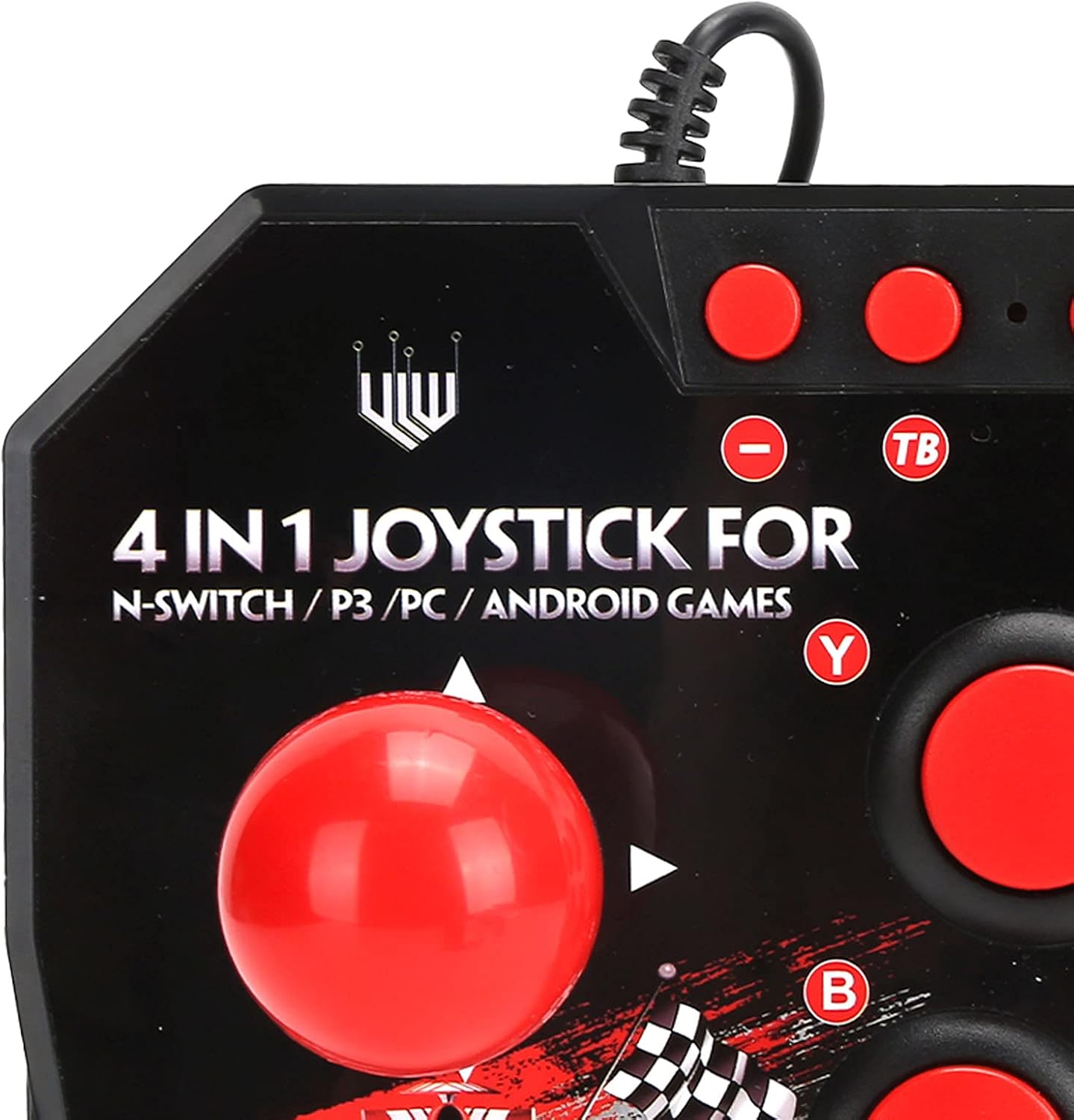
Figura 2: Close-up of WOOXGEHM 4-in-1 Wired Arcade Fight Stick Joystick buttons. A detailed view of the joystick's top panel, showing the "4 IN 1 JOYSTICK FOR N-SWITCH / P3 / PC / ANDROID GAMES" text, along with the red spherical joystick and several red action buttons labeled Y, B, X, A, L, R, and smaller buttons for Turbo functions.

Figura 3: Fund view of WOOXGEHM 4-in-1 Wired Arcade Fight Stick Joystick with suction cups. The underside of the arcade fight stick, showing four clear suction cups designed to secure the device to a flat surface during use. The label indicates "Input: DC5V / 500mA", "Working current: 20mA", and "MADE IN CHINA".
5. Configurare și conectare
The arcade fight stick connects via a wired USB cable. Ensure your console or device is powered on before connecting.
5.1 Conectarea la Nintendo Switch
- Connect the USB cable from the arcade fight stick to an available USB port on your Nintendo Switch dock.
- Ensure "Pro Controller Wired Communication" is enabled in your Switch System Settings.
- Controlerul ar trebui să fie recunoscut automat.
5.2 Conexiune la PC
- Connect the USB cable from the arcade fight stick to an available USB port on your PC.
- The system should automatically install the necessary drivers. If not, manual driver installation may be required (refer to your PC's operating system documentation).
- The controller will be recognized as a standard USB gamepad.
5.3 Conectarea la PlayStation 3 (PS3)
- Connect the USB cable from the arcade fight stick to an available USB port on your PS3 console.
- Controlerul ar trebui să fie recunoscut automat și gata de utilizare.
5.4 Conectarea dispozitivului Android
- Connect the USB cable from the arcade fight stick to your Android device using an OTG (On-The-Go) adapter (not included).
- Ensure your Android device supports OTG functionality.
- The controller should be recognized as an external gamepad.

Figura 4: Multi-platform compatibility. This image illustrates the multi-platform compatibility of the arcade fight stick, showing it connected to a Nintendo Switch console, a PlayStation 3, a PC monitor, and an Android device, highlighting its versatility.

Figura 5: Plug-and-Play functionality. This image highlights the plug-and-play nature of the arcade fight stick, showing it connected to a PlayStation console, a Nintendo Switch, and a monitor displaying game content, emphasizing ease of use across platforms.
6. Instrucțiuni de utilizare
6.1 Controale de bază
- joystick: Use the spherical metal joystick for directional movement.
- Butoane de acțiune: The six large round buttons (A, B, X, Y, L, R) are for primary game actions.
- Butoane funcționale: Smaller buttons above the main action buttons provide additional controls (e.g., Home, Select, Start).
6.2 Turbo Functions
The controller features turbo functions for rapid button presses.
- To activate Turbo for a button, press and hold the desired action button, then press the "TB" (Turbo) button. The button will now rapidly repeat its input when held down.
- To deactivate Turbo, press and hold the same action button, then press the "TB" button again.
6.3 Comutare mod
The joystick may have a mode switch to toggle between different input modes (e.g., D-Pad, Left Analog Stick, Right Analog Stick) for specific games or platforms. Refer to the small buttons near the top left of the controller for these options.
7. Întreținere și îngrijire
Îngrijirea produsului
- curatenie: Wipe the surface of the joystick with a soft, dry cloth. Do not use abrasive cleaners or solvents.
- Depozitare: Păstrați dispozitivul într-un loc răcoros și uscat, ferit de lumina directă a soarelui atunci când nu este utilizat.
- Organizare de cabluri: Evitați îndoirile bruște sau tragerea excesivă a cablului USB pentru a preveni deteriorarea.
8. Depanare
Probleme comune și soluții
- Controlerul nu este recunoscut:
Soluţie: Ensure the USB cable is securely connected to both the joystick and the device/console.
Soluţie: For Nintendo Switch, verify "Pro Controller Wired Communication" is enabled in system settings.
Soluţie: Încercați să vă conectați la un alt port USB.
Soluţie: Restart your console/PC/Android device. - Butoanele sau joystick-ul nu răspund:
Soluţie: Disconnect and reconnect the joystick.
Soluţie: Test the joystick on another compatible device to determine if the issue is with the controller or the device. - Turbo function not working:
Soluţie: Ensure you are correctly activating/deactivating the turbo mode as described in the Operating Instructions.
9. Specificații
Specificatii tehnice
| Caracteristică | Detaliu |
|---|---|
| Model | B0C7GYXMLZ |
| Marca | WOOXGEHM |
| Tip controler | Buton de control, joystick |
| Interfață hardware | USB |
| Material | Acrilonitril Butadien Stiren (ABS) |
| Greutatea articolului | 0.52 kilograme (1.14 de lire sterline) |
| Dimensiune (aprox.) | 21 x 15 x 6 cm (8.3 x 5.9 x 2.4 țoli) |
| Vol. De lucrutage / Curent | DC5V/20mA |
| Lungimea cablului USB | 3 m / 9.8 ft |
| Compatibilitate | Nintendo Switch, PC, PS3, Android Games |

Figura 6: Specificații tehnice de mai susview. An image displaying the technical specifications of the arcade fight stick, including item type, material (ABS), size (21 x 15 x 6 cm), working voltage/current (DC5V/20mA), and USB cable length (3m/9.8ft), along with a list of package contents.
10. Garanție și asistență
Informații despre garanție
This WOOXGEHM product comes with a standard manufacturer's warranty. For specific warranty terms and conditions, please refer to the warranty card included in your package or contact WOOXGEHM customer support.
Asistență pentru clienți
If you encounter any issues or have questions regarding your Arcade Fight Stick, please visit the official WOOXGEHM websau contactați serviciul pentru clienți pentru asistență.