
USHINING T3105
USHINING 4G Senior Flip Phone User Manual
Model: T3105
Introducere
Thank you for choosing the USHINING 4G Senior Flip Phone. This device is specifically designed for ease of use, featuring large buttons, clear sound, and a simple operating system, making it ideal for seniors. This manual provides comprehensive instructions to help you set up, operate, and maintain your new phone.
Conținutul pachetului
Vă rugăm să bifați căsuța pentru următoarele elemente:
- USHINING 4G Senior Cell Phone
- Dock de încărcare
- Long Lasting Battery (1000mAh)
- Manual de utilizare
- Charging Cord (Power Adapter)
- Speedtalk SIM Card (Included with some packages)
- Carcasa pentru telefon
- Ejector tavă SIM
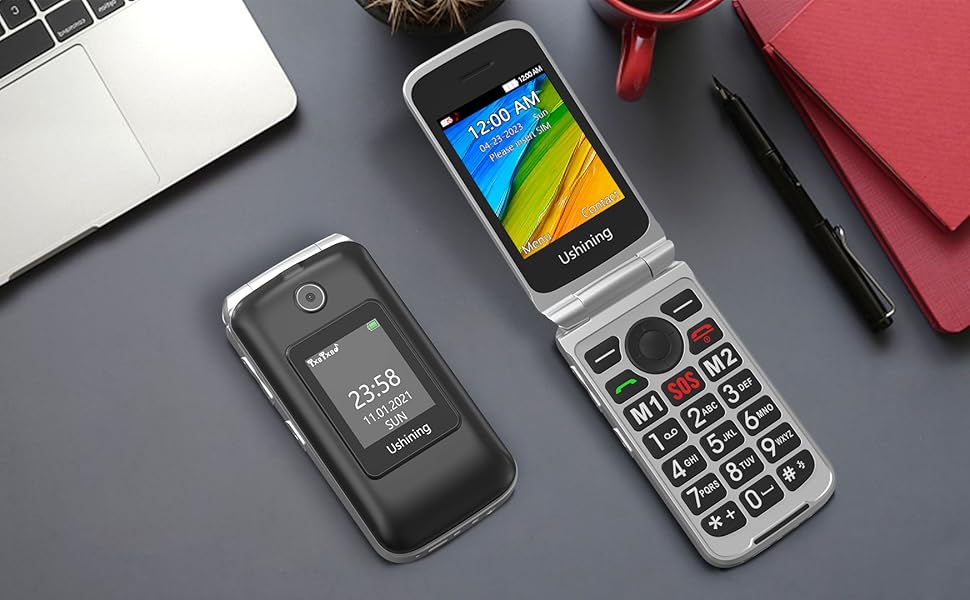
Image: All items included in the USHINING 4G Senior Flip Phone package.
Produs terminatview
The USHINING 4G Senior Flip Phone features a user-friendly design with essential functions for clear communication.

Imagine: față view of the USHINING 4G Senior Flip Phone, both open and in its charging dock.
Caracteristici cheie:
- Butoane mari: Easy to press and navigate.
- Sunet clar: High-definition loudspeakers for clear calls.
- Ecrane duble: 2.8-inch inner screen and 1.77-inch external screen.
- Butonul SOS: For emergency calls.
- Apelare rapida: Quick access to important contacts.
- Lanternă: Built-in 30M powerful flashlight.
- Radio FM: External FM radio.
- Dock de încărcare: Convenient and easy charging.
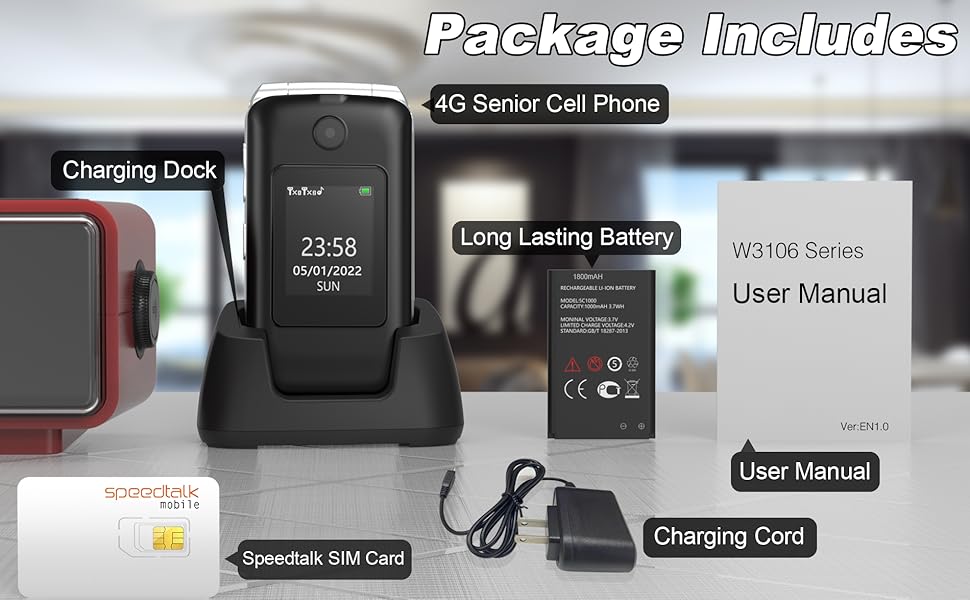
Image: Visual representation of the phone's main features.
Ghid de instalare
1. Introducerea cartelei SIM și a bateriei
- Scoateți capacul din spate: Deschideți ușor capacul din spate al telefonului.
- Introduceți cartela/cartelele SIM: Locate the SIM card slots. This phone supports dual SIM cards. Insert your 4G compatible SIM card(s) into the designated slots with the gold contacts facing down. Ensure the SIM card is correctly oriented as indicated by the diagram near the slot.
- Introduceți bateria: Introduceți bateria în compartimentul bateriei, aliniind contactele aurii de pe baterie cu contactele din telefon.
- Înlocuiți capacul din spate: Securely snap the back cover into place.

Imagine: Internă view of the phone showing SIM card and battery placement. IMEI numbers: 359031100341173, 359031100351057.
2. Încărcarea telefonului
Before first use, fully charge the phone battery. The phone can be charged using the included charging dock or directly via the charging cable.
- Utilizarea stației de încărcare: Connect the charging cord to the charging dock and plug the adapter into a power outlet. Place the phone into the charging dock, ensuring it sits securely. The phone will indicate charging.
- Încărcare directă: Connect the charging cord directly to the phone's charging port and plug the adapter into a power outlet.
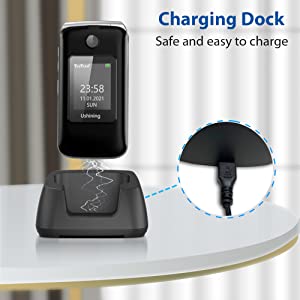
Image: Illustration of the phone being charged using the convenient charging dock.
Instrucțiuni de operare
Pornire/Oprire
- Pornire: Apăsați și mențineți apăsat butonul Pornire/Încheiere apel (butonul roșu) până când ecranul se aprinde.
- Oprire: Apăsați și mențineți apăsat butonul Pornire/Închidere apel până când apar opțiunile de oprire, apoi selectați „Oprire”.
Efectuarea și primirea apelurilor
- Efectuarea unui apel: Formați numărul folosind tastatura și apăsați butonul Apel (butonul verde).
- Primirea unui apel: When the phone rings, press the Call button (green button) to answer. To end a call, press the Power/End Call button (red button).
Buton de urgență SOS
The SOS button on the rear cover is designed for emergencies. You can preset up to 5 emergency contacts.
- Setting SOS Contacts: Navigate to the SOS settings in the phone's menu to add or edit emergency numbers.
- Activarea SOS: In an emergency, press and hold the SOS button for a few seconds. The phone will automatically dial the preset emergency contacts one by one until a connection is made. It will also send an emergency SMS message to these contacts.
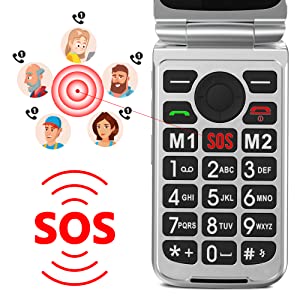
Image: Illustration of the SOS emergency call function and its reach to pre-set contacts.
Apelare rapidă
Assign frequently called numbers to speed dial keys (2-9) for quick access.
- Setarea apelării rapide: Go to Phonebook or Settings, find Speed Dial options, and assign contacts to numbers 2-9.
- Utilizarea apelării rapide: Press and hold the assigned number key to dial the contact.
Lanternă
To activate the built-in flashlight, locate the dedicated flashlight button on the side of the phone or access it through the menu.
Radio FM
The phone features an external FM radio. Access it through the main menu. Headphones may be required for optimal reception.
Compatibilitatea rețelei
This USHINING 4G Senior Flip Phone is designed to work with specific 4G LTE networks. Please ensure your carrier is compatible before use.
- Compatible Carriers (using T-Mobile service): T-Mobile (Prepaid Plan), MetroPCS, Tello Mobile, Ultra Mobile, SpeedTalk, Simple Mobile, Mint Mobile, Red Pocket (GSMT).
- NOT Compatible with: CDMA Carriers (Verizon, Sprint, Boost, PagePlus) or AT&T.
Image: Visual guide to compatible and incompatible network carriers.
Întreţinere
Îngrijirea bateriei
- Evitați temperaturile extreme, care pot reduce durata de viață a bateriei.
- Do not leave the phone uncharged for extended periods.
- Use only the original or certified compatible charger and battery.
Curatenie
- Ștergeți telefonul cu o lavetă moale și uscată.
- Nu utilizați substanțe chimice dure sau produse de curățare abrazive.
- Păstrați portul de încărcare curat de praf și resturi.
Depanare
| Problemă | Cauza posibila | Soluţie |
|---|---|---|
| Telefonul nu pornește. | Bateria este descărcată sau nu este introdusă corect. | Încărcați telefonul timp de cel puțin 30 de minute. Asigurați-vă că bateria este așezată corect. |
| No network signal / "Emergency calls only". | SIM card not inserted correctly, incompatible carrier, or incorrect APN settings. |
|
| Nu aud apelantul / Apelantul nu mă aude. | Volume too low, microphone blocked, or network issue. | Adjust call volume. Ensure microphone is not covered. Try moving to an area with better network coverage. |
| Telefonul se blochează sau nu răspunde. | Eroare temporară de software. | Scoateți și reintroduceți bateria pentru a efectua o resetare completă. |
Specificații
| Numele modelului | USHINING 4G Senior Flip Phone |
| Numărul de model al articolului | T3105 |
| Dimensiunile produsului | 4.09 x 2.11 x 0.83 inci |
| Greutatea articolului | 9.1 uncii |
| Capacitatea bateriei | Litiu-ion 1000 mAh (inclusă) |
| Timp de vorbire | 5-6 ore |
| Timp de așteptare | Over 100 hours (4 days) |
| Dimensiunea internă a ecranului | 2.8 inchi |
| Dimensiunea ecranului extern | 1.77 inchi |
| Rezoluţie | 240 x 320 |
| RAM | 64 MB |
| Capacitate de stocare a memoriei | 128 MB |
| Tehnologia celulară | 4G LTE |
| Comunicare fără fir | Bluetooth, Celulă |
| Jack audio | 3.5 mm |
| Factor de formă | Flip |
| Culoare | Negru |
| Producător | USHINING |
Garanție și suport
For warranty information and technical support, please refer to the warranty card included in your package or contact USHINING customer service. Keep your purchase receipt as proof of purchase.
For further assistance, please visit the official USHINING website or contact their support channels as provided in your product documentation.
Ask a question about this manual
Ask about setup, troubleshooting, compatibility, parts, safety, or missing instructions. Manuals+ will review the question and use this page’s manual context to help answer it.