
1. Introducere
The MOBI CONNECT Smart DualScan Bluetooth Thermometer (Model 700026) is designed for accurate and versatile temperature measurement. It offers multiple reading methods including ear, forehead, room, and object temperature. This device features a backlit screen, LED fever indicators, and memory recall for up to 20 previous readings. It supports both Fahrenheit and Celsius modes and can connect via Bluetooth to the MOBI Smart App for enhanced tracking and management capabilities.

Image: The MOBI CONNECT Smart DualScan Bluetooth Thermometer, its packaging, and a smartphone displaying the companion app.
2. Conținutul pachetului
Verificați dacă toate articolele sunt prezente în colet:
- 1 x MOBI CONNECT Smart DualScan Bluetooth Thermometer
- 1 x Protective Cap (for forehead mode)
- 1 x Husă de depozitare
- 1 x Manual de utilizare
- 1 x Ghid de pornire rapidă
- 2 x baterii AAA

Imagine: Detaliată view of the thermometer with its components labeled for easy identification.
3. Configurare
3.1. Instalarea bateriei
- Open the battery compartment cover located on the back of the thermometer.
- Introduceți două baterii AAA, asigurându-vă că polaritatea este corectă (+/-).
- Închideți bine capacul compartimentului bateriei.
3.2. Pornire/Oprire
- Pentru a porni, apăsați tasta SCAN/Power button. The device will perform a self-test and display the last reading.
- The thermometer will automatically power off after approximately 30 seconds of inactivity to conserve battery life.
3.3. Switching Temperature Units (Fahrenheit/Celsius)
Cu dispozitivul pornit, apăsați și mențineți apăsat butonul MOD button for 3 seconds to switch between Fahrenheit (°F) and Celsius (°C).
4. Moduri de operare
4.1. Forehead Measurement
- Ensure the protective cap is on the probe.
- Apăsați tasta SCAN/Power butonul pentru a porni termometrul.
- Position the thermometer approximately 0.5 to 1 inch (1-2.5 cm) from the center of the forehead.
- Țineți apăsat butonul SCANĂ button. A beep will sound, and the temperature will be displayed on the LCD screen.

Image: Demonstrating forehead temperature measurement.
4.2. Ear Measurement
- Gently remove the protective cap from the probe.
- Apăsați tasta SCAN/Power butonul pentru a porni termometrul.
- Carefully insert the probe into the ear canal. For children under 1 year, gently pull the ear straight back. For children over 1 year and adults, gently pull the ear up and back.
- Țineți apăsat butonul SCANĂ button. A beep will sound, and the temperature will be displayed on the LCD screen.

Image: Removing the protective cap for ear measurement.

Image: Demonstrating ear temperature measurement.
4.3. Room and Object Temperature Measurement
The thermometer can also measure ambient room temperature and the temperature of objects (e.g., liquids, surfaces). To switch to these modes, press the MOD button repeatedly until the desired icon (room or object) appears on the display. Then, point the thermometer at the object or area and press SCANĂ.
4.4. Fever Indicator
The LCD display changes color to indicate temperature status:
- Iluminare de fundal verde: Indicates a normal body temperature.
- Iluminare de fundal roșie: Indicates a high body temperature (fever warning).
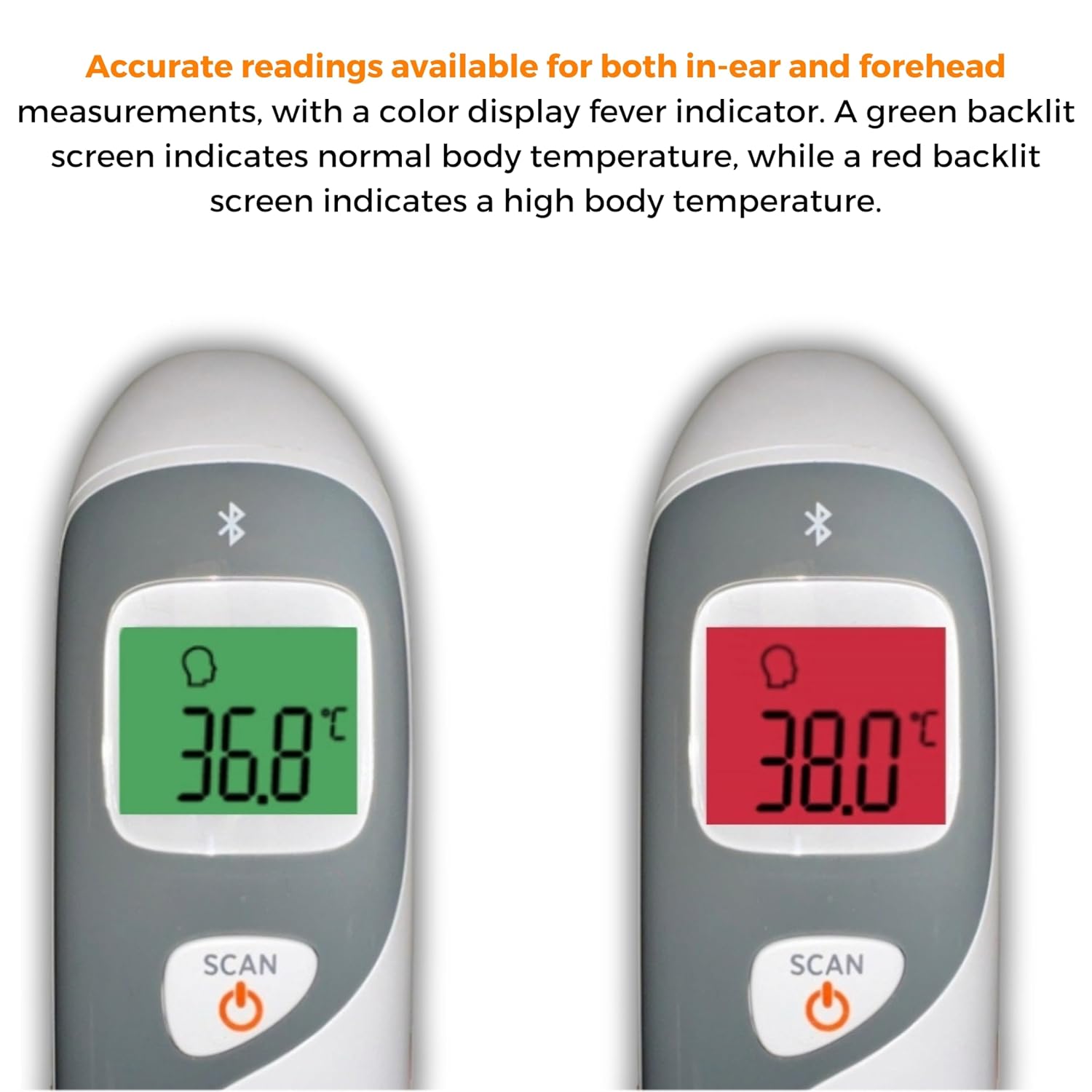
Image: The thermometer's color-changing LCD display indicating normal (green) and high (red) temperatures.
4.5. Reamintirea memoriei
The thermometer stores the last 20 temperature readings. To access these readings, press the MEM/MUTE button while the device is on. Each press will cycle through the stored readings.
5. Bluetooth Connectivity and MOBI Smart App
The MOBI CONNECT Smart DualScan Thermometer can be used independently or paired with your smartphone via Bluetooth for enhanced tracking and features through the MOBI Smart App.
5.1. Descărcare și împerechere a aplicației
- Download the "MOBI Smart" app from your device's app store (available on iOS and Android).
- Asigurați-vă că Bluetooth este activat pe smartphone-ul dvs.
- Open the MOBI Smart App and follow the on-screen instructions to pair your thermometer.
5.2. Caracteristicile aplicației
- Urmărire automată: Automatically records temperature readings from the thermometer.
- Utilizatori multipli Profiles: Create and manage profiles for each family member to track their health data independently.
- Înregistrarea datelor: Add comments to each reading for context.
- Reporting & Graphs: View powerful reports and graphs for daily, weekly, monthly, or yearly temperature trends.
- Opțiuni de export: Export data for sharing with healthcare professionals.
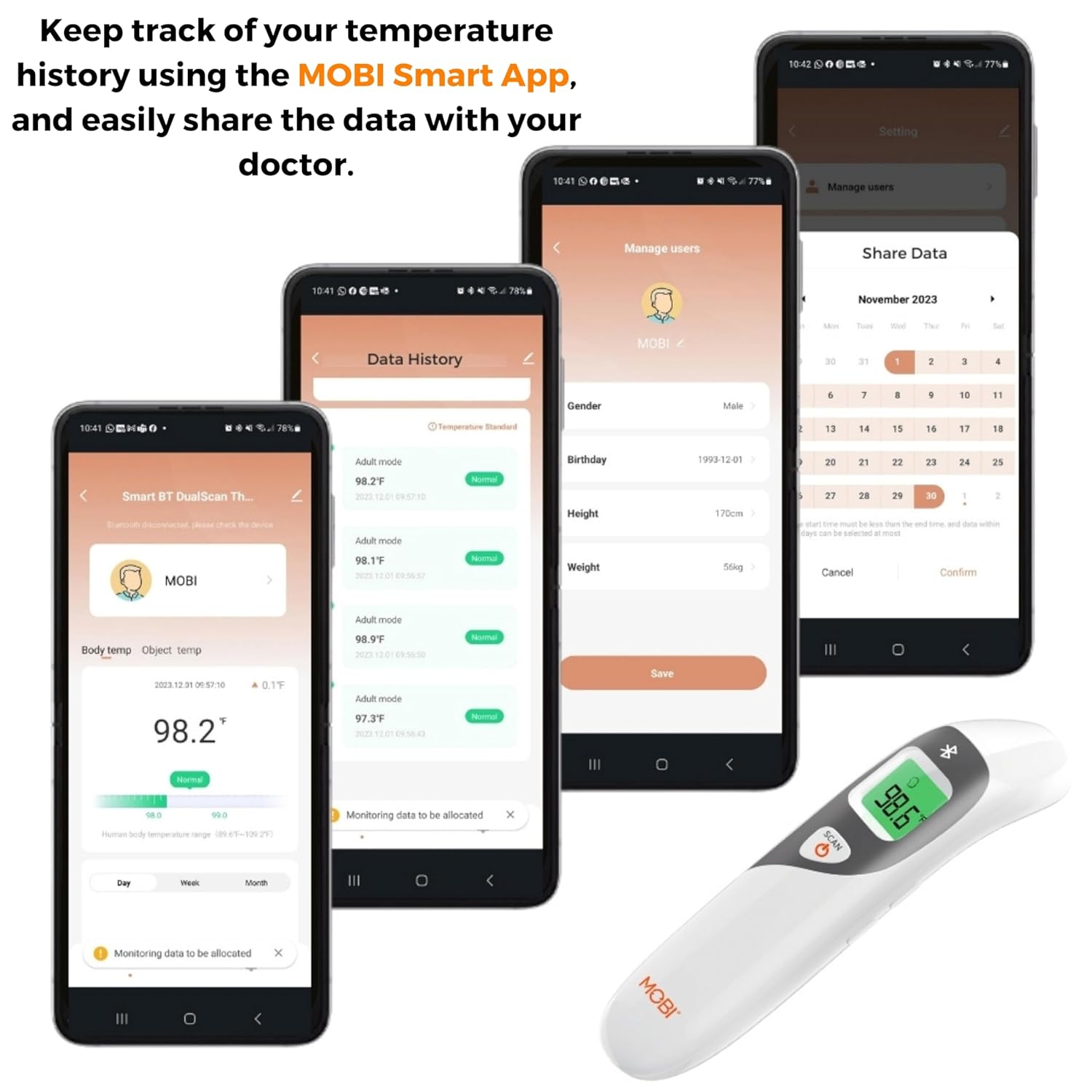
Image: Screenshots of the MOBI Smart App interface, showing data tracking and user management.
5.3. Videoclip oficial al produsului
Video: Un oficial s-a terminatview of the MOBI Smart DualScan Bluetooth Ear & Forehead Thermometer, demonstrating its features and usage.
6. Întreținere
6.1. Curatenie
To clean the thermometer, wipe it with a soft, damp cloth. Do not immerse the device in water or use abrasive cleaners. Ensure the probe is clean before each use, especially for ear measurements.
6.2. Depozitare
Store the thermometer in its protective pouch in a cool, dry place, away from direct sunlight and extreme temperatures. Remove batteries if the device will not be used for an extended period.
7. Depanare
- "Lo" or "Hi" Reading: Indicates a temperature outside the measurable range. Ensure proper placement and try again.
- Citiri inexacte:
- Check for proper probe placement (ear or forehead).
- Asigurați-vă că sonda este curată.
- Verify the correct mode (Adult/Child/Object) is selected if applicable.
- Allow the thermometer to acclimate to room temperature for 30 minutes if it has been in a significantly different environment.
- Probleme de conexiune Bluetooth:
- Asigurați-vă că Bluetooth este activat pe smartphone-ul dvs.
- Restart the thermometer and the MOBI Smart App.
- Ensure the thermometer is within range of your smartphone.
- Fără afișare: Verificați instalarea bateriei și înlocuiți-le dacă este necesar.
8. Specificații
| Numărul de model | 700026 |
| Sursa de alimentare | Alimentat cu baterii (2 x AAA) |
| Tip de afișare | LCD cu iluminare din spate |
| Conectivitate | Bluetooth |
| Moduri de măsurare | Ear, Forehead, Room, Object |
| Unități de temperatură | Fahrenheit (°F) / Celsius (°C) |
| Rechemare memorie | Ultimele 20 de lecturi |
| Îngrijirea produsului | Ștergeți curățați |
| Material | Plastic |
| Producător | Mobi Technologies Inc. |
9. Garanție și asistență
For warranty information or technical support, please contact Mobi Technologies Inc. directly. Refer to the product packaging or the official MOBI website pentru cele mai recente date de contact.