
1. Introducere
Thank you for choosing the SPLITSKY NZFS Kids Alarm Clock. This device combines an alarm clock, white noise sleep aid, and an 8-mode RGB night light, designed to assist with sleep and wake-up routines for children and adults. Please read this manual thoroughly to understand its features and ensure proper operation.
Informații de siguranță:
- Țineți dispozitivul departe de apă și de medii cu umiditate ridicată.
- Nu încercați să dezasamblați sau să reparați singur dispozitivul.
- Use only the provided USB-C power cable or a certified equivalent.
- Asigurați o ventilație adecvată în jurul dispozitivului.
2. Conținutul pachetului
Verificați dacă toate articolele sunt prezente în colet:
- SPLITSKY NZFS Kids Alarm Clock
- 1.2M (4.7 inch) USB-C Power Cable
- Manual de utilizare (acest document)
- 1 x CR2032 Lithium Ion Battery (pre-installed for memory backup)
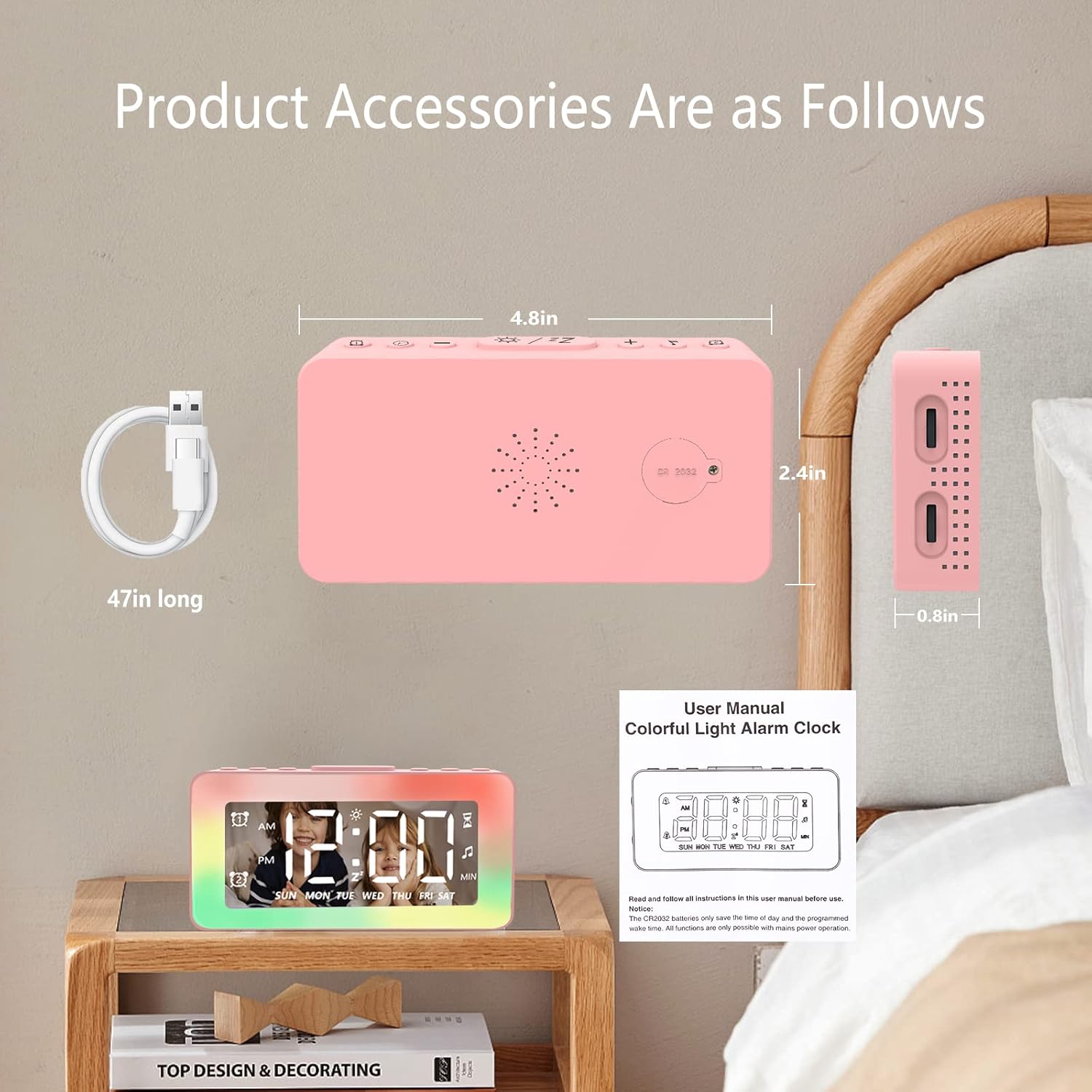
Image: The SPLITSKY NZFS Kids Alarm Clock, a USB-C power cable, and the user manual are included in the package.
3. Produs terminatview
Familiarizează-te cu butoanele și porturile ceasului tău deșteptător:

Imagine: Detaliată view of the alarm clock's top buttons and side ports, including Alarm 1, Time Setting, Light Minus/Settings, Snooze/Light Mode Switch, Light Plus/Setup, Music Switch, Alarm 2, Volume Setting, Time Brightness Setting, USB Output Charging Port, and Type-C Input Interface.
- Buton Alarmă 1: Set and activate Alarm 1.
- Buton de setare a orei: Reglați ora curentă.
- Light Minus / Settings Button: Decrease light brightness or navigate settings.
- Snooze / Light Mode Switch Button: Activate snooze, or cycle through light modes.
- Light Plus / Setup Button: Increase light brightness or confirm settings.
- Buton de comutare a muzicii: Cycle through white noise sounds.
- Buton Alarmă 2: Set and activate Alarm 2.
- Volume Setting Wheel (Side): Adjust alarm and white noise volume.
- Time Brightness Setting Wheel (Side): Reglați luminozitatea afișajului.
- USB Output Charging Port (Side): Charge external devices.
- Type-C Input Interface (Side): Connect power cable to the alarm clock.
4. Configurare
4.1 Conexiune la alimentare
- Connect the provided USB-C power cable to the Type-C Input Interface on the side of the alarm clock.
- Conectați celălalt capăt al cablului USB-C la un adaptor de alimentare USB compatibil (nu este inclus) sau la un port USB.
- Afișajul se va ilumina, indicând că ceasul este pornit.

Image: The SPLITSKY NZFS Kids Alarm Clock is shown powered on and connected via its USB-C port, also demonstrating its capability to charge a smartphone.
4.2 Battery Installation (Memory Backup)
The alarm clock includes a pre-installed CR2032 battery. This battery serves as a memory backup to retain time and alarm settings during a power outage or when the main power is disconnected. It does not power the clock for regular operation.
- If the battery needs replacement, locate the battery compartment on the back of the unit.
- Folosiți o șurubelniță mică pentru a deschide compartimentul.
- Înlocuiți-l cu o baterie CR2032 nouă, asigurând polaritatea corectă.
- Închideți bine compartimentul.
5. Instrucțiuni de utilizare
5.1 Setting the Time (12H/24H Format)
- Țineți apăsat butonul Buton de setare a orei until the hour digits begin to flash.
- Utilizați Light Minus / Settings Button (jos) sau Light Plus / Setup Button (up) to adjust the hour.
- Apăsați tasta Buton de setare a orei again to move to minute adjustment. Adjust minutes using the Light Minus/Plus buttons.
- Apăsați tasta Buton de setare a orei a third time to select 12-hour or 24-hour format. Adjust using the Light Minus/Plus buttons.
- Apăsați tasta Buton de setare a orei încă o dată pentru a confirma și a ieși din modul de setare a orei.
5.2 Setting Alarms (Dual Alarm, Daily/Weekday/Weekend Mode)
The clock supports two independent alarms (Alarm 1 and Alarm 2).
- Țineți apăsat butonul Butonul Alarmă 1 (for Alarm 1) or Butonul Alarmă 2 (for Alarm 2) until the alarm hour digits flash.
- Utilizați Light Minus / Settings Button or Light Plus / Setup Button pentru a regla ora.
- Press the respective Alarm Button again to move to minute adjustment. Adjust minutes using the Light Minus/Plus buttons.
- Press the respective Alarm Button again to select the alarm mode:
- Mod zilnic: Alarma sună în fiecare zi.
- Weekday Mode: Alarma sună de luni până vineri.
- Weekend Mode: Alarma sună sâmbătă și duminică.
- Press the respective Alarm Button once more to confirm and exit alarm setting mode.
- To enable/disable an alarm, short press the Butonul Alarmă 1 or Butonul Alarmă 2O pictogramă de alarmă va apărea/dispăre pe afișaj.
5.3 Funcția Snooze
Când sună o alarmă, atingeți Snooze / Light Mode Switch Button on top to activate snooze. The alarm will pause for 9 minutes and then sound again. This can be repeated multiple times.
5.4 Night Light (8 Modes RGB, 10-level dimming)
The alarm clock features 6 solid color lights and 2 ambient colorful lights.
- Apăsați scurt pe Snooze / Light Mode Switch Button to turn on the night light and cycle through the 8 color modes.
- To adjust the brightness (10 levels), use the Light Minus / Settings Button or Light Plus / Setup Button while the night light is active.
- To turn off the night light, continue pressing the Snooze / Light Mode Switch Button până când lumina se stinge.

Image: Multiple SPLITSKY NZFS Kids Alarm Clocks are shown, each displaying a different color from the 8 available RGB night light modes.
5.5 White Noise Sleep Aid (8 Sounds)
The clock offers 8 soothing sounds to aid sleep.
- Apăsați scurt pe Buton de comutare pentru muzică to turn on the white noise and cycle through the available sounds.
- To adjust the volume (16 levels), use the Volume Setting Wheel on the side of the clock.
- To turn off the white noise, continue pressing the Buton de comutare pentru muzică until the sound stops.

Image: The SPLITSKY NZFS Kids Alarm Clock is displayed on a bedside table, with icons illustrating the various white noise options such as rain, cicadas, piano, bonfire, waves, birdsong, and church bells.
5.6 Sleep Timer (10-120 minutes)
The sleep timer allows you to set a duration for the white noise and/or night light to play before automatically turning off.
- While white noise or night light is active, press and hold the Buton de comutare pentru muzică (for white noise timer) or Snooze / Light Mode Switch Button (for light timer).
- Utilizați Light Minus / Settings Button or Light Plus / Setup Button to select the desired timer duration (10, 20, 30, 60, 90, 120 minutes).
- Press the respective button again to confirm the timer setting. The timer icon will appear on the display.
5.7 Reglarea luminozității afișajului
Adjust the brightness of the LED time display using the Time Brightness Setting Wheel on the side of the clock.
5.8 port de încărcare USB
The USB output charging port on the side of the alarm clock can be used to charge other small electronic devices, such as smartphones. Connect your device's charging cable to this port.
6. Întreținere
6.1 Curățare
- Asigurați-vă că dispozitivul este deconectat înainte de curățare.
- Ștergeți suprafața cu o cârpă moale și uscată.
- Nu utilizați agenți de curățare abrazivi, solvenți sau spray-uri chimice.
6.2 Depozitare
When not in use for extended periods, store the alarm clock in a cool, dry place, away from direct sunlight and extreme temperatures.
7. Depanare
If you encounter issues with your SPLITSKY NZFS Kids Alarm Clock, refer to the table below for common problems and solutions.
| Problemă | Cauza posibila | Soluţie |
|---|---|---|
| Afișajul ceasului este oprit sau întunecat. | Not connected to power; Time brightness set too low. | Ensure USB-C cable is securely connected to a power source. Adjust the Time Brightness Setting Wheel. |
| Alarma nu sună. | Alarm not activated; Alarm volume too low. | Check if the alarm icon is displayed. If not, short press the respective Alarm Button to activate. Adjust the Volume Setting Wheel. |
| Time/settings reset after power disconnection. | CR2032 backup battery is depleted or missing. | Înlocuiți bateria CR2032 în compartimentul pentru baterii. |
| Night light or white noise not working. | Function not activated; Sleep timer active. | Apăsați scurt pe Snooze / Light Mode Switch Button or Buton de comutare pentru muzică to activate. Check if a sleep timer is set. |
8. Specificații
| Caracteristică | Detaliu |
|---|---|
| Marca | SPLITSKY |
| Numărul de model | NZFS |
| Tip de afișare | LED digital |
| Dimensiunile produsului | 3.17"W x 3.17"H (approximately 8.05 cm W x 8.05 cm H) |
| Greutatea articolului | 8.1 uncii (aproximativ 230 de grame) |
| Sursa de alimentare | Corded Electric (USB-C), Battery Powered (CR2032 for memory) |
| Moduri de lumină de noapte | 8 (6 solid colors, 2 ambient colorful) with 10-level dimming |
| Sunete de zgomot alb | 8 sunete liniștitoare |
| Tonuri de alarmă | 7 wake-up alarm tones with 16-level volume control |
| Caracteristici de alarmă | Dual Alarm, Daily/Weekday/Weekend modes, 9-minute Snooze |
| Funcția de cronometru | 10-120 minute sleep timer for sounds and lights |
| Conectivitate | USB-C Input, USB-A Output (for charging external devices) |
| Material | Acrilonitril butadienă stiren |
9. Garanție și asistență
9.1 Informații despre garanție
Please refer to the warranty information provided at the time of purchase or contact your retailer for details regarding the product warranty. Keep your proof of purchase for any warranty claims.
9.2 Asistență pentru clienți
For technical assistance, troubleshooting beyond this manual, or general inquiries, please contact the seller through the platform where you purchased the product. Provide your order number and a detailed description of the issue for prompt support.