
1. Introducere
This manual provides essential information for the safe and efficient operation of your Acekool Portable Air Conditioner. This 3-in-1 unit offers cooling, fan, and dehumidification functions, designed to provide comfort in various indoor environments. Please read this manual thoroughly before installation and use, and retain it for future reference.
2. Informații de siguranță
Pentru a preveni rănirea utilizatorului sau a altor persoane și daune materiale, trebuie respectate următoarele instrucțiuni. Funcționarea incorectă din cauza ignorării instrucțiunilor poate provoca daune sau daune.
- Siguranta electrica: Ensure the power supply matches the unit's requirements (220 Volts). Do not operate with a damaged power cord or plug. Do not share the electrical outlet with other appliances. Always unplug the unit before cleaning or servicing.
- Agent frigorific (R290): This appliance contains R290 refrigerant, which is flammable. Keep the unit away from open flames, heat sources, and ignition sources. Do not puncture or burn the refrigerant circuit.
- Plasare: Place the unit on a flat, stable surface. Maintain a minimum distance of 20 cm from walls or other objects to ensure proper airflow. Do not block air inlets or outlets.
- Copii și animale de companie: Keep children and pets away from the unit. Do not allow children to play with the appliance or its controls.
- Drenarea apei: Ensure proper drainage of condensed water, especially during dehumidification mode, to prevent water overflow and damage.
- Întreţinere: Efectuați întreținerea numai așa cum este descris în acest manual. Pentru reparații, contactați personalul de service calificat.
3. Ce se află în cutie
Carefully unpack the box and ensure all items are present and undamaged. If any items are missing or damaged, contact customer support.
- Portable Air Conditioner Unit (x1)
- Telecomandă (x1)
- Exhaust Hose (x1)
- Window Sealing Kit (x1)
- Drain Hose (x1)
- Manual de utilizare (x1)

Image: All components included in the product package, clearly labeled with numbers for identification.
4. Configurare
Urmați acești pași pentru a configura aparatul de aer condiționat portabil pentru performanță optimă.
4.1 Plasarea unității
- Așezați unitatea pe o suprafață fermă și plană în camera dorită.
- Ensure there is at least 20 cm of space around the unit for proper air circulation.
- Poziționați unitatea lângă o fereastră sau o ușă pentru instalarea furtunului de evacuare.
4.2 Instalarea furtunului de evacuare
- Attach the exhaust hose connector to the back of the air conditioner unit.
- Extindeți furtunul de evacuare și atașați adaptorul kitului pentru fereastră la celălalt capăt.
- Adjust the window sealing plate to fit your window opening. Secure it in place.
- Introduceți adaptorul kitului pentru fereastră în deschiderea plăcii de etanșare a ferestrei.
- Ensure the exhaust hose is as straight and short as possible to maximize efficiency. Avoid kinks or sharp bends.

Image: Visual instructions demonstrating the process of connecting the exhaust hose to the unit and installing it in a window.

Imagine: Detaliată view of the exhaust hose connection points, highlighting the ease of installation.
4.3 Conexiune la alimentare
Plug the power cord into a grounded electrical outlet (220V). Do not use extension cords or adapters.
5. Instrucțiuni de utilizare
Your Acekool Portable Air Conditioner can be operated using the control panel on the unit or the included remote control.
5.1 Panoul de control pesteview
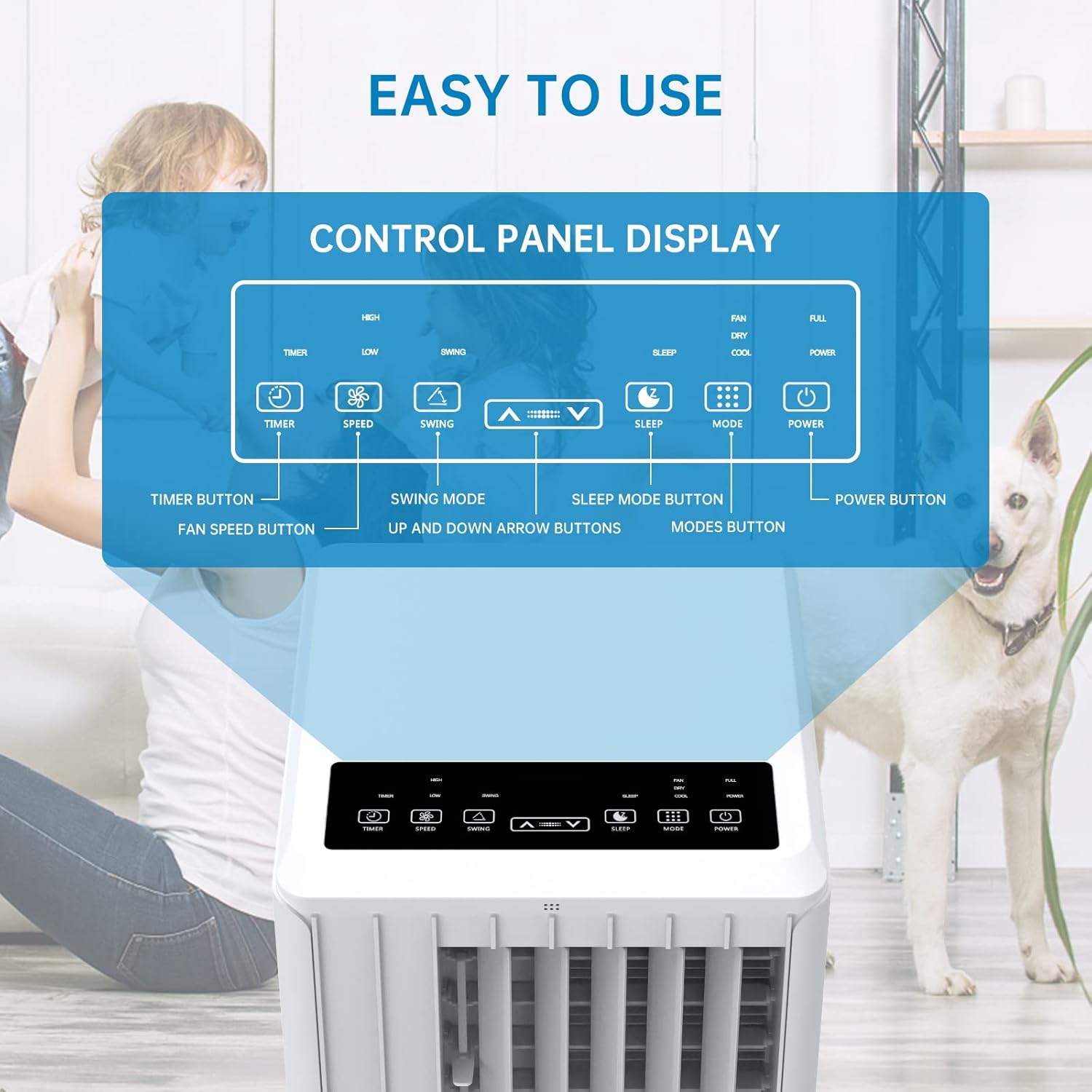
Image: A detailed diagram illustrating the control panel buttons and their functions, including Timer, Speed, Swing, Sleep, Mode, and Power.

Image: A user interacting with the touch-sensitive control panel, demonstrating its intuitive design.
- Buton de alimentare: Pornește sau oprește unitatea.
- Butonul de mod: Comută între modurile Răcire, Ventilator și Dezumidificare.
- Buton de viteza: Reglează viteza ventilatorului (Mică, Medie, Mare).
- Buton cronometru: Setează temporizatorul automat de pornire/oprire (până la 24 de ore).
- Buton de balansare: Activează sau dezactivează oscilația automată a jaluzelelor pentru o distribuție mai largă a aerului.
- Săgeți sus/jos: Ajustează setările de temperatură sau durata temporizatorului.
- Buton Sleep: Activates Sleep Mode for quiet operation and energy saving during sleep.
5.2 Telecomandă
The remote control provides convenient operation from a distance. Ensure there are no obstructions between the remote and the unit's receiver.

Image: The portable air conditioner unit alongside its remote control, demonstrating the convenience of remote operation and the air swing feature.
5.3 Moduri de operare
Unitatea oferă trei moduri principale de funcționare:

Image: A graphic illustrating the three distinct modes of operation: Cooling, Dehumidifying, and Fan, with their respective visual effects.
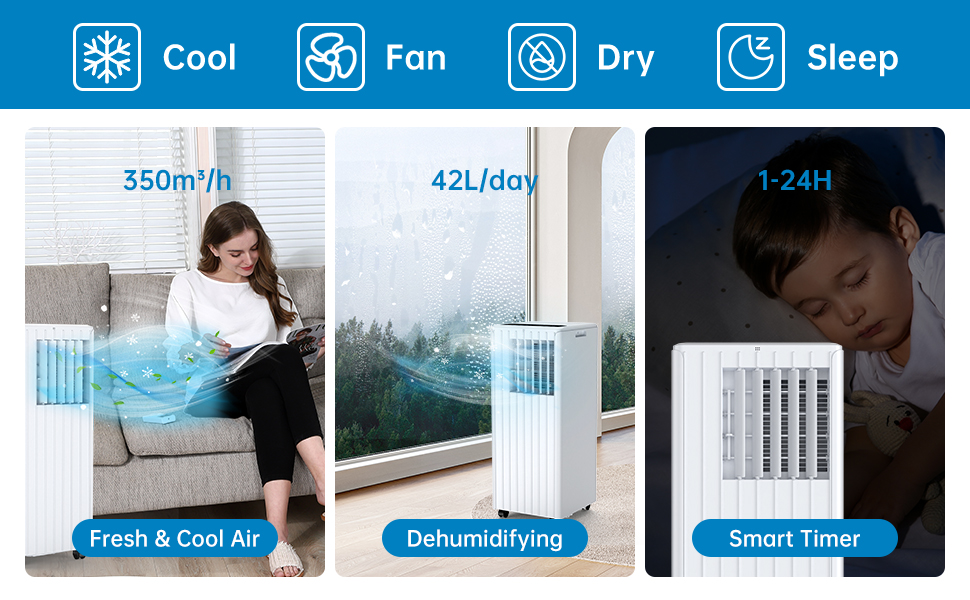
Image: A comprehensive display of the unit's modes, including cooling, fan, dry (dehumidifying), and sleep, along with performance metrics.
- Mod de răcire: Provides powerful cooling. Set your desired temperature using the Up/Down arrows. The unit will cool until the room reaches the set temperature.
- Mod ventilator: Circulă aerul fără răcire. Alegeți între viteze mici, medii sau mari ale ventilatorului.
- Mod de dezumidificare: Removes excess moisture from the air. The unit will operate at a low fan speed. Ensure the continuous drainage hose is connected for prolonged use in this mode.
5.4 Modul Sleep
Activate Sleep Mode for quiet operation and energy efficiency during nighttime. In this mode, the fan speed is reduced, and the temperature may gradually increase to ensure comfortable sleep.

Image: The portable air conditioner in a bedroom setting, illustrating its quiet operation and features like automatic shut-off and 24-hour smart timer for undisturbed sleep.

Image: A graph depicting the temperature adjustment curve in Sleep Mode, showing how the temperature gradually rises over several hours to maintain comfort.
6. Întreținere
Întreținerea regulată asigură longevitatea și funcționarea eficientă a aparatului dumneavoastră de aer condiționat.
6.1 Curățarea filtrului de aer
Filtrul de aer trebuie curățat la fiecare două săptămâni sau mai frecvent, în funcție de utilizare și de calitatea aerului. Un filtru murdar poate reduce eficiența răcirii și fluxul de aer.
- Deconectați unitatea de la priză.
- Localizați și scoateți filtrul de aer din spatele sau din lateralul unității.
- Spălați filtrul sub jet de apă (caldă, nu fierbinte) sau folosiți un aspirator pentru a îndepărta praful.
- Lăsați filtrul să se usuce complet înainte de a-l reintroduce în unitate. Nu îl expuneți la lumina directă a soarelui.

Imagine: Un prim-plan view of the washable filter being easily removed from the unit for maintenance.
6.2 Evacuarea apei
The unit has an internal water collection tank. When the tank is full, the unit will stop operating and display an indicator. You will need to drain the water manually.
- Deconectați unitatea.
- Așezați o cratiță sau o găleată puțin adâncă sub orificiul de scurgere din partea inferioară a unității.
- Remove the drainage plug and allow the water to drain completely.
- Replace the drainage plug firmly.
For continuous drainage in dehumidification mode, connect the provided drain hose to the continuous drainage outlet.
6.3 Curățare generală
Ștergeți exteriorul unității cu un material moale, damp Nu utilizați substanțe chimice dure, abrazive sau solvenți.
6.4 Depozitare
Înainte de a depozita unitatea pentru o perioadă lungă de timp:
- Drain all condensed water.
- Curățați filtrul de aer.
- Deconectați cablul de alimentare și înfășurați-l cu grijă.
- Depozitați unitatea într-un loc uscat și răcoros, ferit de lumina directă a soarelui și de temperaturi extreme.
7. Depanare
Dacă întâmpinați probleme cu aparatul de aer condiționat, consultați tabelul de mai jos pentru probleme frecvente și soluții.
| Problemă | Cauza posibila | Soluţie |
|---|---|---|
| Unitatea nu pornește | Fără alimentare Rezervor de apă plin Protecție la supraîncălzire activată | Check power plug and outlet Goliți rezervorul de apă Lăsați unitatea să se răcească timp de 30 de minute |
| Răcire insuficientă | Filtrul de aer murdar Exhaust hose blocked or kinked Dimensiunea camerei este prea mare Ferestrele/ușile se deschid Setarea temperaturii este prea mare | Curățați filtrul de aer Verificați și curățați furtunul de evacuare Asigurați-vă că unitatea este potrivită pentru dimensiunea camerei Închideți toate ferestrele și ușile Scădeți temperatura setată |
| Scurgeri de apă | Buşon de scurgere slăbit Unitatea nu este la nivel Continuous drain hose improperly connected | Bușon de golire sigur Așezați unitatea pe o suprafață plană Ensure drain hose is properly attached and sloped downwards |
| Unitatea este zgomotoasă | Unitatea nu este pe o suprafață plană Vibrații ale componentelor interne | Așezați unitatea pe o suprafață plană și stabilă This may be normal operation noise, especially at high fan speeds. Ensure no obstructions. |
| Telecomanda nu funcționează | Bateriile uzate sau introduse incorect Obstrucție între telecomandă și unitate | Înlocuiți bateriile, verificați polaritatea Remove any obstructions, ensure direct line of sight |
8. Specificații
Technical specifications for the Acekool Portable Air Conditioner Model PAC-M09.
| Caracteristică | Caietul de sarcini |
|---|---|
| Numărul de model | PAC-M09 |
| Marca | Acekool |
| Capacitatea de racire | 9000 BTU |
| Agent frigorific | R290 |
| Alimentare electrică | 220 volți |
| Nivel maxim de zgomot | 55 dB(A) |
| Dimensiuni produs (L x l x H) | 38.2 x 35 x 88.5 cm |
| Greutatea produsului | 26 kg |
| Capacitate de dezumidificare | 42 L / zi |
| Evaluarea eficienței energetice | Clasa A |
| VĂZĂTOR | 2.8 |
| Zona de acoperire recomandată | 30-40 m² |
9. Garanție și asistență
For warranty information, technical support, or service inquiries, please refer to the warranty card included with your product or contact Acekool customer service through their official website or the retailer where the product was purchased. Please have your model number (PAC-M09) and purchase date ready when contacting support.