
1. Introducere
The MOBAPAD ChiTu PRO-HD is a versatile wireless controller designed for an enhanced gaming experience across multiple platforms. It features advanced technology such as Hall-effect joysticks, ALPS linear motors, and comprehensive customization options. This manual provides essential information for setting up, operating, maintaining, and troubleshooting your controller.

Figure 1: MOBAPAD ChiTu PRO-HD Wireless Controller connected to a Nintendo Switch.
2. Conținutul pachetului
Asigurați-vă că toate articolele sunt prezente în colet:
- MOBAPAD ChiTu PRO-HD Wireless Controller
- USB-A to USB-C Cable (1m / 39.37in)
- Manual de instructiuni
- Additional Cross-style D-Pad for swapping

Figure 2: Included items in the MOBAPAD ChiTu PRO-HD package.
3. Configurare
3.1 Încărcarea controlerului
Connect the controller to a power source using the provided USB-A to USB-C cable. The controller features a built-in 1000mAh lithium battery, providing approximately 30 hours of usage on a full charge.

Figure 3: USB-C charging port and programmable back paddles.
3.2 Împerecherea cu Nintendo Switch
- Pe Nintendo Switch, navighează la meniul HOME.
- Selectați „Controlere” > „Modificare prindere/ordine”.
- On the MOBAPAD ChiTu PRO-HD controller, press and hold the small pairing button located on the back of the controller (between the M1 and M2 buttons) until the LED indicators begin to flash.
- Once the controller is detected by the Switch, the LED indicators will stabilize, and the controller will be paired.
Video 1: Un overview of the MOBAPAD ChiTu PRO-HD controller's features and pairing process.
3.3 Detachable D-Pad and Joysticks
The controller supports detachable joysticks and a replaceable D-pad. To swap the D-pad, gently pull the existing D-pad off and align the new D-pad with the slots, then press firmly until it clicks into place. This allows for customization based on game genres and player preferences.
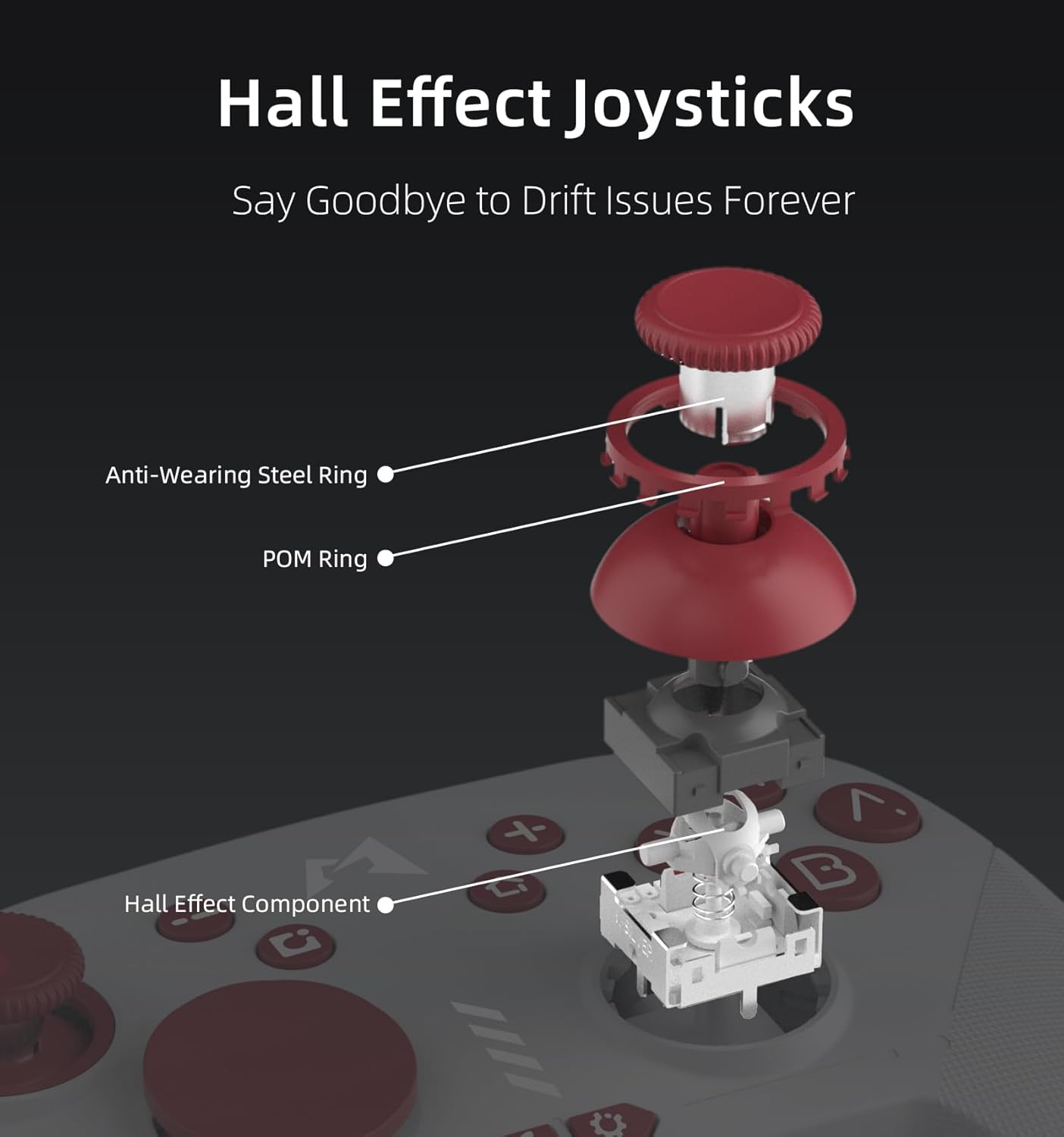
Figura 4: Explodat view of Hall Effect Joysticks, highlighting components designed to prevent drift.
4. Instrucțiuni de utilizare
4.1 Controale de bază
- Manete analogice: Pentru mișcare precisă și control al camerei.
- Butoane A/B/X/Y: Butoane de acțiune standard.
- Butoane +/-: Plus and Minus buttons for in-game menus.
- Buton Captură de ecran: Capture screenshots during gameplay.
- Buton Acasă: Return to the HOME Menu.
- Shoulder Buttons (L/R, ZL/ZR): For various in-game actions.
4.2 Six-Axis Motion Sensing
The controller supports six-axis motion sensing, allowing for intuitive control in compatible games. This feature is particularly useful for aiming, steering, and solving puzzles that require tilting or motion input.

Figure 5: Demonstrating 6-Axis Gyroscope motion sensing.
4.3 Funcționalitate NFC
The controller includes NFC functionality, enabling you to scan Amiibo figures for in-game bonuses and content. Simply place your Amiibo on the MOBAPAD logo area on the controller to activate.

Figure 6: Amiibo scanning via NFC on the controller.
5. Caracteristici cheie
- Hall-Effect Joysticks: Equipped with Control Silver's custom JH16 Hall-effect joysticks, ensuring precise input, low power consumption, resistance to interference, and prevention of metal magnetization, effectively eliminating stick drift.
- HD Rumble: Features an original ALPS linear motor with 320Hz high-frequency drive and dual-axis space, providing a lifelike and immersive vibration experience.
- Butoane mecanice: The face buttons offer a tactile and responsive feel, similar to mechanical switches, ensuring accurate and satisfying feedback with each press.
- Durabilitate: Designed for longevity with 5 million mechanical button presses and 5 million Hall-effect joystick cycles.
- Integrated Mechanical Structure: The joystick's mechanical design uses an integrated structure to resolve issues like metal magnetization and magnetic interference, enhancing electrical performance and consistent quality.
6. Personalizare
6.1 Funcția Turbo
The controller includes an independent Turbo button for rapid-fire actions. To activate, press and hold the Turbo button, then press the desired action button (e.g., A, B, X, Y). The button will now repeatedly register presses as long as it's held down. There are three different turbo intensities, starting at medium. Repeat the process to deactivate.

Figure 7: Independent Turbo Button for rapid-fire actions.
6.2 Programare macrocomenzi
The controller supports macro programming for complex command sequences. To record a macro:
- Press and hold the 'Settings' button (gear icon) for a few seconds until the controller vibrates and the logo turns purple, indicating it's ready to record.
- Perform the desired button inputs for your macro.
- To save the macro, press either the M1 or M2 back paddle. The recorded sequence will be assigned to that paddle.
6.3 Software-Based Customization
Utilize the dedicated mobile application for advanced customization, including joystick dead zone adjustment, key remapping for macro programming, and RGB lighting control for the logo.

Figure 8: Companion app for advanced customization.
7. Întreținere
To ensure the longevity and optimal performance of your MOBAPAD ChiTu PRO-HD controller, follow these maintenance guidelines:
- curatenie: Folosiți o lavetă moale și uscată pentru a șterge controlerul. Pentru murdăria persistentă, ștergeți ușor.ampClătiți laveta cu apă sau o soluție de curățare delicată. Evitați substanțele chimice dure sau materialele abrazive.
- Depozitare: Depozitați controlerul într-un loc răcoros și uscat, ferit de lumina directă a soarelui și de temperaturi extreme.
- Manipulare: Avoid dropping the controller or subjecting it to strong impacts, as this can damage internal components.
8. Depanare
If you encounter issues with your controller, try the following steps:
- Controller Not Pairing: Ensure the controller is charged. Press and hold the pairing button on the back of the controller until the LEDs flash, then re-attempt pairing via the Nintendo Switch 'Change Grip/Order' menu.
- Întârziere la intrare sau deconectări: Ensure the controller is within range of the console. Avoid obstructions between the controller and the console. If issues persist, try resetting the controller using the small reset hole on the back.
- Stick Drift: The Hall-effect joysticks are designed to prevent drift. If you experience any unusual stick behavior, try recalibrating the joysticks via the companion app or the Switch system settings.
- Probleme de încărcare: Verify that the USB-C cable is securely connected to both the controller and the power source. Try using a different USB-C cable or power adapter.
9. Specificații
| Caracteristică | Detaliu |
|---|---|
| Numărul de model | PRO-HD |
| Dimensiuni | 5.99 x 4.13 x 2.42 inci |
| Greutatea articolului | 12.52 uncii |
| Baterie | 1000mAh Lithium (included) |
| Durata de viață a bateriei | Aproximativ. 30 ore |
| Conectivitate | Wireless (Bluetooth), USB-C |
| Tip joystick | Hall-Effect (JH16) |
| Vibrație | ALPS Linear Motor (HD Rumble) |
| Controlul mișcării | Giroscop cu 6 axe |
| Suport NFC | Yes (Amiibo) |
| Producător | Dongguan Heng xun Energy Technology CO., Ltd. |
10. Garanție și asistență
For warranty information or technical support, please refer to the documentation included with your purchase or contact MOBAPAD customer service directly. Keep your proof of purchase for any warranty claims.