
USHINING T3105
USHINING 3G Senior Flip Phone User Manual
Model: T3105
Introducere
Thank you for choosing the USHINING 3G Senior Flip Phone. This manual provides comprehensive instructions for setting up, operating, and maintaining your new device. Designed with ease of use in mind, this phone features large buttons, a clear display, and essential functions to keep you connected. Please read this manual thoroughly to ensure proper usage and to maximize your phone's capabilities.
Conținutul pachetului

This image displays all items included in the USHINING 3G Senior Flip Phone package. It shows the flip phone, its dedicated charging dock, a long-lasting battery, the user manual, a SpeedTalk SIM card, and the charging cord.
- USHINING 3G Senior Flip Phone (Model: T3105)
- Dock de încărcare
- Long Lasting Battery (1200mAh)
- SpeedTalk SIM Card
- Charging Cord (USB cable and power adapter)
- Manual de utilizare
Înființat
1. Instalarea cartelei SIM și a bateriei
Before using your phone, you need to install the SIM card and battery. The phone supports dual SIM cards (Micro and Full-sized) for added flexibility.
- Scoateți cu grijă capacul din spate al telefonului.
- Insert the SpeedTalk SIM card (or your preferred compatible SIM card) into the designated SIM slot(s). Ensure the gold contacts face downwards and the card is correctly oriented.
- Introduceți bateria de 1200 mAh în compartimentul bateriei, aliniind contactele.
- Puneți capacul din spate la loc până când se fixează în siguranță cu un clic.
2. Încărcarea telefonului

This image illustrates the USHINING 3G Senior Flip Phone placed in its charging dock. It highlights the phone's 1200mAh battery, indicating a standby time of over 200 hours and approximately 300 minutes of voice talk time.
The phone comes with a convenient charging dock. For initial use, fully charge the battery.
- Connect the charging cord to the charging dock and then to a power outlet.
- Place the phone into the charging dock, ensuring it is seated correctly. The phone will indicate that it is charging.
- A full charge typically takes approximately 3 hours. The 1200mAh battery provides 5-6 hours of talk time or over 100 hours (4 days) of standby time.
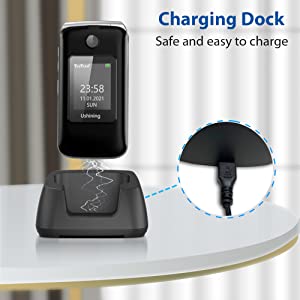
Această imagine oferă un prim-plan view of the charging dock, emphasizing its design for safe and easy charging. It shows the USB port where the charging cable connects.
Instrucțiuni de operare
Funcții de bază
- Pornire/Oprire: Press and hold the Power/End Call button (red button) to turn the phone on or off.
- Efectuand apeluri: Formați numărul folosind tastatura mare și apăsați butonul Apel (butonul verde).
- Primirea apelurilor: Press the Call button (green button) to answer an incoming call.
- Mesaje text: Navigate to the 'Messages' menu to compose and send text messages.
Tastatură și afișaj

This image highlights the user-friendly design of the USHINING 3G Senior Flip Phone, showcasing its large keypad buttons and big, easy-to-read icons on the internal display.
The phone features a 2.8-inch inner screen and a 1.77-inch external screen with large menu icons and a large font for enhanced visibility. The keypad is designed with large, easy-to-press buttons.
Apeluri de urgență SOS

This image illustrates the SOS emergency call feature of the USHINING 3G Senior Flip Phone. It shows the dedicated SOS button on the phone and a diagram indicating how it connects to five pre-set emergency contacts, ensuring safety for the elderly.
The dedicated SOS button allows for immediate dialing to pre-set emergency contacts in case of an emergency. You can preset up to 5 emergency contact numbers.
- Go to the 'SOS Settings' menu.
- Adăugați până la 5 numere de contact în caz de urgență.
- In an emergency, press and hold the SOS button. The phone will automatically dial the preset numbers sequentially until one is answered. It will also send an emergency text message to these contacts.
Apelare rapidă
The phone supports speed dial buttons (2-9) for quick access to frequently called numbers.
- Accesați „Setări” > „Apelare rapidă”.
- Assign a contact to each number (2-9).
- To use, press and hold the assigned number key to dial the contact.
Funcții suplimentare

This image displays a grid of icons representing the practical functions available on the USHINING 3G Senior Flip Phone. These include Calendar, support for Dual SIM cards, SOS Button, Alarm Clock, Speed Dial, Camera, Torch (flashlight), and FM Radio.
- Lanternă: The phone includes a powerful flashlight. Activate it via a dedicated shortcut key or through the menu.
- Radio FM: Enjoy external FM radio without needing headphones.
- Ceas cu alarmă: Setați mai multe alarme pentru mementouri.
- Casetofon: Redați audio files stored on the phone or an inserted memory card.
- Calculator: Efectuați calcule de bază.
- Calendaristic: Urmăriți datele și evenimentele.
- Bluetooth: Conectați-vă la căști Bluetooth sau la alte dispozitive.
- Lista neagră: Blocați numerele nedorite.
- Setări de limbă: Supports English, Dutch, Spanish, Portuguese, French, and Italian.
- Camera: The phone has front and rear cameras. Note that camera quality is basic and not comparable to smartphones.
Compatibilitatea rețelei

This image clearly outlines the network compatibility of the USHINING 3G Senior Flip Phone. It lists compatible carriers such as T-Mobile, MetroPCS, Red Pocket (GSMT), SpeedTalk, Tello, Lyca Mobile, Ultra Mobile, and Mint Mobile. It also explicitly states that the phone is not compatible with AT&T, Sprint, or Verizon networks.
This USHINING 3G basic cell phone operates on a 3G WCDMA network. It is compatible with carriers that utilize T-Mobile's service. Please verify your carrier's network type before use.
- Transportatori compatibili: T-Mobile (Prepaid Plan), MetroPCS, Tello Mobile, Ultra Mobile, SpeedTalk, Simple Mobile, Mint Mobile, Red Pocket (GSMT).
- NOT Compatible with: CDMA Carriers such as Verizon, Sprint, Boost, PagePlus, or AT&T.
Întreţinere
- Păstrați telefonul uscat. Umiditatea poate deteriora circuitele electronice.
- Nu expuneți telefonul la temperaturi extreme.
- Clean the phone with a soft, dry cloth. Avoid using harsh chemicals or cleaning solvents.
- Handle the battery with care. Do not puncture, disassemble, or expose it to high temperatures.
- Folosiți doar încărcătoare și accesorii aprobate.
Depanare
| Problemă | Soluție posibilă |
|---|---|
| Telefonul nu pornește. | Ensure the battery is correctly installed and fully charged. Press and hold the power button for a few seconds. |
| Nu pot efectua sau primi apeluri. | Check if the SIM card is properly inserted. Verify network signal strength. Ensure your SIM card is activated and compatible with 3G WCDMA networks (T-Mobile based carriers). |
| Calitate slabă a apelurilor. | Move to an area with better network coverage. Ensure the earpiece/microphone is not obstructed. |
| Bateria nu se încarcă. | Ensure the charging dock and cable are properly connected to the phone and power outlet. Check for any damage to the charger or charging port. |
| Butonul SOS nu funcționează. | Verify that emergency contacts are correctly set up in the SOS settings. Ensure the phone has network signal. |
Specificații
- Model: T3105
- Dimensiuni: 4.09 x 2.11 x 0.83 inci
- Greutate: 9.6 uncii
- Afişa: 2.8-inch inner screen, 1.77-inch external screen (240 x 320 resolution)
- Baterie: 1200mAh Lithium-ion (5-6 hours talk time, 100+ hours standby)
- RAM: 64 MB
- Stocare internă: 128 MB
- Tehnologia rețelei: 3G WCDMA (UMTS)
- Suport card SIM: Dual SIM (Micro and Full-sized)
- Conectivitate: Bluetooth
- Camera: Rear and Front (basic functionality)
- Intrare interfață umană: Butoane
- Culoare: Negru
- Limbi: English, Dutch, Spanish, Portuguese, French, Italian
Garanție și suport
For warranty information and technical support, please refer to the documentation included with your purchase or contact USHINING customer service. Keep your purchase receipt as proof of purchase for any warranty claims.
Ask a question about this manual
Ask about setup, troubleshooting, compatibility, parts, safety, or missing instructions. Manuals+ will review the question and use this page’s manual context to help answer it.