
Introducere
This manual provides essential instructions for the assembly, operation, maintenance, and troubleshooting of your FLEXISPOT Comhar 55-inch Electric Standing Desk. Please read this manual thoroughly before use to ensure proper function and safety.

The FLEXISPOT Comhar 55-inch Electric Standing Desk, showcasing its spacious desktop, integrated drawer, and control panel.
Informații de siguranță
- Do not exceed the desk's maximum weight capacity of 154 lbs (70 kg).
- Exercise caution during assembly and operation. Keep hands and objects clear of moving parts.
- Asigurați-vă că biroul este așezat pe o suprafață plană.
- Keep children and pets away from the desk during operation. Utilize the child lock feature when not in use.
- Nu încercați să modificați structura sau componentele electrice ale biroului.
Înființat
The FLEXISPOT Comhar desk features an innovative quick-install design, significantly simplifying the assembly process. A factory-installed crossbeam reduces setup time, allowing for completion in approximately 5 minutes.
Etape de asamblare:
- Despachetați toate componentele și verificați-le în funcție de lista de piese inclusă.
- Place the desktop upside down on a soft, clean surface to prevent scratches.
- Attach the desk legs to the pre-installed crossbeam and desktop using the provided hardware.
- Connect all necessary cables according to the diagram in the separate quick start guide.
- Carefully flip the desk upright with assistance and position it in your desired location.
Instrucțiuni de operare
Reglarea înălțimii
The desk's electric motor allows for smooth height adjustments. Use the up and down arrow buttons on the control panel to move the desk to your desired height. The height can be adjusted from 28.7 inches to 48 inches.

The desk offers a wide height adjustment range, allowing users to easily switch between sitting and standing positions.
Presetari de memorie
The control panel includes four programmable height presets. To save a height:
- Reglați biroul la înălțimea dorită.
- Press the 'M' button (or similar memory set button, refer to quick start guide).
- Press one of the numbered preset buttons (1, 2, 3, or 4) until you hear a beep or see the display confirm.
To recall a saved height, simply press the corresponding numbered preset button.
Blocare pentru copii
Activate the child lock feature to prevent accidental height adjustments. Locate the child lock button on the control panel and press it to engage or disengage the lock.
Porturi de încărcare USB integrate
The desk is equipped with integrated USB-A and USB-C ports for convenient charging of mobile devices. Note that these ports may temporarily pause charging while the desk height is being adjusted. Laptop charging is not supported through these ports.

The control panel features a digital display, height adjustment buttons, four programmable memory presets, a child lock, and integrated USB-A and USB-C charging ports.
Sertar de depozitare
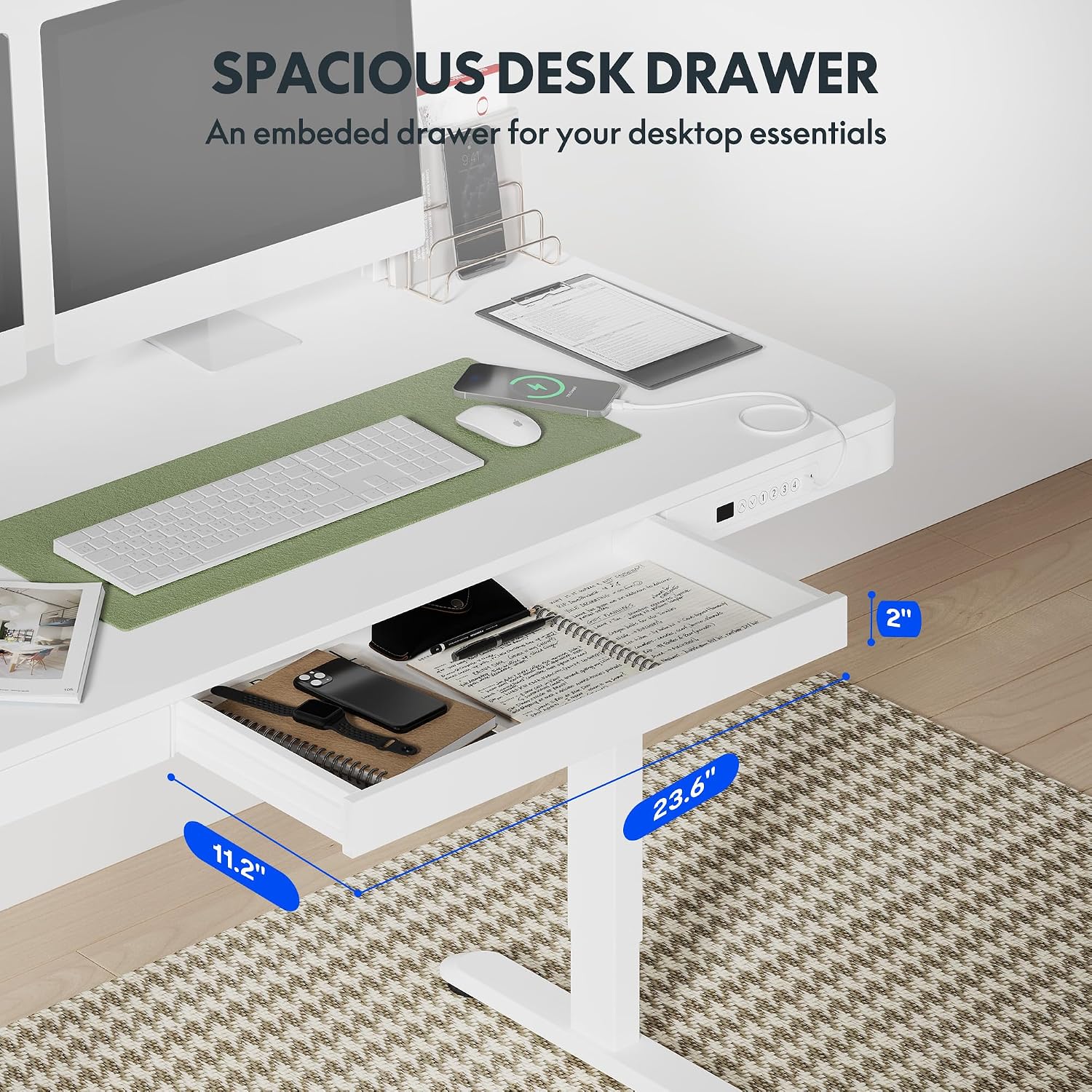
A pull-out drawer is integrated into the desktop, providing discreet storage for small office supplies and personal items. Gently pull the drawer to open and push to close.

The convenient pull-out drawer provides integrated storage for office essentials, keeping your workspace organized.
Funcție anti-coliziune
The desk is equipped with an anti-collision system. If the desk encounters an obstacle during height adjustment, it will automatically stop and reverse slightly to prevent damage or injury.
The anti-collision system automatically detects obstacles during height adjustment, stopping and reversing to prevent damage or injury.
Întreţinere
- Regularly wipe the desktop and frame with a soft, damp pânză. Evitați curățarea abrazivă.
- Verificați periodic toate șuruburile și conexiunile pentru a vă asigura că sunt fixate.
- Keep the motor and electrical components free from dust and moisture.
Depanare
| Problemă | Cauza posibila | Soluţie |
|---|---|---|
| Biroul nu se mișcă și nu răspunde la comenzi. | Power cable disconnected; Child lock engaged; Motor overload; Control panel malfunction. | Check power connection. Disengage child lock. Unplug desk for 10 minutes, then plug back in. Reduce weight on desk. If problem persists, contact support. |
| Porturile USB nu se încarcă. | Desk is adjusting height; Device not compatible; Cable issue. | Wait for desk movement to complete. Ensure device is compatible with USB charging. Try a different USB cable. Note: Laptop charging is not supported. |
| Biroul scoate zgomote neobișnuite. | Loose components; Obstruction. | Check all screws and ensure they are tightened. Inspect for any obstructions under or around the desk. |
Specificații

Detailed dimensions of the desk, illustrating the desktop size and the adjustable height range from 28.9 inches to 46.5 inches.
| Caracteristică | Detaliu |
|---|---|
| Marca | FLEXISPOT |
| Numele modelului | Standing Desk (Comhar) |
| Numărul de model | B0C2Y3645L |
| Culoare | Alb |
| Dimensiuni produs (D x L x H) | 23.8" x 47.3" x 47.6" (Overall) |
| Dimensiune desktop | 55" x 28" (approximate working surface) |
| Interval de reglare a înălțimii | 28.7" to 48" (including 2.6" tabletop thickness) |
| Capacitate maximă de greutate | 154 de lire sterline (70 kg) |
| Greutatea articolului | 113 de lire sterline (51.3 kg) |
| Material pentru desktop | Lemn |
| Material de bază | Metal (Oțel aliat) |
| Caracteristici speciale | Electric Height Adjustment, Integrated Drawer, USB-A & USB-C Charging Ports, 4 Memory Presets, Child Lock, Anti-Collision System |
| Asamblare necesară | Yes (Quick Assembly) |
| Componente incluse | Built-in USB Port, All Assembly Tools |
garanție
This FLEXISPOT Comhar Electric Standing Desk comes with a Limited Warranty. For specific terms and conditions, please refer to the warranty documentation included with your product or visit the official FLEXISPOT website-ul.
Sprijin
If you encounter any issues or have questions regarding your FLEXISPOT Comhar Electric Standing Desk that are not addressed in this manual, please contact FLEXISPOT customer support. Contact information can typically be found on the manufacturer's website-ul sau pe ambalajul produsului.