
1. Introducere
Thank you for choosing the Bimar VC77 Tower Fan. This manual provides important information regarding the safe operation, installation, maintenance, and troubleshooting of your new fan. Please read these instructions carefully before use and keep them for future reference.
The Bimar VC77 is an 80 cm tower fan designed for domestic indoor ventilation. It features 3 speed settings, a 60-minute timer, automatic right/left oscillation, and adjustable up/down tilt, powered by a 45W induction motor.
2. Instrucțiuni de siguranță
AVERTISMENT: Nerespectarea acestor instrucțiuni de siguranță poate duce la electrocutare, incendiu sau vătămări corporale grave.
- This appliance is intended for domestic indoor use only. Do not use it for any other purpose. Any other use is considered improper and dangerous.
- Ensure the power outlet is easily accessible to quickly disconnect the plug in an emergency.
- Position the fan away from heat sources (open flames, gas stoves, etc.) and liquid containers to prevent water splashes.
- Do not insert any tools or fingers between the protective grille meshes of the fan.
- Nu folosiți ventilatorul cu un cablu sau un ștecher deteriorat. Dacă cablul de alimentare este deteriorat, acesta trebuie înlocuit de producător, de agentul său de service sau de persoane cu calificare similară pentru a evita un pericol.
- Always unplug the fan before cleaning or when not in use for extended periods.
- Nu lăsați aparatul la îndemâna copiilor și a animalelor de companie.
- Do not cover the fan during operation.
3. Produs terminatview
Familiarize yourself with the components of your Bimar VC77 Tower Fan.
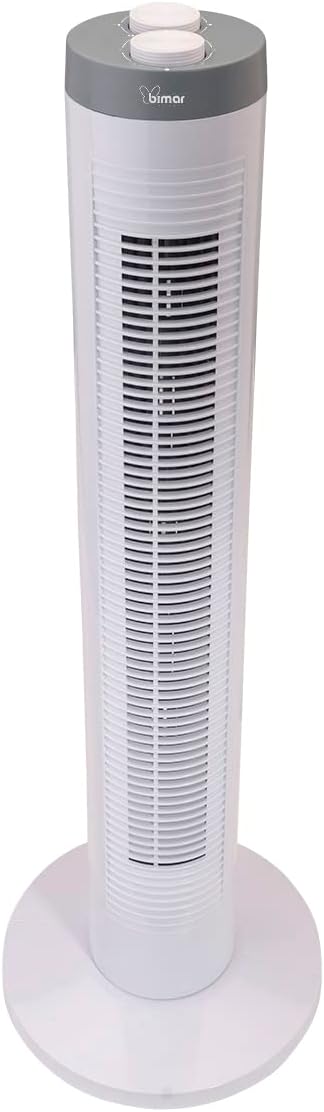
Imaginea 3.1: Faţă view of the Bimar VC77 Tower Fan, showing the main body, base, and control panel on top.

Imaginea 3.2: Latura view of the Bimar VC77 Tower Fan, illustrating its compact design and the handle for easy transport.

Imaginea 3.3: Detailed diagram of the fan's top control panel, indicating the knobs for speed selection, timer setting, and oscillation function.
Componente cheie:
- Panou de control: Located on the top of the fan, featuring selector knobs for various functions.
- Grila de evacuare a aerului: Front grille through which air is expelled.
- Baza: Oferă stabilitate ventilatorului turn.
- Mâner integrat: For easy transportation of the unit.
- Cablu de alimentare: Pentru conectarea la o priză electrică.
4. Configurare și instalare
Follow these steps to set up your Bimar VC77 Tower Fan:
- Despachetarea: Carefully remove the fan from its packaging. Retain the packaging for storage or if the product needs to be returned.
- Base Assembly (if required): Some models may require simple assembly of the base. Align the base parts and secure them according to the diagrams in the separate installation manual (if provided). Ensure the base is firmly attached for stability.
- Plasare: Place the fan on a flat, stable surface. Ensure there is adequate space around the fan for proper air circulation and oscillation. Avoid placing it near curtains or other objects that could obstruct airflow or get caught in the fan.
- Conexiune de alimentare: Plug the power cord into a standard 220-240V~ 50Hz electrical outlet. Ensure the outlet is easily accessible.
5. Instrucțiuni de utilizare
The Bimar VC77 Tower Fan is controlled via selector knobs located on the top panel.
- Pornire/Oprire: Turn the speed selector knob to one of the speed settings (Min, Med, Max) to turn the fan on. Turn it to '0' to turn the fan off.
- Reglarea vitezei ventilatorului: Rotate the speed selector knob to choose your desired airflow intensity:
- Min: Viteză redusă pentru o circulație ușoară a aerului.
- Med: Viteză medie pentru un flux de aer moderat.
- Max: Viteză mare pentru răcire maximă.
- Oscilație automată: To activate the automatic right/left oscillation, turn the oscillation knob to the 'ON' position. The fan will sweep air across a wider area. Turn the knob to 'OFF' to stop oscillation.
- Înclinare reglabilă: The fan head can be manually tilted up or down to direct the airflow vertically. Gently push or pull the top section of the fan to adjust the tilt angle.
- Funcția de cronometru: Use the timer knob to set the fan to operate for a specific duration, up to 60 minutes. Rotate the timer knob clockwise to the desired time setting. The fan will automatically turn off once the set time has elapsed. To bypass the timer, ensure the timer knob is set to the 'ON' position (usually indicated by a continuous operation symbol or '0' if it's a countdown timer).
6. Întreținere
Regular cleaning and maintenance will ensure the longevity and efficient operation of your fan.
- curatenie:
- Deconectați întotdeauna ventilatorul de la priză înainte de curățare.
- Folosiți un moale, damp cloth to wipe the exterior surfaces of the fan. Do not use abrasive cleaners, solvents, or harsh chemicals, as these can damage the plastic.
- For dust accumulation on the grilles, use a vacuum cleaner with a brush attachment or compressed air to gently remove dust. Do not attempt to disassemble the fan to clean internal components.
- Ensure the fan is completely dry before plugging it back in and operating it.
- Depozitare: Când nu este utilizat pentru perioade lungi de timp, depozitați ventilatorul în ambalajul original sau acoperiți-l pentru a-l proteja de praf. Depozitați într-un loc răcoros și uscat.
7. Depanare
If you encounter issues with your Bimar VC77 Tower Fan, refer to the following common problems and solutions:
| Problemă | Cauza posibila | Soluţie |
|---|---|---|
| Ventilatorul nu pornește. |
|
|
| Flux de aer slab sau absent. |
|
|
| Fan is noisy during operation. |
|
|
| Oscilația nu funcționează. |
|
|
If the problem persists after trying these solutions, please contact Bimar customer support.
8. Specificații
| Caracteristică | Detaliu |
|---|---|
| Numele modelului | VC77 |
| Marca | bimar |
| Tip | Tower Fan (Column Fan) |
| Înălţime | 81.5 cm |
| Dimensiuni (DxWxH) | 26.8P x 26.8L x 81.5H cm |
| Greutate | 2.4 kg |
| Sursa de alimentare | Electric cu fir |
| Voltage | 220-240V~ 50Hz |
| Wattage | 45W |
| Tip motor | Motor cu inducție |
| Numărul de viteze | 3 (Min / Med / Max) |
| Cronometru | Până la 60 de minute |
| Oscilaţie | Automatic Right/Left |
| Ajustare înclinare | Adjustable Up/Down |
| Metoda de control | Buton / Buton |
| Material | Plastic |
| Nivel de zgomot | 45 de decibeli |
| Utilizare în interior/exterior | De interior |
9. Garanție și asistență
For warranty information, please refer to the documentation provided with your purchase or contact the retailer. Bimar products are designed for reliability and performance.
If you require technical assistance, have questions about your product, or need to report a fault, please contact Bimar customer support. You may also find additional resources, including detailed user and installation manuals, on the manufacturer's website sau prin intermediul următoarelor linkuri:
Please have your model number (VC77) and purchase details ready when contacting support.