
USHINING T380
USHINING T380 4G Unlocked Flip Phone
Manual de utilizare
1. Introducere
Thank you for choosing the USHINING T380 4G Unlocked Flip Phone. This device is designed with simplicity and ease of use in mind, making it ideal for seniors. It features large buttons, a clear display, and essential functions like SOS emergency calls, speed dial, and a charging dock for convenient power management. This manual provides detailed instructions to help you set up, operate, and maintain your new phone.

Image: The USHINING T380 flip phone, closed and resting in its charging dock. The phone is blue with a black dock.
2. Conținutul pachetului
Vă rugăm să bifați căsuța pentru următoarele elemente:
- USHINING T380 4G Senior Cell Phone
- Dock de încărcare
- Long Lasting Battery (1000mAh Lithium Ion)
- Manual de utilizare (acest document)
- Speedtalk SIM Card (if included with your purchase)
- Charging Cord (USB to Micro USB)
- Adaptor de alimentare

Image: A visual representation of the items included in the product package, showing the phone, charging dock, battery, user manual, Speedtalk SIM card, and charging cable with adapter.
3. Caracteristicile produsului
The USHINING T380 is equipped with a range of features designed for convenience and safety:
- Conectivitate 4G LTE: For reliable call quality and basic internet access.
- Butoane mari și afișaj clar: Easy to see and press for comfortable dialing and navigation.
- Buton de urgență SOS: Quickly contacts pre-set emergency numbers with a single press.
- Apelare rapida: Assign up to 8 contacts for quick calling.
- Dock de încărcare: Simple drop-in charging, eliminating the need to fumble with cables.
- FM Radio & MP3 Player: Enjoy audio entertainment.
- Basic Camera: For simple photo capture.
- Lanternă: Convenabil pentru situații de lumină slabă.
- Bluetooth: For connecting to compatible headsets or other devices.
- Calendar & Alarm Clock: Useful daily tools.
- Blacklist Function: Protects against unwanted calls.

Image: A graphic displaying various practical features of the phone, including FM Radio, Camera, Bluetooth, 4G LTE, MP3 player, Calendar, Call logs, Flashlight, Speed Dial, Alarm Clock, SMS, SOS, and Large buttons.
4. Configurare
4.1 Instalarea bateriei
- Open the back cover of the phone by gently prying it from the notch at the bottom.
- Aliniați contactele aurii ale bateriei cu bornele telefonului.
- Apăsați ferm bateria în jos până când se fixează în poziție cu un clic.
- Puneți la loc capacul din spate, asigurându-vă că se fixează în siguranță.
4.2 SIM Card & Micro SD Card Installation
The phone supports dual SIM cards (Standard SIM) and one Micro SD card for expanded storage.
- With the back cover and battery removed, locate the SIM card slots. There are two standard SIM slots and one Micro SD card slot.
- Gently slide your SIM card(s) into the designated slot(s) with the gold contacts facing down, following the diagram on the phone.
- If installing a Micro SD card, carefully slide it into its slot. Note: There may be a small plastic cover over the Micro SD slot; slide the card underneath it.
- Reintroduceți bateria și puneți la loc capacul din spate.
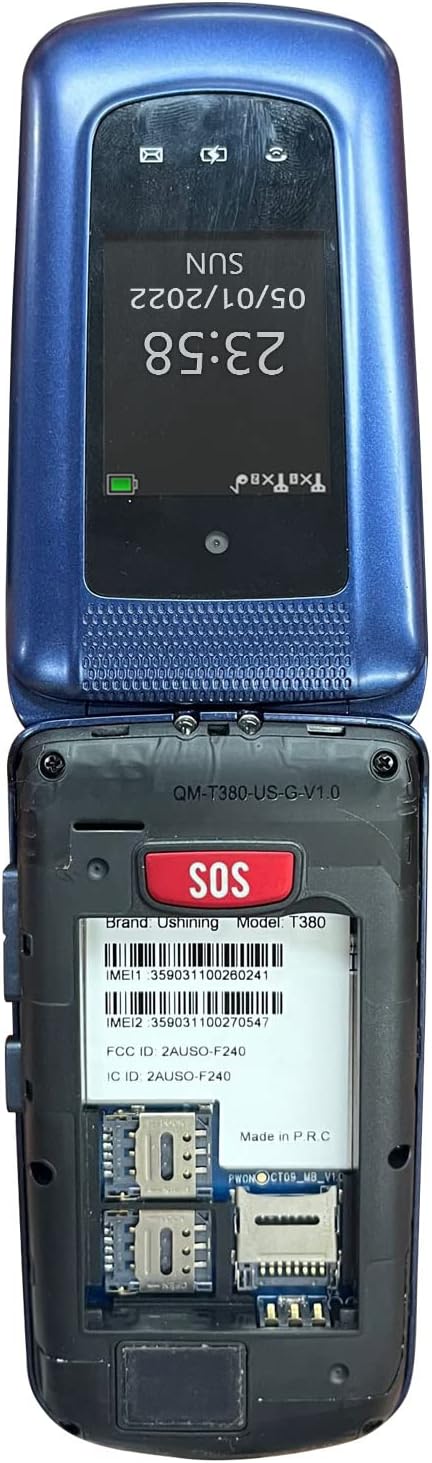
Image: The back of the USHINING T380 flip phone with the cover removed, revealing the battery compartment and slots for two SIM cards and one Micro SD card.
4.3 Încărcarea telefonului
Before first use, fully charge the phone for approximately 3 hours.
- Utilizarea stației de încărcare: Place the phone into the charging dock, ensuring it sits securely. The charging indicator on the phone's screen will activate.
- Încărcare directă: Connect the Micro USB charging cable directly to the phone's charging port and the other end to the power adapter, then plug into a wall outlet.
4.4 Pornire/Oprire
- Pentru a porni: Apăsați și mențineți apăsat butonul roșu Încheiere apel/Pornire (⏏) până când ecranul se aprinde.
- Pentru a opri: Apăsați și mențineți apăsat butonul roșu Încheiere apel/Pornire (⏏) until the power off options appear, then select 'Power off'.
4.5 Compatibilitatea rețelei
The USHINING T380 is designed to work with T-Mobile and its associated MVNOs (Mobile Virtual Network Operators) in the United States. It is incompatibil with AT&T, Sprint, or Verizon networks.
Compatible Carriers (T-Mobile Network):
- T-Mobile
- Metrou cu T-Mobile
- RedPocket (GSMT)
- Speedtalk Mobile
- Tello
- Lyca Mobile
- Ultra Mobile
- Mint Mobile

Image: A diagram illustrating compatible carriers (T-Mobile, Metro, RedPocket, Speedtalk, Tello, Lyca, Ultra, Mint Mobile) and incompatible carriers (AT&T, Sprint, Verizon) for the USHINING T380 phone.
5. Instrucțiuni de utilizare
5.1 Funcții de apel de bază
- Efectuarea unui apel: Enter the phone number using the keypad and press the green Call button (✆).
- Răspunsul la un apel: When the phone rings, open the flip or press the green Call button (✆).
- Încheierea unui apel: Apăsați butonul roșu Încheiere apel (⏏) or close the flip.
- Reglarea volumului: Use the volume buttons on the side of the phone during a call.
5.2 Apel de urgență SOS
The SOS button is located on the back of the phone. It allows you to quickly contact pre-set emergency contacts.
- Configurarea contactelor SOS: Navigate to the SOS settings in the phone's menu. You can typically add up to 5 emergency numbers. These numbers will be called in sequence until one answers. The phone will also send an emergency SMS message to these contacts.
- Utilizarea funcției SOS: In an emergency, press and hold the SOS button on the back of the phone for a few seconds. The phone will activate an alarm, send an SMS to your emergency contacts, and then begin dialing them one by one.

Image: A visual explanation of the SOS Emergency Call feature, showing how it supports up to 5 family numbers and guarantees safety, alongside a Blacklist feature for protection from fraud calls.
5.3 Apelare rapidă
Atribuiți numerele apelate frecvent unor taste specifice pentru apelare rapidă.
- Setting Up Speed Dial: Go to the phone's settings or contacts menu to find the speed dial options. You can typically assign numbers to keys 2-9.
- Utilizarea apelării rapide: Press and hold the assigned number key (e.g., '2' for Son, '3' for Daughter) to automatically dial the pre-set contact.

Image: A graphic demonstrating the 8 speed dial buttons on the phone, allowing users to assign contacts like Son, Daughter, Mom, Dad, etc., for quick access.
5.4 Messaging (SMS)
- Navigați la meniul „Mesaje”.
- Selectați „Scrieți mesaj” pentru a compune un SMS nou.
- Introduceți numărul destinatarului sau selectați din contacte, apoi tastați mesajul folosind tastatura.
- Apăsați pe „Trimite”.
5.5 Radio FM
- Accesați aplicația „Radio FM” din meniul principal.
- Folosiți tastele de navigare pentru a scana posturile sau pentru a regla manual o frecvență.
- Este posibil să fie necesare căști care să acționeze ca o antenă pentru o recepție optimă.
Player MP3 de 5.6 inch
- Ensure you have MP3 files stored on a Micro SD card inserted into the phone.
- Go to the 'MP3 Player' or 'Music' application.
- Răsfoiți și selectați sunetul dorit filee să se joace.
5.7 Camera
- Deschideți aplicația „Cameră” din meniu.
- Încadrează-ți fotografia folosind afișajul.
- Press the 'OK' or center navigation button to capture the photo.
5.8 Lanterna
- The flashlight can typically be activated by a dedicated button on the side of the phone or through the main menu.
5.9 Bluetooth
- Accesați „Setări” și apoi „Bluetooth”.
- Activați Bluetooth-ul.
- Caută available devices and pair with your desired Bluetooth headset or speaker.
5.10 Calendar & Alarm Clock
- Access 'Calendar' to view date și adăugați mementouri.
- Access 'Alarm Clock' to set multiple alarms with custom times and tones.
6. Întreținere
- curatenie: Folosește o lavetă moale și uscată pentru a curăța exteriorul telefonului. Evită detergenții lichizi.
- Îngrijirea bateriei: Pentru a prelungi durata de viață a bateriei, evitați temperaturile extreme. Nu lăsați telefonul complet descărcat pentru perioade lungi de timp.
- Depozitare: Depozitați telefonul într-un loc răcoros și uscat atunci când nu îl utilizați.
- Evitați picăturile: While durable, repeated drops can damage the internal components.
7. Depanare
| Problemă | Cauză/Soluție posibilă |
|---|---|
| Telefonul nu pornește | Battery is low or not installed correctly. Charge the phone for at least 30 minutes. Ensure battery is properly seated. |
| "Emergency Call Only" or No Network | SIM card not installed correctly or not activated. Ensure your carrier is compatible with the phone (T-Mobile network only). Contact your service provider. |
| Cannot hear caller / Low sound | Volume is too low. Press the volume up button during a call. Ensure speaker is not blocked. |
| Cannot send/receive SMS | Check network signal. Verify SMS center number in message settings (contact your carrier for this). |
| Lanterna este slabă | This phone's flashlight is designed for basic illumination and may not be as bright as smartphone flashlights. Ensure battery is charged. |
| Telefonul se blochează sau nu răspunde | Remove the battery, wait a few seconds, then reinsert it and power on the phone. |
8. Specificații
| Caracteristică | Detaliu |
|---|---|
| Numele modelului | T380 |
| Marca | USHINING |
| Factor de formă | Flip Phone |
| Culoare | Albastru |
| Tehnologia celulară | 4G |
| Compatibilitatea operatorilor de telefonie mobilă | T-Mobile Network (e.g., T-Mobile, Metro, Speedtalk, Mint Mobile) |
| Dimensiunea ecranului | 2.4 inchi |
| Rezoluţie | 240 x 320 pixeli |
| RAM | 64 MB |
| Capacitate de stocare a memoriei | 128 MB (intern) |
| Stocare extensibilă | Slot pentru card micro SD (cardul nu este inclus) |
| Capacitatea bateriei | 1000 Miliamp Ore (ion de litiu) |
| Tehnologii de conectivitate | Bluetooth, Celulă |
| Intrare interfață umană | Butoane, Cadran |
| Dimensiunile produsului | 4.09 x 2.11 x 0.83 inci |
| Greutatea articolului | 10.2 uncii |
9. Garanție și asistență
For warranty information and technical support, please refer to the documentation provided with your purchase or contact USHINING customer service directly. Contact details can typically be found on the manufacturer's official website-ul sau pe ambalajul produsului.
Ask a question about this manual
Ask about setup, troubleshooting, compatibility, parts, safety, or missing instructions. Manuals+ will review the question and use this page’s manual context to help answer it.