
1. Introducere
Thank you for choosing the Edtiske WiFi Extender. This device is designed to expand your existing Wi-Fi network coverage, eliminate dead zones, and provide a stable, high-speed internet connection throughout your home or office. With dual-band support (5GHz and 2.4GHz) and speeds up to 1200Mbps, it ensures seamless streaming, gaming, and browsing for multiple devices.
2. Conținutul pachetului
Vă rugăm să verificați dacă toate articolele sunt prezente în coletul dumneavoastră:
- 1 x Edtiske WiFi Extender Unit
- 1 x Power Adapter (integrated)
- 1 x Manual de instrucțiuni (acest document)
3. Produs terminatview

Figure 3.1: Edtiske WiFi Extender plugged into a standard wall outlet.
The Edtiske WiFi Extender is a compact device designed for easy integration into your home. It features a direct plug-in design, eliminating the need for external power adapters.
3.1. Caracteristici cheie
- Conectivitate dublă bandă: Supports both 5GHz (up to 866Mbps) and 2.4GHz (up to 300Mbps) Wi-Fi bands for flexible and high-speed connections.
- Acoperire largă: Extends Wi-Fi signal up to 10,000 sq. ft, covering large homes and multiple floors.
- Capacitate mare a dispozitivului: Capabil să conecteze până la 45 de dispozitive simultan.
- Moduri de operare multiple: Functions as an Access Point (AP), Repeater, or Router.
- Porturi Ethernet: Equipped with WAN and LAN ports for wired connections.

Figure 3.2: Dual-band capabilities of the WiFi Extender.

Figure 3.3: High-gain antennas and Ethernet ports for stable connections.
3.2. Indicatoare LED
- LED de alimentare: Indică starea de alimentare.
- LED WLAN: Indică activitate Wi-Fi.
- LED LAN: Indică activitate pe portul LAN.
- LED WAN: Indicates activity on the WAN port.
- LED-uri cu puterea semnalului: Indicate the strength of the Wi-Fi signal received from the main router.
3.3. Butoane și porturi
- Buton WPS/Resetare: Used for WPS (Wi-Fi Protected Setup) pairing or to reset the device to factory defaults (press and hold for 10 seconds).
- WAN Port (RJ45): Used for connecting to a modem in Router mode or for internet access in AP mode.
- Port LAN (RJ45): Used for connecting wired devices (e.g., PC, game console) to the network.
4. Configurare
The Edtiske WiFi Extender supports three main operating modes: Repeater Mode, AP Mode, and Router Mode. Choose the mode that best suits your network needs.
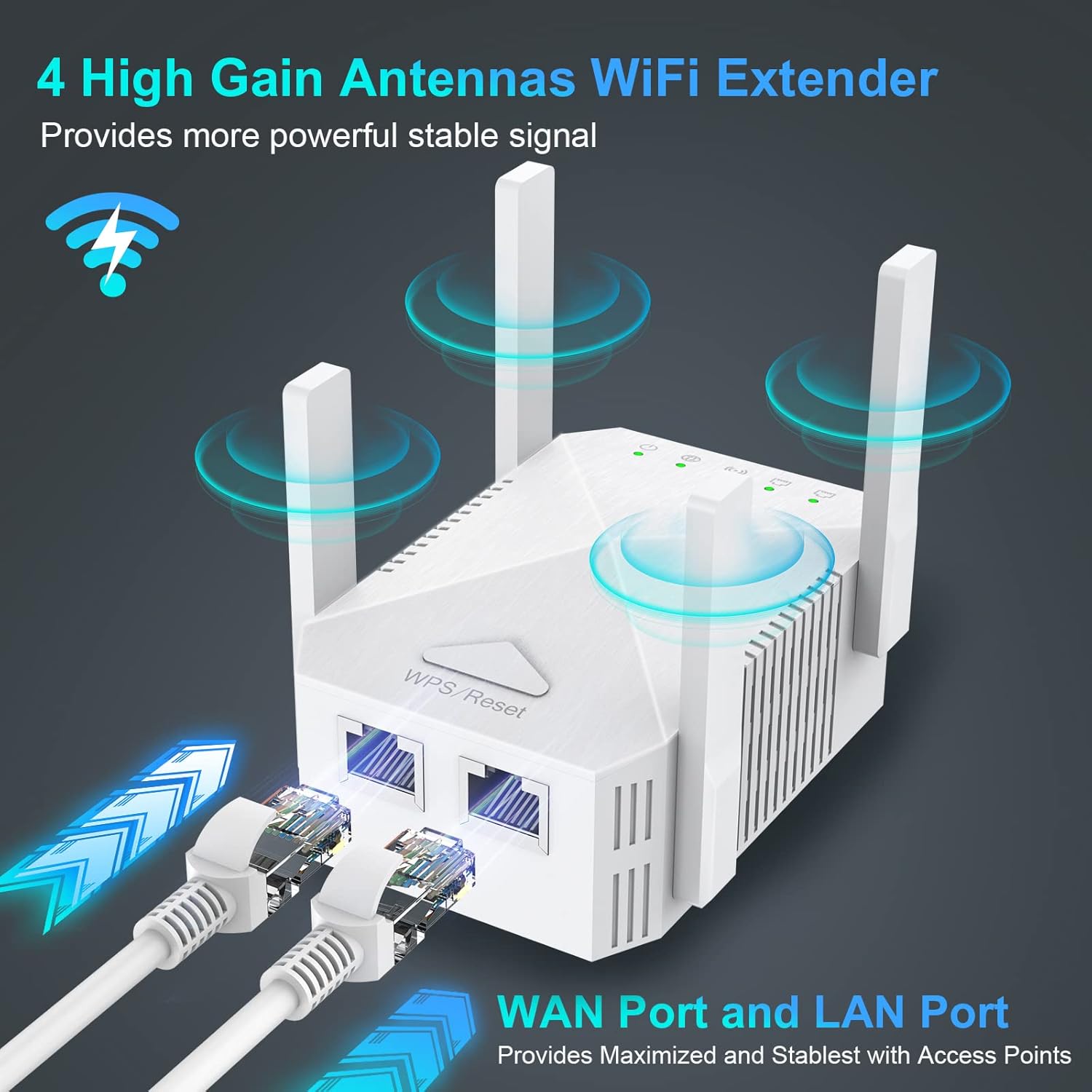
Figure 4.1: Three-in-one mode application.
4.1. Initial Setup Steps (Common to all modes)
- Pornire: Plug the WiFi Extender into a power outlet near your main router. Wait for the Power LED to turn solid.
- Conectare la extender: On your computer or mobile device, connect to the Wi-Fi network broadcast by the extender (e.g., "WiFi_Extender_XXXX"). No password is required initially.
- Pagina de configurare a accesului: Deschide a web browser and enter the default IP address (usually 192.168.10.1) or the setup URL provided in the quick guide.
- Log in: Introduceți numele de utilizator și parola implicite (de obicei „admin” pentru ambele).
- Selectați modul: Follow the on-screen wizard to select your desired operating mode (Repeater, AP, or Router).
4.2. Repeater Mode Setup
In Repeater Mode, the extender wirelessly connects to your existing router and rebroadcasts the signal to extend coverage.
- After selecting Repeater Mode, the extender will scan for available Wi-Fi networks.
- Select your main Wi-Fi network (SSID) from the list.
- Enter the Wi-Fi password for your main network.
- Puteți alege să păstrați același SSID pentru rețeaua extinsă sau să creați unul nou.
- Click "Apply" or "Save" to complete the setup. The extender will restart.
- Once restarted, relocate the extender to a location between your router and the Wi-Fi dead zone. Ensure the Signal Strength LEDs indicate a good connection.
4.3. AP Mode Setup (Access Point)
In AP Mode, the extender connects to your router via an Ethernet cable and creates a new wireless network, converting a wired network into a wireless one.
- Connect an Ethernet cable from your main router's LAN port to the Extender's WAN port.
- Select AP Mode in the setup wizard.
- Configure the new Wi-Fi network's SSID and password.
- Click "Apply" or "Save". The extender will restart.
4.4. Router Mode Setup
In Router Mode, the extender acts as a primary router, connecting directly to your modem and creating a new Wi-Fi network.
- Connect an Ethernet cable from your modem to the Extender's WAN port.
- Select Router Mode in the setup wizard.
- Choose your internet connection type (e.g., PPPoE, Dynamic IP, Static IP) and enter necessary details provided by your ISP.
- Configure the new Wi-Fi network's SSID and password.
- Click "Apply" or "Save". The extender will restart.
5. Operarea extenderului
Once configured, the Edtiske WiFi Extender operates automatically. For optimal performance, consider the following:
- Plasare: For Repeater Mode, place the extender roughly halfway between your main router and the area where you need improved Wi-Fi. Avoid placing it near large metal objects, concrete walls, or other electronic devices that may cause interference.
- Puterea semnalului: Monitor the Signal Strength LEDs on the extender. Green indicates a strong connection, yellow indicates a fair connection, and red indicates a weak or no connection. Adjust placement if necessary.
- Conexiuni prin cablu: Use the LAN port to connect wired devices for maximum stability and speed, especially for gaming consoles, smart TVs, or desktop computers.

Figure 5.1: Extended WiFi coverage throughout a property.

Figure 5.2: Wide compatibility with up to 45 connected devices.

Figure 5.3: Extending WiFi to every corner of the house.
6. Întreținere
To ensure the longevity and optimal performance of your Edtiske WiFi Extender, follow these maintenance guidelines:
- Păstra curat: Regularly wipe the device with a soft, dry cloth. Do not use liquid cleaners or aerosols.
- Ventilare: Ensure the ventilation holes are not blocked. Proper airflow prevents overheating.
- Actualizări firmware: Verificați periodic producătorul website pentru actualizări de firmware. Actualizările pot îmbunătăți performanța, pot adăuga funcții și pot remedia erori.
- Ciclu de alimentare: If you experience intermittent issues, try unplugging the extender from the power outlet for 10 seconds and then plugging it back in. This can resolve minor glitches.
- Conditii de mediu: Evitați expunerea dispozitivului la temperaturi extreme, umiditate sau lumina directă a soarelui.
7. Depanare
Dacă întâmpinați probleme cu extenderul WiFi, consultați următoarele probleme și soluții comune:
- Fără acces la internet după configurare:
- Ensure the extender is receiving a strong signal from your main router (check Signal Strength LEDs).
- Verificați dacă parola Wi-Fi introdusă în timpul configurării este corectă.
- Încearcă să repornești atât routerul principal, cât și extenderul.
- If in Repeater Mode, ensure your main router is broadcasting both 2.4GHz and 5GHz bands if you intend to extend both. Note that some users have reported that in Repeater Mode, the extender may primarily communicate with the router on the 2.4GHz band, potentially limiting overall speed even if the extender broadcasts a 5GHz network.
- Nu se poate accesa pagina de configurare:
- Ensure your device is connected to the extender's Wi-Fi network (not your main router's).
- Ștergeți memoria cache a browserului sau încercați un alt browser.
- Verify the IP address or URL este corect.
- Viteze mici:
- Relocate the extender closer to your main router to improve signal strength.
- Reduceți interferențele îndepărtând extenderul de alte dispozitive electronice.
- Asigurați-vă că routerul principal oferă o viteză adecvată a internetului.
- Consider using a wired connection via the LAN port for critical devices.
- Deconectări frecvente:
- Verificați actualizările de firmware.
- Perform a factory reset (press and hold the WPS/Reset button for 10 seconds) and reconfigure the extender.
- Ensure the extender is not placed in an area with too many physical obstructions.
8. Specificații
| Caracteristică | Descriere |
|---|---|
| Marca | Edtiske |
| Numărul de model | Alb |
| Dimensiunile produsului | 3.45 x 2.24 x 1.18 inci |
| Greutatea articolului | 4.2 uncii |
| Comunicare wireless standard | 802.11ac |
| Rata de transfer de date | 1200 de megabiți pe secundă |
| Clasa de bandă de frecvență | Bandă dublă (5 GHz/2.4 GHz) |
| Tip conector | RJ45 (WAN/LAN) |
9. Garanție și asistență
The Edtiske WiFi Extender typically comes with a manufacturer's warranty. Please refer to the warranty information provided in the original packaging or contact the seller/manufacturer directly for details regarding warranty claims and technical support. Keep your purchase receipt as proof of purchase.