
UNITOPSCI A3197A4
UNITOPSCI 2G+64G 9 Inch Double Din Android Car Stereo
Manual de utilizare
1. Introducere
Thank you for choosing the UNITOPSCI 2G+64G 9 Inch Double Din Android Car Stereo. This advanced head unit is designed to enhance your driving experience with its comprehensive features, including a 9-inch capacitive touch screen, Android 13 operating system, wireless Apple CarPlay, Android Auto, Bluetooth, GPS navigation, mirror link, WiFi, FM radio, USB connectivity, steering wheel control (SWC), and DVR support. This manual provides detailed instructions for installation, operation, maintenance, and troubleshooting to ensure optimal performance and longevity of your device.

Image: The UNITOPSCI 9-inch Android Car Stereo, showcasing its user interface with navigation, music playback, and system settings.
2. Ce se află în cutie
Please verify that all components are present in the package before proceeding with installation.
- 1 x Sistem stereo auto Android
- 1 x Cameră de rezervă
- 1 x Antenă GPS
- 1 x Cablu de intrare pentru camera spate
- Cablu 1 x RCA
- 1 x cablu de alimentare
- 1 x cablu USB
- 2 x Metal Frame
- 1 x Manual de utilizare
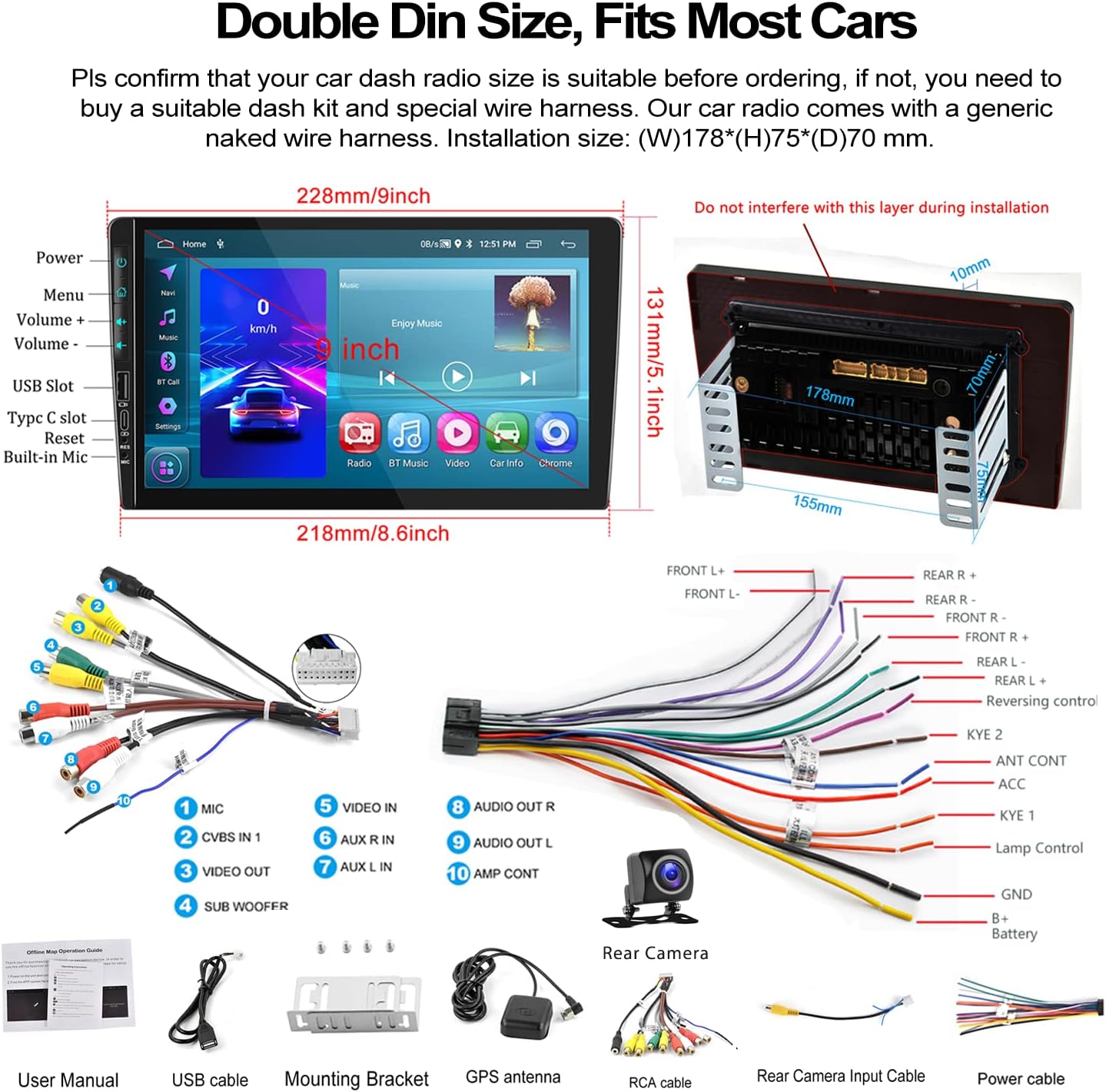
Image: A visual representation of the car stereo's dimensions, along with all the cables and accessories included in the package, such as the power cable, RCA cables, USB cable, GPS antenna, and backup camera.
3. Specificații
| Caracteristică | Descriere |
|---|---|
| Sistem | Android 13 |
| RAM | 2 GB |
| ROM | 64 GB |
| Dimensiunea ecranului | 9 inchi |
| Rezoluția ecranului | 1024x600 |
| Putere Amplifier Chip | 7388 |
| Radio Chip | 8035 |
| Putere de ieșire | 4*45W |
| Versiune Bluetooth | 4.2 |
| Banda de frecvențe radio | FM/RDS |
| Temperatura de lucru | -40℃ până la 80℃ |
| Dimensiunea de instalare | 7 inch (W), 3.8 inch (H) / 178mm (W) x 97mm (H) |
| Dimensiunile produsului | 1.85 x 7 x 4.02 inci |
| Greutatea articolului | 2.29 lire sterline |
4. Configurare și instalare
Proper installation is crucial for the performance and safety of your car stereo. It is recommended to have the installation performed by a professional if you are unsure about any steps.
4.1 Verificare înainte de instalare
- Ensure your car's dashboard opening is compatible with the standard double din size (approximately 7 inches wide by 3.8 inches high).
- Disconnect the car battery's negative terminal before starting any wiring.
- Familiarize yourself with the wiring harness provided.
4.2 Conexiuni de cablare
Refer to the wiring diagram provided in the 'What's in the Box' section and the specific rear view wiring diagram below for detailed connections.
- Cablu de alimentare: Connect the power cable to your car's power supply according to the diagram.
- Cabluri RCA: Connect audio and video input/output cables as needed for external devices (e.g., amp(aparate de iluminat, monitoare pentru tetiere).
- Cabluri USB: Connect the dual USB interfaces for media playback, charging, or wired Android Auto.
- Antena GPS: Montați antena GPS într-un loc cu lumină naturală view cerului pentru o recepție optimă a semnalului.
- Cablu de intrare pentru camera din spate: This cable is essential for the backup camera functionality.
4.3 Cablarea camerei de marșarier
The included AHD backup camera requires specific wiring for proper operation:
- Putere camerei: The red wire of the backup camera connects to the positive (+) back battery supply (e.g., reverse light power). The black wire connects to the negative (-) battery supply (ground).
- Intrare video: The yellow RCA video output from the backup camera connects to the "CAM IN" port on the rear of the car radio.
- Sârmă de declanșare: Locate the wire labeled "BACK" or "REVERSE" on the car radio's wire harness. This wire needs to be connected to the positive power supply of your car's reversing light. This signal tells the head unit to automatically switch to the reversing image when reverse gear is engaged.

Image: A comprehensive wiring diagram for the backup camera, showing how to connect the camera's power, video signal, and the trigger wire to the car stereo and vehicle's reverse light system.
5. Instrucțiuni de utilizare
This section details the various functions and how to operate your UNITOPSCI car stereo.
Apple CarPlay și Android Auto fără fir 5.1
Connect your smartphone for seamless integration of navigation, music, calls, and more.
- Conexiune wireless: For both Apple CarPlay and Android Auto, connect your phone via Bluetooth and/or WiFi. Follow the on-screen prompts to establish the connection.
- Conexiune prin cablu: Alternatively, connect your Android phone via a USB data cable for wired Android Auto.
- Control vocal: Utilize Siri (for CarPlay) or Google Assistant (for Android Auto) for hands-free operation of functions like navigation, calls, and music.
- Nota: The Android Auto function may not work for some Samsung phones. CarPlay supports iOS phones up to version 15.4.

Image: Displays of the car stereo showing Wireless Apple CarPlay, Wireless Android Auto, and Mirror Link in action, highlighting their respective interfaces and connection methods.
5.2 Legătură în oglindă
Mirror Link vă permite să afișați ecranul smartphone-ului direct pe ecranul sistemului stereo auto.
- Android/iOS Compatibility: Supports screen mirroring for both Android and iOS devices.
- Conexiune: Connect your phone via USB or WiFi as per the instructions on the stereo.

Image: The car stereo screen mirroring a smartphone, demonstrating the Mirror Link feature.
5.3 Bluetooth Hands-Free & FM Radio
Enjoy safe communication and your favorite radio stations.
- Asociere Bluetooth: Enable Bluetooth on your phone and search for the car stereo. Pair the devices to enable hands-free calling and wireless audio streaming.
- Carte de telefoane: The stereo supports automatic download of your phone book for easy access to contacts.
- Radio FM: Tune into your favorite FM stations. The radio features 18 preset stations for quick access to news, sports, and music.

Image: The car stereo's display showing the Bluetooth hands-free calling interface, FM radio tuner, and options for Bluetooth music and phone book access.
5.4 Navigație GPS și WiFi
Navigate with ease and stay connected.
- Hărți offline: The unit comes with built-in offline maps (HERE WE GO). Switch on WiFi to download map data for your region.
- Hărți online: Supports various online navigation apps for real-time traffic and updates.
- Conectivitate WiFi: Connect to a WiFi hotspot (e.g., from your phone) to access online features, download apps, and browse the internet.
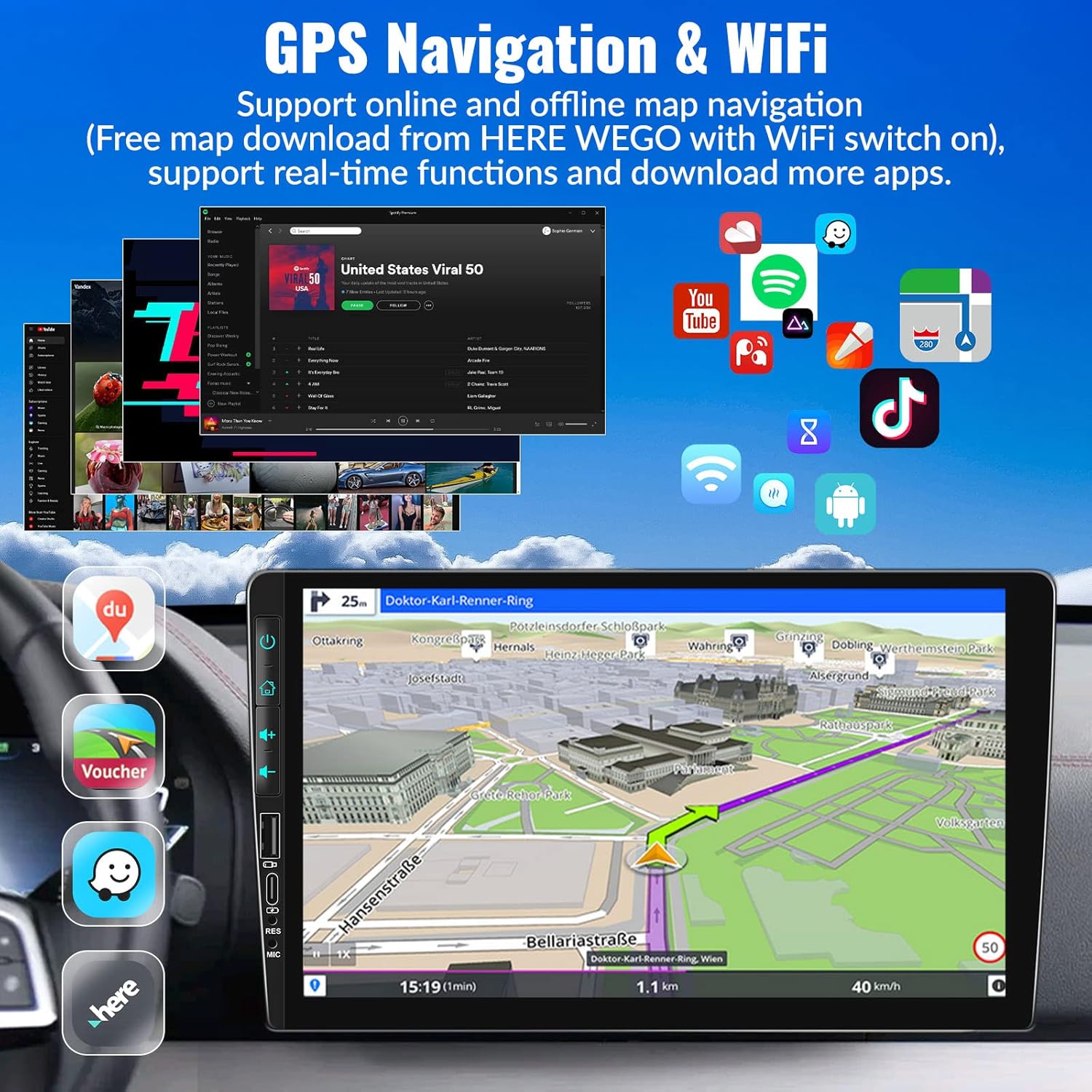
Image: The car stereo's screen showing a GPS navigation map, with various app icons floating around, illustrating the device's WiFi and app capabilities.
5.5 Controlul volanului (SWC)
Controlează-ți sistemul stereo fără să-ți iei mâinile de pe volan.
- Înființat: Access the Steering Wheel Control settings in the system menu. Follow the on-screen instructions to map your car's steering wheel buttons to the stereo's functions (e.g., volume up/down, track skip, mode).
- Comoditate: Easily switch songs, radio channels, and adjust volume for a safer driving experience.
5.6 EQ Sound Setting
Personalizează-ți experiența audio.
- presetări: Choose from various preset EQ modes such as Pop, Classic, Rock, Jazz, and more.
- Personalizare: Adjust individual frequency bands to create your preferred sound profile.

Image: The car stereo screen showing the AHD rear view camera display with parking lines, and a separate image illustrating the steering wheel control setup interface.
5.7 AHD Rear View Camera foto
Enhance parking safety with the included backup camera.
- Comutator automat: When properly wired, the stereo will automatically switch to the reversing image on the 9-inch touch screen when you engage reverse gear.
- Caracteristici: The camera provides HD image quality, is waterproof, offers night vision, and has a wide-angle view.
5.8 HD Screen & UI Themes
Personalize your stereo's appearance.
- Afişa: The 1024x600 capacitive touch screen features 2.5D glass and supports HD 1080p video playback.
- Teme UI: Choose from 28 different UI themes to customize the look and feel of your car stereo's interface.

Image: The car stereo's HD screen displaying a vibrant image, alongside a selection of 28 different desktop UI themes for personalization.
5.9 Colorful Lights
Customize the button illumination.
- Opțiuni: There are 7 options for button light colors, allowing you to match your car's interior lighting or your personal preference.

Image: The car stereo showcasing its customizable colorful button lights, with a spectrum of 7 color options.
6. Întreținere
Pentru a asigura longevitatea și performanța optimă a sistemului stereo auto, urmați aceste instrucțiuni de întreținere:
- Curățarea ecranului: Folosiți o lavetă moale, fără scame, pentru a șterge ușor ecranul tactil. Pentru petele persistente, ștergeți ușor.ampCurățați laveta cu apă sau cu un produs de curățare sigur pentru ecran. Evitați materialele abrazive sau substanțele chimice dure.
- Curatenie generala: Păstrați unitatea curată de praf și resturi. Folosiți o perie moale sau aer comprimat pentru a curăța orificiile de ventilație și crăpăturile butoanelor.
- Controlul temperaturii: Evitați expunerea unității la temperaturi extreme (foarte calde sau foarte reci) pentru perioade lungi de timp, deoarece acest lucru poate afecta performanța și durata de viață.
- Actualizări de software: Periodically check for software updates from UNITOPSCI to ensure you have the latest features and bug fixes.
- Conexiuni prin cablu: Asigurați-vă că toate cablurile sunt conectate corect. Conexiunile slăbite pot duce la probleme intermitente.
7. Depanare
If you encounter any issues with your car stereo, refer to the following common problems and solutions:
| Problemă | Cauză și soluție posibilă |
|---|---|
| Nu există alimentare / Unitatea nu pornește |
|
| Fără ieșire de sunet |
|
| Backup Camera Not Displaying Image |
|
| Wireless CarPlay/Android Auto Not Connecting or Laggy |
|
| Comenzile de pe volan nu funcționează |
|
| Touch Screen Unresponsive or Malfunctioning |
|
Dacă problema persistă după ce încercați aceste soluții, vă rugăm să contactați serviciul de asistență pentru clienți pentru asistență suplimentară.
8. Garanție și asistență
UNITOPSCI is committed to providing high-quality products and satisfactory services.
- Garantie: Acest produs vine cu o garanție de 1 ani de la data achiziției.
- Serviciu de înlocuire: Enjoy a 12-month replacement service for eligible issues.
- Garanția de returnare a banilor: Se oferă o garanție de returnare a banilor de 30 de zile.
- Suport pe viață: UNITOPSCI provides full-life product support, including after-sales consultation and technical assistance.
- Contactați asistența: For any product problems or inquiries, please feel free to write to us at UNITOPSCI@126.com. Our team aims for a quick response within 16 hours.

Image: Visual representation of UNITOPSCI's customer support services, including contact information.
Ask a question about this manual
Ask about setup, troubleshooting, compatibility, parts, safety, or missing instructions. Manuals+ will review the question and use this page’s manual context to help answer it.