
1. Introducere
Thank you for choosing the FLEXISPOT EF1 Basic Plus Electric Height-Adjustable Desk. This manual provides essential information for the safe and efficient assembly, operation, and maintenance of your new desk. Please read these instructions thoroughly before use and retain them for future reference.
Avertismente de siguranță
- Always follow the assembly instructions carefully to prevent accidents and ensure proper function.
- Do not exceed the maximum load capacity of 70 kg (154 lbs) on the desktop. Overloading can compromise stability and cause damage.
- To prevent tipping, especially when the desk is at its maximum height (121 cm), ensure the desk is anchored correctly to a stable wall.
- Keep children and pets away from the desk during operation to avoid injury from moving parts.
- Ensure there are no obstructions in the desk's path during height adjustment.
- Nu stați și nu stați în picioare pe birou.
- Deconectați alimentarea cu energie electrică înainte de curățare sau efectuarea oricărei operațiuni de întreținere.
2. Configurare și asamblare
The FLEXISPOT EF1 Basic Plus desk requires assembly. Please ensure all components are present before beginning. Refer to the included assembly guide for detailed step-by-step instructions.
Despachetarea și verificarea componentelor
Carefully unpack all parts and lay them out on a soft, clean surface to prevent scratches. Verify that all components listed in the packing list are present.
Asamblare terminatăview
- Attach the lifting columns to the desk feet.
- Connect the crossbar to the lifting columns.
- Fixați biroul pe cadrul asamblat.
- Install the control panel and cable management tray (if included).
- Connect all motor and control cables according to the wiring diagram.
- Conectați cablul de alimentare la o priză cu împământare.

Figura 1: The FLEXISPOT EF1 Basic Plus Electric Height-Adjustable Desk with a black tabletop and white frame, set up in a home office environment.

Figura 2: This image illustrates the smooth, single-piece desktop construction of the FlexiSpot desk, contrasting it with typical multi-piece desktops that may have uneven surfaces.

Figura 3: An illustrative diagram detailing various desktop size and color options, along with key specifications for the desk frame, including adjustable height range, static and dynamic load capacities, and lifting noise levels.
3. Instrucțiuni de utilizare
Panou de control terminatview

Figura 4: Un detaliat view of the desk's Smart Control Panel, highlighting the LED display, the up and down adjustment buttons, and four numbered buttons for memory presets.
The desk is equipped with an advanced all-in-one keypad for easy height adjustment and memory functions.
- Display LED: Afișează înălțimea curentă a biroului în centimetri.
- Up/Down Buttons (⌃ / ⌄): Press and hold to manually adjust the desk height upwards or downwards. Release the button to stop at the desired height.
- Presetări de memorie (1, 2, 3, 4): Four programmable buttons to save and recall your preferred sitting and standing heights.
Setarea presetărilor de memorie
- Reglați biroul la înălțimea dorită folosind butoanele Sus/Jos.
- Press the "M" or "SET" button (if available, otherwise proceed to step 3) to activate memory mode.
- Press one of the numbered preset buttons (1, 2, 3, or 4) within 3 seconds. The LED display will show "S-1", "S-2", etc., indicating the height has been saved to that preset.
Recalling Memory Presets
Simply press the desired numbered preset button (1, 2, 3, or 4). The desk will automatically move to the saved height.
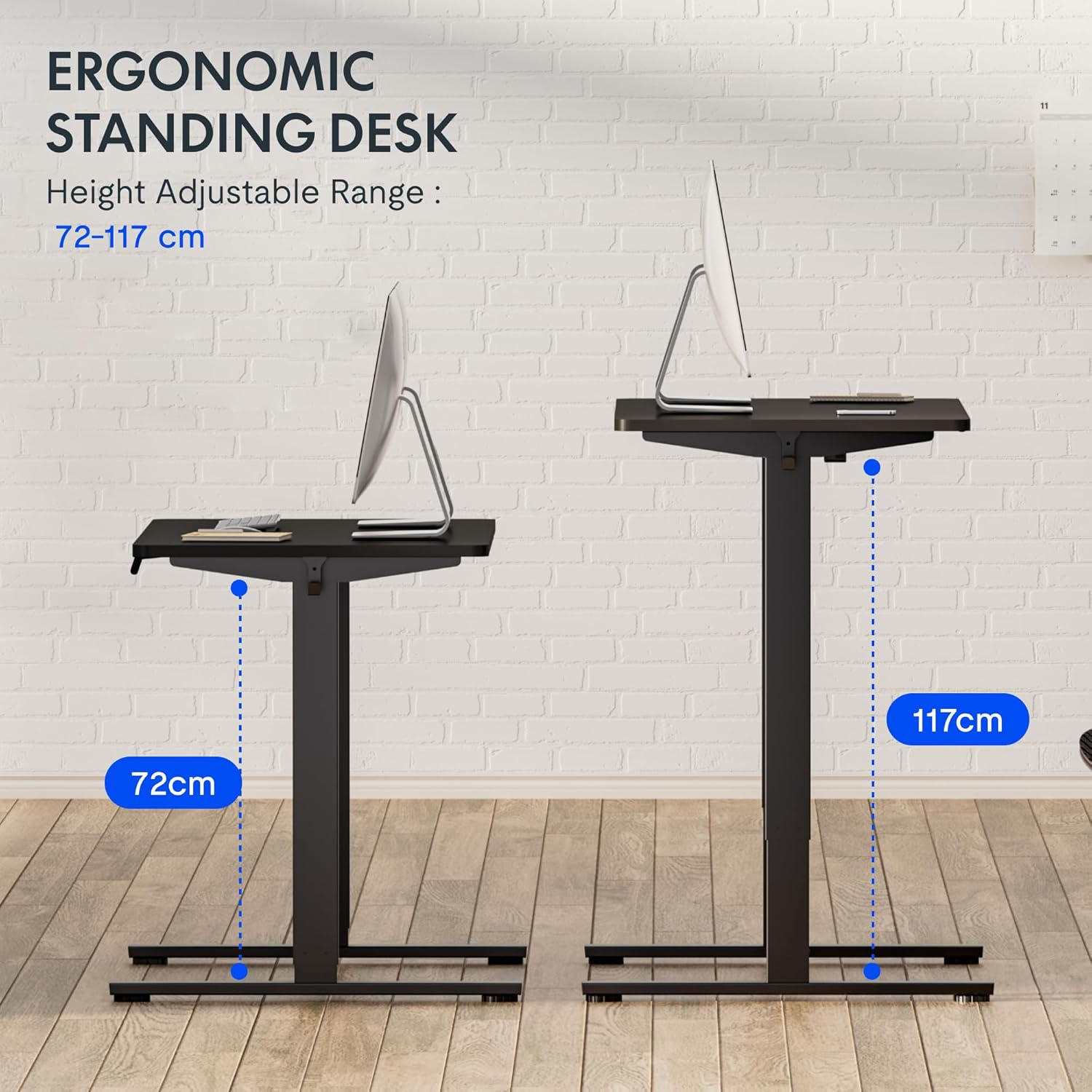
Figura 5: This image demonstrates the height adjustment capabilities of the desk, showing a range from 72 cm (sitting height) to 117 cm (standing height). Note that the full adjustable range for this model is 71 cm to 121 cm.
4. Întreținere
Regular maintenance ensures the longevity and optimal performance of your FLEXISPOT desk.
- curatenie: Ștergeți suprafața de lucru și rama cu o lavetă moale șiamp Evitați produsele de curățare abrazive sau substanțele chimice dure care ar putea deteriora finisajul.
- Organizare de cabluri: Periodically check and organize cables to prevent tangles and ensure smooth operation.
- Inspecţie: Regularly inspect all screws and bolts to ensure they are tight. Retighten if necessary.
- Lubrifiere: The lifting columns are generally maintenance-free. Do not attempt to lubricate internal components unless specifically instructed by customer support.
5. Depanare
Dacă întâmpinați probleme cu biroul dvs., consultați următoarele probleme și soluții frecvente.
| Problemă | Cauza posibila | Soluţie |
|---|---|---|
| Biroul nu se mișcă. |
|
|
| Biroul se mișcă neuniform sau scoate zgomote neobișnuite. |
|
|
| Cod de eroare afișat pe LED. |
|
|
Procedura de resetare
If the desk is not functioning correctly, a reset may resolve the issue.
- Press and hold the "Down" button until the desk reaches its lowest position and slightly retracts, then releases.
- If this does not initiate a reset, unplug the desk from the power outlet for at least 10 seconds, then plug it back in.
- Repeat step 1. The desk should now be reset.
6. Specificații
| Marca | FLEXISPOT |
| Numărul de model | HU-XI-201 |
| Desktop Dimensions (L x W x Thickness) | 120 x 80 x 2.5 cm |
| Adjustable Height Range (without tabletop) | 71 cm - 121 cm |
| Max Lifting Speed | 2.5 cm/s |
| Capacitate maximă de încărcare | 70 kg (154 lbs) |
| Lifting Noise Level | <50 dB |
| Material pentru desktop | Engineered Wood (MDF) with High-Pressure Laminate |
| Material cadru | Oțel acoperit cu pulbere |
| Culoare | Black tabletop + White frame |
| Caracteristici | Electric height adjustment, 4 memory presets |
7. Garanție și asistență
Informații despre garanție
FLEXISPOT stands behind the quality of its products. Your EF1 Basic Plus desk comes with the following warranty:
- 3 an garanție: Covers controllers and motors.
- 5 an garanție: Covers the desk frame.
Please retain your proof of purchase for warranty claims. The warranty covers manufacturing defects under normal use. It does not cover damage caused by misuse, accidents, unauthorized modifications, or failure to follow the instructions in this manual.

Figura 6: An image outlining the warranty coverage for FlexiSpot desks, specifically mentioning a 3-year warranty for controllers and motors, and a 5-year warranty for the desk frame.
Asistență pentru clienți
For technical assistance, warranty claims, or any questions regarding your FLEXISPOT EF1 Basic Plus desk, please contact FLEXISPOT customer support.
Website: www.flexispot.com (or regional equivalent)
E-mail: Refer to your purchase documentation or the official FlexiSpot website pentru e-mail de contact.
Telefon: Refer to your purchase documentation or the official FlexiSpot website pentru număr de telefon de contact.