
Nurati Nurati N1
Nurati N1 Sport Bluetooth 5.2 In-Ear Headphones User Manual
Model: Nurati N1

Image: Nurati N1 Sport Bluetooth 5.2 In-Ear Headphones, black with neckband design.
Introducere
The Nurati N1 Sport Bluetooth 5.2 In-Ear Headphones are designed for an immersive audio experience and clear communication. Featuring a long-lasting battery, IPX6 waterproofing, and advanced noise cancellation for calls, these headphones are suitable for various activities and environments.
Ce este în cutie
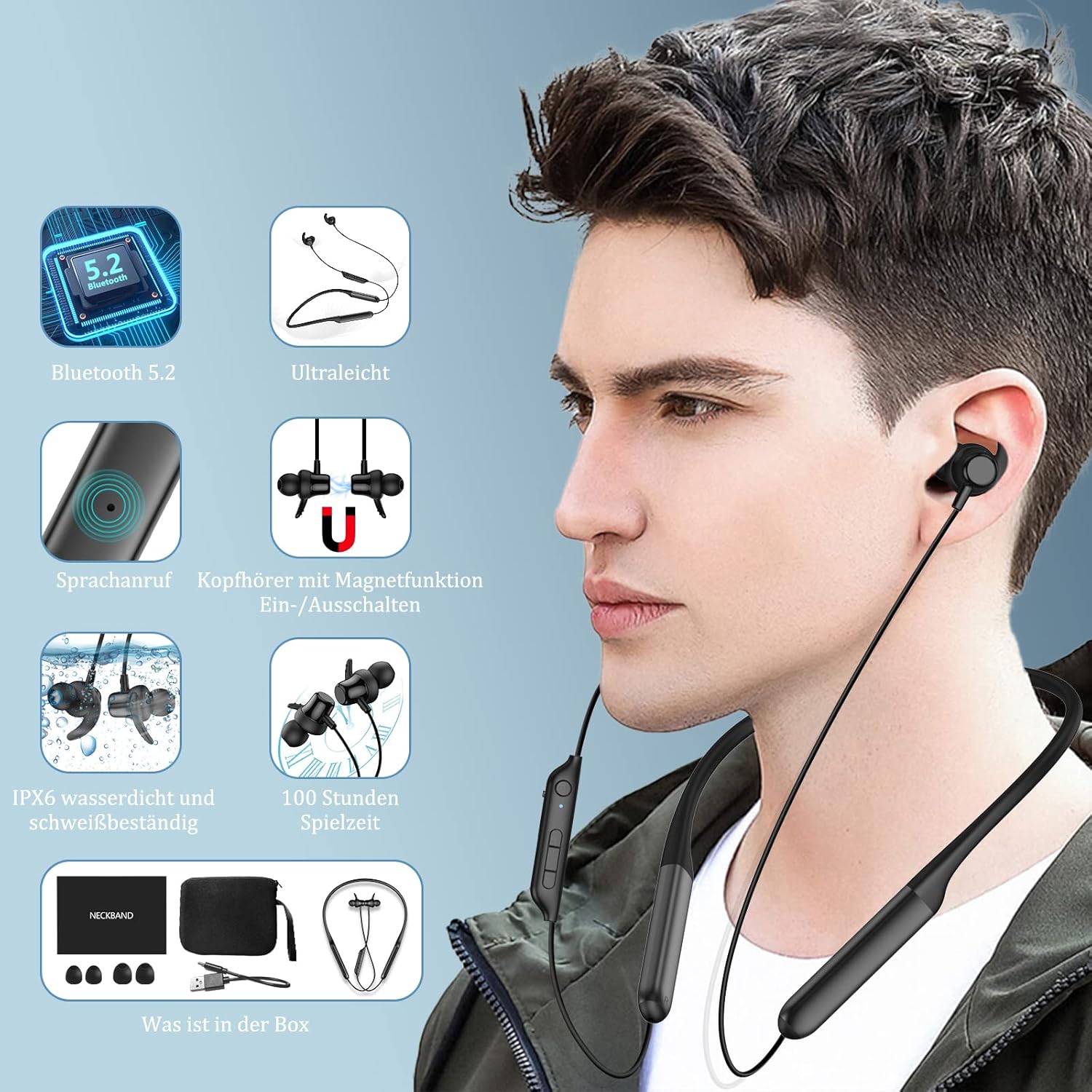
Image: Contents of the Nurati N1 headphone box, including the headphones, charging cable, ear tips, and user manual.
Your Nurati N1 package should contain the following items:
- Nurati N1 Sport Bluetooth Headphones
- Cablu de încărcare USB de tip C
- Mai multe dimensiuni de dopuri pentru urechi
- Manual de utilizare
Înființat
Încărcare inițială
Before first use, fully charge your Nurati N1 headphones. Connect the provided USB Type-C cable to the charging port on the headphones and a compatible USB power source. The LED indicator will show charging status.
Pornire/Oprire

Image: Illustration of the magnetic switch function for turning the headphones on and off.
- Pornire: Separate the magnetic earbuds. The headphones will automatically power on and enter pairing mode.
- Oprire: Bring the magnetic earbuds together. The headphones will automatically power off.
Asociere Bluetooth

Image: Step-by-step guide for Bluetooth pairing the Nurati N1 headphones with a mobile device.
- Ensure the headphones are powered on (earbuds separated).
- Pe dispozitivul dvs. (smartphone, tabletă etc.), activați Bluetooth.
- Caută available Bluetooth devices. Select "N1" from the list.
- Once connected, the headphones will indicate successful pairing.
Official Product Video: Introduction to Nurati N1
Video: A brief introduction to the Nurati N1 headphones, demonstrating key features and design.
Instrucțiuni de operare
Butoane multifuncționale

Image: Detailed diagram showing the layout and functions of the multi-function buttons on the Nurati N1 headphones.
| Buton/Acțiune | Funcţie |
|---|---|
| Multi-function Button (Main) | Redare/Pauză, Răspuns/Terminare apeluri |
| Long Press Multi-function Button (2 seconds) | Game Mode Toggle |
| Apăsare triplă a butonului multifuncțional | Activați Asistentul vocal |
| Short Press '+' Button | Creșterea volumului |
| Long Press '+' Button | Următoarea piesă |
| Short Press '-' Button | Reducerea volumului |
| Long Press '-' Button | Piesa anterioară |
Efectuarea de apeluri
- The headphones feature ENC (Environmental Noise Cancellation) technology for clear phone calls by isolating background noise.
- Answer/End calls using the Multi-function Button as described above.
Official Product Video: Using the Headphones
Video: Demonstrates various ways to use the Nurati N1 headphones in daily scenarios.
Întreţinere

Image: Nurati N1 headphones shown with water droplets, highlighting their IPX6 waterproof and sweatproof capabilities.
- curatenie: Ștergeți căștile cu un material moale, damp pânză. Nu utilizați agenți de curățare abrazivi sau solvenți.
- Depozitare: Când nu le utilizați, depozitați căștile într-un loc răcoros și uscat, ferit de lumina directă a soarelui și de temperaturi extreme.
- Rezistenta la apa: The headphones are IPX6 waterproof and sweatproof, making them suitable for workouts and light rain. Do not submerge them in water or expose them to strong jets of water.
Official Product Video: IPX6 Waterproofing
Video: Demonstrates the IPX6 waterproof capabilities of the Nurati N1 headphones.
Depanare
If you encounter issues with your Nurati N1 headphones, please try the following steps:
- Fără putere: Ensure the headphones are fully charged. Separate the magnetic earbuds to power them on.
- Nu se poate realiza asocierea: Make sure Bluetooth is enabled on your device and the headphones are in pairing mode. Try turning Bluetooth off and on again on your device. If issues persist, try pairing with another device to rule out device-specific problems.
- Calitate slabă a sunetului: Check the audio source. Ensure the headphones are within the Bluetooth range (up to 10 meters). Try adjusting the volume on both the headphones and your device.
- Conexiune intermitentă: Move closer to your paired device. Avoid obstacles that might interfere with the Bluetooth signal. Ensure no other strong wireless signals are causing interference.
For further assistance, please refer to the contact information provided in your product packaging.
Specificații
| Caracteristică | Detaliu |
|---|---|
| Numele modelului | Nurati N1 |
| Tehnologia de conectivitate | Wireless (Bluetooth 5.2 with EDR) |
| Durata de viață a bateriei | Up to 100 hours playtime (20 hours with 10 min charge) |
| Rezistenta la apa | IPX6 rezistent la apă și transpirație |
| Controlul zgomotului | Environmental Noise Cancellation (ENC) for calls |
| Calitatea sunetului | HiFi Sound with high-performance dynamic driver |
| Plasarea urechii | In-ear |
| Factor de formă | In Ear (Neckband style) |
| Impedanta | 20 ohmi |
| Dimensiunile produsului | 16.5 x 12.6 x 2.4 cm; 30 grame |
| baterii | 2 Lithium-Polymer batteries required (included) |
Key Features Visuals

Excellent Battery Life: Up to 100 hours of playtime.

Ergonomic Design: Comfortable for all-day wear.

HiFi Sound Quality & ENC: Immersive audio and clear calls.
Garanție și suport
For warranty information and customer support, please refer to the documentation included in your product packaging or visit the official Nurati webPăstrați dovada achiziției pentru orice reclamații în garanție.
Ask a question about this manual
Ask about setup, troubleshooting, compatibility, parts, safety, or missing instructions. Manuals+ will review the question and use this page’s manual context to help answer it.