
1. Introducere
This manual provides detailed instructions for the installation, operation, and maintenance of your TP-Link Deco X50-Outdoor AX3000 Whole Home Mesh WiFi 6 Unit. The Deco X50-Outdoor is designed to extend your mesh WiFi network to outdoor and indoor spaces, providing robust and stable wireless connectivity. Please read this manual thoroughly before using the device to ensure proper setup and optimal performance.
2. Informații de siguranță
Respectați întotdeauna aceste măsuri de siguranță de bază pentru a reduce riscul de incendiu, electrocutare și vătămare corporală:
- Nu expuneți acest dispozitiv la apă sau umezeală.
- Nu încercați să dezasamblați, să reparați sau să modificați dispozitivul.
- Utilizați numai adaptorul de alimentare furnizat împreună cu dispozitivul.
- Ensure the device is installed in a stable location to prevent it from falling.
- Țineți aparatul departe de sursele de căldură și lumina directă a soarelui.
- For outdoor installation, ensure all cable connections are properly sealed to prevent water ingress.
3. Conținutul pachetului
Verificați dacă pachetul dvs. conține următoarele articole:
- 1 x TP-Link Deco X50-Outdoor Unit
- 1 x adaptor de alimentare
- 1 x cablu Ethernet
- Mounting Kit (includes mounting bracket, screws, and wall plugs)
- Ghid de instalare rapidă

Image: The retail packaging for the TP-Link Deco X50-Outdoor unit, showing the device and its key features.
4. Produs terminatview
The Deco X50-Outdoor is a cylindrical, white unit designed for both outdoor and indoor use. It features an IP65 rating for waterproof and dustproof protection, making it suitable for various weather conditions.
4.1 Aspectul dispozitivului

Imagine: față view of the TP-Link Deco X50-Outdoor unit, showcasing its sleek, cylindrical design and 'deco outdoor' branding.

Image: The bottom of the Deco X50-Outdoor unit, revealing the port cover and the attachment point for the mounting bracket.
4.2 Porturi și butoane
Under the protective cover at the bottom of the unit, you will find the following:
- Port PoE: Used for Power over Ethernet (PoE) connection, providing both power and data through a single Ethernet cable.
- Porturi LAN (2): For connecting wired devices or for backhaul connection to other Deco units.
- Port de alimentare: For connecting the included power adapter when not using PoE.
- Buton de resetare: A small button to reset the device to factory settings.

Imagine: Un prim-plan view of the PoE and AC power supply ports located at the base of the Deco X50-Outdoor unit, with labels indicating their functions.
5. Configurare
Follow these steps to set up your Deco X50-Outdoor unit. It is recommended to use the TP-Link Deco app for a guided setup process.
5.1 Download the Deco App
- Scan the QR code in the Quick Installation Guide or search for "TP-Link Deco" in the App Store or Google Play.
- Descărcați și instalați aplicația Deco pe smartphone sau tabletă.
5.2 Instalare fizică
The Deco X50-Outdoor can be mounted on a pole, wall, or placed on a tabletop.
- Alegeți o locație: Select a location that provides optimal WiFi coverage and is within range of your existing Deco network (if extending). For outdoor use, ensure it's protected from direct impact and accessible for power/Ethernet.
- Montare:
- Montare pe stâlp: Use the provided straps to secure the mounting bracket to a pole.
- Montare pe perete: Drill holes, insert wall plugs, and screw the mounting bracket to the wall.
- Masa: Simply place the unit on a flat, stable surface.
- Conectare alimentare:
- Utilizarea adaptorului de alimentare: Connect the provided power adapter to the power port and plug it into an electrical outlet.
- Folosind PoE: Connect an Ethernet cable from a PoE-enabled switch or injector to the PoE port on the Deco unit.
- Connect to Existing Network (Optional): If you are using the Deco X50-Outdoor as a satellite unit, it will connect wirelessly to your main Deco unit. For a wired backhaul, connect an Ethernet cable from one of the LAN ports to your main Deco unit or network switch.

Image: The Deco X50-Outdoor unit securely mounted on an outdoor pole, demonstrating a typical installation scenario.
5.3 Configurare ghidată prin aplicație
- Deschide aplicația Deco și conectează-te cu ID-ul tău TP-Link. Dacă nu ai unul, creează-ți un cont.
- Tap the "+" icon in the top right corner to add a new Deco unit.
- Select your Deco model (X50-Outdoor) and follow the on-screen instructions to complete the setup. The app will guide you through connecting the unit and integrating it into your existing Deco mesh network.
6. Operare
Once set up, your Deco X50-Outdoor unit will automatically integrate into your mesh network, providing seamless WiFi coverage. You can manage your network using the TP-Link Deco app.
6.1 Deco App Features
The Deco app allows you to:
- View dispozitivele conectate și starea acestora.
- Configurați o rețea de oaspeți.
- Manage parental controls.
- Prioritize devices for optimal performance (QoS).
- Access HomeShield Security features.
- Actualizați firmware-ul.
- Monitor network health and usage.
6.2 Stare indicator LED
The LED on your Deco unit indicates its status:
- Verde continuu: Deco funcționează corect.
- Verde pulsatoriu: Deco începe.
- Roșu continuu: Deco are o problemă (de exemplu, nu are conexiune la internet).
- Roșu pulsatoriu: Deco este deconectat de la unitatea Deco principală.
- Albastru solid: Deco este gata de configurare.
- Albastru pulsatoriu: Deco is pairing via Bluetooth.
7. Întreținere
Regular maintenance ensures the longevity and optimal performance of your Deco X50-Outdoor unit.
7.1 de actualizări de firmware
Keep your Deco's firmware updated to benefit from the latest features, security enhancements, and bug fixes. You can check for and install updates via the Deco app.
7.2 Curățare
Wipe the device with a soft, dry cloth. Do not use liquid cleaners or chemical sprays.
7.3 Considerații de mediu
Despite its outdoor rating, avoid placing the unit in locations where it is constantly submerged in water or exposed to extreme physical impact.
8. Depanare
If you encounter issues with your Deco X50-Outdoor, try the following solutions:
8.1 Fără conexiune la internet
- Check the LED status. If solid red, ensure your main Deco unit has an internet connection.
- Verify that the Ethernet cable (if used) is securely connected.
- Restart your modem, main Deco unit, and then the X50-Outdoor unit.
8.2 Deco X50-Outdoor Disconnected
- Ensure the unit is within range of your main Deco or another satellite Deco.
- Verificați conexiunea de alimentare.
- Try relocating the unit to a closer position to the main Deco.
8.3 Slow WiFi Speed
- Ensure the unit is placed in an open area, free from obstructions.
- Verificați actualizările de firmware.
- Folosește aplicația Deco pentru a rula un test de optimizare a rețelei.
8.4 Resetare din fabrică
If issues persist, you may need to perform a factory reset. With the Deco unit powered on, use a pin to press and hold the Reset button until the LED turns solid red (approximately 1 second), then release. The unit will restart with factory default settings.
9. Specificații
Technical details for the TP-Link Deco X50-Outdoor unit:
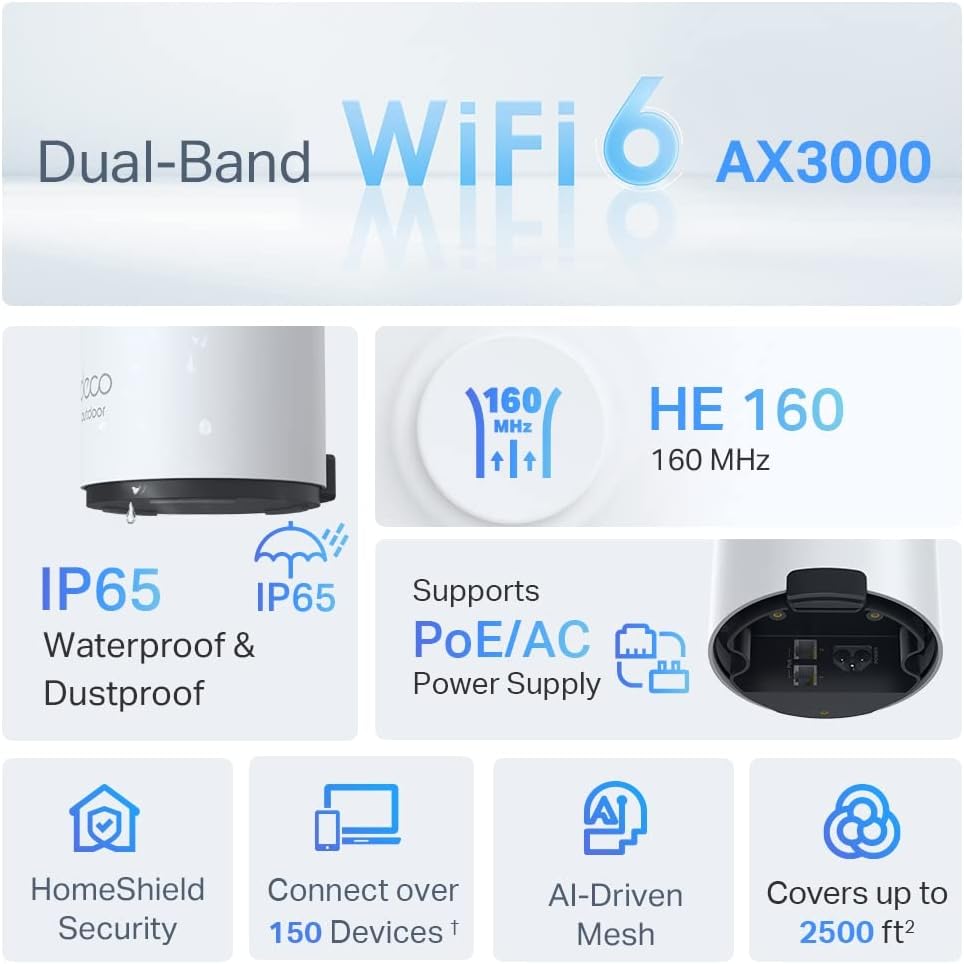
Image: An infographic highlighting key features of the Deco X50-Outdoor, including Dual-Band WiFi 6, AX3000 speeds, IP65 rating, PoE/AC power support, HomeShield Security, support for over 150 devices, AI-Driven Mesh, and up to 2500 sq ft coverage.
| Caracteristică | Detaliu |
|---|---|
| Numele modelului | AX3000 Outdoor Whole Home Mesh WiFi 6 Unit |
| standard wireless | Wi-Fi 6 (802.11ax) |
| Clasa de bandă de frecvență | Dual-Band |
| Rata de transfer de date | Up to 2402 Mbps (5 GHz) + 574 Mbps (2.4 GHz) |
| Interval de conectivitate | Up to 2000 Square Feet (per unit) |
| Porturi | 2 x Gigabit Ethernet Ports (Auto-sensing WAN/LAN) |
| Alimentare electrică | PoE (802.3at) or AC Power Adapter (240V AC) |
| Rezistență la intemperii | IP65 (rezistent la apă și praf) |
| Protocol de securitate | WPA, WPA2, WPA3 |
| Metoda de control | TP-Link Deco App |
| Greutatea articolului | 0.9 kilograme |
10. Garanție și asistență
Pentru informații despre garanție și asistență tehnică, vă rugăm să consultați pagina oficială TP-Link. website-ul sau contactați serviciul pentru clienți.
- TP-Link Oficial Website: www.tp-link.com
- Suport tehnic: Vizitați secțiunea de asistență de pe TP-Link website pentru întrebări frecvente, ghiduri de depanare și informații de contact.