
1. Introducere
The HiBy FD1 is a portable USB Digital-to-Analog Converter (DAC) and headphone amplifier designed to enhance audio quality from various devices. It features dual ES9118 audio chips for high-resolution sound and supports both single-ended and balanced headphone outputs.
This device is compatible with a wide range of operating systems and devices, including Android, iOS, Windows, macOS, smartphones, computers, tablets, and digital audio players.

Image 1: The HiBy FD1 USB Headphone Amplifier, showcasindatorită designului său compact.
Caracteristici cheie:
- Dual ES9118 Audio Chips: Provides high-resolution audio and enhanced decoding capabilities.
- Dual Crystal Oscillators: Lowers jitter and improves digital audio accuracy for 44.1x and 48x clocked audio signals.
- Ieșiri versatile: Includes 3.5mm single-ended (SE) and 2.5mm balanced headphone outputs.
- Compatibilitate largă: Supports multiple system platforms including Android, iOS, Windows, and macOS.
- Lossless Audio Support: Compatible with most lossless music formats, including native DSD128 decoding.
- Hardware USB Mode Switch: Allows switching between USB Audio 1.0 and 2.0 standards.
- Driverless Plug-and-Play: No charging required; automatically powers on when connected via USB and shuts down when unplugged.
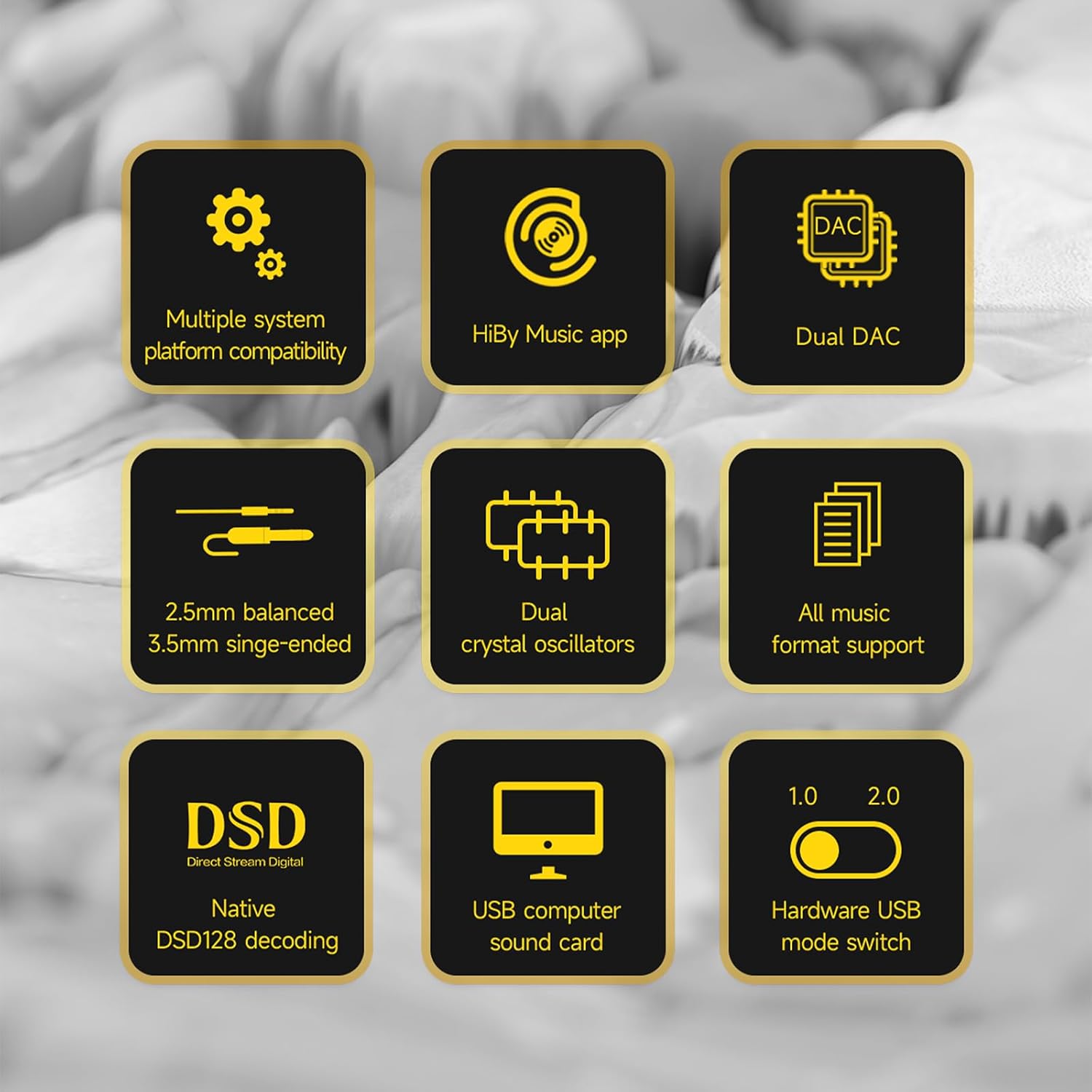
Image 2: A visual representation of the HiBy FD1's key features, including dual DAC, DSD support, and multiple system compatibility.
2. Configurare
2.1 Conectarea la dispozitive
The HiBy FD1 connects to your source device (computer, smartphone, tablet) via its USB Type-C port. It is designed for driverless plug-and-play operation.
- For Android/Windows/macOS: Connect the FD1 using a compatible USB Type-C cable.
- Pentru dispozitive iOS (iPhone/iPad): A Camera Connection Kit (CCK) cable is required for proper functionality.

Image 3: The HiBy FD1 connected to various devices, illustrating its broad compatibility with smartphones, tablets, and computers.
2.2 USB Mode Switch
The FD1 features a hardware switch to select between USB Audio 1.0 and USB Audio 2.0 standards. This switch is located on the side of the device.
- USB Audio 1.0: Provides driverless plug-and-play functionality on Windows 7/8/10. DSD audio is not supported in this mode.
- USB Audio 2.0: Offers driverless plug-and-play on Windows 10 (build 1703 and later). For DSD support on Windows, an additional driver installation may be required.

Image 4: Close-up of the HiBy FD1's hardware USB mode switch, allowing selection between 1.0 and 2.0 standards.
2.3 Pornire/Oprire
The HiBy FD1 automatically powers on when connected to a USB source and automatically shuts down when disconnected. No external power button or charging is required as it draws power directly from the connected device.

Image 5: The HiBy FD1 connected to a smartphone and a laptop, demonstrating its plug-and-play functionality without external charging.
3. Instrucțiuni de utilizare
3.1 Conectarea căștilor
The HiBy FD1 offers two headphone output options:
- 3.5mm Single-Ended (SE) Output: Pentru căști standard.
- Ieșire echilibrată de 2.5 mm: For headphones with a balanced connection, offering improved audio performance.
Connect your headphones to the appropriate port on the FD1.
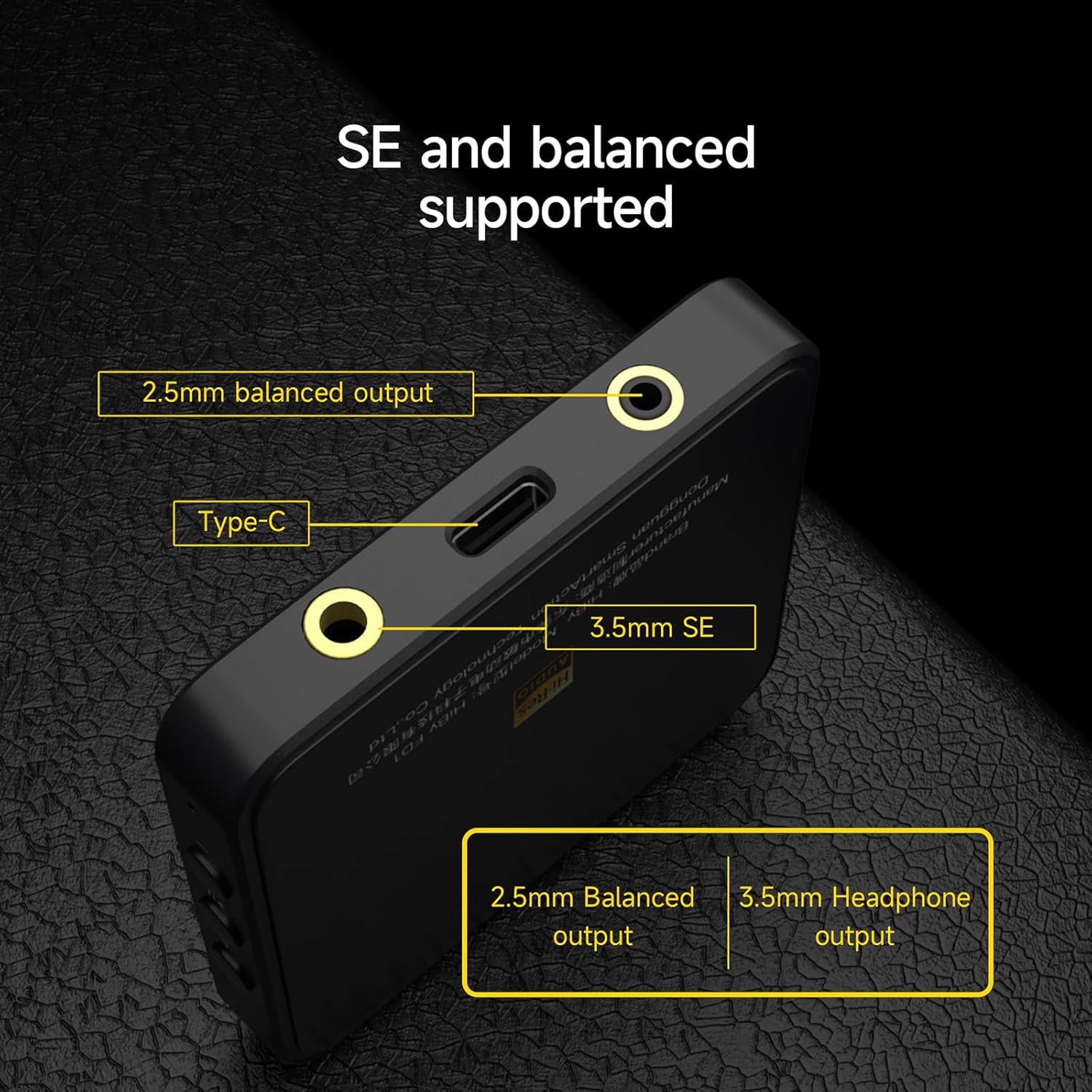
Imaginea 6: O imagine detaliată view of the HiBy FD1's ports, highlighting the 2.5mm balanced output, Type-C input, and 3.5mm single-ended output.
3.2 Playback and Controls
Once connected, the FD1 acts as an external sound card for your device. Play audio through your preferred music application. The FD1 features hardware buttons for basic playback control:
- Volum +: Atingeți pentru a crește volumul.
- Redare/Pauză: Atingeți pentru a reda sau întrerupe audio.
- Volum -: Atingeți pentru a reduce volumul.
3.3 Starea luminii indicatoare
The FD1 includes an indicator light that changes color to reflect the current audio status and samprata:

Image 7: The HiBy FD1's hardware buttons (Volume+, Play/Pause, Volume-) and a table explaining the indicator light colors for different audio statuses.
| Stare | Roşu | Verde | Albastru | Alb |
|---|---|---|---|---|
| Connected, not playing | ||||
| Playing at PCM 32k-48kHz | Da | |||
| Playing at PCM 88.2k-192kHz | Da | |||
| Playing at DSD | Da |
Note: The table indicates which color is active for each status.
3.4 HiBy Music App
For optimal compatibility and advanced features, it is recommended to use the HiBy Music app, which offers an exclusive HQ USB Audio Access mode.
4. Întreținere
To ensure the longevity and optimal performance of your HiBy FD1, follow these general maintenance guidelines:
- Păstrați dispozitivul curat ștergându-l cu o cârpă moale și uscată. Evitați utilizarea substanțelor chimice dure sau a materialelor abrazive.
- Depozitați dispozitivul într-un loc răcoros și uscat, ferit de lumina directă a soarelui, temperaturi extreme și umiditate ridicată.
- Evitați să scăpați dispozitivul sau să îl supuneți la impacturi puternice.
- Nu încercați să dezasamblați sau să reparați dispozitivul singur, deoarece acest lucru poate anula garanția.
5. Depanare
If you encounter issues with your HiBy FD1, consider the following basic troubleshooting steps:
- Fără sunet:
- Ensure the FD1 is securely connected to your source device and headphones.
- Check the volume levels on both your source device and the FD1.
- Verify that the correct audio output device (HiBy FD1) is selected in your operating system's sound settings.
- Testați cu căști diferite sau cu un dispozitiv sursă diferit pentru a izola problema.
- Dispozitiv nerecunoscut:
- Încercați un alt port USB sau cablu.
- Ensure the USB mode switch on the FD1 is set correctly (1.0 or 2.0) for your operating system.
- Reporniți dispozitivul sursă.
- For Windows 10 (build 1703 and later) with USB Audio 2.0 and DSD, ensure any necessary drivers are installed.
- Audio distorsionat:
- Reduce the volume on your source device or the FD1.
- Asigurați-vă audio file nu este corupt.
- Verificați dacă există interferențe de la alte dispozitive electronice.
Dacă acești pași nu rezolvă problema, vă rugăm să consultați secțiunea de asistență pentru asistență suplimentară.
6. Specificații
| Caracteristică | Caietul de sarcini |
|---|---|
| Numărul de model | HiBy FD1 |
| Marca | HiBy |
| Interfață hardware | USB tip C |
| Dispozitive compatibile | Desktop, Laptop, Smartphones, Tablets (Android, iOS, Windows, macOS) |
| Protocol de legătură de date | USB |
| Rata de transfer de date | 441 Megabits Per Second (Max) |
| Cipuri DAC | Dual ES9118 |
| Ieșiri pentru căști | 3.5mm Single-Ended, 2.5mm Balanced |
| Suport DSD | Native DSD128 decoding |
| Moduri audio USB | USB Audio 1.0, USB Audio 2.0 (switchable) |
7. Informații despre garanție
HiBy products come with a 1 an garanție from the date of purchase. This warranty covers manufacturing defects. If damage is not caused by human factors, parts will be replaced free of charge.
Vă rugăm să păstrați dovada achiziției pentru cererile de garanție.
8. Suport
For technical support, warranty claims, or further inquiries regarding your HiBy FD1, please contact HiBy customer service through their official website-ul sau comerciantul de la care ați achiziționat produsul.
You can visit the official HiBy store on Amazon for more information: HiBy Amazon Store