
1. Introducere
This manual provides detailed instructions for the amazon basics Wired Gaming Mouse, Model ABIM03. This mouse is designed to enhance your gaming and computing experience with its adjustable DPI, customizable RGB lighting, and programmable buttons. Please read this manual thoroughly before use to ensure proper operation and longevity of your device.
2. Caracteristicile produsului
- DPI reglabil: Up to 6400 DPI for precise cursor control and quick movements.
- Iluminare RGB personalizabilă: Personalize your mouse with various RGB lighting modes and driver customization options for PC.
- Butoane programabile: Equipped with multiple programmable buttons for assigning custom functions or macros.
- Gaming-Grade Sensor: Ensures accurate tracking and rapid response for gaming.
- Design durabil: Features extra durable switches and enhanced build quality for extended use.
- Honeycomb Grip: Ergonomic honeycomb design provides a comfortable and secure grip.

Image: The amazon basics Wired Gaming Mouse highlighting its adjustable DPI settings, ranging from 1200 to 7200 (though product states up to 6400).
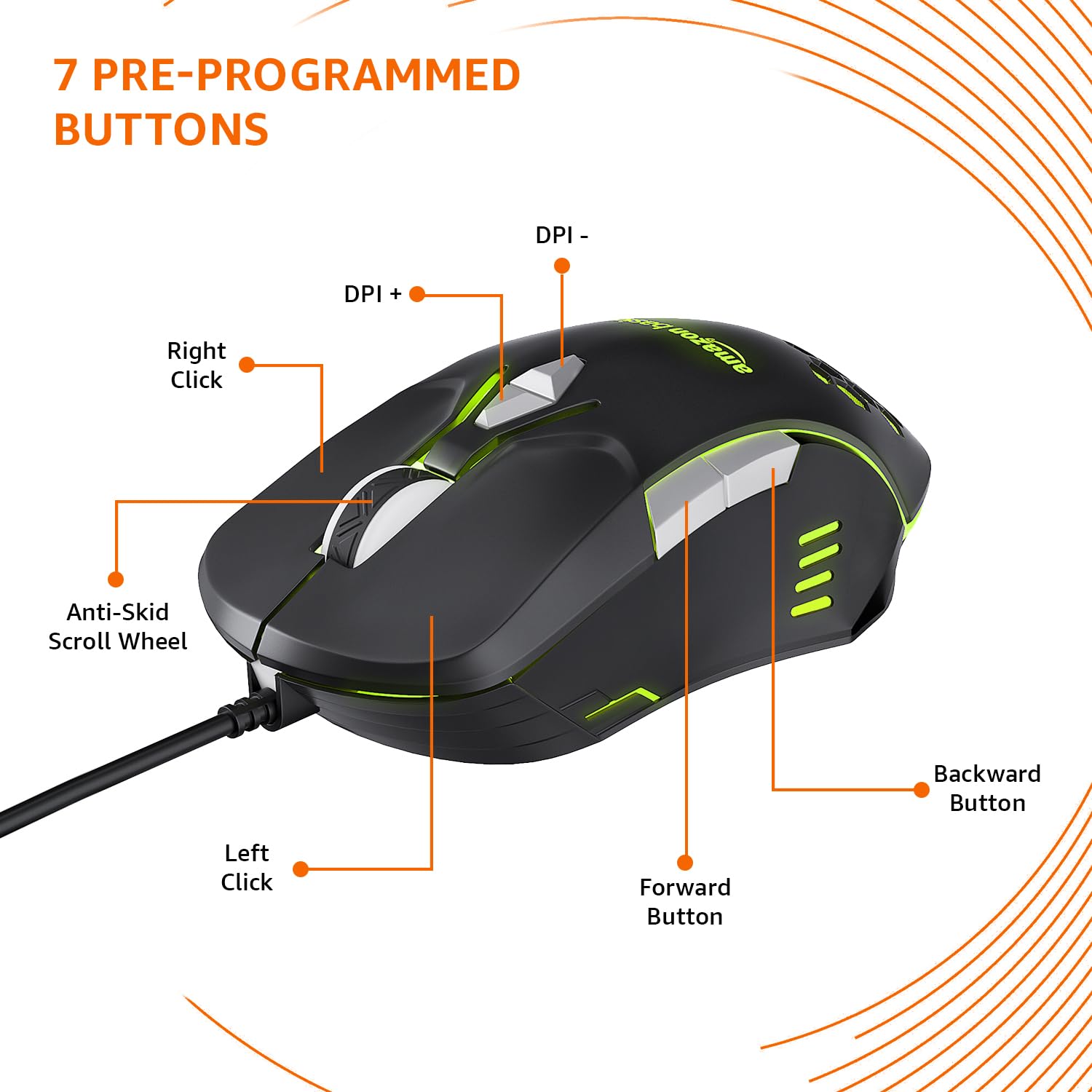
Image: The amazon basics Wired Gaming Mouse showing its 7 pre-programmed buttons, including Left Click, Right Click, Anti-Skid Scroll Wheel, DPI+, DPI-, Forward Button, and Backward Button.

Imagine: O imagine de sus în jos view of the amazon basics Wired Gaming Mouse, emphasizing its honeycomb-designed surface for improved grip and airflow.

Image: The amazon basics Wired Gaming Mouse illuminated with red RGB lighting, showcasing its light and comfortable design.
3. Instrucțiuni de configurare
- Despachetați mouse-ul: Scoateți cu grijă mouse-ul de gaming din ambalaj.
- Conectați-vă la PC: Conectați conectorul USB al mouse-ului într-un port USB disponibil de pe computer.
- Instalare driver: Your operating system (Windows, Linux) should automatically detect and install the necessary drivers. If prompted, follow the on-screen instructions. For advanced customization of RGB and programmable keys, refer to the manufacturer's website pentru software specific de drivere.
- Plasare: Place the mouse on a flat, clean surface or a mouse pad for optimal performance.
4. Instrucțiuni de utilizare
4.1 Funcționalitate de bază
- Click stânga: Acțiune primară, selecție.
- Click dreapta: Secondary action, context menus.
- Rotiță de defilare: Scroll up/down pages. Pressing the scroll wheel often acts as a middle click.
- Butoane Înainte/Înapoi: De obicei folosit pentru navigare în web browsere sau file exploratori.
4.2 Reglarea DPI (puncte pe inch)
The mouse features dedicated DPI adjustment buttons (DPI+ and DPI-) to change cursor sensitivity on the fly. Press these buttons to cycle through different DPI levels up to 6400. A higher DPI setting results in faster cursor movement across the screen with less physical mouse movement.
4.3 Customizing RGB Lighting
The mouse includes customizable RGB lighting. Specific lighting modes can often be cycled through using a dedicated button (if present) or through the optional driver software. Refer to the driver software for advanced customization options, including color selection, effects, and brightness.
4.4 Programming Buttons
The mouse is equipped with programmable buttons. To assign custom functions, macros, or key combinations to these buttons, you will need to install and use the specific driver software provided by the manufacturer. This software typically allows you to create profilepentru diferite aplicații sau jocuri.
Video: A short product highlight video demonstrating the key features of the amazon basics Wired Gaming Mouse, including adjustable DPI, RGB lighting, programmable buttons, and durable design.
5. Întreținere
- curatenie: Folosiți o lavetă moale și uscată pentru a curăța exteriorul mouse-ului. Pentru murdăria persistentă, ștergeți ușor.amp se poate folosi o lavetă, asigurându-vă că nu pătrunde lichid în mouse.
- Curățarea senzorului: Occasionally, use a cotton swab lightly dampened with isopropyl alcohol to gently clean the optical sensor on the underside of the mouse. Ensure the mouse is disconnected before cleaning.
- Evitați lichidele: Do not immerse the mouse in water or any cleaning solutions.
- Depozitare: Depozitați mouse-ul într-un loc răcoros și uscat, ferit de lumina directă a soarelui și de temperaturi extreme.
6. Depanare
| Problemă | Soluţie |
|---|---|
| Mouse-ul nu răspunde. |
|
| Mișcarea cursorului este neregulată sau sacadată. |
|
| Programmable buttons are not working. |
|
| RGB lighting is not working or stuck. |
|
7. Specificații
| Caracteristică | Detaliu |
|---|---|
| Marca | bazele Amazon |
| Numărul de model | ABIM03 |
| Tehnologia de conectivitate | Cu fir (USB) |
| Tehnologia de detectare a mișcării | Optic |
| Interval DPI | Până la 6400 DPI |
| Taste programabile | 4 (in addition to standard left/right click and scroll) |
| Iluminat | RGB |
| Culoare | Negru |
| Greutatea articolului | 145 g |
| Dimensiunile produsului (Lxlxh) | 15.8 x 10.4 x 5.4 cm |
| Platformă hardware | PC |
| Compatibilitatea sistemelor de operare | Linux, Windows 7 and above |
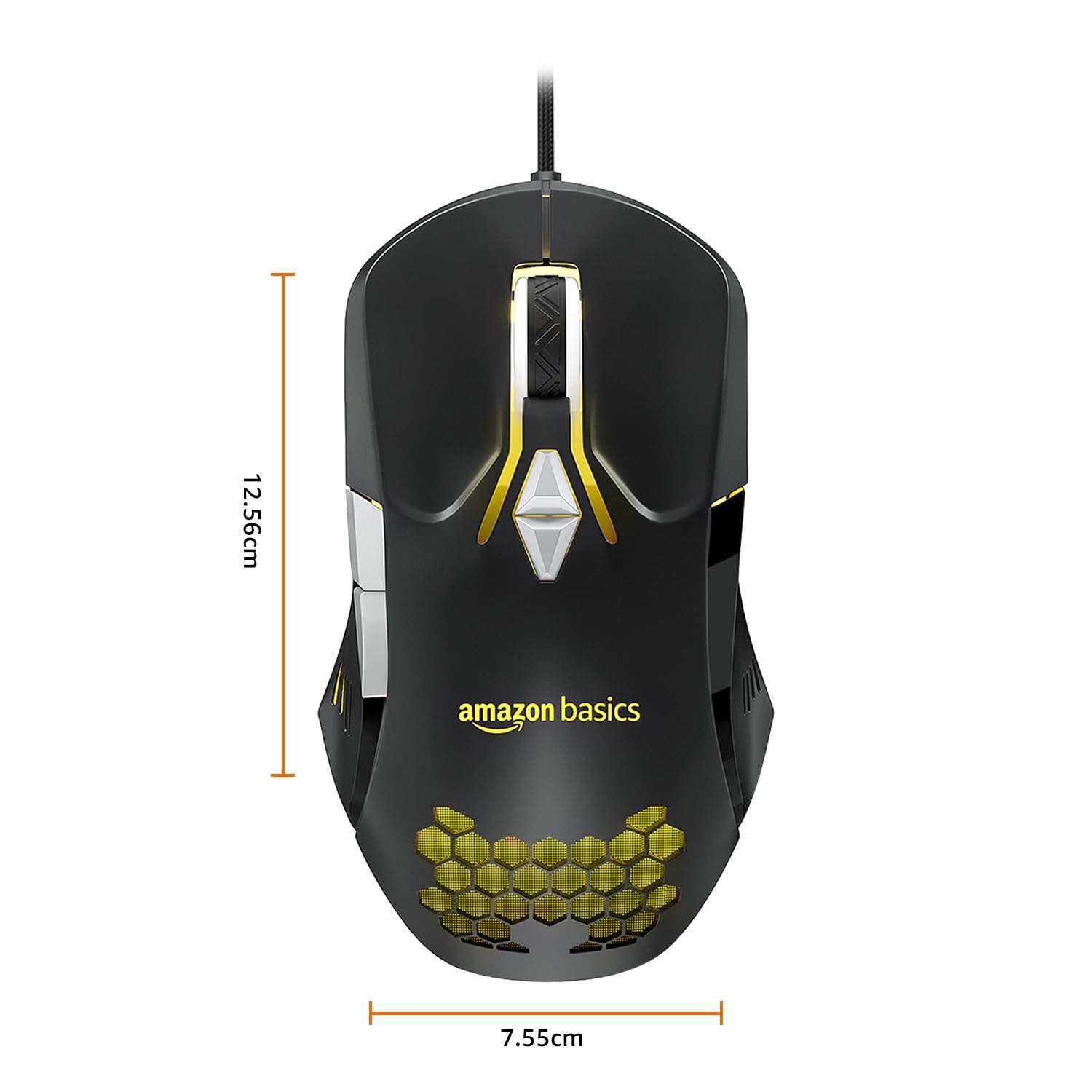
Image: The amazon basics Wired Gaming Mouse with its length (12.56cm) and width (7.55cm) dimensions indicated.
8. Informații despre garanție
This amazon basics Wired Gaming Mouse comes with a 1 ani garanție from the date of purchase. This warranty covers manufacturing defects and issues arising from normal use. It does not cover damage caused by misuse, accidents, unauthorized modifications, or normal wear and tear. Please retain your proof of purchase for warranty claims.
9. Suport
For further assistance, technical support, or warranty claims, please visit the official amazon basics support page or contact customer service through your purchase platform. Ensure you have your product model number (ABIM03) and proof of purchase ready when contacting support.
Resurse online:
- Pagina produsului: amazon.in/dp/B0BTD2YN6Y
- amazon basics Store: amazon basics Store