
Produs terminatview
The Clarion JM-Carry On is a portable speaker designed for versatile audio playback. It features a wired microphone input, multi-color light effects, and an in-built battery for on-the-go use. Its compact and portable design allows for easy transport and setup in various environments.

Image: Clarion JM-Carry On Portable Bluetooth Speaker shown with its wired microphone.
Video: Un pesteview of the Clarion Portable Bluetooth Speaker, highlighting its features and audio performance.
Conținutul pachetului
Vă rugăm să bifați căsuța pentru următoarele elemente:
- Clarion JM-Carry On Portable Bluetooth Speaker
- Microfon cu fir
- Cablu de încărcare
Configurare inițială
- Încărcarea difuzorului: Connect the provided charging cable to the speaker's charging port and a suitable power source. The LED indicator will show charging status. Ensure the speaker is fully charged before first use for optimal battery life.
- Pornire/Oprire: Locate the power switch on the speaker. Slide it to the 'ON' position to power on the device. Slide it to 'OFF' to power off.
- Asociere Bluetooth:
- Porniți difuzorul. Acesta va intra automat în modul de asociere Bluetooth, indicat de un LED care clipește.
- Pe smartphone sau tabletă, activați Bluetooth și căutați dispozitivele disponibile.
- Select "Clarion JM-Carry On" from the list. A confirmation tone will sound upon successful pairing.
- Connecting Wired Microphone: Insert the wired microphone's plug into the designated microphone input jack on the speaker.
Ghid de operare
- Selectarea modului: Use the 'Mode' button to switch between Bluetooth (BT), FM Radio, USB, and AUX input modes.
- Mod Bluetooth: Once paired, audio from your connected device will play through the speaker. Use your device or the speaker's controls for volume and track navigation.
- Modul radio FM: In FM mode, press and hold the 'Play/Pause' button to auto-scan and save available radio stations. Use the 'Next/Previous' buttons to navigate through saved stations.
- Mod USB/AUX: Insert a USB drive into the USB port for MP3 playback or connect an external audio device via the AUX input using a 3.5mm audio cable.
- TWS (True Wireless Stereo) Functionality: To connect two JM-Carry On speakers for stereo sound, ensure both speakers are in Bluetooth mode and not connected to any device. Press and hold the TWS button on one speaker until you hear a pairing tone. The two speakers will connect, and then you can pair your device to the primary speaker.
- Control sunet: Adjust the master volume using the main rotary knob. Separate controls may be available for microphone volume and echo effects.
- Efecte de lumină LED: The speaker features multi-color LED light effects. Use the dedicated 'Light' button to cycle through different light modes or turn them off.
Îngrijire și întreținere
- curatenie: Folosiți o lavetă moale și uscată pentru a curăța exteriorul difuzorului. Nu utilizați produse de curățare abrazive sau solvenți.
- Depozitare: Depozitați difuzorul într-un loc răcoros și uscat, ferit de lumina directă a soarelui și de temperaturi extreme.
- Îngrijirea bateriei: Pentru a prelungi durata de viață a bateriei, evitați descărcarea completă frecventă a bateriei. Încărcați difuzorul în mod regulat, chiar dacă nu este utilizat pentru perioade lungi de timp.
- Rezistenta la apa: Această boxă nu este impermeabilă. Evitați expunerea la apă sau umiditate ridicată.
Ghid de depanare
| Problemă | Soluţie |
|---|---|
| Difuzorul nu pornește. | Ensure the battery is charged. Connect the charging cable and try again. Check the power switch position. |
| Niciun sunet din difuzor. | Check the volume level on both the speaker and the connected device. Ensure the correct input mode (BT, AUX, USB) is selected. |
| Asocierea Bluetooth nu reușește. | Ensure the speaker is in pairing mode. Turn off and on Bluetooth on your device. Move the device closer to the speaker. Disconnect from other Bluetooth devices. |
| Microfonul nu funcționează. | Ensure the microphone is securely plugged into the correct jack. Check the microphone volume control on the speaker. |
| Recepția radioului FM este slabă. | Adjust the speaker's position. Extend any external antenna if available. |
Specificatii tehnice
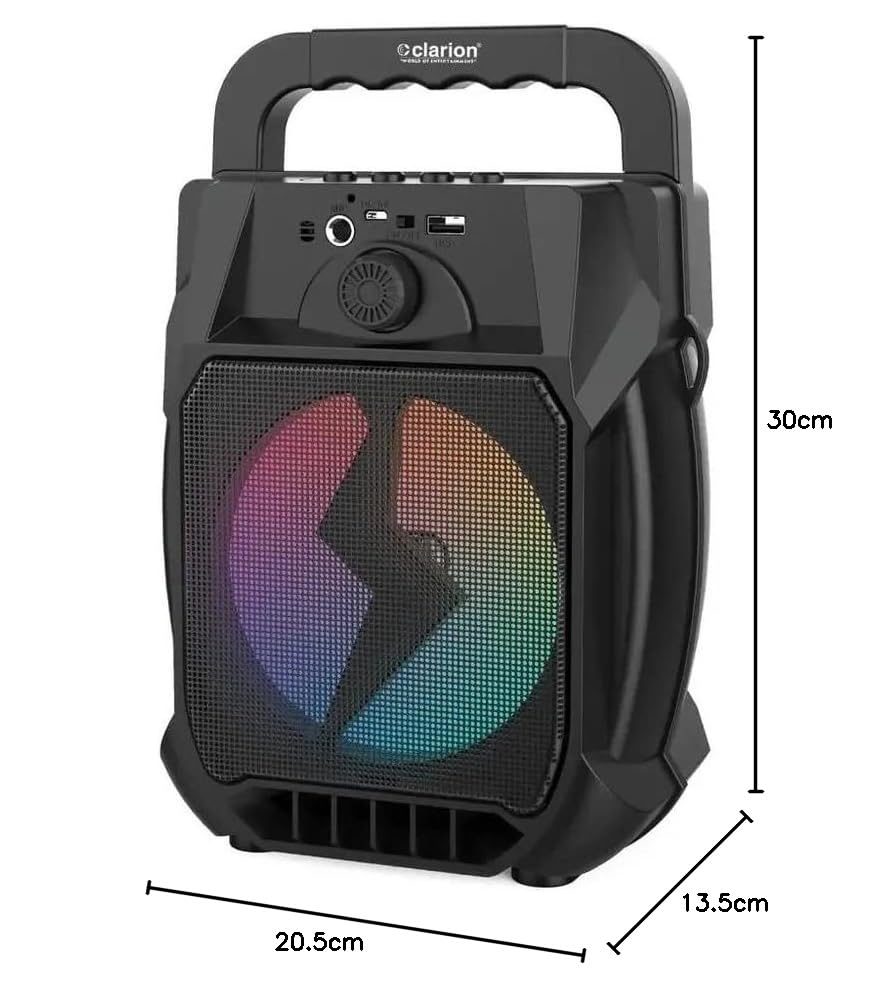
Image: Clarion JM-Carry On Portable Bluetooth Speaker with its dimensions indicated.
- Marca: Clarion (Generic)
- Nume model: JM-Carry On
- Putere maximă de ieșire difuzor: 20 wați RMS
- Tehnologie de conectivitate: Auxiliar, Bluetooth, USB
- Mod de ieșire audio: Stereo
- Tip de montare: Etaj permanent
- Tip difuzor: Satelit
- Caracteristicile produsului: Built-In Microphone, Radio, Subwoofer, Multi-color Light Effect, Sound Controller
- Metoda de control: Atingere
- Woofer Driver Diameter: 6.5 inchi
- Durata medie a bateriei: 3-4 ore
- Capacitate baterie: 1.2 Amp Hours (3.7V)
- Dimensiuni articol (D x l x H): 13.5 x 20.5 x 30 centimetri
- Dispozitive compatibile: Smartphone, Tabletă
- Sursa de alimentare: Alimentat cu baterie
Garanție și asistență pentru clienți
This Clarion JM-Carry On Portable Bluetooth Speaker comes with a 1 an garanție on the speaker unit from the date of purchase. Please retain your purchase receipt as proof of warranty.
For any technical assistance, troubleshooting, or warranty claims, please contact Clarion Computers customer support. Refer to your purchase documentation for specific contact details or visit the official Clarion Computers website pentru informații de asistență.
Note: The warranty typically covers manufacturing defects and does not cover damage caused by misuse, accidents, unauthorized modifications, or normal wear and tear.