
Introducere
This manual provides instructions for the proper setup, operation, and maintenance of your Comix C-2031 Desk Calculator. This calculator is designed for general arithmetic tasks in home, office, or school environments, featuring a large 12-digit LCD display and dual power sources.

Caracteristici cheie
The Comix C-2031 Desk Calculator is equipped with several features designed for ease of use and reliability:
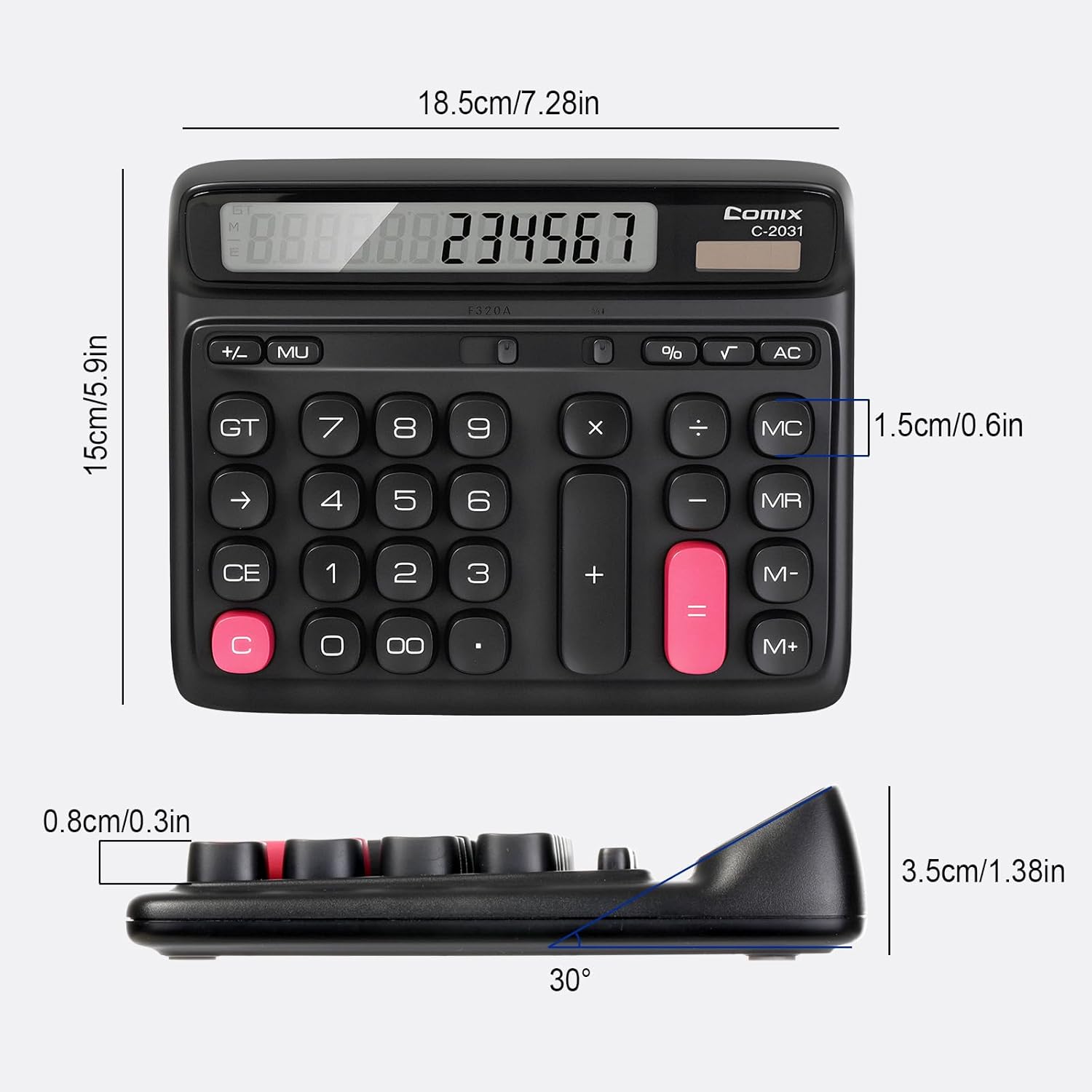
- Ecran LCD mare cu 12 cifre: Provides clear and accurate readings with a 30° tilt for comfortable viewing.
- Ergonomic Computer Key Design: Features round keys for comfortable touch and clear feedback, designed for efficient data entry.
- Sursa de alimentare duala: Operates on solar energy in well-lit conditions and includes a 1 AA battery for consistent performance, especially in low light.
- Picioare antiderapante: Equipped with four non-slip feet to ensure stability on your desk during use.
- Dimensiune compactă: Measures 7.28 x 5.9 x 1.38 inches, fitting conveniently on any desk.

Înființat
Sursa de alimentare
The Comix C-2031 calculator utilizes a dual power system, operating on both solar energy and a single AA battery. For optimal display clarity and consistent operation, especially in environments with varying light conditions, using the AA battery is recommended.
- Energie solara: The calculator will automatically use solar power when sufficient light is available. Ensure the solar panel (located above the display) is exposed to light for operation without battery power.
- Instalare baterie:
- Localizați compartimentul bateriilor pe spatele calculatorului.
- Deschideți capacul compartimentului bateriei.
- Introduceți o baterie AA, asigurându-vă că polaritatea este corectă (+/-).
- Închideți bine capacul compartimentului bateriei.

Instrucțiuni de operare
Familiarize yourself with the calculator's key functions for efficient use.

Operații de bază
- Număr de intrare: Press the number keys (0-9) to input digits.
- Punct zecimal: Press the "." key for decimal values.
- Adunare (+), Scădere (-), Înmulțire (×), Împărțire (÷): Press the corresponding operator key after entering the first number, then enter the second number, and press "=" for the result.
- Egal (=): Displays the result of a calculation.
Ștergeți funcțiile
- C (Clear the Screen): Clears the current entry on the display without affecting memory or ongoing calculations.
- CE (Ștergeți intrarea): Șterge ultimul număr sau ultima operațiune introdusă.
- AC (Clear All): Clears all entries, operations, and memory content, resetting the calculator to its initial state.
- Backspace (→): Șterge ultima cifră introdusă.
Funcții de memorie
- M+ (Memorie Plus): Adaugă numărul afișat în memorie.
- M- (Minusul memoriei): Scade numărul afișat din memorie.
- MR (Rechemare memorie): Reafișează pe afișaj valoarea stocată în memorie.
- MC (Ștergerea memoriei): Șterge conținutul memoriei.
Funcții avansate
- % (Procenttage): Folosit pentru procentetage calcule. De example, to calculate 10% of 200, enter 200 × 10 %, which will display 20.
- √ (rădăcină pătrată): Calculează rădăcina pătrată a numărului afișat.
- GT (total mare): Acumulează rezultatele tuturor calculelor. Apăsarea tastei GT afișează totalul general.
- MU (Mark-Up): Used for profit margin calculations.
Produs terminatview Video
Întreţinere
- curatenie: Wipe the calculator with a soft, dry cloth. Do not use liquid cleaners or abrasive materials.
- Înlocuire baterie: If the display becomes dim or unresponsive, replace the AA battery in the compartment on the back of the unit. Ensure proper polarity.
- Depozitare: Depozitați calculatorul într-un loc răcoros și uscat, ferit de lumina directă a soarelui și de temperaturi extreme.
Depanare
| Problemă | Cauza posibila | Soluţie |
|---|---|---|
| Afișajul este gol sau întunecat. | Lumină insuficientă pentru energia solară sau baterie descărcată. | Move the calculator to a brighter area or replace the AA battery. |
| Tastele nu răspund. | Temporary software glitch or low power. | Press the AC button to reset. If the issue persists, replace the battery. |
| Rezultate incorecte ale calculelor. | Incorrect key sequence or function usage. | Review the operating instructions for the specific function. Press AC to clear all previous entries and start a new calculation. |
Specificații
- Model: C-2031
- Afişa: 12-Digit Large LCD Display
- Sursa de alimentare: Solar and 1 x AA Battery (included)
- Dimensiuni produs: 7.28 x 5.9 x 1.38 inchi (18.5 x 15 x 3.5 cm)
- Greutatea articolului: 10.5 uncii (297.67 grame)
- Tip cheie: Ergonomic Computer Keys
- Caracteristici: 30° Tilt Display, Non-Slip Feet
Garanție și suport
Comix products are manufactured with quality and reliability in mind. For any questions, technical support, or warranty inquiries, please refer to the contact information provided with your purchase or visit the official Comix website. Vă rugăm să păstrați dovada achiziției pentru reclamații în garanție.