
Sharp RP-TT70
Sharp RP-TT70 Vinyl Record Player Turntable User Manual
Model: RP-TT70
1. Produs terminatview
The Sharp RP-TT70 is a 12-inch vinyl record player turntable designed to deliver a rich audio experience with modern convenience. It features a classic wooden cabinet and comes with stereo bookshelf speakers. This belt-drive turntable supports multiple playback speeds and offers versatile connectivity options, including dual Bluetooth functionality.

Figure 1.1: Sharp RP-TT70 Turntable and Speakers. The turntable features a stylish wooden finish and a clear dust cover, flanked by two matching stereo bookshelf speakers.
2. Ce este inclus
Vă rugăm să verificați conținutul pachetului pentru a vă asigura că toate articolele sunt prezente:
- Sharp RP-TT70 Turntable Unit
- Stereo Bookshelf Speakers (2 units)
- Capac de praf
- Adaptor de alimentare
- Manual de utilizare (acest document)
3. Instrucțiuni de configurare
Follow these steps to set up your Sharp RP-TT70 turntable:
- Plasare: Place the turntable on a stable, level surface away from direct sunlight, heat sources, and excessive dust. Ensure adequate ventilation around the unit.
- Conexiune difuzor: Connect the included stereo bookshelf speakers to the "SPEAKER OUT" terminals on the rear of the turntable. Ensure correct polarity (positive to positive, negative to negative).
- Conexiune de alimentare: Connect the power adapter to the "POWER IN DC 12V" port on the rear of the turntable, then plug the adapter into a wall outlet.
- Capac de praf: Carefully attach the dust cover to the hinges on the back of the turntable.

Figure 3.1: Rear Panel Connections. This image highlights the AUX-IN Jack, RCL (R&L) Speaker Out, Pitch (+)(-) Speed Calibration, and Power In DC 12V ports, crucial for proper setup.
4. Instrucțiuni de utilizare
4.1 Redarea unui disc de vinil
- Pornire: Turn the power knob to activate the turntable.
- Selectați viteza: Adjust the speed selector to match the record's RPM (33 1/3, 45, or 78 RPM). For 45 RPM records, place the included 45 RPM adapter on the spindle.
- Înregistrare loc: Așezați cu grijă discul de vinil pe platanul pick-up-ului.
- Braț de ridicare: Ridicați ușor brațul folosind maneta de repornire.
- Position Stylus: Mișcați brațul peste șanțul de început dorit al discului.
- Braț inferior: Coborâți încet brațul folosind maneta de reper. Stylus-ul va face contact cu discul, iar redarea va începe.
- Reglarea volumului: Adjust the volume using the volume knob on the turntable.
- Funcția de oprire automată: The turntable features an auto-stop function that will automatically stop the platter rotation when the record reaches its end.
4.2 Conectivitate Bluetooth
The Sharp RP-TT70 supports dual Bluetooth connectivity, allowing you to stream music in two ways:
- Streaming Vinyl to External Bluetooth Device:
- Asigurați-vă că placa turnantă este pornită.
- Activate Bluetooth pairing mode on your external Bluetooth speaker or headphones.
- The turntable will automatically search for and connect to nearby Bluetooth devices. The Bluetooth indicator light will illuminate when connected.
- Once connected, audio from your vinyl record will play through the external Bluetooth device.
- Streaming Music from Your Phone to Turntable Speakers:
- Asigurați-vă că placa turnantă este pornită.
- On your smartphone or other Bluetooth-enabled device, search for "Sharp RP-TT70" in the Bluetooth settings.
- Select the turntable to pair. The Bluetooth indicator light will illuminate when connected.
- Once connected, audio from your phone will play through the turntable's included stereo speakers.
4.3 Auxiliary Input (AUX-IN)
Connect external audio devices such as smartphones, tablets, or MP3 players using a 3.5mm audio cable (not included) to the AUX-IN jack on the rear of the turntable. Switch the input mode to AUX to play audio through the turntable's speakers.
4.4 Mufă pentru căști
For private listening, connect headphones to the headphone jack located on the front panel of the turntable.
5. Întreținere
Proper maintenance ensures the longevity and optimal performance of your turntable:
- Capac de praf: Always keep the dust cover closed when the turntable is not in use to prevent dust accumulation on the platter and stylus.
- Curățarea stylusului: Gently clean the stylus regularly using a soft brush designed for turntable styli. Brush from back to front.
- Curățarea platanului rotativ: Wipe the turntable and speakers with a soft, dry cloth. Do not use abrasive cleaners or solvents.
- Cartridge and Stylus Replacement: The RP-TT70 uses a changeable ceramic cartridge and stylus. If sound quality degrades or the stylus is damaged, replace it with a compatible Sharp replacement part.
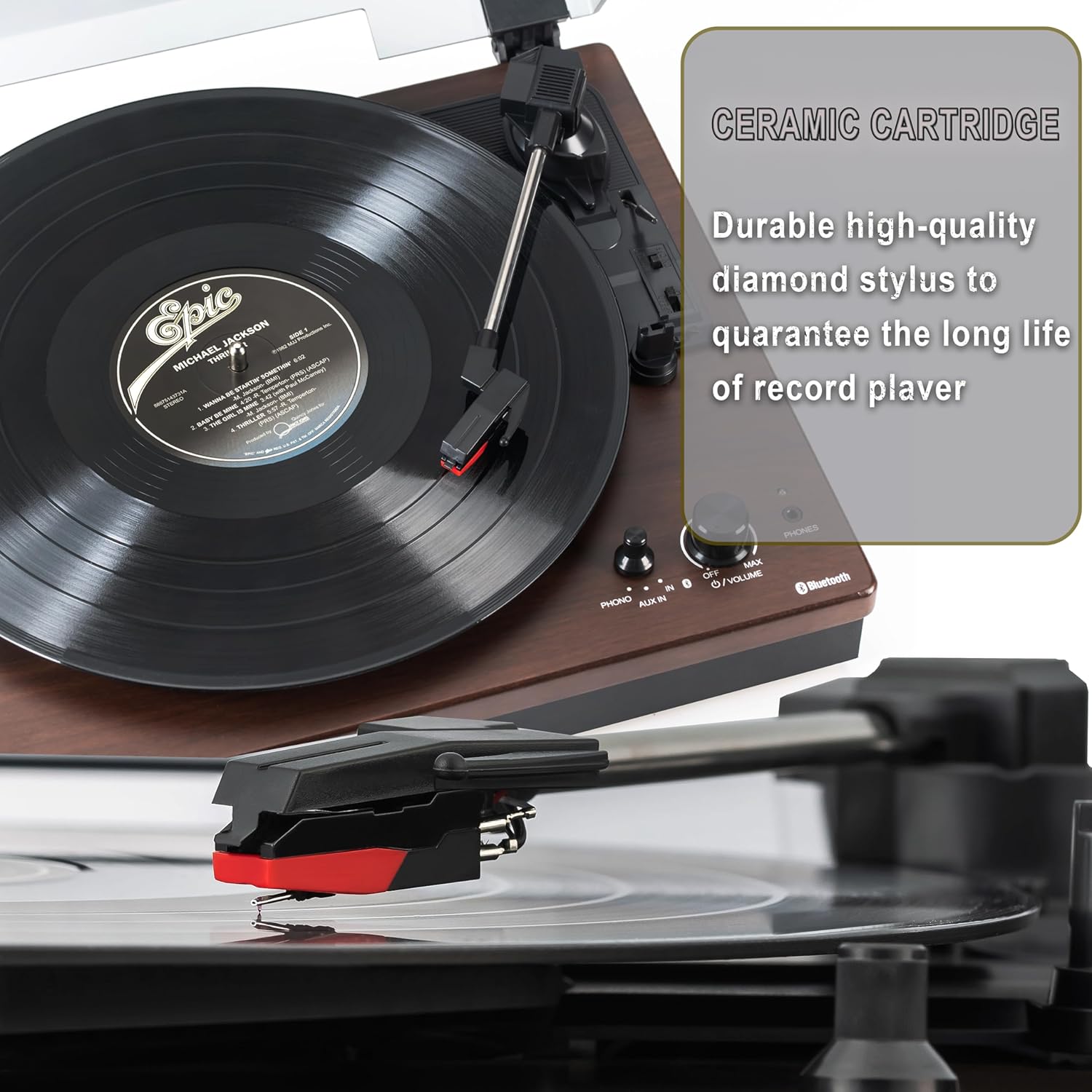
Figure 5.1: Ceramic Cartridge. The turntable is equipped with a durable high-quality diamond stylus designed for extended record playback life.
6. Depanare
If you encounter issues with your Sharp RP-TT70, refer to the following common problems and solutions:
| Problemă | Cauza posibila | Soluţie |
|---|---|---|
| Fără putere | Adaptorul de alimentare nu este conectat sau priza nu este activă. | Ensure power adapter is securely plugged into the turntable and a working wall outlet. |
| Niciun sunet de la difuzoare | Speakers not connected correctly; Volume too low; Incorrect input mode. | Check speaker cable connections and polarity. Increase volume. Ensure turntable is in PHONO or AUX mode as appropriate. |
| Poor Sound Quality / Skipping | Acul murdar sau uzat; Disc murdar; Platan nealiniat. | Clean the stylus and record. Ensure the turntable is on a stable, level surface. Consider replacing the stylus if worn. |
| Probleme de asociere Bluetooth | Device too far; Bluetooth not enabled on external device; Interference. | Ensure devices are within range (approx. 30 ft). Confirm Bluetooth is enabled on the external device. Try restarting both devices. |
| Platter Not Spinning | Belt dislodged; Auto-stop engaged prematurely. | Check if the drive belt is properly seated around the platter and motor pulley. If auto-stop is causing issues, ensure the record is placed correctly. |
7. Specificații
| Caracteristică | Detaliu |
|---|---|
| Numărul de model | RP-TT70 |
| Marca | Ascuțit |
| Dimensiunile produsului | 16.8 x 13.5 x 2.8 inci |
| Greutatea articolului | 18.6 lire sterline |
| Tehnologia de conectivitate | Bluetooth (Bi-directional) |
| Viteze acceptate | 33 1/3, 45, 78 RPM |
| Componente incluse | Turntable, Stereo Bookshelf Speakers |
| Material | Plastic, Lemn |
| Culoare | Black (with wooden finish) |
| Tip cartuș | Changeable Ceramic Cartridge and Stylus |
| Caracteristici | Belt-drive, Auto-return, Pitch control, Dust cover |
8. Garanție și asistență
Pentru informații despre garanție și asistență tehnică, vă rugăm să consultați site-ul oficial Sharp. website-ul lor web sau contactați direct serviciul lor de asistență pentru clienți. Păstrați bonul fiscal ca dovadă a achiziției pentru reclamațiile în garanție.
Ask a question about this manual
Ask about setup, troubleshooting, compatibility, parts, safety, or missing instructions. Manuals+ will review the question and use this page’s manual context to help answer it.