
Produs terminatview
The COMICA Vimo C1 is a 2.4G dual-channel mini wireless microphone system designed for broadcast-level audio quality. It is universally compatible with cameras, phones, and computers, making it suitable for various applications including video recording, streaming, voice recording, interviews, și vlogging.
Caracteristici cheie:
- Broadcast-level sound quality, universal for camera, phone, and computer.
- Digital signal processing with one-key noise reduction support.
- Real-time audio monitoring, with Mono/Stereo/Safety mode switch.
- 4-level gain control and one-click mute function.
- Rotatable IPS display for intuitive operation and usage.
- Up to 7 hours of battery life for continuous operation.
- Multifunctional USB-C port for charging and monitoring.
- Low latency (<20ms) and a working range of up to 200m (open area).
Conținutul pachetului
The COMICA Vimo C1 package includes all necessary components for immediate use:

Imagine: Pesteview of the COMICA Vimo C1 package contents, showing the receiver, transmitter, wind muff, 3.5mm TRS-TRS audio cable, 3.5mm TRS-TRRS audio cable, 1-to-3 charging/output cable, warranty card, user manual, and a carry case.
- 1 x receptor (RX)
- 1 x transmițător (TX)
- 1 x Wind Muff
- 1 x 3.5mm TRS-TRS Audio Cable
- 1 x 3.5mm TRS-TRRS Audio Cable
- 1 x 1-to-3 Charging/Output Cable
- 1 x card de garanție
- 1 x Manual de utilizare
- 1 x Carry Case
Ghid de instalare
Identificarea componentelor
Familiarize yourself with the Receiver (RX) and Transmitter (TX) units. The RX unit features an IPS display for settings and monitoring, while the TX unit is compact and designed for discreet placement.

Image: The COMICA Vimo C1 Receiver (left) and Transmitter (right), highlighting their compact design and the receiver's display.
Încărcare inițială
Before first use, ensure both the transmitter and receiver are fully charged. Use the provided 1-to-3 charging cable with a USB-C power source. The units can be charged via a power bank or a standard USB charger.

Image: Illustration of the Vimo C1 transmitter and receiver, indicating an 8-hour duration time and a 2-hour charging time when powered via a USB-C cable.
Conectarea la dispozitive
The Vimo C1 offers broad compatibility with various recording devices. Use the appropriate audio cable (TRS-TRS for cameras, TRS-TRRS for smartphones) to connect the receiver to your camera, smartphone, or computer.
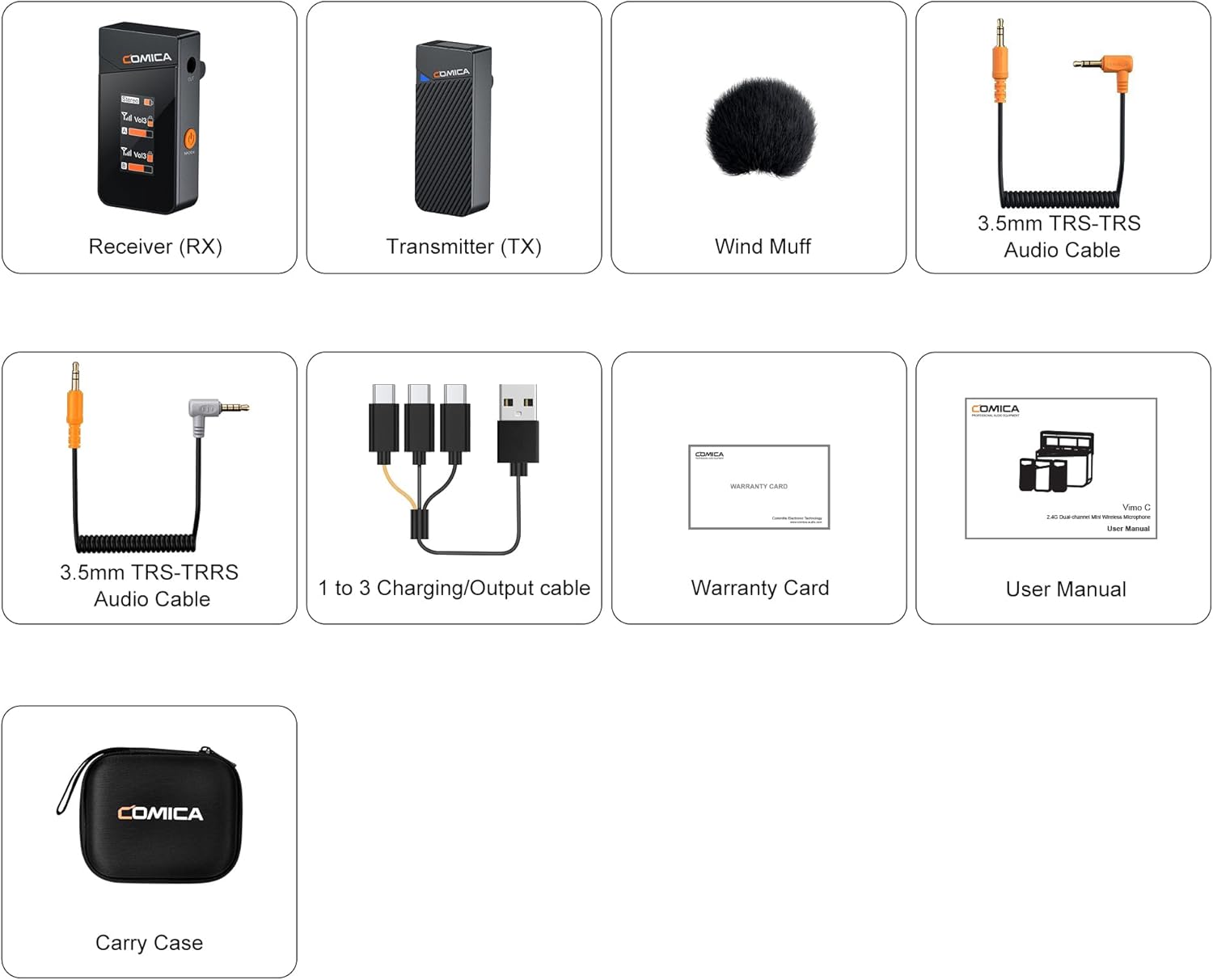
Image: The Vimo C1 wireless microphone system displayed alongside a DSLR camera, a laptop, and a smartphone, demonstrating its compatibility with various recording devices.
Instrucțiuni de operare
Pornire/Oprire
Press and hold the power button on both the transmitter (TX) and receiver (RX) units to power them on or off. The units will automatically pair upon powering on.
Anularea zgomotului
The Vimo C1 features an advanced DSP noise cancellation chip. To activate or deactivate noise reduction, locate the dedicated noise cancellation button on the transmitter. Press it once to toggle the function.

Image: A visual representation of the Vimo C1's one-click noise cancellation feature, demonstrating how it cleans audio by reducing environmental noise.
Mode Switching (MONO/STEREO/Safety)
The receiver supports Mono, Stereo, and Safety modes. Briefly press the TX power button to cycle through these modes. The current mode will be displayed on the RX's IPS screen.
- Mod mono: Combines both audio channels into a single mono track.
- Mod stereo: Records audio from each transmitter as separate left and right channels.
- Modul de siguranță: Outputs two different audio tracks. One is normal audio, and the other is a safe track with a -6dB reduction to prevent clipping and sound distortion.

Image: The COMICA Vimo C1 receiver's IPS display, showing the 'Stereo' mode selected and real-time audio level indicators for channels A and B.
Controlul volumului și dezactivarea sunetului
Adjust the volume using the VOL A/B buttons on the transmitter. The Vimo C1 offers 4 levels of volume adjustment. To mute the microphone, briefly press the TX power button. This allows for temporary pauses during recording without powering off the system.

Image: The COMICA Vimo C1 transmitter and receiver, illustrating the 4-level volume adjustment and the one-key mute function available on the transmitters.
IPS Display Orientation
The Vimo C1 receiver features a reversible IPS display. To flip the screen vertically, press and hold both the volume '+' and '-' keys simultaneously. This allows users to adjust the screen orientation for optimal viewing, especially when the RX is mounted on a camera's cold shoe.

Image: The COMICA Vimo C1 receiver attached to a camera, showcasing its rotatable IPS display that can be flipped vertically by pressing volume buttons, ensuring clear visibility from different angles.
Întreţinere
Durata de viață a bateriei și încărcare
The Vimo C1 transmitter and receiver can operate continuously for up to 7 hours on a full charge. They support working while charging, allowing for extended use. Use the provided 1-to-3 charging cable for convenient charging of multiple units simultaneously.
Depozitare
When not in use, store the Vimo C1 units in the provided carry case to protect them from dust, moisture, and physical damage. Ensure units are powered off before storage to conserve battery life.
Depanare
If you encounter issues with your COMICA Vimo C1, please refer to the following common solutions:
- Intermittent Signal/Dropouts: Due to the characteristics of 2.4G wireless transmission, maintain a face-to-face orientation between the transmitter and receiver during use. Avoid turning your back to the receiver, as this can lead to signal dropouts. This is considered normal behavior for 2.4G wireless devices.
- No Stereo Function in Single-Channel Mode: Please note that the stereo function cannot be achieved when operating in single-channel mode. Ensure you are in a dual-channel configuration for stereo output.
- Fără ieșire audio: Check all cable connections (3.5mm TRS/TRRS) to ensure they are securely plugged into the correct ports on both the receiver and your recording device. Verify the volume levels on both the transmitter and receiver. Ensure the microphone is not muted.
- Calitate audio slabă/Distorsiune: Check the gain settings on the transmitter; adjust to a lower level if distortion occurs. Ensure noise cancellation is enabled if operating in a noisy environment. Verify that the wind muff is properly installed if recording outdoors.
- Device Not Recognizing Microphone: Ensure the correct audio cable (TRS for cameras, TRRS for smartphones/computers) is used. For smartphones, some models may require a separate adapter (e.g., USB-C to 3.5mm adapter) if they lack a dedicated 3.5mm jack.
Specificații
| Caracteristică | Caietul de sarcini |
|---|---|
| Numele modelului | COMICA Vimo C1 |
| Factor de formă a microfonului | Microfon Lavalier |
| Model polar | Omnidirecțional |
| Tehnologia de conectivitate | USB |
| Tip conector | 3.5 mm Jack |
| Platformă hardware | Camera, Computer, Smartphone |
| Numărul de canale | 4 |
| Sensibilitate Audio | 30 dB |
| Raportul semnal-zgomot | 65 dB |
| Sursa de alimentare | Alimentat cu baterie |
| Tip baterie | 1 polimer de litiu (inclus) |
| Baterie reîncărcabilă | Da |
| Greutatea articolului | 32 grame |
| Dimensiuni articol (L x l x H) | 12.5 x 11 x 7 centimetri |
| Utilizări recomandate | Video recording, streaming, voice recording, interview, vlog |