
1. Introducere și informații despre siguranță
Mulțumesc pentru achizițieasing the Fenton RP161 Bluetooth Stereo Turntable. This manual provides essential information for the safe and correct operation of your device. Please read it thoroughly before use and retain it for future reference.
Instrucțiuni importante de siguranță:
- Nu expuneți unitatea la ploaie sau umezeală pentru a preveni incendiul sau electrocutarea.
- Asigurați o ventilație corespunzătoare; nu blocați nicio deschidere de ventilație.
- Așezați unitatea pe o suprafață stabilă, plană.
- Utilizați numai adaptorul de alimentare furnizat împreună cu unitatea.
- Nu încercați să reparați unitatea singur. Apelați la personal calificat pentru toate lucrările de service.
- Nu expuneți unitatea la lumina directă a soarelui, la surse de căldură și la câmpuri magnetice puternice.
2. Produs terminatview
The Fenton RP161 is a versatile stereo turntable featuring integrated speakers and Bluetooth connectivity. It supports three playback speeds for various record types.

Figura 2.1: Per total view of the Fenton RP161 Turntable.
Componente:
- Capac de praf: Protejează platanul și brațul de praf.
- platou: Suprafața rotativă pe care sunt plasate înregistrările.
- Ax: Central pin for placing records.
- Adaptor 45 RPM: Used for playing 7-inch records with large center holes.
- Arme de ton: Ține cartusul și stiloul.
- Stylus (Ac): Citește șanțurile discului.
- Comutator selector de viteză: Allows selection of 33, 45, or 78 RPM.
- Comutator de oprire automată: Engages or disengages the automatic stop function.
- Buton de volum/pornire: Controls power and audio output level.
- Difuzoare integrate: Ieșire audio încorporată.
- Ieșire linie RCA: Pentru conectarea la sisteme audio externe.
- Intrare curent continuu: Pentru conectarea adaptorului de alimentare.

Figure 2.2: Tonearm, Speed Selector, and Auto Stop Switch.
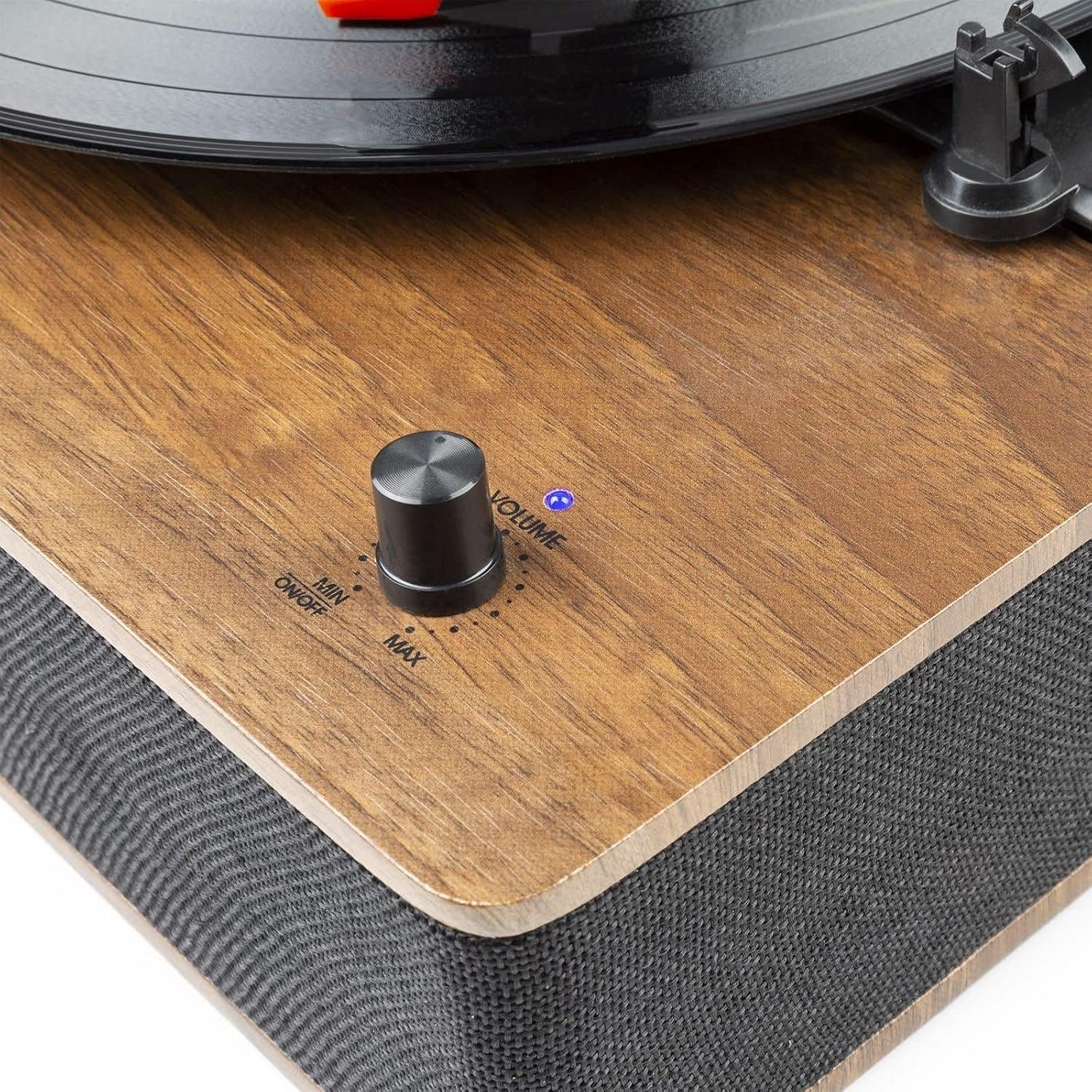
Figure 2.3: Volume and Power Knob.

Figure 2.4: Rear Panel with RCA Output and DC Input.
3. Configurare
Despachetarea:
- Scoateți cu grijă platanul din ambalaj.
- Remove all protective materials, including the stylus protector.
- Ensure all components are present: turntable unit, dust cover, 45 RPM adapter, and power adapter.
Plasare:
- Place the turntable on a flat, stable, and level surface to prevent vibrations and ensure proper playback.
- Avoid placing it near speakers or other vibration-producing equipment.
Conexiune de alimentare:
- Connect the supplied power adapter to the DC 5V 1A input port on the rear of the turntable.
- Conectați adaptorul la o priză de perete adecvată.
External Audio Connection (Optional):
- Pentru a se conecta la un extern amplifier or powered speakers, use an RCA cable (not included) to connect the RCA Line Output ports on the rear of the turntable to the corresponding input on your audio system.
4. Instrucțiuni de utilizare
4.1 Playing Records:
- Pornire: Rotate the Volume/Power knob clockwise until it clicks and the indicator light illuminates. Adjust to a low volume setting initially.
- Selectați viteza: Set the speed selector switch to the appropriate speed for your record (33, 45, or 78 RPM). For 7-inch records with a large center hole, place the 45 RPM adapter on the spindle.
- Înregistrare loc: Carefully place your record on the turntable platter.
- Oprire automată: Set the AUTO STOP switch to ON if you want the platter to stop rotating automatically when the record finishes. Set to OFF for continuous rotation.
- Poziția brațului: Gently lift the tonearm using the tonearm lift lever. Move the tonearm over the desired starting groove of the record.
- Braț inferior: Slowly lower the tonearm onto the record using the tonearm lift lever. The music will begin to play.
- Reglați volumul: Adjust the Volume/Power knob to your desired listening level.
- Sfârșitul redării: When the record finishes, if AUTO STOP is ON, the platter will stop. If AUTO STOP is OFF, manually lift the tonearm and return it to its rest.
- Oprire: Rotate the Volume/Power knob counter-clockwise until it clicks to turn off the unit.
4.2 Bluetooth Operation:
The RP161 can receive audio wirelessly from a Bluetooth-enabled device.
- Pornire: Turn on the turntable by rotating the Volume/Power knob. The unit will automatically enter Bluetooth pairing mode, indicated by a flashing blue LED light.
- Activați Bluetooth: Pe smartphone, tabletă sau alt dispozitiv Bluetooth, activați Bluetooth și căutați dispozitivele disponibile.
- Pereche: Select 'Fenton RP161' from the list of devices. Once paired, the blue LED light will stop flashing and remain solid.
- Redare audio: You can now play music from your Bluetooth device through the turntable's speakers. Adjust the volume using the Volume/Power knob on the turntable and/or your connected device.
- Deconecta: To disconnect, turn off Bluetooth on your device or power off the turntable.
5. Întreținere
Curățarea unității:
- Deconectați întotdeauna unitatea de la priză înainte de curățare.
- Folosiți o lavetă moale și uscată pentru a șterge suprafețele exterioare.
- Nu utilizați agenți de curățare abrazivi, ceară sau solvenți, deoarece aceștia pot deteriora finisajul.
Îngrijirea stylusului:
- Stylusul este delicat. Manevrați-l cu mare grijă.
- Curățați periodic stylusul folosind o perie moale, frecându-l ușor din spate în față.
- A worn stylus can damage records and degrade sound quality. Replace the stylus approximately every 200-300 hours of playback.
Îngrijirea capacului anti-praf:
- Wipe the dust cover gently with a soft, damp pânză.
- Avoid using harsh chemicals that could scratch or cloud the plastic.
6. Depanare
| Problemă | Cauza posibila | Soluţie |
|---|---|---|
| Fără putere | Adaptorul de alimentare nu este conectat sau este defect. | Asigurați-vă că adaptorul de alimentare este conectat corect la unitate și la o priză funcțională. |
| Fără sunet din difuzoare | Volume too low; stylus protector still on; stylus damaged. | Increase volume. Remove stylus protector. Check stylus for damage and replace if necessary. |
| Omiterea înregistrărilor | Record is dirty or scratched; stylus is worn or dirty; turntable not level. | Curățați discul. Curățați sau înlocuiți acul. Asigurați-vă că platanul este pe o suprafață plană. |
| Bluetooth nu se conectează | Turntable not in pairing mode; device Bluetooth off; too far from unit. | Ensure turntable LED is flashing (pairing mode). Turn on Bluetooth on your device. Move device closer to the turntable. |
| Platoul nu se învârte | Power off; belt dislodged; AUTO STOP engaged prematurely. | Ensure power is on. Check if the drive belt is correctly positioned around the motor pulley and platter. Try setting AUTO STOP to OFF. |
7. Specificații
| Putere de ieșire | 50W |
| Viteze de redare | 33 1/3, 45, 78 RPM |
| Conexiune de ieșire | Ieșire linie RCA |
| Tip de unitate | Transmisia cu centură |
| Alimentare electrică | 230Vac/50Hz (5V DC adapter included) |
| Dimensiuni (L x l x H) | 33 x 32 x 13 cm |
| Greutate | 2.75 kg |
| Caracteristici | Integrated Hi-Fi speakers, Bluetooth audio streaming, removable dust cover, ceramic stereo cartridge with needle, shock-absorbing feet. |
8. Garanție și asistență
This product is covered by a warranty in accordance with local regulations. Please refer to your purchase documentation for specific terms and conditions.
Disponibilitatea pieselor de schimb: Spare parts for the Fenton RP161 are guaranteed to be available for 2 years from the date of purchase.
For technical support or service inquiries, please contact your retailer or the Fenton customer service department.


